
1. Product Overview
The F008 Smart Digital Lock is an advanced security solution for your home or office, integrating a high-definition camera, an electronic doorbell, and multiple convenient unlocking methods. Designed for ease of use and robust security, this lock offers seamless integration with the Tuya Smart app, providing remote access and monitoring capabilities.
Its versatile design allows for installation on both left and right-handed doors with a thickness ranging from 40mm to 70mm.

Figure 1.1: Front and back panels of the F008 Smart Digital Lock, showcasing the sleek black design and integrated keypad and camera.
2. Product Components
Before installation, please verify that all components listed below are present in your package:
- 1 x Front Panel (with integrated camera and keypad)
- 1 x Rear Panel (with battery compartment and internal lock button)
- 1 x Pressure Lock (Mortise Lock)
- 5 x Smart Cards (RFID cards for access)
- 2 x Mechanical Keys (for emergency override)
- 1 x Screw Kit (for installation)
- 1 x User Manual (this document)
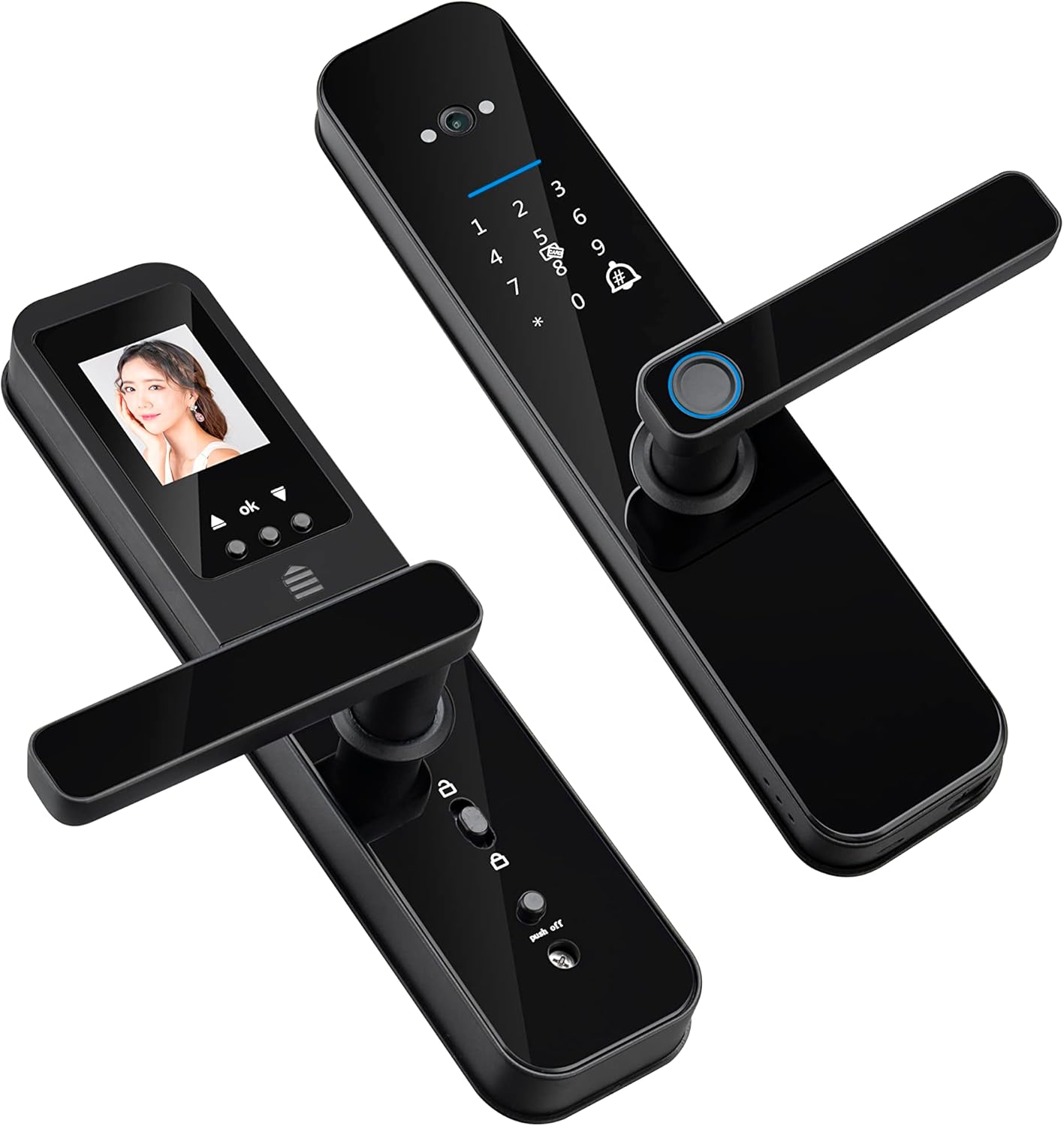
Figure 2.1: An angled perspective of the F008 Smart Digital Lock, highlighting its modern design and handle mechanism.
3. Key Features
- HD Camera and Doorbell: Features an integrated HD camera (magic eye) that captures images when the doorbell rings, allowing you to see who is outside.
- Five Unlocking Methods: Offers versatile access via fingerprint, password, smart card, mechanical key, and remotely through the Tuya Wifi application.
- Unlock Records with Images: The Tuya app maintains a log of who unlocked the door, displaying a captured photo at the time of entry.
- 8 Language System: The voice prompt system supports 8 different languages: Portuguese, English, Arabic, Chinese, Russian, Spanish, Thai, and Vietnamese.
- Emergency Power Options: In case of battery depletion, the lock can be opened using mechanical keys or powered temporarily via a micro USB connection.
- Built-in Connection Gateway: Includes an embedded gateway, eliminating the need for an additional external gateway for connectivity.

Figure 3.1: Visual representation of the five distinct unlocking methods available with the F008 Smart Digital Lock.

Figure 3.2: The F008 Smart Digital Lock supports 8 different voice prompt languages for user convenience.
4. Setup and Installation
4.1. Pre-Installation Check
Ensure your door meets the following specifications:
- Door Thickness: 40mm - 70mm.
- Door Handing: The lock is universal and can be adjusted for both left and right-handed doors.
4.2. Mortise Lock Dimensions
Refer to the diagrams below for precise mortise lock dimensions to ensure compatibility with your door frame.
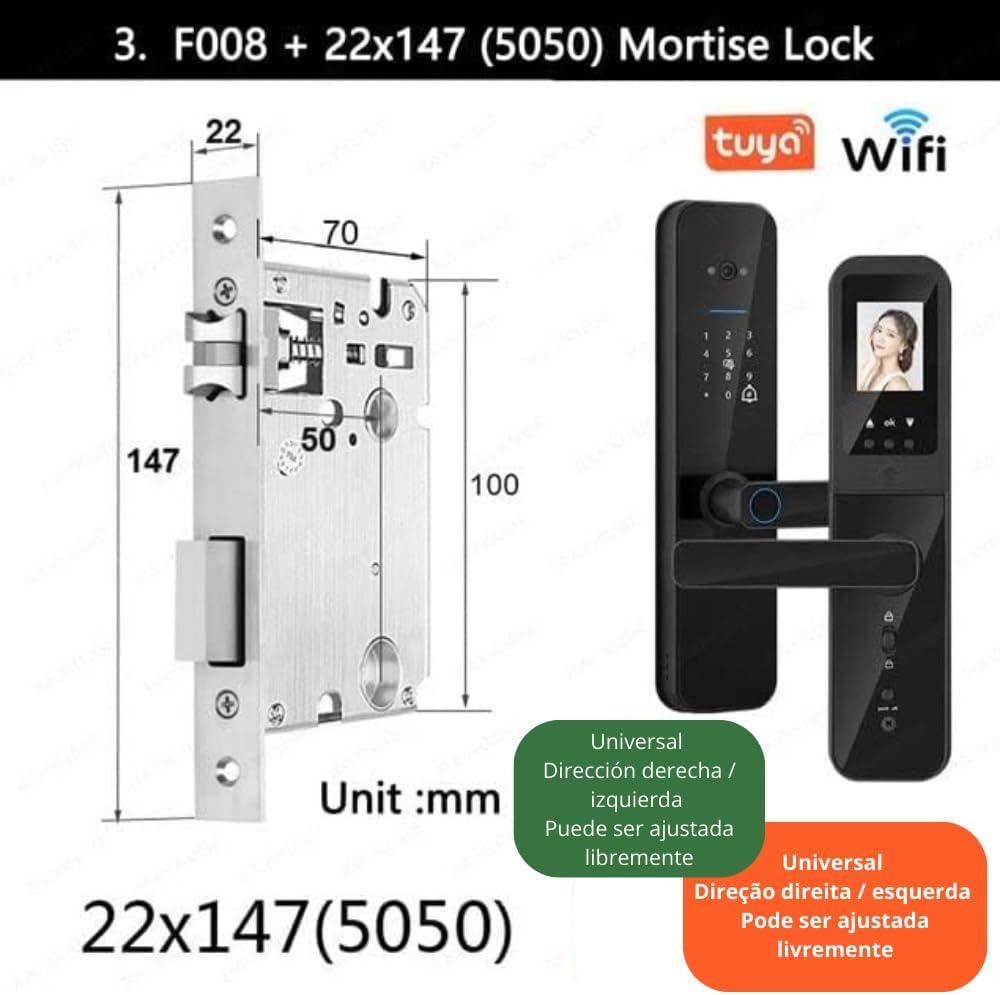
Figure 4.1: Detailed dimensions of the 22x147(5050) mortise lock, crucial for proper installation.

Figure 4.2: Illustration of various adjustable mortise lock sizes and the recommended door thickness range (40-70cm) for the F008 lock.
4.3. Installation Steps
Detailed installation instructions are provided in the included User Manual. It is recommended to follow these steps carefully or consult a professional for installation.
4.4. Initial Configuration
Upon first power-up, the lock will guide you through initial setup, including language selection. You can choose from 8 supported languages. Follow the voice prompts to set up administrator fingerprints, passwords, and cards.
5. Operating Instructions
5.1. Unlocking the Door
- Fingerprint: Place your registered finger on the fingerprint sensor.
- Password: Enter your registered password on the keypad, followed by the '#' key.
- Smart Card: Present a registered smart card to the card reader area.
- Mechanical Key: Insert the mechanical key into the hidden keyhole and turn to unlock.
- Tuya App: Open the Tuya Smart app on your smartphone and follow the prompts for remote unlocking.

Figure 5.1: The F008 lock supports one-touch fingerprint unlocking and features a smart peephole with real-time capture.
5.2. Camera and Doorbell Functions
When the doorbell button is pressed, the internal screen automatically displays the image from the outdoor camera. Simultaneously, a notification will be sent to your Tuya app, allowing you to view the visitor and remotely unlock the door if desired.

Figure 5.2: The process from doorbell activation to remote unlocking via the Tuya app, including internal screen display.

Figure 5.3: The integrated HD camera provides a clear and unobstructed view of the area outside your door.
5.3. Tuya App Integration
The Tuya Smart app allows for comprehensive control and monitoring:
- Remote Unlocking: Unlock your door from anywhere with an internet connection.
- Access Logs: View a detailed history of all unlock events, including captured images of the person who unlocked the door.
- Temporary Passwords: Generate temporary passwords for guests or service providers.
- Settings Management: Manage user fingerprints, passwords, and smart cards.
6. Maintenance
- Battery Replacement: The lock operates on 4 AA batteries. Replace them promptly when the low battery indicator appears.
- Emergency Power: In case of complete battery depletion, use the mechanical keys or connect a micro USB power bank to the emergency power port for temporary power.
- Cleaning: Wipe the lock's surface with a soft, dry cloth. Avoid using abrasive cleaners or solvents that could damage the finish or electronic components.
- Fingerprint Sensor: Keep the fingerprint sensor clean and dry for optimal performance.
7. Troubleshooting
| Problem | Possible Cause | Solution |
|---|---|---|
| Lock does not respond / No power. | Batteries are depleted or incorrectly installed. | Replace batteries (4 x AA). If still unresponsive, use mechanical key or connect micro USB power. |
| Fingerprint not recognized. | Fingerprint sensor is dirty, finger is wet/dirty, or fingerprint is not properly registered. | Clean the sensor. Ensure finger is clean and dry. Re-register fingerprint if necessary. Try another unlock method. |
| Cannot connect to Tuya App. | Incorrect Wi-Fi credentials, poor Wi-Fi signal, or app pairing issue. | Ensure correct Wi-Fi password. Check Wi-Fi signal strength near the lock. Follow app pairing instructions carefully. Restart lock and router. |
| Voice prompts are in an unfamiliar language. | Language setting needs to be changed. | Access the lock's settings menu (usually via administrator password/fingerprint) and select your preferred language from the 8 available options. |
| Camera/Peephole not displaying image. | Camera lens is obstructed or a software glitch. | Ensure the camera lens is clean and unobstructed. Restart the lock by removing and reinserting batteries. |
8. Specifications
| Feature | Detail |
|---|---|
| Model | F008 |
| Brand | Generic |
| Dimensions (L x W x H) | 35.56 x 18.29 x 13.21 cm (14 x 7.2 x 5.2 inches) |
| Material | Metal |
| Color | Black |
| Unlock Methods | Biometric (Fingerprint), Password, Smart Card, Mechanical Key, Tuya App |
| Camera | Integrated HD Camera (Magic Eye) |
| Doorbell | Electronic Doorbell Functionality |
| App Compatibility | Tuya Smart App (Wi-Fi) |
| Power Source | 4 x AA Batteries |
| Emergency Power | Micro USB Port |
| Supported Door Thickness | 40mm - 70mm |
| Voice Prompts | 8 Languages (Portuguese, English, Arabic, Chinese, Russian, Spanish, Thai, Vietnamese) |
9. Warranty and Support
For information regarding warranty coverage, returns, or technical support, please refer to the specific warranty card included with your product or contact the retailer/manufacturer directly. Keep your purchase receipt as proof of purchase.
For app-related issues or advanced configurations, please consult the Tuya Smart app's help section or their official support channels.