
1. Introduction
Thank you for choosing the Generic Alfa Gold 10000mAh Power Bank BTE-17. This portable charger is designed to provide reliable power for your mobile devices on the go, featuring a high-capacity battery, multiple built-in charging cables, and wireless charging capabilities. This manual provides essential information for the safe and efficient use of your power bank. Please read it thoroughly before use and retain it for future reference.
2. Product Overview
Key Features:
- 10000mAh High Capacity: Provides multiple charges for most smartphones.
- Fast Charging: Supports rapid power delivery to compatible devices.
- Built-in Cables: Integrated USB, Type-C, iPhone (Lightning), and V8 (Micro USB) cables for universal compatibility.
- Wireless Charging: Convenient induction charging for Qi-compatible devices.
- Compact and Portable Design: Easy to carry for travel and daily use.
Package Contents:
- 1 x Generic Alfa Gold 10000mAh Power Bank BTE-17
- 1 x User Manual
3. Setup
Initial Charging of the Power Bank:
- Before first use, fully charge your power bank.
- Connect the power bank to a USB wall charger (not included) using its built-in USB cable or a Type-C cable.
- The LED indicator or digital display will show the charging status. Once fully charged, the indicator will show 100% or a steady light.
4. Operating Instructions
Charging Your Devices (Wired):
- Identify the correct built-in cable for your device: USB, Type-C, iPhone (Lightning), or V8 (Micro USB).
- Pull out the appropriate cable from its storage slot on the power bank.
- Connect the cable to your device's charging port.
- The power bank will automatically begin charging your device. The power bank's display will show its remaining battery level.
- To stop charging, simply disconnect the cable from your device.
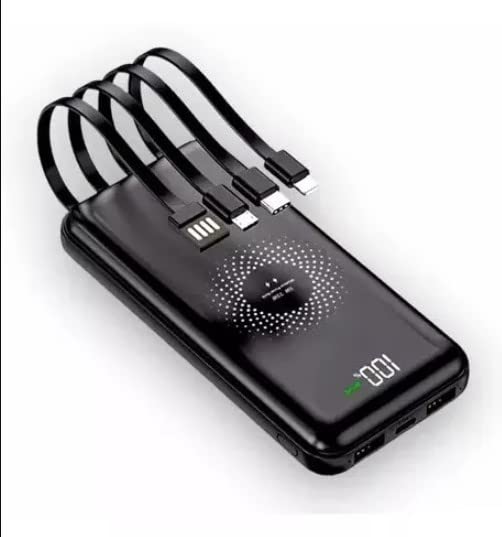
This image showcases the compact design of the Alfa Gold Power Bank BTE-17, featuring its convenient built-in charging cables. These cables include USB, Type-C, iPhone (Lightning), and V8 (Micro USB) connectors, allowing for versatile charging without needing to carry extra cables.
Charging Your Devices (Wireless Induction):
- Ensure your device is Qi-compatible for wireless charging.
- Place your Qi-compatible device directly onto the designated wireless charging area of the power bank.
- Ensure the device is centered on the charging pad for optimal connection.
- The power bank will automatically detect your device and begin wireless charging. Your device's screen should indicate that it is charging.
- Remove your device from the power bank to stop wireless charging.
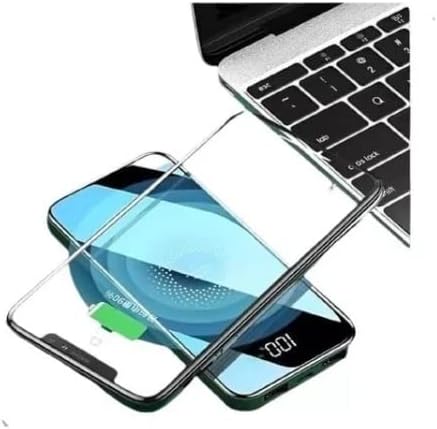
This image illustrates the wireless charging capability of the power bank. Place your compatible smartphone on the designated charging area of the power bank to initiate wireless power transfer. The phone's display indicates a full charge.
5. Maintenance
- Cleaning: Use a soft, dry cloth to clean the power bank. Avoid using harsh chemicals or abrasive materials.
- Storage: Store the power bank in a cool, dry place away from direct sunlight and extreme temperatures.
- Battery Care: To prolong battery life, fully charge the power bank at least once every three months, even if not in use. Avoid completely draining the battery frequently.
- Handling: Do not drop, disassemble, or attempt to repair the power bank yourself. This can void the warranty and cause damage.
6. Troubleshooting
- Power Bank Not Charging:
- Ensure the charging cable is securely connected to both the power bank and the power source.
- Try a different USB wall adapter or charging cable.
- Device Not Charging from Power Bank (Wired):
- Verify that the correct built-in cable is used for your device.
- Check if the power bank has sufficient charge.
- Ensure the cable is firmly connected to both the power bank and your device.
- Device Not Charging from Power Bank (Wireless):
- Confirm your device supports Qi wireless charging.
- Ensure your device is centered on the wireless charging area of the power bank.
- Remove any thick phone cases that might interfere with wireless charging.
- Check if the power bank has sufficient charge.
- Slow Charging:
- Ensure you are using a compatible fast-charging adapter for the power bank (if applicable).
- Some devices may limit charging speed to protect battery health.
7. Specifications
| Brand | Generic |
| Model | BTE-17 |
| Battery Capacity | 10000 Milliampere Hour (mAh) |
| Connector Type | USB Type C (for input/output), Built-in USB, Type-C, iPhone (Lightning), V8 (Micro USB) cables |
| Output Current | 2.1 Amperes |
| Special Features | Fast charging, Wireless charging |
8. Safety Information
- Do not expose the power bank to extreme temperatures (above 60°C / 140°F or below 0°C / 32°F).
- Avoid contact with water or other liquids.
- Do not short-circuit the power bank.
- Keep out of reach of children.
- Do not puncture, crush, or incinerate the power bank.
- Dispose of the power bank responsibly according to local regulations.
9. Warranty and Support
No specific warranty information was provided with this product. For support or inquiries, please refer to the retailer or point of purchase.


