
Yoncon YONCONX601
Yoncon Smart Food Scale User Manual
Model: YONCONX601
Introduction
Thank you for choosing the Yoncon Smart Food Scale. This digital kitchen scale is designed for precise measurement of food items, supporting various culinary needs from cooking and baking to portion control for dietary management. Its compact design and smart features make it a valuable tool in any kitchen.

Image: The Yoncon Smart Food Scale in a kitchen setting, demonstrating its use with a smartphone app for diet tracking.
Safety Information
- Do not immerse the scale in water or other liquids.
- Clean the scale with a damp cloth. Avoid abrasive cleaners.
- Do not overload the scale beyond its maximum capacity of 3000 grams (6.6 lbs).
- Keep the scale on a flat, stable surface during use for accurate readings.
- Store in a dry place away from extreme temperatures.
Package Contents
- Yoncon Smart Food Scale (Model YONCONX601)
- AAA Batteries (included)
- User Manual
Product Overview
The Yoncon Smart Food Scale features a sleek design with a stainless steel platform and an easy-to-read LCD digital display. It includes intuitive buttons for power, unit conversion, and tare function.

Image: A clear view of the Yoncon Smart Food Scale's stainless steel weighing platform and digital display.

Image: An exploded diagram illustrating the internal components of the scale, including the stainless steel platform, LCD display, high accuracy sensors, and ABS plastic body.
Setup
1. Battery Installation
Locate the battery compartment on the underside of the scale. Insert the included AAA batteries, ensuring correct polarity. Close the battery compartment cover securely.
2. Initial Placement
Place the scale on a hard, flat, and stable surface. Uneven surfaces can affect weighing accuracy.
3. App Connection (Optional)
For enhanced features like nutritional analysis and diet tracking, download the companion app (e.g., WEALHUB APP as mentioned in some reviews) from your device's app store. Follow the in-app instructions to pair your scale via Bluetooth. This allows for seamless data synchronization and tracking of your food intake.
Video: Demonstration of the Yoncon Smart Food Scale connecting to a smartphone app via Bluetooth, showing how weight data is transferred for nutritional analysis and diet tracking.
Operating Instructions
1. Power On/Off
Press the ON/OFF button to turn the scale on. The display will show "0.0" when ready. Press and hold the ON/OFF button to turn the scale off.
2. Unit Conversion
Press the UNIT button to switch between available units of measurement (grams "g" and ounces "oz").

Image: The scale displaying the option to switch between grams and ounces, highlighting its versatility for different measurement needs.
3. Tare Function
The Tare function allows you to subtract the weight of a container or previous ingredients, enabling you to weigh multiple items in the same bowl accurately.
- Place an empty container on the scale.
- Press the TARE button. The display will reset to "0.0".
- Add your food item(s) to the container. The display will show only the weight of the added items.
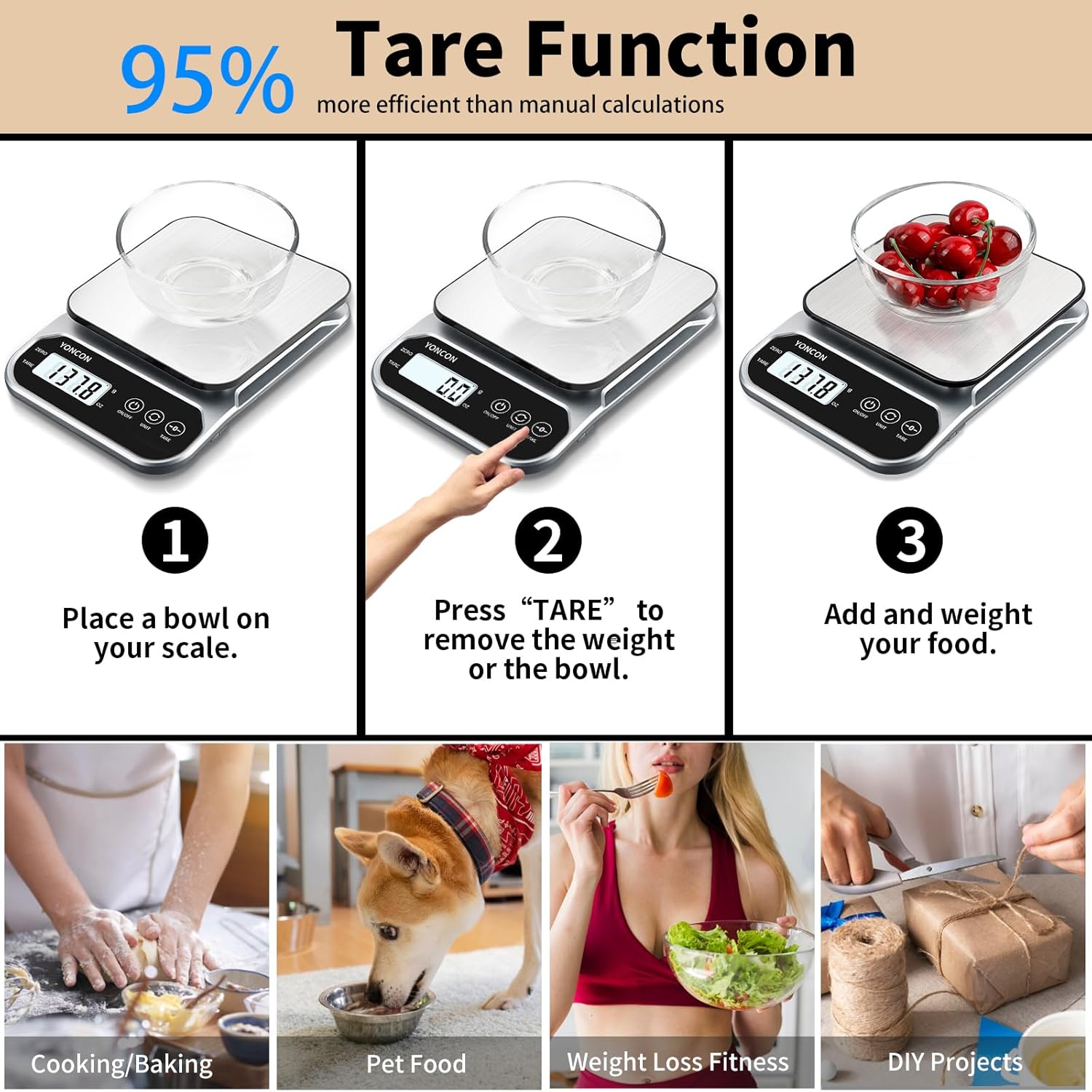
Image: A visual guide showing the three-step process of using the tare function: placing a bowl, pressing tare, and adding food for accurate measurement.
4. Weighing Food
Place the item directly on the scale's platform or in a container (using the Tare function). Wait for the display to stabilize and show the accurate weight. The scale offers high accuracy with a 0.1g division.

Image: The scale displaying precise measurements, highlighting its 0.1g accuracy for small quantities.
5. Nutritional Analysis (via App)
When connected to the app, the scale can help track nutritional information. After weighing an item, input the food type into the app. The app will then provide detailed nutritional data, including calories, fats, proteins, and carbohydrates, based on the measured weight.

Image: The scale showing a food item being weighed, with a corresponding smartphone screen displaying a comprehensive nutritional breakdown.
Maintenance
1. Cleaning
To clean the scale, wipe the stainless steel platform and body with a soft, damp cloth. Do not use harsh chemicals or abrasive materials, as they may damage the surface or electronic components. Ensure the scale is dry before storage.

Image: A hand cleaning the stainless steel platform of the scale with a soft cloth, emphasizing ease of cleaning.
2. Storage
Store the scale in a cool, dry place. Its compact size allows for easy storage in drawers or on shelves, minimizing countertop clutter.

Image: The scale neatly stored in a kitchen drawer, highlighting its compact and space-saving design.
Troubleshooting
- Inaccurate Readings: Ensure the scale is on a flat, stable surface. Check battery levels. Avoid placing items that exceed the maximum weight capacity.
- Display Not Turning On: Verify batteries are correctly installed and have sufficient charge. Replace batteries if necessary.
- App Connectivity Issues: Ensure Bluetooth is enabled on your device and the scale is within range. Restart both the app and the scale. Refer to the app's specific troubleshooting guide if issues persist.
- "Lo" or "Err" on Display: "Lo" indicates low battery; replace batteries. "Err" indicates overload; remove items immediately to prevent damage.
Specifications
| Feature | Detail |
|---|---|
| Brand | Yoncon |
| Model | YONCONX601 |
| Display Type | LCD, Digital |
| Weight Limit | 3000 Grams (3kg) |
| Readout Accuracy | 0.1g |
| Measurement Units | Grams (g), Ounces (oz) |
| Material | Acrylonitrile Butadiene Styrene (ABS) |
| Power Source | AAA Batteries (included) |
| Item Weight | 13.44 Ounces |
| Form Factor | Mini, Counter Scale |
Warranty and Support
For warranty information or technical support, please refer to the contact details provided on the product packaging or visit the official Yoncon website. Keep your purchase receipt as proof of purchase for warranty claims.
Ask a question about this manual
Ask about setup, troubleshooting, compatibility, parts, safety, or missing instructions. Manuals+ will review the question and use this page’s manual context to help answer it.