
Introduction
This manual provides comprehensive instructions for the installation and use of the VCELINK Cat 7 Tool-Free RJ45 Connector. Designed for ease of use and high performance, this connector allows for quick and reliable termination of Cat 7 network cables without specialized crimping tools. Its robust construction ensures stable signal transmission and durability.
The full metal structure, made from zinc alloy, effectively shields against external network signal interference. Phosphor bronze gold-plated contacts ensure fast and stable signal transmission, resisting corrosion and repeated connections, contributing to the RJ45 connector's high transmission quality and long lifespan.
The innovative tool-free design with an LSA threading guide simplifies and speeds up wiring. This connector is also reusable, helping to reduce waste. The entire installation process can be completed in approximately 2 minutes, making it accessible for both professional installers and DIY enthusiasts.
Safety Information
- Always handle network cables and connectors with care to avoid damage to the conductors or insulation.
- Ensure the work area is clean and well-lit.
- Do not expose the connector to excessive moisture or extreme temperatures.
- Keep out of reach of children.
- If any part of the connector appears damaged, do not use it.
Package Contents
The package includes:
- 2 x VCELINK Cat 7 Tool-Free RJ45 Connectors
- 1 x User Manual (this document)
Specifications
| Model Number | KJ20BK-C7-2P-DE |
| Product Dimensions (L x W x H) | 4.97 x 2 x 0.92 cm |
| Item Weight | 36 Grams |
| Outer Material | Zinc Alloy |
| Connector Type | RJ45 |
| Cable Type | Ethernet |
| Ethernet Cable Category | Category 7 (Cat 7) |
| Data Transfer Rate | 10 Gigabits per second (10Gbps) |
| Frequency | 600 MHz |
| Number of Pins | 8 |
| Compatible Devices | Laptop, Router, Smart TV, Switch, Camera, TV Box |
| Recommended Use | Installation Cable |
| Supported Cable Diameter (including insulation) | 1.35 to 1.5 mm |
| Supported Cable Outer Diameter | 6 to 9.5 mm |
| Supported Wire Gauge | AWG22-AWG26 (for CAT5 to CAT8 network cables) |
| Operating Temperature | -10 °C to 60 °C |
| Power over Ethernet (PoE) Support | PoE, PoE+, UPoE |
| Standards Compliance | Cat.6A ISO/IEC11801, TIA568-C.2 |
| Wiring Schemes Supported | T568A or T568B |
Setup and Installation
Follow these steps to properly install the VCELINK Cat 7 Tool-Free RJ45 Connector:
Step 1: Prepare the Cable

Insert the cable boot onto the network cable. Carefully strip approximately 2-3 cm (0.8-1.2 inches) of the outer jacket from the cable end, exposing the shielded wires.
Step 2: Remove Foil Shield and Braid
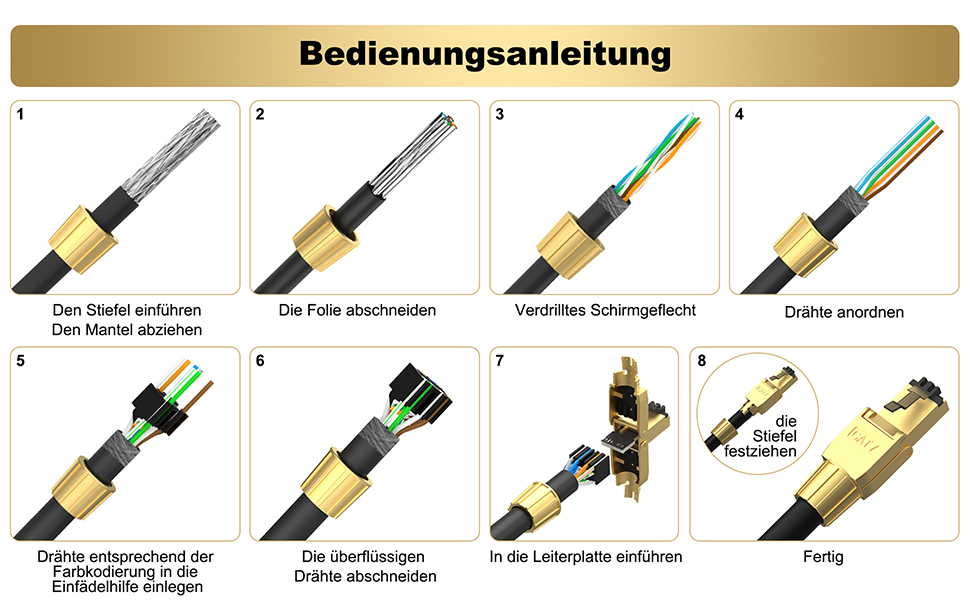
Carefully cut and remove any foil shield present. Twist the shield braid together to form a single strand.
Step 3: Organize and Place Wires

Untwist the wire pairs and straighten them. Refer to the color code diagram (T568A or T568B, typically printed on the load bar) and carefully insert each wire into its corresponding slot in the load bar. Ensure the wires are fully seated.
T568A Wiring Diagram:
1: White/Green, 2: Green, 3: White/Orange, 4: Blue, 5: White/Blue, 6: Orange, 7: White/Brown, 8: Brown
T568B Wiring Diagram:
1: White/Orange, 2: Orange, 3: White/Green, 4: Blue, 5: White/Blue, 6: Green, 7: White/Brown, 8: Brown
Step 4: Trim Excess Wires

Once all wires are correctly placed in the load bar, use a sharp cutter to trim any excess wire ends flush with the top of the load bar.
Step 5: Insert Load Bar into Connector

Carefully insert the load bar, with the trimmed wires, into the main body of the RJ45 connector. Ensure it clicks securely into place, making proper contact with the PCB.
Step 6: Close and Secure the Connector

Close the two halves of the connector housing until they snap together firmly. Slide the cable boot forward and tighten it onto the connector body to secure the cable and provide strain relief. The installation is now complete.
Operating Instructions
Once properly installed, the VCELINK Cat 7 Tool-Free RJ45 Connector functions as a standard network connector. Simply plug the terminated cable into any compatible RJ45 port on your network devices.

The connector is compatible with a wide range of devices including laptops, routers, Smart TVs, network switches, IP cameras, and TV boxes.
The connector supports data transfer rates up to 10Gbps and frequencies up to 600MHz, making it suitable for high-speed network applications, including those requiring Power over Ethernet (PoE, PoE+, UPoE).
Maintenance
The VCELINK Cat 7 Tool-Free RJ45 Connector requires minimal maintenance. To ensure optimal performance and longevity:
- Keep the connector and connected cables clean and free from dust and debris.
- Avoid bending or twisting the cable excessively near the connector.
- Ensure the connector is securely plugged into devices to prevent intermittent connections.
- Do not expose the connector to corrosive liquids or extreme environmental conditions.
Troubleshooting
If you experience issues with your network connection after installing the connector, consider the following:
- No Network Connection:
- Verify that all wires are correctly seated in the load bar according to the T568A or T568B standard.
- Ensure the load bar is fully inserted into the connector body and the housing is securely closed.
- Check that the cable is properly connected to both the network device and the wall jack/patch panel.
- Test the cable with a network cable tester if available.
- Slow Network Speed:
- Confirm that the cable used is indeed Cat 7 and meets the specifications for your network speed requirements.
- Ensure there are no kinks or severe bends in the cable.
- Check for any external interference sources near the cable run. The full metal shielding of the connector helps, but the cable itself should also be shielded for optimal performance.
- Intermittent Connection:
- Re-check all connections for looseness.
- Inspect the wire terminations within the load bar for any loose or improperly cut wires.
Warranty and Support
VCELINK provides an 18-month quality warranty for this product. We are committed to ensuring customer satisfaction.
In case of any quality-related issues, you are eligible for a full refund or a free replacement. Our customer service team is available 24 hours to assist you with any questions or concerns regarding your VCELINK Cat 7 Tool-Free RJ45 Connector.
For support, please contact VCELINK directly through the retailer's platform or visit our official website.