
1. Introduction
This document provides instructions for the Generic Replacement Remote Control. This remote is designed to function as a substitute for original remote controls for various devices, including Westinghouse WD40FB1530 and WD50FE2200 Smart 4K UHD LED LCD HDTVs, as well as other compatible audio/video players, home theater systems, set-top boxes, and projectors.
This is a dedicated replacement remote control and does not require programming or setup. Simply install the batteries to begin operation. Please note that as a replacement, some functions may differ or not be available compared to the original remote control.
2. Setup: Battery Installation
The remote control requires two (2) AAA batteries for operation. Batteries are not included with the remote control.
- Locate the battery compartment on the back of the remote control.
- Slide the battery compartment cover downwards or outwards to open it.
- Insert two AAA batteries, ensuring the positive (+) and negative (-) terminals align correctly with the markings inside the compartment.
- Replace the battery compartment cover by sliding it back into place until it clicks securely.
Important: Do not mix old and new batteries, or different types of batteries. Remove batteries if the remote control will not be used for an extended period.
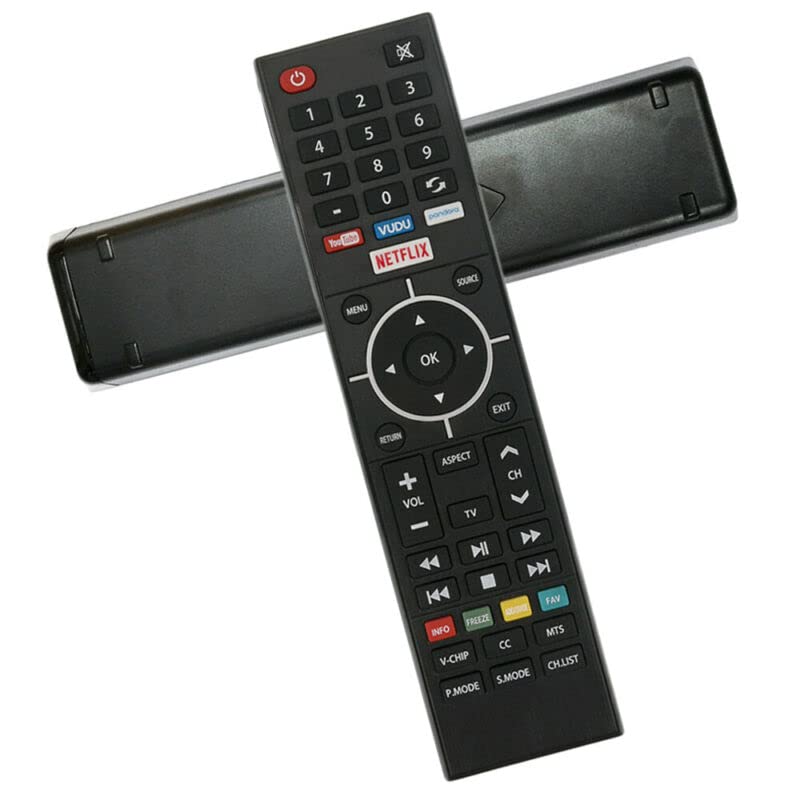
Figure 2.1: Front view of the Generic Replacement Remote Control. The remote features a black body with various function buttons, including a red power button, number pad, navigation cluster, volume and channel controls, media playback buttons, and dedicated app buttons for YouTube, VUDU, Netflix, and Pandora.
3. Operating Instructions
Point the remote control directly at the infrared (IR) receiver on your device. The maximum effective range is approximately 5 meters (16 feet).
Button Functions:
- Power (Red Button): Turns the device on or off.
- Mute (Crossed Speaker Icon): Mutes or unmutes the audio.
- Number Pad (0-9, -): Direct input for channel numbers or other numerical selections.
- Return/Refresh (Curved Arrow): Navigates back or refreshes content.
- App Buttons (YouTube, VUDU, Netflix, Pandora): Direct access to streaming applications.
- MENU: Opens the main menu of the device.
- SOURCE: Selects the input source (e.g., HDMI 1, AV).
- Navigation Arrows (Up, Down, Left, Right): Moves cursor or selection within menus.
- OK: Confirms a selection or enters a menu item.
- RETURN: Goes back to the previous screen or menu.
- EXIT: Closes the current menu or application.
- VOL (+/-): Increases or decreases the volume level.
- CH (Up/Down Arrows): Changes the television channel.
- TV: Switches to TV mode or input.
- ASPECT: Changes the screen aspect ratio.
- Media Controls (Rewind, Play/Pause, Fast Forward, Previous Track, Stop, Next Track): Controls playback of media content.
- INFO (Red): Displays information about the current program or content.
- FREEZE (Green): Pauses the current video frame.
- FAV (Teal): Accesses favorite channels or content.
- V-CHIP: Accesses V-Chip parental control settings.
- CC (Closed Caption): Toggles closed captions on or off.
- MTS (Multi-channel Television Sound): Selects audio modes (e.g., Stereo, SAP).
- P.MODE (Picture Mode): Cycles through picture presets (e.g., Standard, Movie, Vivid).
- S.MODE (Sound Mode): Cycles through sound presets (e.g., Standard, Music, Speech).
- CH.LIST (Channel List): Displays the list of available channels.
4. Maintenance
- Battery Replacement: Replace batteries when the remote's performance degrades or it stops responding. Always replace both batteries simultaneously with new AAA batteries.
- Storage: If the remote control will not be used for an extended period, remove the batteries to prevent leakage and potential damage.
- Cleaning: Clean the remote control with a soft, dry cloth. Do not use liquid cleaners or abrasive materials.
- Handling: Avoid dropping the remote control or exposing it to extreme temperatures or moisture.
5. Troubleshooting
- Remote is not responding:
- Ensure batteries are installed correctly with the correct polarity.
- Replace old batteries with new AAA batteries.
- Check for any obstructions between the remote control and the device's IR receiver.
- Ensure you are within the effective operating range (approximately 5 meters).
- Some functions do not work:
- As a replacement remote control, some advanced or specific functions of the original remote may not be supported. This is not indicative of a defective product.
- Refer to your device's original manual for specific function compatibility.
- Short transmission distance:
- Replace batteries with new ones.
- Ensure there are no strong light sources or other IR devices interfering with the signal.
6. Specifications
| Feature | Specification |
|---|---|
| Brand | Generic |
| Compatible Devices | Westinghouse WD40FB1530, WD50FE2200 Smart 4K UHD LED LCD HDTVs, DVD/Blu-ray Player, Home Theater, Set Top Box, Stereo System, Television, Projector |
| Connectivity Technology | Infrared (IR) |
| Maximum Range | 5 Meters |
| Power Source | 2 x AAA Batteries (not included) |
| Material | ABS/Plastic |
| Special Feature | Ergonomic design |
7. Warranty and Support
This replacement remote control is tested for functionality before delivery to ensure it is working correctly upon receipt. As a generic replacement item, specific warranty details may vary. For any issues or support inquiries, please contact the seller directly through your purchase platform.