
NS-RC01G-09, NS-RC06A-11, NS-32L430A11
Replacement Remote Control User Manual
For Insignia TV Models: NS-RC01G-09, NS-RC06A-11, NS-32L430A11
1. Introduction
This manual provides essential information for the setup, operation, and maintenance of your new replacement remote control. This remote is designed to function with various Insignia TV models, including NS-RC01G-09, NS-RC06A-11, and NS-32L430A11. Please note that as a replacement unit, some advanced functions of your original remote may not be supported.
The remote control is made of durable ABS material, designed for comfortable handling and long-lasting use. It operates using infrared (IR) technology.
2. Setup
2.1 Battery Installation
To begin using your remote control, you will need to install two (2) AAA batteries. Ensure correct polarity (+/-) when inserting the batteries into the battery compartment located on the back of the remote.

Figure 1: Front view of the replacement remote control. This image displays the layout of the buttons, including the power button at the top, the numerical keypad, navigation arrows, volume and channel controls, and various function buttons.
2.2 Initial Setup
This replacement remote control requires no programming or complex setup. Once the batteries are correctly installed, the remote is ready for immediate use with compatible Insignia TV models.
3. Operating Instructions
Point the remote control directly at the infrared receiver on your television. Ensure there are no obstructions between the remote and the TV.
3.1 Basic Functions
- Power Button: Located at the top, typically red, to turn the TV on or off.
- Number Pad (0-9): For direct channel input.
- Volume Up/Down (VOL +/-): Adjusts the audio volume.
- Channel Up/Down (CH +/-): Changes the television channel.
- Mute: Silences the TV audio.
- Input: Cycles through available input sources (HDMI, AV, etc.).
- Menu: Accesses the TV's main menu.
- Navigation Buttons (Up, Down, Left, Right, Enter): Used to navigate menus and confirm selections.
- Exit: Exits the current menu or screen.
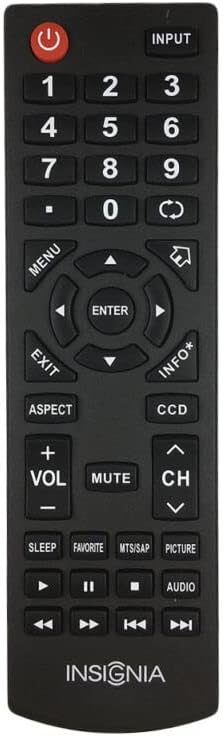
Figure 2: Top-down view of the replacement remote control. This perspective provides a clear view of the button arrangement and the remote's ergonomic design.
3.2 Compatibility Note
As a replacement remote control, some specific or advanced functions present on your original equipment manufacturer (OEM) remote may not be fully functional or available. This is not indicative of a defect but rather a characteristic of a universal or replacement remote. If a particular function does not work, it may be due to this compatibility difference.
4. Maintenance
4.1 Battery Care
- Replace batteries when the remote's responsiveness decreases.
- Always replace both batteries at the same time with new ones of the same type (AAA).
- Do not mix old and new batteries, or different types of batteries.
- If the remote will not be used for an extended period, remove the batteries to prevent leakage and potential damage to the remote.
4.2 Cleaning
To clean the remote control, gently wipe its surface with a soft, dry cloth. For stubborn dirt, a slightly damp cloth can be used, followed immediately by a dry cloth. Avoid using harsh chemicals, abrasive cleaners, or excessive moisture, as these can damage the remote's finish or internal components.
5. Troubleshooting
- Remote Not Responding:
- Check if the batteries are installed correctly with the correct polarity.
- Replace old batteries with new AAA batteries.
- Ensure there is a clear line of sight between the remote's infrared emitter and the TV's IR receiver. Remove any obstructions.
- Confirm the remote is pointed directly at the TV.
- Some Functions Not Working:
- As a replacement remote, certain advanced or specific functions of your original TV remote may not be supported. This is normal for replacement units and does not indicate a defect.
- Refer to your TV's original manual for specific functions if this remote does not provide them.
6. Specifications
| Brand | Generic |
| Manufacturer | e-remotecontrol |
| Compatible Devices | Television, Set Top Box, Stereo System, DVD/Blu-ray Player, Home Theater |
| Connectivity Technology | Infrared (IR) |
| Batteries Required | 2 x AAA (not included) |
| Color | Black or White (randomly sent) |
| Max Number of Supported Devices | 1 |
7. Warranty and Support
Specific warranty information for this replacement remote control is not provided in this manual. For details regarding warranty coverage, returns, or technical support, please contact the seller or retailer from whom you purchased the product. It is recommended to retain your proof of purchase for any warranty claims.