
CAFEMASY CCR-305d
CAFEMASY CCR-305d Home Use Air Coffee Bean Roaster Machine Instruction Manual
Model: CCR-305d | Brand: CAFEMASY
1. Important Safety Instructions
Please read all instructions carefully before using the CAFEMASY Coffee Bean Roaster Machine. Failure to follow these instructions may result in electric shock, fire, or serious injury.
- Always place the roaster on a stable, heat-resistant surface.
- Do not immerse the main unit in water or other liquids.
- Keep out of reach of children and pets.
- Ensure adequate ventilation during operation, as roasting produces smoke and chaff.
- Do not touch hot surfaces during or immediately after operation. Use the handle provided.
- Unplug the appliance when not in use and before cleaning.
- Use only green coffee beans for roasting.
- Do not overfill the roasting chamber; adhere to the maximum capacity of 100g.
2. Product Overview
The CAFEMASY CCR-305d is an air coffee bean roaster designed for home use, offering both automatic and manual control for precise roasting.

Figure 2.1: CAFEMASY Coffee Bean Roaster Machine and included accessories.
Components:
- Main Unit: Houses the heating element, fan, control panel, and motor.
- Roasting Jar: Clear high boron glass chamber for observing the roasting process. Features a safe handle.
- Lid with Chaff Collection Basket: Collects coffee bean chaff during roasting.
- Control Panel: Features an LED screen, adjustable knobs for time and heat, and buttons for fan control and mode selection.

Figure 2.2: Exploded view showing the lid, stainless steel mesh, safety lock, clear glass roasting jar, fan, high-speed motor, LED display, and adjustable knobs.
3. Setup and Assembly
Follow these steps to assemble your CAFEMASY Coffee Bean Roaster before first use.
- Place the main unit on a flat, stable, and heat-resistant surface.
- Align the clear glass roasting jar with the main unit and gently twist to secure it. Ensure it is locked tightly to prevent hot air from escaping.
- Place the stainless steel mesh chaff collection basket into the top of the roasting jar.
- Position the lid on top of the chaff collection basket and twist to lock it securely.

Figure 3.1: Visual guide for assembling the CAFEMASY Coffee Bean Roaster.
4. Operating Instructions
The CAFEMASY Coffee Bean Roaster offers two operating modes: Automatic and Manual.

Figure 4.1: Control panel highlighting the two roasting modes.
4.1. Roasting Capacity
The recommended roasting capacity is 80g (2.8oz) to 100g (3.5oz) of green coffee beans per batch. Do not exceed 100g to ensure even roasting and proper machine function.

Figure 4.2: Illustration of coffee beans inside the roasting chamber, demonstrating the recommended capacity.
4.2. Automatic Mode
Ideal for beginners, this mode simplifies the roasting process.
- Add 80-100g of green coffee beans to the roasting jar.
- Ensure the lid is securely locked.
- Press the AUTO button on the control panel.
- The machine will automatically roast for 10 minutes with a default heating level of 6 and fan power level of 8. These settings are not adjustable in Automatic Mode.
- After roasting, the system automatically switches to cold blowing for cooling.
Video 4.1: Demonstration of the CAFEMASY Air Coffee Bean Roaster Machine in operation, showcasing its features and ease of use for home roasting.
4.3. Manual Mode
For experienced users who prefer customized roasting profiles.
- Add 80-100g of green coffee beans to the roasting jar.
- Ensure the lid is securely locked.
- Use the TIME knob to set the roasting duration (1-15 minutes).
- Use the HEAT knob to adjust the heating level (1-8 levels).
- Use the FAN+ and FAN- buttons to adjust the fan power level (1-8 levels).
- Press the START button to begin roasting.
- Monitor the beans through the clear glass jar.
- After roasting, the system automatically switches to cold blowing for cooling.
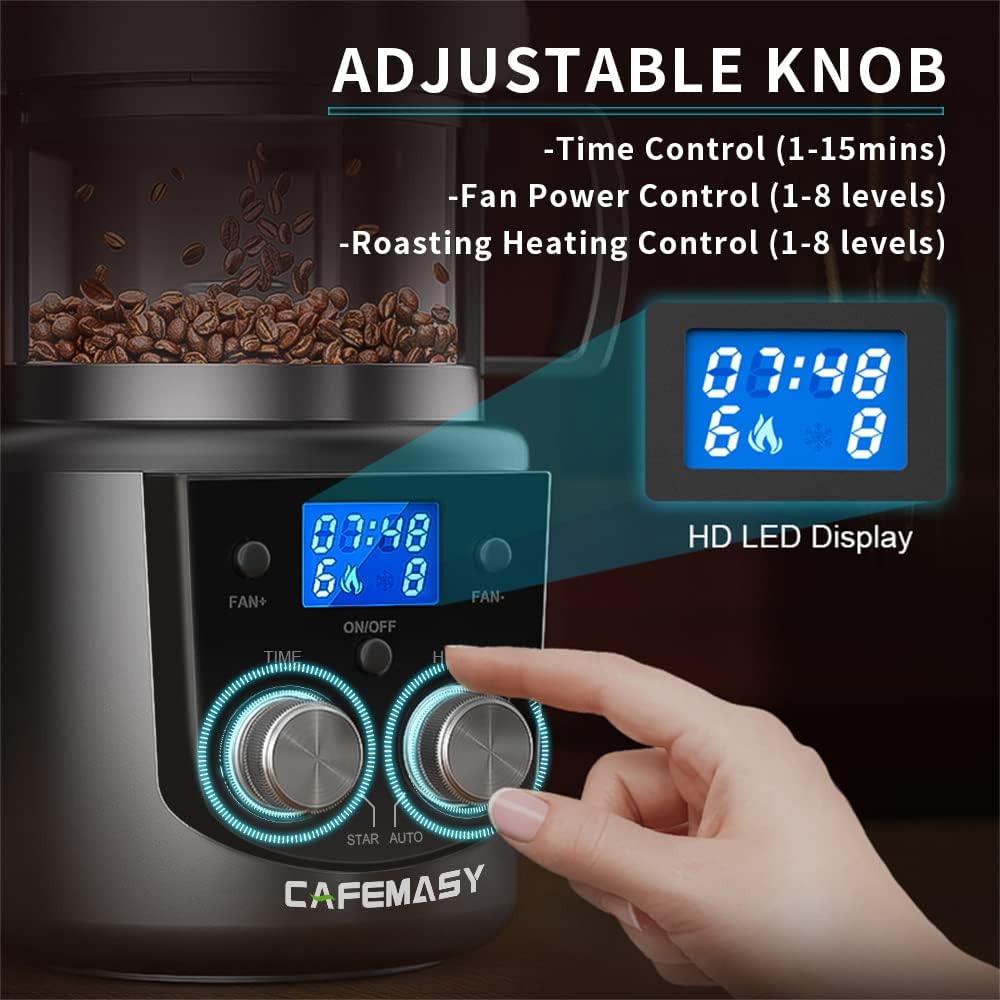
Figure 4.3: Close-up of the control panel showing adjustable knobs and LED display for precise control.

Figure 4.4: Detailed overview of settings available in Manual and Automatic modes.
4.4. Air Heating and Cooling System
The roaster features a 2-in-1 air heating and cooling function. During roasting, hot air circulates to ensure even heating. Upon completion, the system automatically initiates a cold blowing cycle to rapidly cool the beans, preventing over-roasting and preserving flavor.

Figure 4.5: Visual representation of the air heating and cooling airflow within the roaster.
5. Maintenance and Cleaning
Regular cleaning ensures optimal performance and longevity of your roaster.
- Always unplug the roaster and allow it to cool completely before cleaning.
- Remove the lid and chaff collection basket. Empty any collected chaff into a waste bin.
- Clean the chaff collection basket and lid with a soft brush or damp cloth. Do not use abrasive cleaners.
- The clear glass roasting jar can be detached and washed with warm, soapy water. Ensure it is completely dry before reassembly.
- Wipe the exterior of the main unit with a damp cloth. Do not immerse the main unit in water.

Figure 5.1: The chaff collection basket, designed for easy removal and cleaning.
6. Troubleshooting
If you encounter issues with your CAFEMASY Coffee Bean Roaster, refer to the following common problems and solutions.
| Problem | Possible Cause | Solution |
|---|---|---|
| Roaster does not turn on. | Not plugged in; power outlet issue; lid not securely locked. | Ensure power cord is securely plugged in. Test the outlet with another appliance. Verify the roasting jar and lid are correctly assembled and locked. |
| Beans not roasting evenly. | Overfilling; incorrect fan/heat settings (Manual Mode). | Reduce bean quantity to within 100g. In Manual Mode, adjust fan speed to ensure proper bean circulation and heat distribution. |
| Excessive smoke during roasting. | Normal during later stages of roasting; poor ventilation. | Ensure adequate ventilation in your roasting area. This is normal for darker roasts. |
| Error code displayed (e.g., E1). | Internal malfunction. | Unplug the unit, wait a few minutes, then plug it back in. If the error persists, contact customer support. |
For issues not listed here, please contact CAFEMASY customer support.
7. Specifications
| Feature | Detail |
|---|---|
| Brand | CAFEMASY |
| Model Number | CCR-305d |
| Color | Black |
| Special Feature | Cooling |
| Material | Plastic |
| Control Type | Touch |
| Power Source | Electric |
| Dimensions (Size) | 9.4 x 10.8 inches |
| Item Weight | 5.44 pounds |
| Capacity | 100 Grams |
| Wattage | 1400 watts |
| UPC | 774980344316 |
8. Warranty and Support
For warranty information, product support, or to inquire about replacement parts, please refer to the warranty card included with your product or visit the official CAFEMASY website. Keep your purchase receipt as proof of purchase.