
Introduction
Thank you for choosing the IKG BTW86 Wireless Earbuds. This manual provides detailed instructions for setting up, operating, and maintaining your earbuds to ensure optimal performance and a seamless audio experience. Please read this manual carefully before using the product and retain it for future reference.
What's in the Box
Upon unpacking your IKG BTW86 Wireless Earbuds, please ensure all the following components are present:
- IKG BTW86 Wireless Earbuds (Left and Right)
- Charging Case
- USB-C Charging Cable
- User Manual

This image displays the IKG BTW86 earbuds and their charging case, emphasizing the extended battery life of up to 30 hours total playtime (5 hours per charge, plus 25 hours from the case). It also highlights the convenience of USB-C fast charging, where 10 minutes of charge provides 1 hour of play.
Product Overview
Familiarize yourself with the main components of your IKG BTW86 Wireless Earbuds:
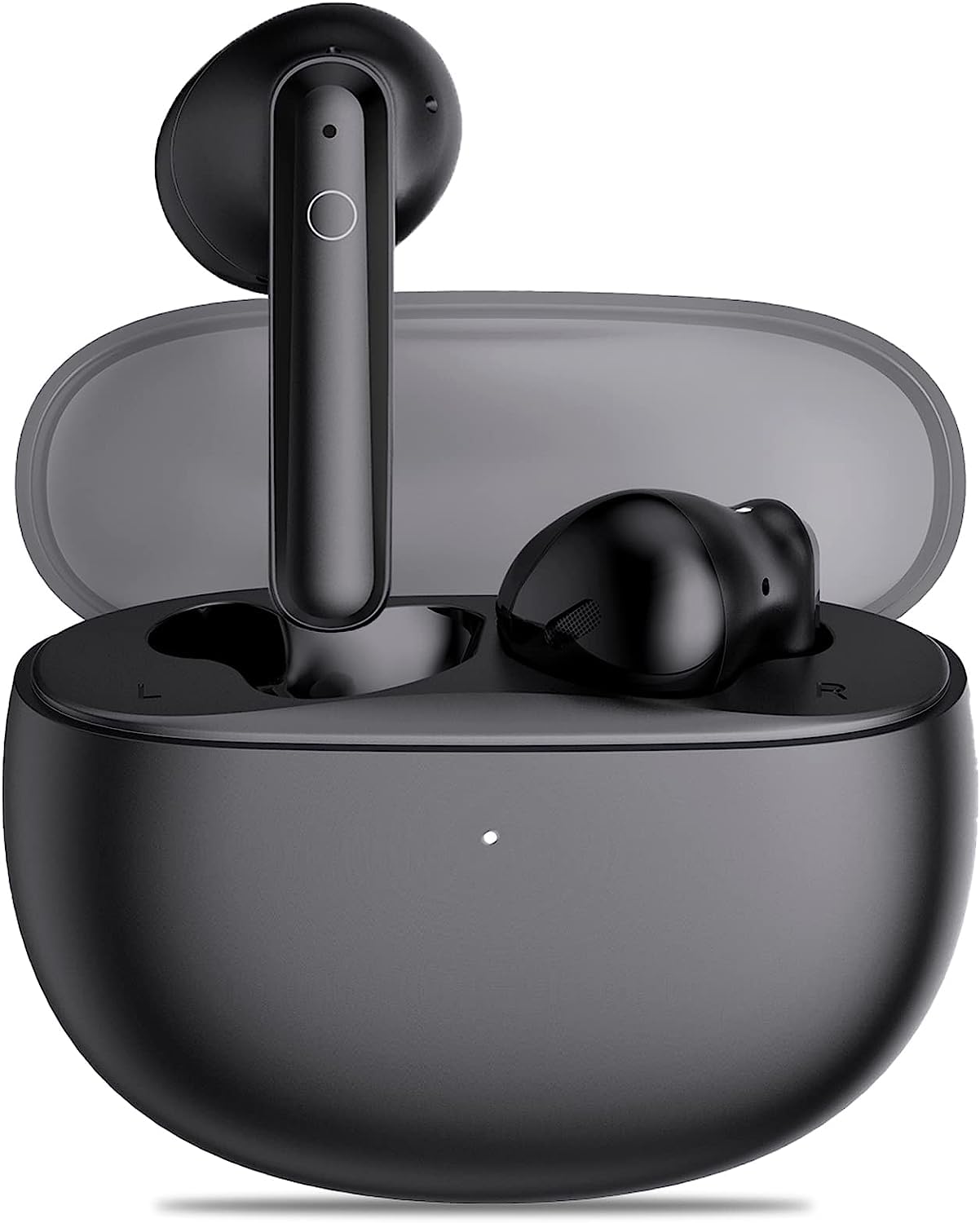
A view of the IKG BTW86 wireless earbuds nestled in their open charging case, showcasing their compact and ergonomic design.
The earbuds feature a touch control area on the outer surface for various functions. The charging case includes a USB-C port for charging and LED indicators to show battery status.

This image illustrates the advanced internal components of the IKG BTW86 earbud, highlighting the 13.4mm bionic graphene diaphragm responsible for powerful bass and clear audio. A frequency response graph compares the BTW86's audio profile against others, showing enhanced low and high frequencies.
Setup
1. Charging the Earbuds and Case
Before first use, it is recommended to fully charge both the earbuds and the charging case.
- Place the earbuds into their respective slots in the charging case.
- Connect the provided USB-C charging cable to the charging port on the case and plug the other end into a USB power adapter (not included) or a computer's USB port.
- The LED indicator on the charging case will show the charging status. Once fully charged, the indicator may change or turn off.
A full charge provides up to 5 hours of playtime for the earbuds, with the charging case offering an additional 25 hours, totaling 30 hours of non-stop play.
2. Pairing with Your Device (One-Step Pairing)
The IKG BTW86 earbuds feature Bluetooth 5.3 technology for fast and stable connections.
- Power On: Open the lid of the charging case. The earbuds will automatically power on and enter pairing mode.
- Enable Bluetooth: On your smartphone, tablet, or other Bluetooth-enabled device, go to the Bluetooth settings and ensure Bluetooth is turned on.
- Select Device: In the list of available Bluetooth devices, search for and select "BTW86".
- Connection Confirmation: Once connected, you will hear an audio prompt from the earbuds, and "BTW86" will appear as a connected device on your screen.
The earbuds will automatically reconnect to the last paired device when removed from the case, provided Bluetooth is enabled on your device.

This image demonstrates the one-step pairing process for the IKG BTW86 earbuds. Simply open the charging case, and the earbuds will appear on your device's Bluetooth list, ready for connection. The phone screen shows 'BTW86' as a discoverable device.

This image showcases the IKG BTW86 earbuds' integration with Bluetooth 5.3 technology, emphasizing an 80% increase in connection speed, 95% improvement in connection stability, and a 99% reduction in connection loss for a superior wireless experience.
Operating Instructions
Power On/Off
- Power On: Open the charging case lid, and the earbuds will automatically power on. Alternatively, if the earbuds are out of the case, press and hold the touch control area on both earbuds for 3 seconds.
- Power Off: Place the earbuds back into the charging case and close the lid. They will automatically power off and begin charging. Alternatively, press and hold the touch control area on both earbuds for 5 seconds.
Smart Touch Controls
The IKG BTW86 earbuds feature intuitive touch controls for easy management of music and calls:

This diagram details the intuitive smart touch controls available on the IKG BTW86 earbuds. Functions include single tap for play/pause or answer/end calls, double tap for next/previous song, triple tap for volume adjustment, and press-and-hold for rejecting calls or activating the voice assistant.
- Play/Pause: Single tap on either the Left (L) or Right (R) earbud.
- Next Song: Double tap on the Right (R) earbud.
- Previous Song: Double tap on the Left (L) earbud.
- Volume Up: Triple tap on the Right (R) earbud.
- Volume Down: Triple tap on the Left (L) earbud.
- Answer/End Call: Single tap on either the Left (L) or Right (R) earbud.
- Reject Call: Press and hold on either the Left (L) or Right (R) earbud for 2 seconds.
- Activate Voice Assistant: Press and hold on either the Left (L) or Right (R) earbud for 2 seconds (when not on a call).
Call Quality
The IKG BTW86 earbuds are equipped with 4Mics ENC (Environmental Noise Cancellation) and CVC8.0 technology. This advanced system ensures crystal clear call quality by effectively reducing background noise, allowing for high-definition calls even in noisy outdoor environments.

This image illustrates the crystal clear call quality of the IKG BTW86 earbuds, equipped with 4Mics ENC and CVC8.0 technology. The user is shown enjoying a high-definition call, even in outdoor environments, thanks to effective noise cancellation.
Maintenance
Proper maintenance will extend the lifespan of your IKG BTW86 Wireless Earbuds.
- Cleaning: Regularly clean the earbuds, especially the charging contacts and ear tips, with a soft, dry, lint-free cloth. Do not use liquids, sprays, or abrasive cleaners, as these can damage the product.
- Storage: Always store the earbuds in their charging case when not in use. This protects them from dust, damage, and keeps them charged for your next use.
- Battery Care: To prolong the battery life, avoid fully discharging the earbuds and case frequently. Charge them regularly, even if not used for extended periods. Avoid exposing the product to extreme temperatures.
- Water Resistance: The earbuds are sweat-resistant, making them suitable for workouts. However, they are not waterproof. Avoid submerging them in water or exposing them to heavy rain or other liquids.
Troubleshooting
If you encounter any issues with your IKG BTW86 Wireless Earbuds, please refer to the following common solutions:
- Earbuds not pairing:
- Ensure both earbuds are sufficiently charged.
- Place both earbuds back into the charging case, close the lid, wait 5 seconds, then open the lid again to re-enter pairing mode.
- On your device, delete "BTW86" from your Bluetooth device list and attempt the pairing process again.
- Ensure your device's Bluetooth is enabled and the earbuds are within range (typically 10 meters or 33 feet).
- Only one earbud working:
- Place both earbuds back into the charging case and close the lid. Wait a few seconds, then open the lid. This often re-syncs them.
- Check the battery level of both earbuds individually.
- No sound:
- Check the volume level on your connected device and ensure it is not muted.
- Ensure the earbuds are properly paired and connected to your device.
- Try playing audio from a different application or source to rule out app-specific issues.
- Charging issues:
- Ensure the USB-C cable is securely connected to both the charging case and the power source.
- Check if the charging contacts on the earbuds and inside the case are clean and free of any debris.
- Try using a different USB-C cable or power adapter to rule out faulty accessories.
Specifications
Detailed technical specifications for the IKG BTW86 Wireless Earbuds:
| Feature | Detail |
|---|---|
| Model Number | BTW86 |
| Brand | IKG |
| Connectivity Technology | Wireless (Bluetooth 5.3) |
| Form Factor | In-Ear |
| Driver Size | 13.4mm (Bionic Graphene Diaphragm) |
| Call Technology | 4Mics ENC + CVC8.0 |
| Playtime per Charge | Up to 5 hours |
| Total Playtime (with charging case) | Up to 30 hours |
| Charging Port | USB-C |
| Material | Plastic |
| Special Features | Fast Charging, Built-in Microphone, Sweat-resistant |
| Age Range (Description) | Adult |
Warranty Information
IKG products are designed and manufactured to the highest quality standards. For specific warranty details regarding your BTW86 Wireless Earbuds, please refer to the warranty card included in your product packaging. This document outlines the terms and conditions of the warranty, including coverage period and claim procedures. Please retain your proof of purchase for warranty service.
Support
For further assistance, troubleshooting, or product inquiries that are not covered in this manual, please visit the official IKG website or contact their customer support team. Contact information can typically be found on the product packaging or the official website.