
MOESAPU CS
MOESAPU MX600 Golf Rangefinder with Slope User Manual
Model: MX600 | Brand: MOESAPU
1. Introduction
Thank you for choosing the MOESAPU MX600 Golf Rangefinder. This device is designed to provide accurate distance measurements for golf, hunting, and other outdoor activities. It features high-definition optics, fast measurement, slope compensation, and flagpole locking technology. Please read this manual thoroughly before using the device to ensure proper operation and to maximize its performance and lifespan.
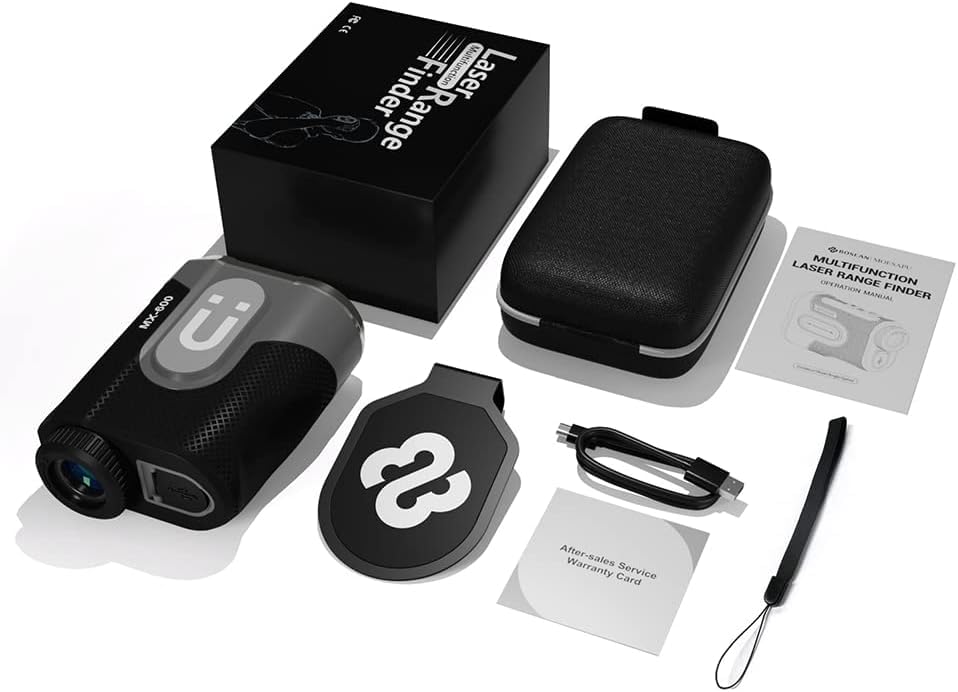
Package Contents
Upon opening the package, please verify that all items listed below are present and in good condition:
- MOESAPU MX600 Golf Rangefinder
- Carry Protection Case
- Cleaning Cloth
- Type-C Charging Cable
- Wrist Strap
- User Manual (this document)
- Warranty Card
2. Safety Information
- Laser Safety: This device uses an invisible Class 1 laser. Do not stare directly into the laser beam or point it at others. Direct eye exposure to the laser beam may cause permanent eye damage.
- Battery Safety: The device contains a built-in rechargeable lithium battery. Do not disassemble, puncture, or expose the battery to extreme temperatures or fire. Use only the provided charging cable or a certified Type-C cable.
- Water Resistance: The device is IPX6 water-resistant, meaning it can withstand strong jets of water. However, it is not designed for submersion. Avoid prolonged exposure to heavy rain or submerging it in water.
- Cleaning: Use only the provided cleaning cloth or a soft, lint-free cloth to clean the lenses. Avoid abrasive materials or harsh chemicals.
- Operating Temperature: Operate the device within the specified temperature range (typically -10°C to 50°C).
- Children: Keep the device out of reach of children.
3. Product Overview
3.1 Components

The MOESAPU MX600 features a robust design with intuitive controls. Key components include:
- Objective Lens: The front lens through which the laser is emitted and received.
- Eyepiece/Diopter Adjustment: Used for viewing and adjusting focus.
- Power/Measurement Button: Activates the device and initiates measurements.
- Mode Button: Switches between different measurement modes.
- Slope Switch: A physical switch to enable or disable slope compensation.
- Magnetic Strip: Allows for convenient attachment to metal surfaces, such as a golf cart frame.
- Type-C Charging Port: For recharging the internal battery.
3.2 Key Features
- High-Precision Measurement: Offers ±1 yard accuracy with a maximum range of 1200 yards and 0.5-second quick measurement.
- 7X Magnification: Provides clear and bright images for easy target acquisition.

Image 3.2.1: The MX600 features 7x magnification and crystal clear optics for enhanced viewing. - Slope Compensation: Calculates the slope-adjusted distance, providing a more accurate "play as" distance for uphill or downhill shots. This feature can be toggled ON/OFF, making the device tournament legal when OFF.

Image 3.2.2: Visual representation of slope compensation calculating adjusted distance and flagpole locking with vibration feedback. - Flagpole Locking Technology (PinSeeker): Vibrates to confirm that the flag has been successfully locked, distinguishing it from background objects.
- Magnetic Grip: Integrated magnets allow for convenient attachment to metal surfaces, such as a golf cart.

Image 3.2.3: The magnetic grip allows for easy and secure attachment to a golf cart or other metal surfaces. - Multiple Measurement Modes: Includes modes for distance, flagpole, slope, speed, fog, and altimeter.

Image 3.2.4: The rangefinder offers six distinct measurement modes to suit various needs. - Durable and Waterproof: IPX6 water and dust resistance, combined with a robust rubber shell, ensures durability in various outdoor conditions.
- Long Battery Life: Equipped with an 800mAh rechargeable lithium battery, providing approximately 5,000 measurements on a full charge, with Type-C fast charging support.
4. Setup
4.1 Battery Charging
The MOESAPU MX600 comes with a built-in rechargeable lithium battery. Before first use, it is recommended to fully charge the device.
- Locate the Type-C charging port on the side of the rangefinder.
- Connect the provided Type-C charging cable to the port.
- Connect the other end of the cable to a standard USB power adapter (not included) or a computer's USB port.
- The charging indicator light will illuminate during charging and turn off when fully charged.
- A full charge typically takes a few hours. The 800mAh battery supports approximately 5,000 continuous measurements.

4.2 Initial Power On and Diopter Adjustment
- Power On: Press the Power/Measurement Button once to turn on the device. The display will activate.
- Diopter Adjustment: Look through the eyepiece. If the display or target appears blurry, rotate the diopter adjustment ring (located around the eyepiece) until the view is sharp and clear. This adjustment is crucial for clear viewing and accurate readings.
- Auto Shut-off: The device will automatically power off after a period of inactivity to conserve battery.
5. Operating Instructions
5.1 Basic Measurement
- Power on the device by pressing the Power/Measurement Button.
- Aim the crosshairs in the display at your desired target.
- Press the Power/Measurement Button again to initiate a measurement. The distance will be displayed almost instantly.
- For continuous scanning, hold down the Power/Measurement Button. The distance will update as you pan across targets.
5.2 Mode Switching
Press the Mode Button to cycle through the available measurement modes. The active mode will be indicated on the display.
- Distance Mode: Measures the straight-line distance to the target.
- Flagpole Locking Mode (PinSeeker): Designed for golf. When aiming at a flag, the device will prioritize the closest object and vibrate to confirm flag lock.
- Slope Mode: Measures the straight-line distance, horizontal distance, and slope-adjusted distance. This mode is active when the physical slope switch is ON.
- Speed Mode: Measures the speed of a moving object. Aim at the object and press the measurement button.
- Fog Mode: Optimized for use in foggy conditions, reducing interference from mist.
- Altimeter Mode: Measures the relative height difference between two points.
5.3 Slope Compensation (Tournament Legal)
The MOESAPU MX600 features a physical slope switch to enable or disable slope compensation.
- Slope ON: Slide the slope switch to the "ON" position. The device will display both the actual distance and the slope-adjusted distance (recommended for practice).
- Slope OFF: Slide the slope switch to the "OFF" position. The device will only display the actual straight-line distance, making it compliant with golf tournament rules.
5.4 Magnetic Attachment
The integrated magnetic strip allows for convenient storage and access during a round of golf.
- Simply attach the rangefinder to any metal surface, such as the frame of a golf cart or a metal accessory.
- Ensure the rangefinder is securely attached before moving.

6. Maintenance
- Cleaning Lenses: Use the provided cleaning cloth or a soft, lint-free cloth to gently wipe the objective and eyepiece lenses. Do not use fingers or abrasive materials, as this can scratch the lens coatings.
- Cleaning Body: Wipe the body of the rangefinder with a soft, damp cloth. Avoid using harsh chemicals or solvents.
- Storage: When not in use, store the rangefinder in its protective carry case in a cool, dry place, away from direct sunlight and extreme temperatures.
- Battery Care: For optimal battery life, avoid fully discharging the battery frequently. If storing for an extended period, charge the battery to about 50% every few months.
- Water Resistance: While IPX6 rated, always ensure the Type-C charging port cover is securely closed to maintain water resistance. Dry the device thoroughly if it gets wet.
7. Troubleshooting
| Problem | Possible Cause | Solution |
|---|---|---|
| Device does not power on. | Low or depleted battery. | Charge the battery using the provided Type-C cable. |
| Display is blurry. | Diopter not adjusted correctly. | Rotate the diopter adjustment ring until the display is clear. |
| Inaccurate measurements. | Unstable aiming; dirty lenses; target too far or too small; environmental interference (e.g., heavy fog). | Ensure stable aiming; clean lenses; try measuring a larger target; use Fog Mode if applicable. |
| Flagpole Lock not working. | Targeting too wide; flag too small or obscured. | Ensure precise aiming at the flag; try scanning slowly across the flag. |
| Device not responding. | Temporary software glitch. | Try turning the device off and on again. If unresponsive, allow the battery to fully discharge and then recharge. |
8. Specifications
| Feature | Detail |
|---|---|
| Brand | MOESAPU |
| Model | MX600 |
| Measuring Range | 5 - 1200 yards |
| Accuracy | ±1 yard |
| Measurement Speed | 0.5 seconds |
| Magnification | 7X |
| Laser Type | Class 1 (invisible) |
| Battery Type | 800mAh Rechargeable Lithium |
| Charging Port | Type-C |
| Water Resistance | IPX6 |
| Material | Plastic, Silicone |
| Item Weight | 127 g |
| Dimensions (LxWxH) | 10.2 x 7.6 x 4.3 cm |
| UPC | 788567610404 |
9. Warranty and Support
The MOESAPU MX600 Golf Rangefinder comes with a standard manufacturer's warranty. Please refer to the included Warranty Card for specific terms and conditions, including warranty period and coverage details.
For technical support, troubleshooting assistance, or warranty claims, please contact MOESAPU customer service through the contact information provided on your warranty card or the official MOESAPU website.
Please retain your purchase receipt as proof of purchase for warranty purposes.
Related Documents - CS
 |
HY-2070 Digital Microscope User Manual Detailed instructions and specifications for the HAYEAR HY-2070 digital microscope, covering product features, main parameters, button operations, interface connections, and remote control usage. |
 |
Cytek Aurora™ CS System Technical Specifications Detailed technical specifications for the Cytek Aurora™ CS System, a high-performance flow cytometry instrument. Includes information on optics, electronics, fluidics, workstation, performance metrics, functional specifications, installation, and room requirements. |
 |
Laserworld Club Series CS-8000RGB FX | CS-12.000RGB FX User Manual This comprehensive user manual provides detailed information on the Laserworld Club Series CS-8000RGB FX and CS-12.000RGB FX show laser projectors. It covers product features, safety instructions, operation modes (Sound-to-Light, Stand-Alone, Master-Slave, DMX, ILDA), technical specifications, and important legal notices. Designed for professional use, this manual ensures safe and effective operation of the laser system. |
 |
Laserworld Club Series CS-2000RGB FX MK2 | CS-4000RGB FX Manual Comprehensive operating manual for the Laserworld Club Series CS-2000RGB FX MK2 and CS-4000RGB FX laser projectors, covering installation, operation, safety, and technical specifications. |
 |
Raya CS-CSX3 3-Inch Locking Casters for C-Stands User Manual User manual for the Raya CS-CSX3 3-inch locking casters, providing attachment instructions, specifications, and warranty information for C-stand accessories. |
 |
Lawn Star Parts Manual 2020 - Comprehensive Guide Official Lawn Star Parts Manual for 2020, detailing spare parts and assembly for a wide range of trimmers, mowers, blowers, chain saws, and shredders. Includes warranty and troubleshooting information. |