
1. Introduction
This document provides instructions for the Generic replacement remote control, model Easytry17425. This remote is designed to be compatible with specific projector models: Wimius K7 S26, Joval FB200-1, and FunFlix RD-828E 5G Mini DLP Portable 1080P Movie Projectors. Please verify your projector model number matches those listed to ensure compatibility. As a replacement item, some advanced functions of your original remote may not be supported.
2. Package Contents
- 1 x Generic Replacement Remote Control (Model: Easytry17425)
Note: Batteries are not included and must be purchased separately.
3. Battery Installation
The remote control requires two (2) AAA batteries for operation. Follow these steps to install the batteries:
- Locate the battery compartment cover on the back of the remote control.
- Press down on the tab and slide the cover downwards to open the compartment.
- Insert two AAA batteries, ensuring the positive (+) and negative (-) terminals align correctly with the markings inside the compartment.
- Slide the battery compartment cover back into place until it clicks securely.
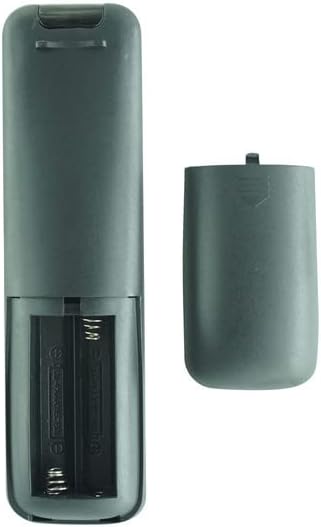
Image: Rear view of the remote control with the battery cover removed, illustrating the correct orientation for AAA battery insertion.
Important: Always replace both batteries at the same time. Do not mix old and new batteries or different types of batteries.
4. Remote Control Layout and Functions
Familiarize yourself with the buttons on your replacement remote control:

Image: Front view of the remote control, displaying the button layout and labels.
- Power Button (Red): Turns the projector on or off.
- Navigation Pad (Up, Down, Left, Right): Navigates through menus and options.
- OK Button: Confirms selections.
- Back/Return Button: Returns to the previous screen or menu.
- Home Button: Accesses the projector's main home screen.
- Volume Up/Down: Adjusts the audio volume.
- Mute Button: Mutes or unmutes the audio.
- Source/Input Button: Selects the input source (e.g., HDMI, USB).
- Menu Button: Opens the projector's settings menu.
- Play/Pause, Fast Forward, Rewind: Controls media playback.
Note: Specific button functions may vary slightly depending on your projector's firmware and model.
5. Operating Instructions
This remote control operates using infrared (IR) technology. Ensure there is a clear line of sight between the remote control and the IR receiver on your projector.
- Power On/Off: Point the remote at the projector and press the Power button.
- Navigation: Use the Navigation Pad to move through menus and options on the projector screen.
- Selection: Press the OK button to confirm a selection or open an item.
- Volume Control: Use the Volume Up and Volume Down buttons to adjust the audio level.
- Input Source: Press the Source/Input button to cycle through available input sources.
For detailed operation of specific projector features, refer to your projector's original user manual.
6. Troubleshooting
If you experience issues with your remote control, try the following:
- Remote Not Responding:
- Check if the batteries are installed correctly with the correct polarity.
- Replace the batteries with fresh AAA batteries.
- Ensure there are no obstructions between the remote control and the projector's IR receiver.
- Make sure you are within the effective operating range (up to 10 meters).
- Limited Functionality:
- As a replacement remote, some advanced or unique functions of your original projector remote may not be supported. This is normal for universal or replacement remotes.
- Verify that your projector model is explicitly listed as compatible.
7. Specifications
| Feature | Specification |
|---|---|
| Model Number | Easytry17425 |
| Connectivity Technology | Infrared (IR) |
| Controller Type | Button Control |
| Maximum Range | 10 Meters (approx. 33 feet) |
| Number of Supported Devices | 1 |
| Batteries Required | 2 x AAA (not included) |
8. Warranty and Support
This product comes with a 90-day warranty from the date of purchase. If you encounter any issues or have questions regarding the compatibility or functionality of this replacement remote control, please contact the manufacturer, Easytry, or your retailer for assistance.
For specific inquiries about your projector's features or advanced settings, please consult the original user manual provided with your Wimius K7 S26, Joval FB200-1, or FunFlix RD-828E projector.