1. Product Overview
The Balboa Direct Topside Control Panel, model BWG TP200T (part number 57282), is an electronic control unit designed for hot tubs and spas. It features a compact oval shape with four buttons for controlling various spa functions including temperature, jets, lighting, and auxiliary features. This topside panel is a complete unit, ready for installation, and comes with a 6-foot cord.
Key Features:
- Electronic Topside Control Panel
- Model: TP200T
- 4-Button Configuration: Temp, Jets, Light, Aux
- Oval Shape
- Cord Length: 6 feet
- Panel Size: 4-5/16 x 1-1/2 inches

Figure 1.1: Front view of the Balboa TP200T topside control panel, showing the display and four control buttons, with its attached cable coiled beside it.

Figure 1.2: Rear view of the Balboa TP200T topside control panel, showing the adhesive backing, internal components, and the attached cable with a yellow "STOP!" warning tag.
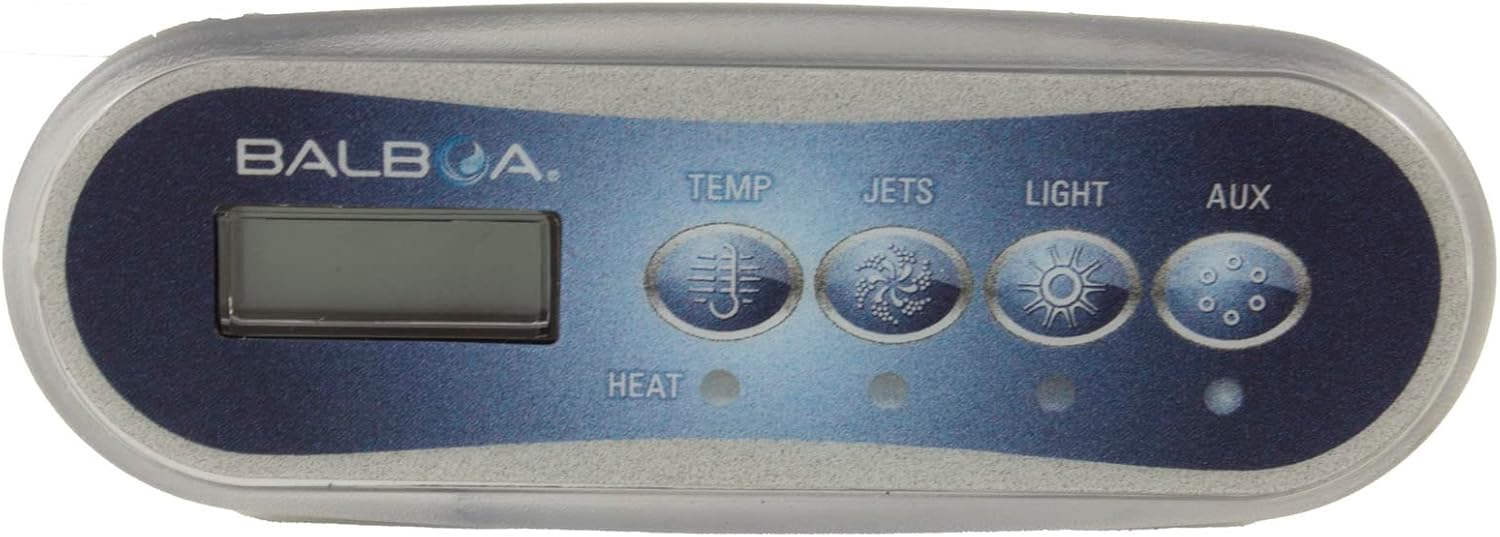
Figure 1.3: Detailed front view of the Balboa TP200T topside control panel, highlighting the "BALBOA" branding, digital display, and the four function buttons: Temp, Jets, Light, and Aux.
2. Setup and Installation
Important Safety Information: Installation should only be performed by a qualified technician. Always disconnect power to the spa at the main breaker before attempting any installation or maintenance. Failure to do so can result in serious injury or death.
Installation Steps:
- Power Disconnection: Ensure the spa's power supply is completely disconnected at the circuit breaker. Verify with a voltage tester.
- Remove Old Panel (if applicable): Carefully remove the existing topside control panel. Note the routing of its cable.
- Clean Mounting Surface: Clean the area where the new panel will be mounted. Ensure it is dry and free of debris for proper adhesion.
- Route New Cable: Carefully route the 6-foot cable of the new TP200T panel through the spa's cabinet to the control pack. Avoid kinks or sharp bends in the cable.
- Connect to Control Pack: Locate the appropriate receptacle on the spa's control pack for the topside panel. Align the connector correctly and push firmly until it clicks into place. Refer to your spa's main control pack manual for specific port locations.
- Mount New Panel: Remove the protective backing from the adhesive on the rear of the TP200T panel. Carefully position the panel over the opening and press firmly to secure it. Ensure it is level and flush with the spa surface.
- Power Restoration: Once the panel is securely mounted and connected, restore power to the spa at the main breaker.
- Initial Test: Power on the spa and test all functions of the new topside panel (temperature adjustment, jets, light, auxiliary).
3. Operating Instructions
The Balboa TP200T topside control panel provides intuitive control over your spa's primary functions. The display will show the current water temperature or other relevant information.
Button Functions:
- TEMP (Temperature): Press this button to adjust the desired water temperature. Subsequent presses or holding the button may cycle through temperature settings or allow for precise adjustment depending on the spa's main control system configuration.
- JETS: Activates or deactivates the spa's jet pumps. Multiple presses may cycle through different jet speeds or activate additional pumps if available.
- LIGHT: Turns the spa's internal lighting system on or off. Repeated presses may cycle through different light modes or colors, if supported by your spa's lighting system.
- AUX (Auxiliary): Controls an auxiliary function, which can vary depending on your spa's configuration. This might include a secondary pump, a blower, or another accessory. Refer to your spa's main user manual for the specific function assigned to the AUX button.
Note: The exact behavior of each button may depend on the specific Balboa control system (e.g., BP series) and the spa manufacturer's programming. Always consult your spa's comprehensive user manual for detailed operational instructions.
4. Maintenance
Proper maintenance of your topside control panel will ensure its longevity and continued functionality.
Cleaning:
- Surface Cleaning: Gently wipe the surface of the control panel with a soft, damp cloth. Use only mild, non-abrasive cleaners.
- Avoid Harsh Chemicals: Do not use abrasive cleaners, solvents, or alcohol-based products, as these can damage the panel's finish and display.
- Water Exposure: While the panel is designed for spa environments, avoid directing high-pressure water streams directly at the panel.
General Care:
- Cable Inspection: Periodically inspect the cable for any signs of wear, cuts, or damage. If damage is found, replace the panel immediately.
- Environmental Protection: Protect the panel from extreme temperatures and direct prolonged sunlight when the spa is not in use, if possible.
5. Troubleshooting
This section provides solutions to common issues you might encounter with your Balboa TP200T topside control panel. For more complex issues, consult a qualified spa technician.
| Problem | Possible Cause | Solution |
|---|---|---|
| Panel is unresponsive or blank display. | No power to the spa; loose cable connection; faulty panel. |
|
| Buttons do not respond. | Panel malfunction; water ingress; sticky buttons. |
|
| Incorrect temperature reading. | Sensor issue; air lock in heater. |
|
For error codes displayed on the panel, refer to your spa's main control system manual (e.g., Balboa BP Series manual) for specific diagnostic information.
6. Specifications
| Attribute | Detail |
|---|---|
| Product Name | Balboa Direct Topside Control Panel |
| Model Number | BWG TP200T |
| Part Number | 57282 |
| Manufacturer | Balboa Water Group |
| Topside Type | Electronic |
| Number of Buttons | 4 (Temp, Jets, Light, Aux) |
| Topside Shape | Oval |
| Panel Size | 4-5/16 x 1-1/2 inches |
| Cord Length | 6 feet |
| Product Dimensions | 5 x 3.75 x 2.05 inches |
| Item Weight | 6.4 ounces |
7. Warranty and Support
Specific warranty information for the Balboa Direct Topside Control Panel (BWG TP200T, 57282) is typically provided by the retailer or the spa manufacturer. Please refer to your purchase documentation or contact the point of sale for details regarding warranty coverage and terms.
For technical support or assistance with installation and troubleshooting beyond the scope of this manual, it is recommended to contact a certified spa technician or the Balboa Water Group customer support directly. You can often find contact information on the official Balboa Water Group website or through your spa manufacturer.
Online Resources:
- Balboa Water Group Official Website: www.balboawatergroup.com (for general product information and support contacts)