Introduction
This manual provides instructions for the installation, operation, and maintenance of your AKNICI 10.36 Inch Tablet Case, Model 1036XF. This case is designed to provide robust protection and enhanced functionality for compatible 10.36 inch tablet models.
Compatible Tablet Models: TECLAST P25T, VASTKING KingPad M10, TCL 10 TABMAX WiFi, OPPO Pad Air, DOOGEE T20, Headwolf Wpad1, UMIDIGI A11 Tablet PC. Please verify your tablet model before installation.
Setup and Installation
Follow these steps to properly install your tablet into the AKNICI case:
- Ensure your tablet is clean and free of debris.
- Carefully align your tablet with the case, ensuring all ports, buttons, and camera cutouts match the case openings.
- Gently press the tablet into the case, starting from one corner and working your way around, ensuring the silicone edges fully encompass the tablet's frame. The flexible silicone material allows for a secure fit.
- Verify that all corners are securely seated within the case's reinforced protection.

Figure 1: Front view of the tablet securely installed in the case.

Figure 2: Reinforced corner design for enhanced drop protection.
Operating Instructions
360° Rotating Stand
The integrated stand on the back of the case allows for versatile viewing angles. To use:
- Locate the circular ring stand on the back of the case.
- Pull the ring outwards until it clicks into an open position.
- Rotate the stand 360 degrees to achieve your desired horizontal or vertical viewing orientation.
- The stand also folds 180 degrees, allowing for various tilt angles.

Figure 3: Demonstrating the 360-degree rotation and 180-degree folding capability of the stand.
Hand Strap
For secure one-handed holding, utilize the adjustable hand strap:
- Slide your hand through the strap located on the back of the case, underneath the rotating stand.
- Adjust the strap for a comfortable and secure fit.
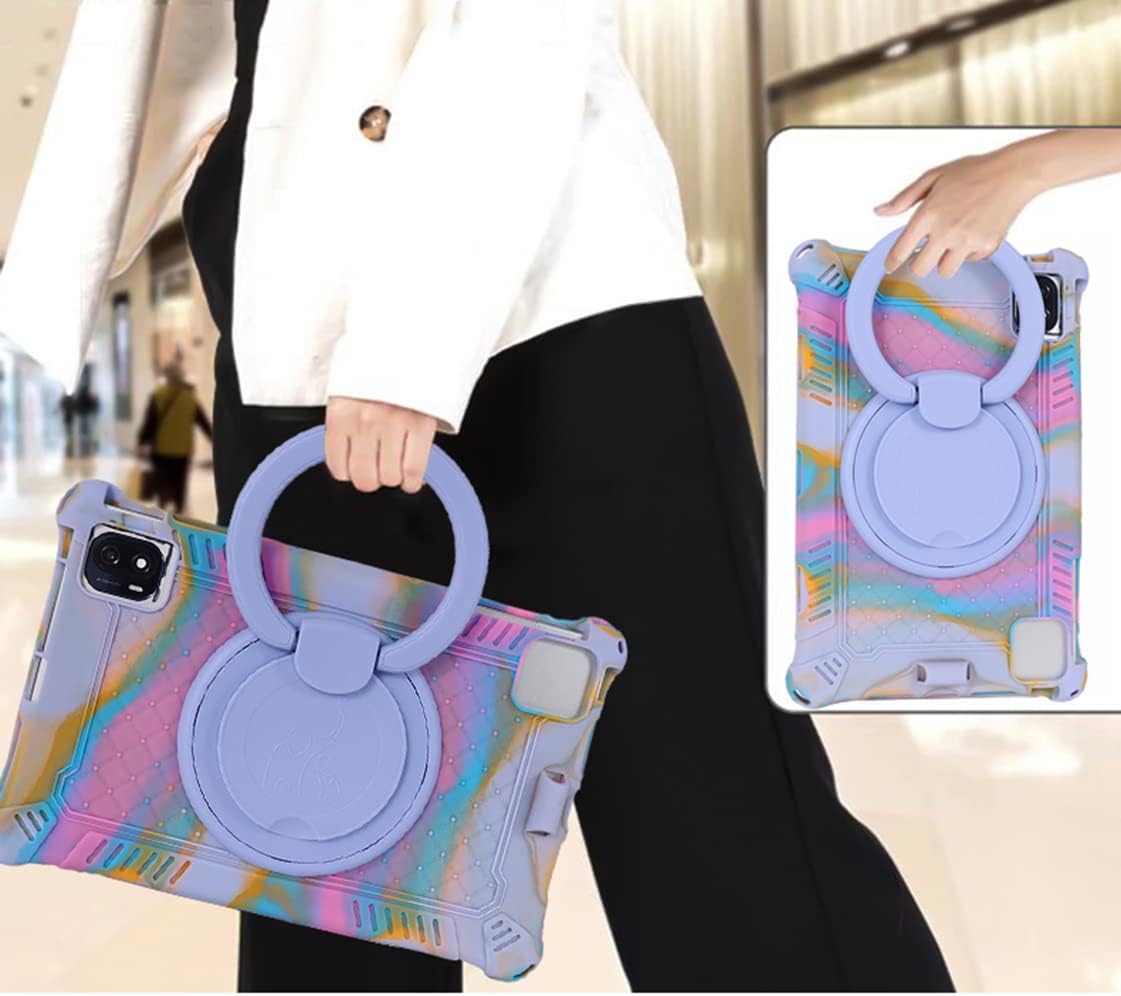
Figure 4: Proper use of the integrated hand strap for secure tablet handling.
Shoulder Belt
For convenient portability, attach the included shoulder belt:
- Locate the attachment points on the corners of the case.
- Clip each end of the shoulder belt securely to these attachment points.
- Adjust the length of the shoulder belt for comfortable carrying.

Figure 5: Example of carrying the tablet case using the adjustable shoulder strap.
Built-in Pencil Holder
A dedicated slot is provided for storing your stylus or digital pencil:
- Insert your stylus into the designated holder on the side of the case.
- Ensure the stylus is securely seated to prevent it from falling out during transport.
Maintenance
To ensure the longevity and appearance of your tablet case, follow these maintenance guidelines:
- Cleaning: Wipe the case regularly with a soft, damp cloth. For stubborn dirt, a mild soap solution can be used. Avoid harsh chemicals or abrasive cleaners, as these may damage the silicone and plastic materials.
- Storage: Store the case in a cool, dry place away from direct sunlight when not in use for extended periods.
- Inspection: Periodically inspect the case for any signs of wear or damage, especially around the corners and stand mechanism, to ensure continued protection.

Figure 6: The flexible and durable silicone material of the case.
Troubleshooting
If you encounter any issues with your tablet case, refer to the following common problems and solutions:
- Tablet does not fit securely:
- Double-check that your tablet model is listed as compatible with this case (TECLAST P25T, VASTKING KingPad M10, TCL 10 TABMAX WiFi, OPPO Pad Air, DOOGEE T20, Headwolf Wpad1, UMIDIGI A11).
- Ensure the tablet is correctly aligned and fully pressed into all corners of the case.
- Stand is stiff or not rotating smoothly:
- Check for any debris or obstructions around the rotating mechanism.
- Apply gentle, even pressure when rotating. Avoid forcing the mechanism.
- Shoulder strap or hand strap feels loose:
- Ensure all clips are securely fastened to the case's attachment points.
- Adjust the strap length for a snug fit.
Specifications
| Feature | Detail |
|---|---|
| Model Number | 1036XF |
| Compatible Devices | TECLAST P25T, VASTKING KingPad M10, TCL 10 TABMAX WiFi, OPPO Pad Air, DOOGEE T20, Headwolf Wpad1, UMIDIGI A11 |
| Material | Heavy Duty Shockproof Soft Silicone & Plastic |
| Special Features | 360° Rotating Stand, Handle, Shoulder Belt, Stylus Holder |
| Item Weight | 7.8 ounces |
| Package Dimensions | 10.08 x 6.65 x 1.34 inches |
Warranty and Support
AKNICI provides customer support to ensure your satisfaction. If you encounter any problems with your product, such as needing a replacement, refund, or assistance with installation, please contact our professional service team.
Customer Service: Our team is available to solve your problems and ensure your complete satisfaction within 24 hours. Please send an email to contact us for assistance.
For further inquiries or support, please refer to the contact information provided with your purchase or on the official AKNICI website.