1. Product Overview
The EENOUR F2000 is a high-capacity portable power station designed for various applications, including emergency backup, outdoor activities, and off-grid power solutions. It features a durable LiFePO4 battery, multiple output ports, and fast charging capabilities.

Image 1: EENOUR F2000 Portable Power Station. This image displays the main unit of the EENOUR F2000 portable power station, highlighting its various ports and digital display.
Key Features:
- Expandable Capacity: Base capacity of 2048Wh, expandable up to 16384Wh with additional batteries.
- Rapid Charging: Achieves full charge in approximately 1 hour using dual AC and solar input.
- High Power Output: Provides up to 2900W (E-Multiply mode) for various appliances.
- Versatile Outputs: 15 output ports including AC, USB-A, QC3.0, Type-C (PD100W), DC, cigarette lighter, and 24V aviation socket.
- UPS Functionality: Uninterruptible Power Supply with 0.01-second automatic switchover during power outages.
- Long-Life Battery: Utilizes LiFePO4 battery technology for extended durability (approx. 10 years of daily use).
- Safety Features: Equipped with a Battery Management System (BMS) for protection against overcharge, over-discharge, overheat, short-circuit, and overload.
2. Setup
Unpacking and Initial Inspection:
- Carefully remove the power station and all accessories from the packaging.
- Verify that all components listed in the packing list are present and undamaged.
- Retain the packaging for future storage or transport.
Initial Charging:
Before first use, fully charge the EENOUR F2000. This ensures optimal battery performance and calibration.
- Connect the power station to a standard AC wall outlet using the provided AC charging cable.
- The display will indicate charging status. A full charge typically takes approximately 1 hour.
- Alternatively, connect compatible solar panels (sold separately) for solar charging.
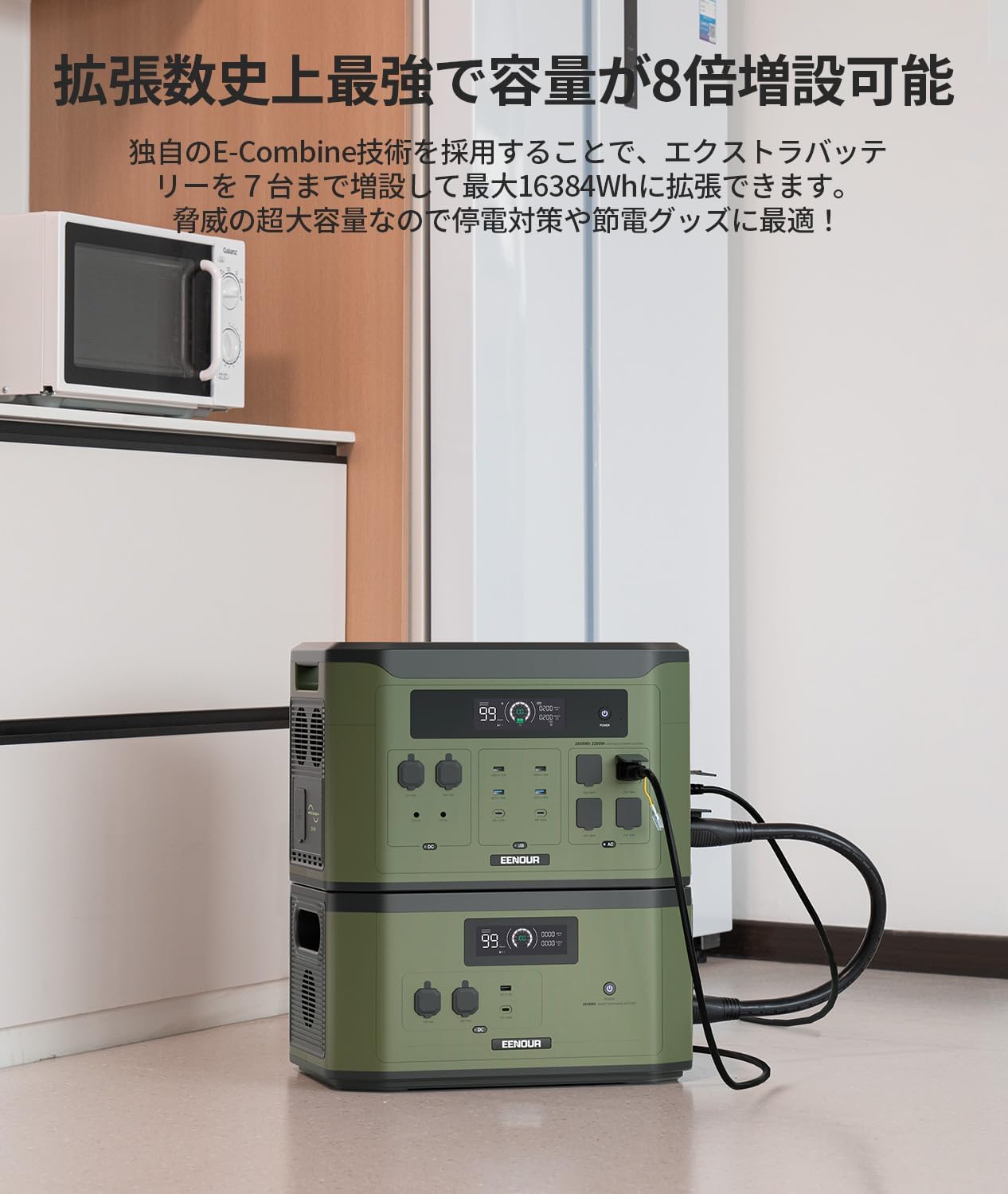
Image 2: EENOUR F2000 charging via solar panel. This image shows the power station connected to a solar panel, demonstrating its solar charging capability.
3. Operating Instructions
Powering On/Off:
- To power on, press and hold the main power button for a few seconds until the display illuminates.
- To power off, press and hold the main power button until the display turns off.
Using Output Ports:
The EENOUR F2000 offers various output ports for different devices:
- AC Outlets (100V): Press the AC power button to activate. Connect household appliances up to 2900W (in E-Multiply mode).
- USB Ports (USB-A, QC3.0, Type-C PD100W): These ports are typically active when the unit is on. Connect smartphones, tablets, laptops, and other USB-powered devices.
- DC Ports (12V, 24V Aviation Socket, Cigarette Lighter): Press the DC power button to activate. Suitable for car accessories, portable refrigerators, and other DC-powered devices.
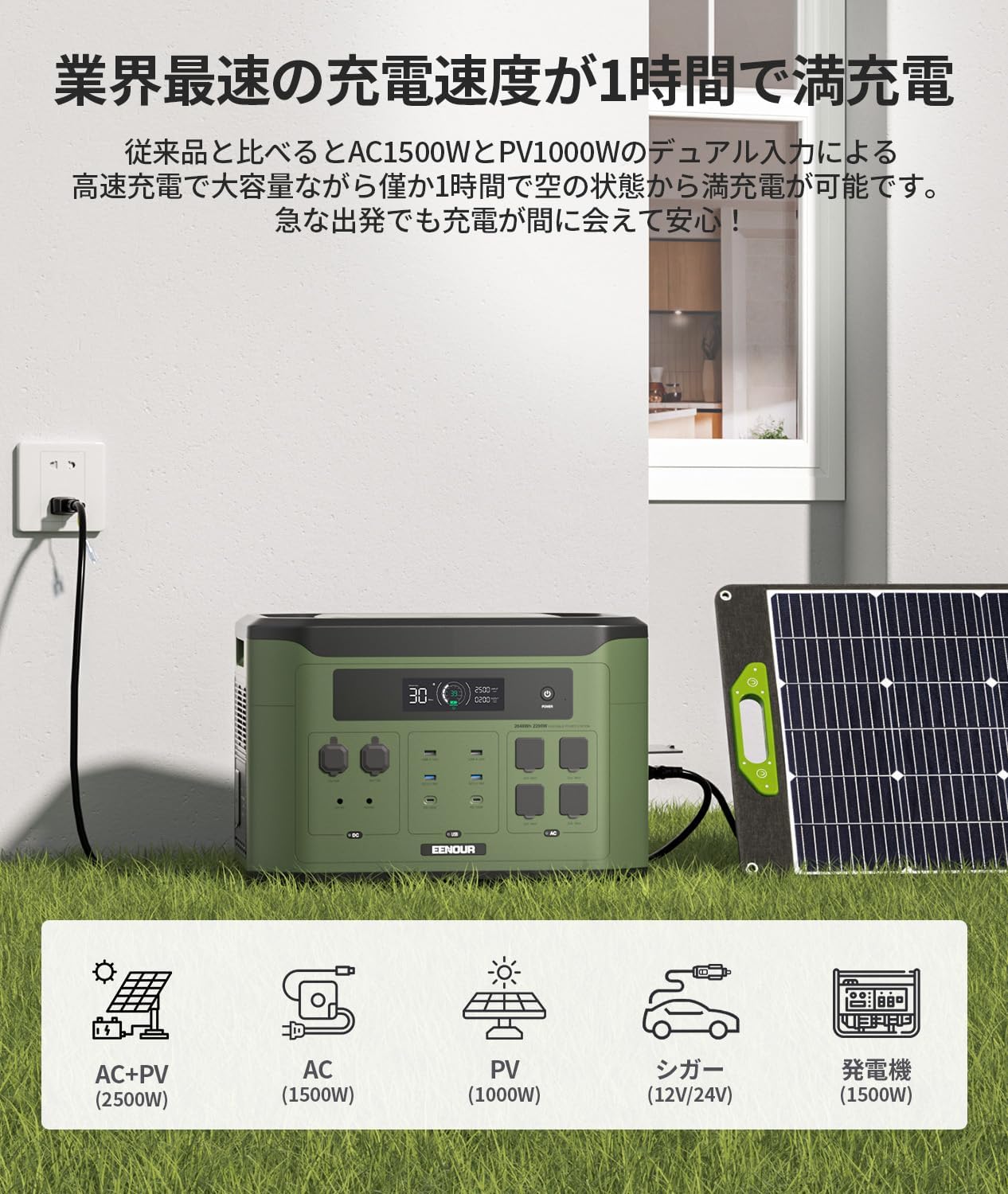
Image 3: EENOUR F2000 with multiple devices connected. This image illustrates the versatility of the power station, showing various devices plugged into its numerous output ports.
E-Multiply Mode:
For high-power appliances exceeding the standard AC output, activate E-Multiply mode to achieve up to 2900W output. Refer to the display for mode activation and status.
UPS (Uninterruptible Power Supply) Function:
The F2000 can act as a UPS. Connect the power station to an AC input and your critical devices to the AC output ports. In case of a power outage, the unit will automatically switch to battery power within 0.01 seconds, ensuring continuous operation for connected devices like refrigerators, medical equipment, or computers.

Image 4: EENOUR F2000 demonstrating UPS functionality. This image shows the power station providing backup power to a computer setup, highlighting its role as an uninterruptible power supply.
Capacity Expansion:
The F2000's capacity can be expanded by connecting up to 7 EENOUR X2000 extra batteries (sold separately) using dedicated extension cables (sold separately). This allows for a maximum capacity of 16384Wh.

Image 5: EENOUR F2000 connected to an expansion battery. This image shows the main power station stacked with an additional battery unit, illustrating its expandable capacity feature.
4. Maintenance
Battery Care:
The EENOUR F2000 uses a LiFePO4 battery, known for its long lifespan (approximately 10 years with daily use). To maximize battery life:
- Avoid extreme temperatures. Store the unit in a cool, dry place.
- If storing for extended periods, charge the unit to approximately 50-80% every 3-6 months.
- Do not fully discharge the battery frequently, as this can reduce its overall lifespan.
General Cleaning:
- Wipe the exterior with a soft, dry cloth.
- Do not use abrasive cleaners or solvents.
- Keep ventilation openings clear of dust and debris.
5. Troubleshooting
Common Issues and Solutions:
- Unit does not power on:
If the power button was pressed on/off in short intervals, the unit may not start. Wait at least 15 seconds between power cycles. To reset the unit, press and hold the main power button for over 1 minute. - Solar charging is not working or input is low:
Ensure all solar panel cables are securely connected. If the input amount is consistently low, try disconnecting and reconnecting the solar cables. The unit requires a minimum input of 40W to initiate solar charging. If using solar panels with voltage below 20V, the input may be unstable. Consider using panels with higher voltage or connecting multiple low-voltage panels in series to achieve a higher, more stable voltage (e.g., 40V). Verify the correct polarity of the XT60I connector; the center terminal should be positive. - AC output not working:
Ensure the AC power button is pressed and the AC indicator on the display is lit. Check if the connected appliance exceeds the maximum output capacity (2900W in E-Multiply mode). - Display not showing correct information:
Refer to the LCD display guide below for understanding indicators. If issues persist, try restarting the unit.

Image 6: EENOUR F2000 LCD display guide. This diagram labels and explains each icon and numerical indicator on the power station's LCD screen, aiding users in monitoring its status.
6. Specifications
| Feature | Specification |
|---|---|
| Brand | EENOUR |
| Model Number | F2000-JP |
| Battery Type | LiFePO4 (Lithium Iron Phosphate) |
| Battery Capacity | 2048Wh / 640000mAh |
| Expandable Capacity | Up to 16384Wh (with 7 X2000 extra batteries) |
| AC Output | 100V, 2900W (E-Multiply Mode) |
| Charging Time (AC + Solar) | Approx. 1 hour |
| Input Voltage | 100 Volts (AC) |
| Output Ports | 5x AC, 2x USB-A, 2x QC3.0, 2x Type-C (PD100W), 2x DC, 1x Cigarette Lighter, 1x 24V Aviation Socket (Total 15) |
| UPS Function | Yes, 0.01s switchover |
| Dimensions | 58 x 42.5 x 41 cm |
| Weight | 23.6 kg |
| Color | Green |
| Certification | Recommended Disaster Preparedness Product |
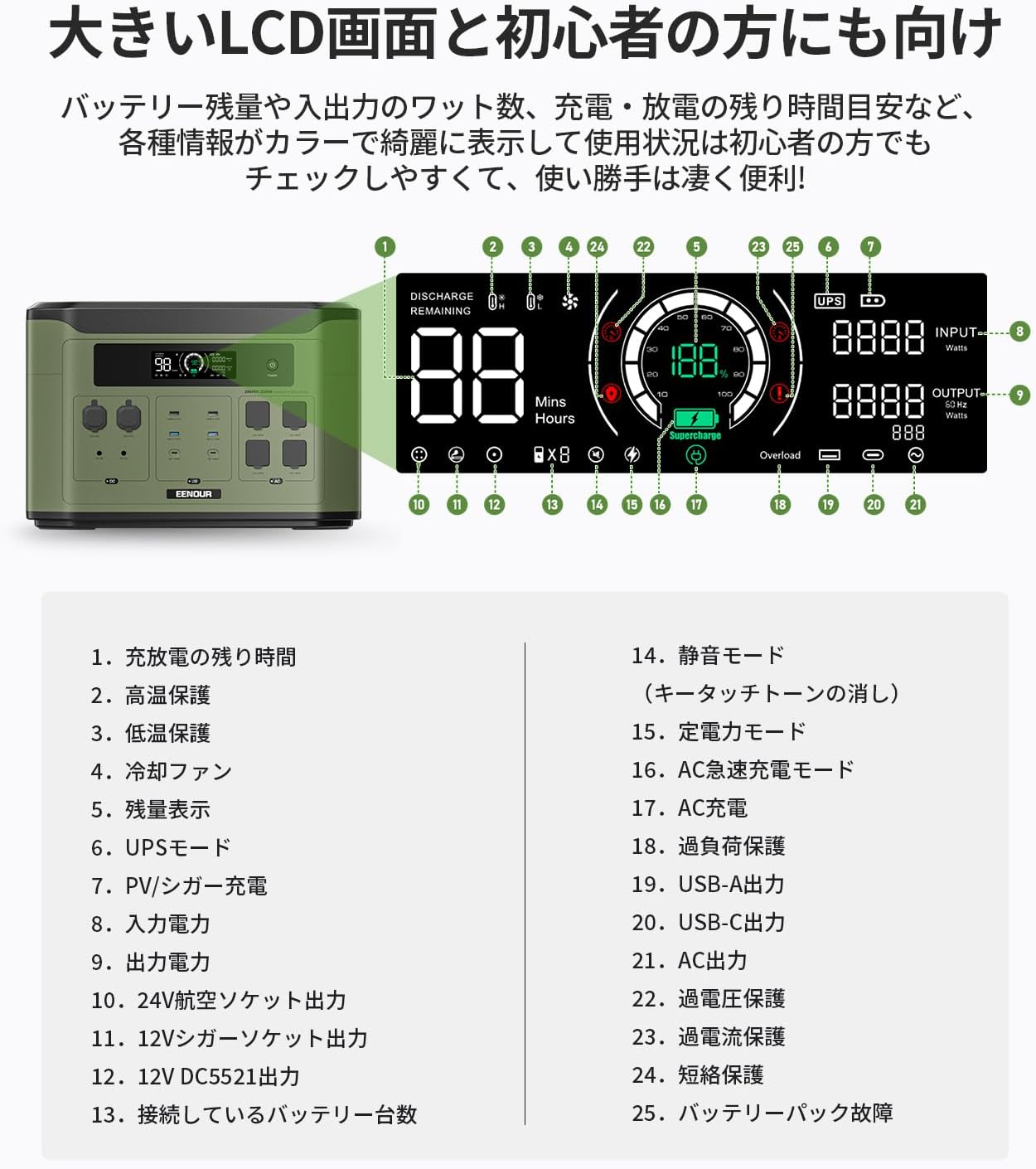
Image 7: EENOUR F2000 dimensions. This image provides a visual representation of the power station's physical dimensions in centimeters.
7. Warranty and Support
EENOUR products are designed for durability and reliability. The F2000 Portable Power Station is equipped with a robust Battery Management System (BMS) for enhanced safety and longevity.
Product Liability (PL) Insurance:
This product is covered by Product Liability (PL) insurance, ensuring peace of mind regarding product safety and quality.
Customer Support:
For any questions, technical assistance, or warranty claims, please contact EENOUR customer support. Our support team is dedicated to providing prompt and helpful assistance.
Contact information can typically be found on the official EENOUR website or through your purchase platform.


