
1. Introduction
Thank you for choosing the SIYEGK BXRadio-376B Emergency Weather Radio. This device is designed to provide reliable communication and essential functions during emergencies, outdoor activities, or daily use. It features multiple power sources, including solar, hand crank, and internal battery, along with AM/FM/NOAA radio reception, a powerful flashlight, a reading lamp, an SOS alarm, and a power bank function for charging external devices. Please read this manual thoroughly to understand its operation and ensure optimal performance.
2. Product Overview
Familiarize yourself with the components of your SIYEGK BXRadio-376B radio.
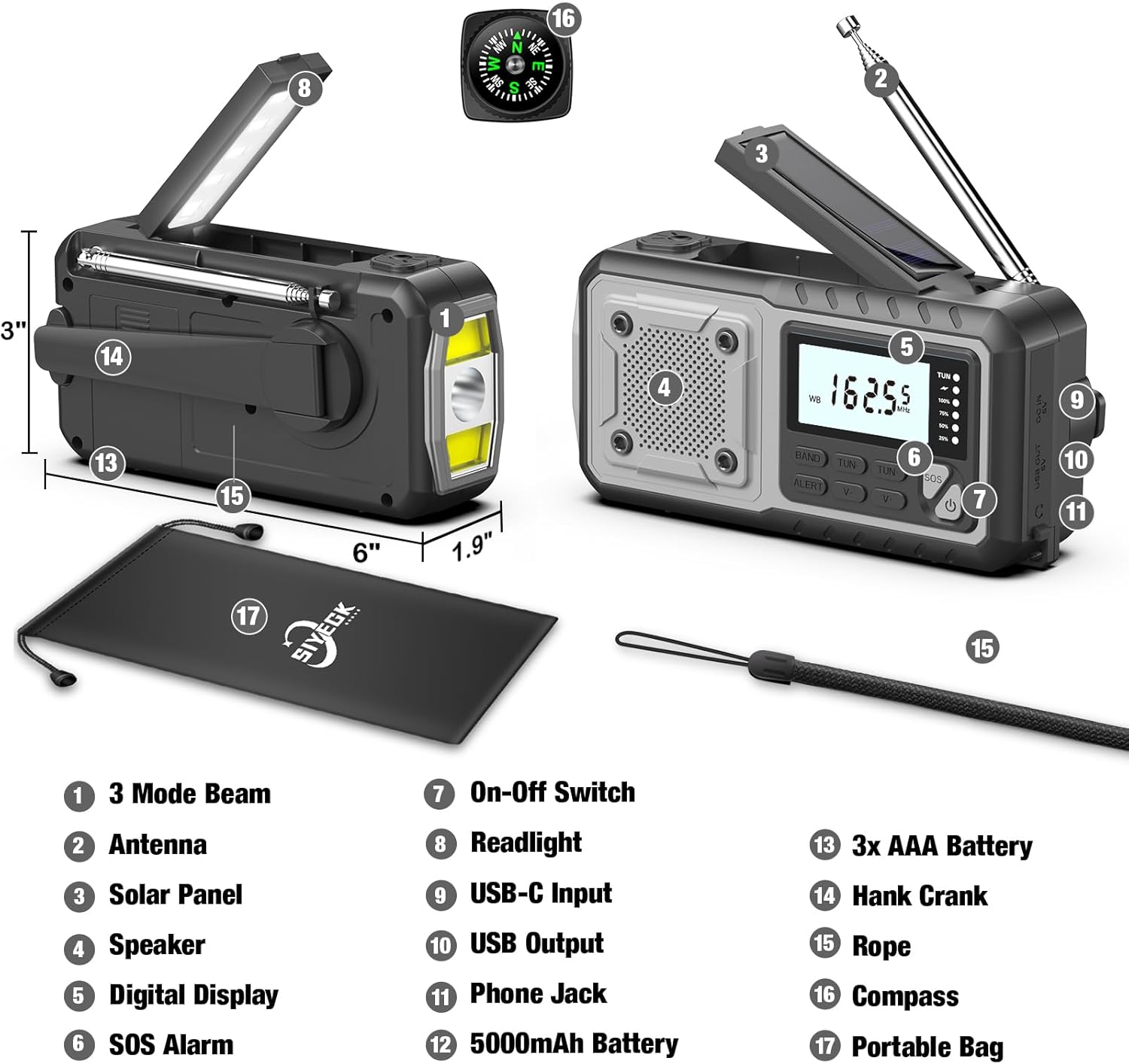
Figure 2.1: Component Diagram of the SIYEGK BXRadio-376B Emergency Weather Radio. Key features include the 3-mode flashlight, extendable antenna, solar charging panel, integrated speaker, clear digital display, SOS alarm button, power switch, foldable reading lamp, USB-C input for charging, USB-A output for device charging, 3.5mm headphone jack, internal 5000mAh battery, AAA battery compartment, hand crank, wrist strap, compass, and a portable bag.

Figure 2.2: Detailed view highlighting the digital display for day and night readability, the comfortable reading lamp, the super long antenna for enhanced signal reception, the solar panel for recharging, the 5000mAh premium battery, the USB-C charge line, and the flip cover protecting the USB ports.
Key Components:
- Digital Display: Shows frequency, band, and battery level.
- Antenna: Extendable for improved radio reception.
- Solar Panel: For trickle charging the internal battery.
- Hand Crank: For manual power generation.
- Flashlight: Multi-mode LED light for illumination.
- Reading Lamp: Foldable lamp for ambient light.
- Speaker: For audio output.
- SOS Alarm: Activates a loud siren and flashing light.
- USB-C Input: For charging the radio's internal battery.
- USB Output: For charging external devices (power bank function).
- 3.5mm Headphone Jack: For private listening.
- AAA Battery Compartment: For optional AAA battery power.
3. Setup
3.1 Initial Charging
Before first use, fully charge the internal 5000mAh battery using the provided USB-C cable. Connect the USB-C end to the radio's USB-C input port and the USB-A end to a standard USB power adapter (not included) or a computer USB port. The battery indicator on the digital display will show charging progress. A full charge typically takes several hours.
3.2 AAA Battery Installation (Optional)
The radio can also be powered by 3 AAA batteries (not included) as an alternative power source.
- Locate the AAA battery compartment on the back of the radio.
- Open the compartment cover.
- Insert 3 AAA batteries, ensuring correct polarity (+/-).
- Close the compartment cover securely.

Figure 3.1: The AAA battery compartment provides an additional power option. The image also illustrates the radio's capability to charge a smartphone and provides estimated operational times for the reading light (60+ hours), radio (50+ hours), far beam flashlight (25+ hours), and mixed beam flashlight (13+ hours).
4. Operating Instructions
4.1 Powering On/Off
Press the Power Button ( ) to turn the radio on or off.
4.2 Radio Functions (AM/FM/NOAA)
- Select Band: Press the BAND button to cycle through FM, AM, and WB (Weather Band) modes.
- Extend Antenna: For optimal reception, fully extend the telescopic antenna when listening to FM or Weather Band. For AM, the internal antenna is generally sufficient, but adjusting the radio's orientation may improve reception.
- Tune Stations: Use the TUN+ and TUN- buttons to manually tune to desired frequencies. Press and hold these buttons for automatic station seeking.
- Volume Control: Use the V+ and V- buttons to adjust the volume.
- NOAA Weather Alert: In WB mode, press the ALERT button to activate the weather alert function. The radio will automatically scan for and alert you to severe weather broadcasts from NOAA.

Figure 4.1: The radio functions as a portable power bank, provides an SOS alarm for emergencies, and offers reliable NOAA weather alerts for events like blizzards.
4.3 Power Sources
The radio offers five ways to power itself:
- 5000mAh Internal Battery: The primary power source, rechargeable via USB-C, solar, or hand crank.
- USB-C Charging: Connect to a USB power source for fast charging.
- Solar Panel: Expose the solar panel to direct sunlight for trickle charging. This method is ideal for maintaining battery charge or extending playtime, not for rapid charging.
- Hand Crank: Rotate the hand crank clockwise or counter-clockwise at a steady pace (approx. 130-150 RPM) for manual power generation. Cranking for 1 minute can provide approximately 5-10 minutes of radio use or 15-20 minutes of flashlight use.
- AAA Batteries: Insert 3 AAA batteries into the compartment for an additional backup power source.
4.4 Flashlight & Reading Lamp
- Flashlight: Press the dedicated Flashlight Button (often integrated with the power button or a separate button labeled with a light icon) to turn on the flashlight. Press repeatedly to cycle through different modes: Far Beam, Dipped Beam, and Mixed Beam.
- Reading Lamp: Lift the solar panel to reveal the reading lamp. It will automatically turn on. Fold it back down to turn it off.

Figure 4.2: The flashlight offers three distinct modes: Far Beam for long-distance illumination, Dipped Beam for wider, closer-range light, and Mixed Beam combining both for comprehensive visibility.
4.5 SOS Alarm
In an emergency, press and hold the SOS button for 3 seconds to activate the loud siren and flashing flashlight. This feature is designed to attract attention. Press the SOS button again to deactivate it.
4.6 Power Bank Function
The radio can charge external USB devices, such as smartphones, using its internal 5000mAh battery.
- Open the protective cover over the USB output port.
- Connect your device's USB charging cable to the radio's USB output port.
- The radio will begin charging your device.
- Close the protective cover after use to prevent dust and moisture ingress.
5. Maintenance
- Cleaning: Wipe the radio with a soft, damp cloth. Do not use harsh chemicals or abrasive cleaners.
- Storage: Store the radio in a cool, dry place away from direct sunlight and extreme temperatures. If storing for extended periods, ensure the internal battery is partially charged (around 50%) and recharge it every 3-6 months to prolong battery life.
- Water Resistance: The radio is designed to be splash-proof, but it is not waterproof. Do not submerge it in water. Ensure all port covers are securely closed to protect against moisture.
- Battery Care: Avoid fully discharging the internal lithium-ion battery frequently, as this can reduce its lifespan.
6. Troubleshooting
| Problem | Possible Cause | Solution |
|---|---|---|
| Radio does not turn on. | Internal battery is depleted. AAA batteries are depleted or incorrectly installed. | Charge the internal battery via USB-C or hand crank. Check and replace AAA batteries if used. |
| Poor radio reception. | Antenna not extended. Weak signal area. Interference. | Fully extend the telescopic antenna. Reposition the radio. Move away from electronic devices causing interference. |
| Flashlight/Reading lamp not working. | Battery is low. Light function not activated correctly. | Charge the internal battery. Ensure the correct button is pressed for the flashlight or the reading lamp is fully open. |
| Cannot charge external devices. | Radio battery is too low. Cable is faulty. Device not compatible. | Ensure the radio's internal battery has sufficient charge. Try a different USB cable. Verify device compatibility. |
| Hand crank is stiff or not charging. | Mechanism obstruction. Incorrect cranking speed. | Ensure no debris is obstructing the crank. Maintain a steady, moderate cranking speed. |
7. Specifications
| Feature | Specification |
|---|---|
| Model Number | BXRadio-376B |
| Product Dimensions | 6.1"L x 2.2"W x 2.7"H (15.5 x 5.6 x 6.9 cm) |
| Item Weight | 1.01 pounds (0.46 kg) |
| Internal Battery | 5000mAh Lithium Ion (included) |
| External Battery Option | 3 x AAA batteries (not included) |
| Power Sources | Battery Powered, Solar, Hand Crank, AAA Battery |
| Radio Bands Supported | AM/FM/7-Band NOAA Weather Band |
| Connectivity Technology | USB (USB-C Input, USB-A Output) |
| Special Features | Built-In AM Antenna, Lightweight, Portable, Rechargeable, Flashlight (3 modes), Reading Lamp, SOS Alarm |
8. Warranty and Support
SIYEGK is committed to providing quality products and customer satisfaction. If you encounter any issues or have questions regarding your BXRadio-376B Emergency Weather Radio, please refer to the included owner's manual for specific warranty details or contact SIYEGK customer support directly. Our team is available to assist you and ensure your satisfaction with your purchase.
For support, please visit the official SIYEGK store or contact the seller through your purchase platform.