
Sony STR-AN1000
Sony STR-AN1000 7.2 Channel 8K AV Receiver User Manual
Model: STR-AN1000 | Brand: Sony
Introduction
This manual provides detailed instructions for the setup, operation, and maintenance of your Sony STR-AN1000 7.2 Channel 8K AV Receiver. Please read this manual thoroughly before using the product to ensure proper and safe operation. Keep this manual for future reference.
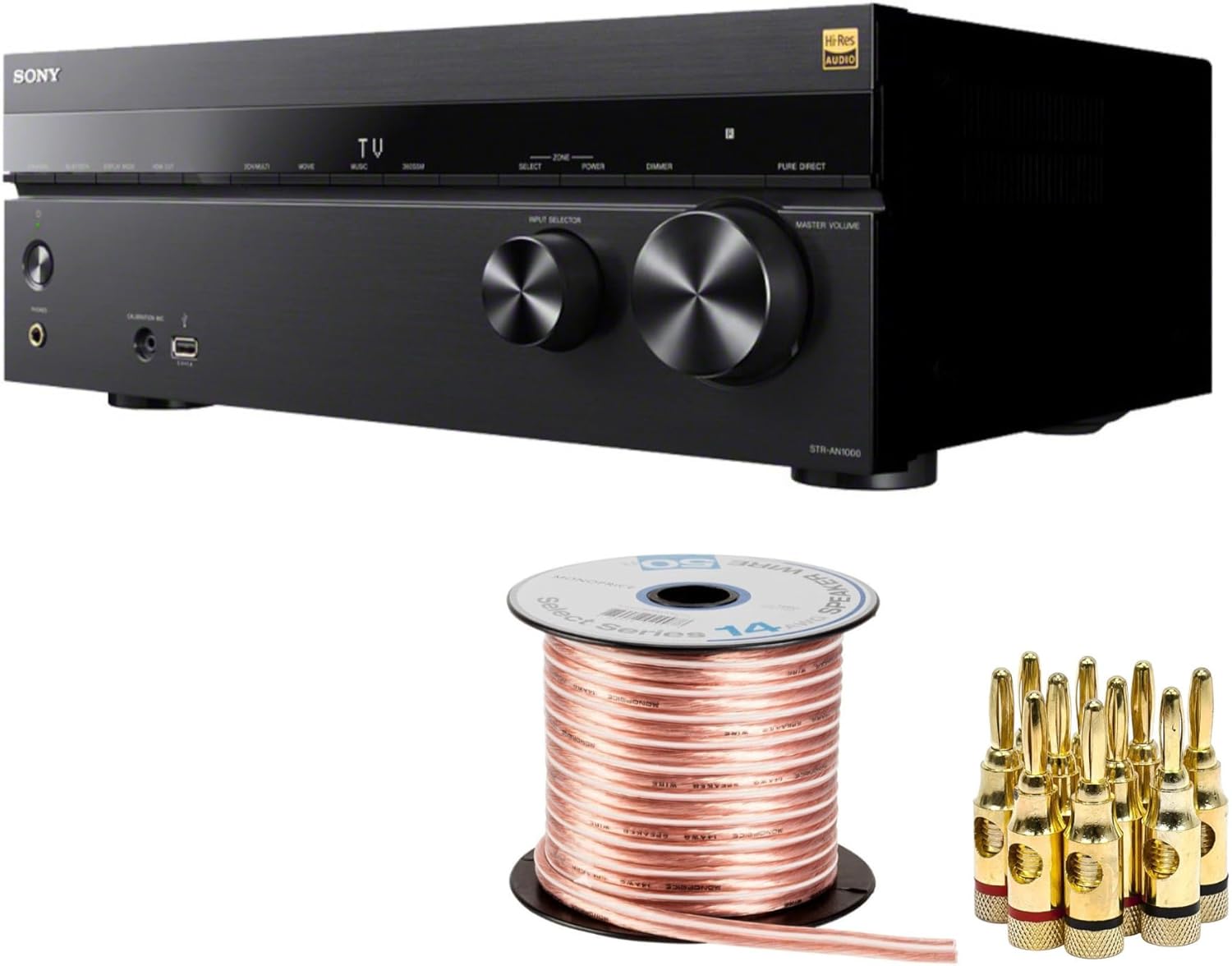
Figure 1: Sony STR-AN1000 AV Receiver, bundled with speaker wire and gold-plated banana plugs. This image displays the main components included in the product package.
Setup Guide
1. Unpacking and Placement
Carefully remove all components from the packaging. Ensure all items listed in the bundle are present. Place the receiver on a stable, level surface with adequate ventilation. Avoid placing it near heat sources or in direct sunlight.

Figure 2: The Sony STR-AN1000 AV Receiver positioned on a media console, demonstrating a typical home theater setup. Ensure proper space for ventilation around the unit.
2. Connecting Speakers
The STR-AN1000 supports a 7.2 channel configuration. Use the provided speaker wire and banana plugs for optimal connection. Ensure correct polarity (+ to + and - to -) for all speakers.
- Connect front left, center, and right speakers.
- Connect surround left and right speakers.
- Connect surround back left and right speakers (if applicable).
- Connect up to two subwoofers.

Figure 3: A spool of 14AWG speaker wire and a set of gold-plated banana plugs. These accessories are included to facilitate secure and high-quality speaker connections to the receiver.

Figure 4: The rear panel of the STR-AN1000 receiver, displaying the comprehensive array of HDMI, audio, and speaker terminals. This view is crucial for understanding connection points.
3. Connecting Video and Audio Sources
Utilize the HDMI inputs for connecting devices such as Blu-ray players, gaming consoles, and streaming devices. The receiver features six HDMI inputs, with two supporting 8K and 4K/120 video sources, and two HDMI outputs.
- Connect HDMI cables from your source devices to the HDMI IN ports on the receiver.
- Connect an HDMI cable from the receiver's HDMI OUT (TV) port to your television's HDMI ARC/eARC input.
- For other audio devices, use optical, coaxial, or analog audio inputs as needed.
4. Initial Power On and Calibration
After all connections are made, connect the power cord and turn on the receiver. The STR-AN1000 features Digital Cinema Auto Calibration IX and 360 Spatial Sound Mapping technology for optimized sound. Follow the on-screen prompts to perform the automatic calibration using the supplied calibration microphone. This process measures your room's acoustics and speaker placement to create an ideal sound field.
Operating Instructions
1. Basic Operation

Figure 5: The front panel of the STR-AN1000 receiver, highlighting the input selector and master volume knobs, along with various buttons for direct access to functions.
- Power On/Off: Press the POWER button on the front panel or remote control.
- Input Selection: Use the INPUT SELECTOR knob on the front panel or the input buttons on the remote to choose your desired source (e.g., HDMI 1, TV, Blu-ray).
- Volume Control: Adjust the MASTER VOLUME knob on the front panel or the VOLUME +/- buttons on the remote control.
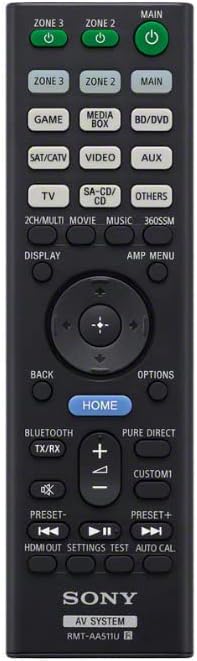
Figure 6: The remote control for the Sony STR-AN1000 AV Receiver, featuring dedicated buttons for input selection, volume, sound modes, and system settings.
2. Audio and Video Features
The STR-AN1000 supports advanced audio and video formats:
- Dolby Atmos & DTS:X: Experience immersive, object-based surround sound.
- Dolby Speaker Virtualization & DTS Virtual:X: Create a virtual surround sound experience from fewer speakers.
- 360 Spatial Sound Mapping: Sony's exclusive technology that adapts the sound field to your environment for true immersion.
- 8K & 4K/120 Video: Supports pass-through of high-resolution video signals for stunning picture quality.

Figure 7: An example of a living room configured with a multi-channel speaker system, demonstrating the potential for immersive audio experiences with the STR-AN1000's capabilities like 360 Spatial Sound Mapping.
Maintenance
Proper maintenance ensures the longevity and performance of your receiver.
- Cleaning: Use a soft, dry cloth to wipe the exterior of the unit. Do not use abrasive cleaners or solvents.
- Ventilation: Ensure the ventilation openings on the top and sides of the receiver are not blocked. Adequate airflow prevents overheating.
- Power Cord: Periodically check the power cord for any damage.
Troubleshooting
If you encounter issues with your STR-AN1000, refer to the following common problems and solutions:
| Problem | Possible Cause / Solution |
|---|---|
| No sound from speakers. |
|
| No video output to TV. |
|
| Remote control not working. |
|
| Receiver overheats. |
|
If the problem persists after attempting these solutions, please contact Sony customer support.
Specifications
| Feature | Detail |
|---|---|
| Model Number | STR-AN1000 |
| Manufacturer | Sony |
| Product Dimensions | 25.6 x 19.4 x 12.3 inches |
| Item Weight | 30.1 pounds |
| Connectivity Technology | HDMI |
| Total HDMI Ports | 6 (2 x 8K/4K120 compatible inputs, 2 x 8K/4K120 compatible outputs) |
| Audio Output Mode | Surround |
| Surround Sound Channel Configuration | 7.2 Channel |
| Special Features | Auto Calibration (Digital Cinema Auto Calibration IX), 360 Spatial Sound Mapping, Dolby Atmos, DTS:X, Dolby Speaker Virtualization, DTS Virtual:X |
| Compatible Devices | Speaker |
| Color | Black |
Warranty and Support
For warranty information and technical support, please refer to the documentation included with your purchase or visit the official Sony support website. Protection plans may be available for extended coverage.
Sony Customer Support: www.sony.com/electronics/support
Related Documents - STR-AN1000
 |
Sony STR-AN1000 AV Receiver Startup Guide A concise startup guide for the Sony STR-AN1000 Multi Channel AV Receiver, covering initial setup, connections, and basic operations. Learn how to connect speakers, TVs, and other AV devices for an immersive audio experience. |
 |
Sony STR-AN1000 7.2 Channel AV Receiver Operating Instructions Comprehensive operating instructions for the Sony STR-AN1000 7.2 Channel AV Receiver. Discover setup, connections, Dolby Atmos, DTS:X, HDMI 2.1, network features, and troubleshooting for your home theater system. |
 |
Sony BRAVIA Theatre Rear 9 Achterluidspreker Gebruikershandleiding Gedetailleerde handleiding voor het instellen, verbinden en oplossen van problemen met de Sony BRAVIA Theatre Rear 9 draadloze achterluidspreker. Bevat installatie-instructies, compatibiliteitsinformatie, specificaties en onderhoudstips. |
 |
Sony TA-AN1000 Multi Channel AV Amplifier Bruksanvisning Användarmanual för Sony TA-AN1000 Multi Channel AV Amplifier. Innehåller instruktioner för installation, drift, felsökning och specifikationer. |
 |
Sony STR-DH790 Multi Channel AV Receiver Operating Instructions Comprehensive operating instructions for the Sony STR-DH790 Multi Channel AV Receiver, covering setup, playback, features like Dolby Atmos, DTS:X, 4K HDR, Bluetooth, and troubleshooting. |
 |
SONY STR-DN1080 多聲道 AV 接收器使用說明書 詳細了解 SONY STR-DN1080 多聲道 AV 接收器的功能、設定、連接和故障排除。本使用說明書提供操作指南,以優化您的家庭影院音響體驗。 |