
1. Product Overview
The Coibeu A18 is a high-performance 4MP HD outdoor wireless IP security camera designed for comprehensive surveillance. It features advanced functionalities such as 2K HD resolution, intelligent human detection, two-way audio communication, and robust IP66 dustproof and waterproof construction. With its PTZ (Pan-Tilt-Zoom) capabilities, including 352° horizontal and 95° vertical rotation, it offers a full 360-degree field of view, ensuring minimal blind spots. The camera supports both wired and wireless (Wi-Fi) connectivity and provides smart night vision for clear monitoring in various lighting conditions.

Image 1.1: Coibeu A18 4MP Outdoor Wireless IP Security Camera.
2. Key Features
- 4MP 2K HD Resolution: Equipped with a high-performance CMOS image sensor, delivering crisp 2K HD image quality for detailed monitoring.
- Intelligent Human Detection: Utilizes AI technology to accurately detect human movement, reducing false alarms from other objects and recording 10-second alarm videos upon detection.
- Two-Way Audio: Integrated microphone and speaker enable remote two-way voice communication via the mobile application, with an effective range of up to 5 meters.
- Flexible Connectivity: Supports both stable wired (Ethernet) and convenient wireless (Wi-Fi) connections. Also allows direct connection to the camera's AP hotspot for real-time viewing and custom settings.
- IP66 Weatherproof Design: Constructed with industrial-grade ABS injection molding and waterproof rubber seals, ensuring stable operation in temperatures from -20°C to 60°C and resistance to rain, snow, and dust.
- 360-Degree PTZ View: Offers a horizontal rotation range of 352° and a vertical rotation range of 95°, providing a comprehensive 360° field of view with minimal blind spots.
- Smart Color Night Vision: Features 4 infrared lights and 4 white lights for enhanced night vision, delivering clearer 4-megapixel color images compared to standard night vision.
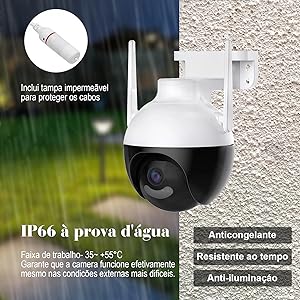
Image 2.1: Visual representation of key features including 4MP, night vision, human tracking, two-way call, multi-user access, memory card storage, IP66, and free movement.
3. Product Components
Your Coibeu A18 camera package includes the following items:
- Coibeu A18 Camera Unit
- Power Adapter
- Mounting Bracket
- Mounting Screws and Wall Plugs
- Waterproof Cable Connectors (for Ethernet and power)
- User Manual (this document)
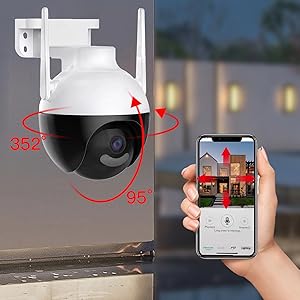
Image 3.1: Detailed view of the camera highlighting its components like memory card slot, recall button, antennas, MIC, waterproof shell, camera lens, IR LEDs, and white LEDs.
4. Setup Instructions
4.1 Physical Installation
- Choose a Location: Select an outdoor location with a clear view of the area you wish to monitor. Ensure it is within Wi-Fi range or near an Ethernet port.
- Mount the Camera: Use the provided mounting bracket, screws, and wall plugs to securely attach the camera to a wall or ceiling.
- Connect Power: Connect the power adapter to the camera's power input. Ensure the connection is secure and protected from weather using the waterproof connectors if applicable.
- (Optional) Connect Ethernet: If using a wired connection, connect an Ethernet cable to the camera's Ethernet port and your router. Use the waterproof connector for protection.
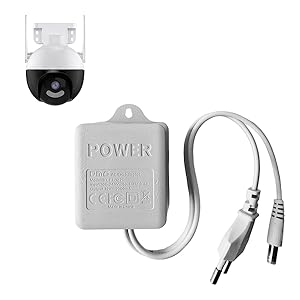
Image 4.1: The camera's IP66 waterproof and dustproof design ensures durability in outdoor conditions.
4.2 App Installation and Device Pairing
- Download the App: Search for the 'Tapo' app (or specified app in your manual) on your smartphone's app store (Google Play Store or Apple App Store) and install it.
- Create an Account: Open the app and follow the on-screen instructions to create a new account or log in if you already have one.
- Add Device: Tap the '+' icon in the app to add a new device. Select your camera model (Coibeu A18 or similar).
- Connect to Camera's Wi-Fi: The app will guide you to connect your phone to the camera's temporary Wi-Fi network (usually named 'Tapo_Cam_XXXX').
- Configure Network: Once connected, select your home Wi-Fi network (2.4GHz only) and enter the password. The camera will then connect to your home network.
- Complete Setup: Follow any remaining prompts to name your camera and finalize the setup process.

Image 4.2: Remote access and control of the camera via a smartphone application.
5. Operating Instructions
5.1 Live View
From the app's main screen, tap on your camera's name to access the live view. You can view real-time footage, take snapshots, and record video directly to your phone.
5.2 Two-Way Audio
In the live view interface, tap the microphone icon to speak through the camera's speaker. Tap the speaker icon to listen to audio from the camera's microphone. This allows for real-time communication with visitors or to deter intruders.
5.3 Motion Detection & Alerts
The camera features intelligent motion detection. You can configure:
- Detection Zones: Define specific areas within the camera's view where motion detection will be active.
- Human Detection: Enable AI-powered human detection to minimize false alarms from pets or other non-human movements.
- Notifications: Receive instant push notifications on your smartphone when motion is detected.
- Alarm Actions: Set the camera to trigger a siren or flash its white lights upon detection to deter intruders.

Image 5.1: The camera's auto-tracking feature follows detected human movement.
5.4 Night Vision Modes
The Coibeu A18 offers versatile night vision options:
- Infrared Mode: Uses invisible infrared light for clear black-and-white footage in complete darkness.
- Color Night Vision: Activates the built-in white lights to capture full-color video even at night, providing more detail.
- Smart Mode: Automatically switches between infrared and color night vision based on detected motion or events.
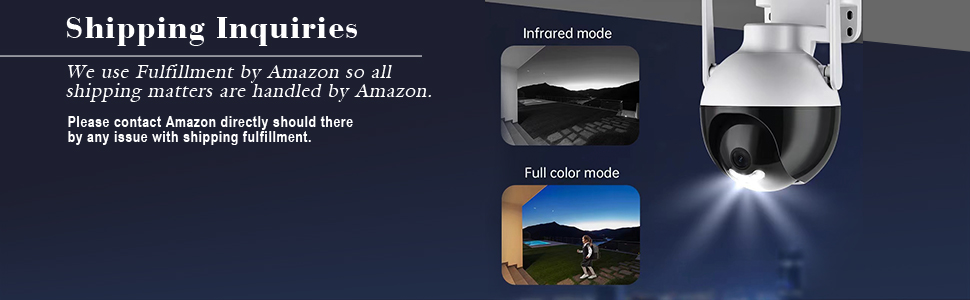
Image 5.2: Demonstration of infrared (black and white) and full-color night vision modes.
5.5 PTZ Control
Utilize the PTZ controls within the app to remotely adjust the camera's viewing angle:
- Pan: Rotate the camera horizontally up to 352°.
- Tilt: Adjust the camera vertically up to 95°.
- Zoom: Use the digital zoom feature to magnify areas of interest.
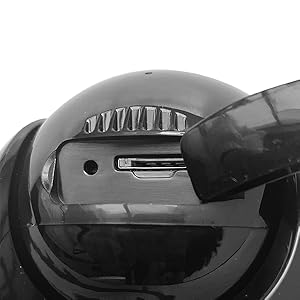
Image 5.3: The camera's PTZ functionality allows for 352° horizontal and 95° vertical rotation.
5.6 Recording & Storage
The camera supports multiple recording and storage options:
- MicroSD Card: Insert a MicroSD card (up to 128GB, Class 10 or higher recommended) into the designated slot for local storage of recordings.
- Cloud Storage: Subscribe to a cloud storage service (if offered by the app) for secure off-site backup of your video footage.
- NVR/DVR Integration: The camera supports the ONVIF protocol, allowing integration with compatible Network Video Recorders (NVRs) or Digital Video Recorders (DVRs) for centralized recording and management.
6. Maintenance
- Cleaning: Regularly clean the camera lens with a soft, dry cloth to ensure clear image quality. Do not use harsh chemicals.
- Waterproof Seals: Periodically inspect the waterproof seals around cables and connections to ensure they are intact and providing adequate protection against moisture.
- Firmware Updates: Check the app regularly for firmware updates. Keeping your camera's firmware updated ensures optimal performance, security, and access to new features.
7. Troubleshooting
- No Power: Ensure the power adapter is securely connected to both the camera and a working power outlet. Check the power indicator light on the camera.
- No Wi-Fi Connection: Verify your Wi-Fi network is active and the camera is within range. Ensure you entered the correct Wi-Fi password during setup. Try restarting your router and the camera.
- Poor Image Quality: Check the camera lens for dirt or obstructions. Ensure the camera is receiving sufficient light. Adjust video quality settings in the app if necessary.
- Motion Detection Not Working: Verify that motion detection is enabled in the app and that detection zones are correctly configured. Check notification settings on your phone.
- Two-Way Audio Issues: Ensure your phone's microphone and speaker are enabled for the app. Check the volume settings in the app.
8. Specifications
| Feature | Specification |
|---|---|
| Brand | Coibeu |
| Model Number | A18 |
| Photo Sensor Resolution | 4 MP (2K HD) |
| Connectivity Technology | Wired, Wireless (Wi-Fi) |
| Special Features | PTZ Technology, Two-Way Audio, Motion Detection, Color Night Vision |
| International Protection Rating | IP66 (Dustproof & Waterproof) |
| Environment | Outdoor |
| Horizontal Rotation Angle | 352 Degrees |
| Vertical Rotation Angle | 95 Degrees |
| Field of View | 360 Degrees |
| Night Vision Range | 5 Meters |
| Compatible Devices | Smartphone |
| Control Method | Application, Amazon Alexa |
| Power Source | AC |
| Material | Plastic |
| Dimensions | 15 x 15 x 11 cm |
| Item Weight | 370 Grams |

Image 8.1: Key parameters and dimensions of the Coibeu A18 camera.
9. Official Product Video
Video 9.1: Demonstration of PTZ functionality and optical zoom for a similar camera. Note: This video mentions a 5MP camera with 10x optical zoom, while the Coibeu A18 is a 4MP camera.
10. Warranty and Support
For warranty information, technical support, or any inquiries regarding your Coibeu A18 camera, please refer to the contact details provided in your product packaging or visit the official Coibeu website. Keep your purchase receipt for warranty claims.