
Introduction
Thank you for choosing the HyperMotion Tobi Frey 3-in-1 Evolving Tricycle. This manual provides essential information for the safe assembly, operation, and maintenance of your tricycle. Please read these instructions carefully before use and retain them for future reference. This tricycle is designed for children aged 12 months to 4 years, with a maximum weight capacity of 20 kg.
Important Safety Information:
- Always supervise children when using the tricycle.
- Ensure all parts are securely fastened before each use.
- Do not use near stairs, hills, roads, or swimming pools.
- The child must wear appropriate protective gear, including a helmet.
- This product is not intended for use in traffic.
- Maximum load capacity is 20 kg.
Package Contents
Verify that all components are present in the package:
- Evolving Tricycle Frame
- 360° Swivel Seat
- Adjustable and Removable Parental Handle
- Retractable Footrests
- 3-point Safety Belt
- Storage Basket
- Canopy
- Wheels (Front and Rear)

Image: All components of the HyperMotion Tobi Frey 3-in-1 Evolving Tricycle.
Setup and Assembly
Assembly is required. Follow these steps carefully:
- Attach the Front Wheel and Handlebar: Secure the front wheel to the fork. Insert the handlebar into the front fork tube and tighten the locking mechanism.
- Install the Rear Wheels: Attach the rear wheels to the main frame axle. Ensure they click into place securely.
- Mount the Seat: Place the swivel seat onto the designated mounting point on the frame. Ensure it locks securely and can rotate freely when unlocked.
- Attach the Parental Handle: Insert the parental handle into the rear slot of the frame. Adjust its height and secure it with the locking pin or lever.
- Install the Canopy and Storage Basket: Attach the canopy to the seat backrest. Place the storage basket onto its designated hooks at the rear of the tricycle.
- Final Check: Ensure all screws, bolts, and locking mechanisms are tight and secure before allowing a child to use the tricycle.

Image: Illustration of attaching the front wheel and handlebar.

Image: Illustration of installing the rear wheels.

Image: Illustration of mounting the swivel seat.

Image: Illustration of attaching the parental handle.

Image: Illustration of installing the canopy and storage basket.
Operating Instructions
Evolving Modes (12 months to 4 years)
The HyperMotion Tobi Frey tricycle adapts to your child's growth through various stages:

Image: Visual representation of the tricycle's evolving stages from 12 months to 4 years.
- Stage 1 (12-18 months): Parental Control Mode. The child is secured in the seat with the 3-point harness. The parental handle controls steering and movement. Footrests are extended for comfort.
- Stage 2 (18-24 months): Assisted Tricycle Mode. The child can begin to use the pedals, but the parental handle still provides steering assistance and control. Footrests can be retracted if the child reaches the pedals.
- Stage 3 (24-36 months): Training Tricycle Mode. The parental handle can be removed, allowing the child to steer and pedal independently. The 3-point harness can be removed if the child is stable enough.
- Stage 4 (36+ months): Independent Tricycle Mode. All parental features (handle, canopy, harness) can be removed, transforming it into a classic tricycle for independent riding.
Using the 360° Swivel Seat
The seat can rotate 360 degrees, allowing the child to face forward or backward towards the parent.
- To rotate the seat, locate the locking mechanism beneath the seat.
- Unlock the seat by pressing the button or lifting the lever.
- Gently rotate the seat to the desired position (forward or backward).
- Ensure the seat locks securely into place before use.
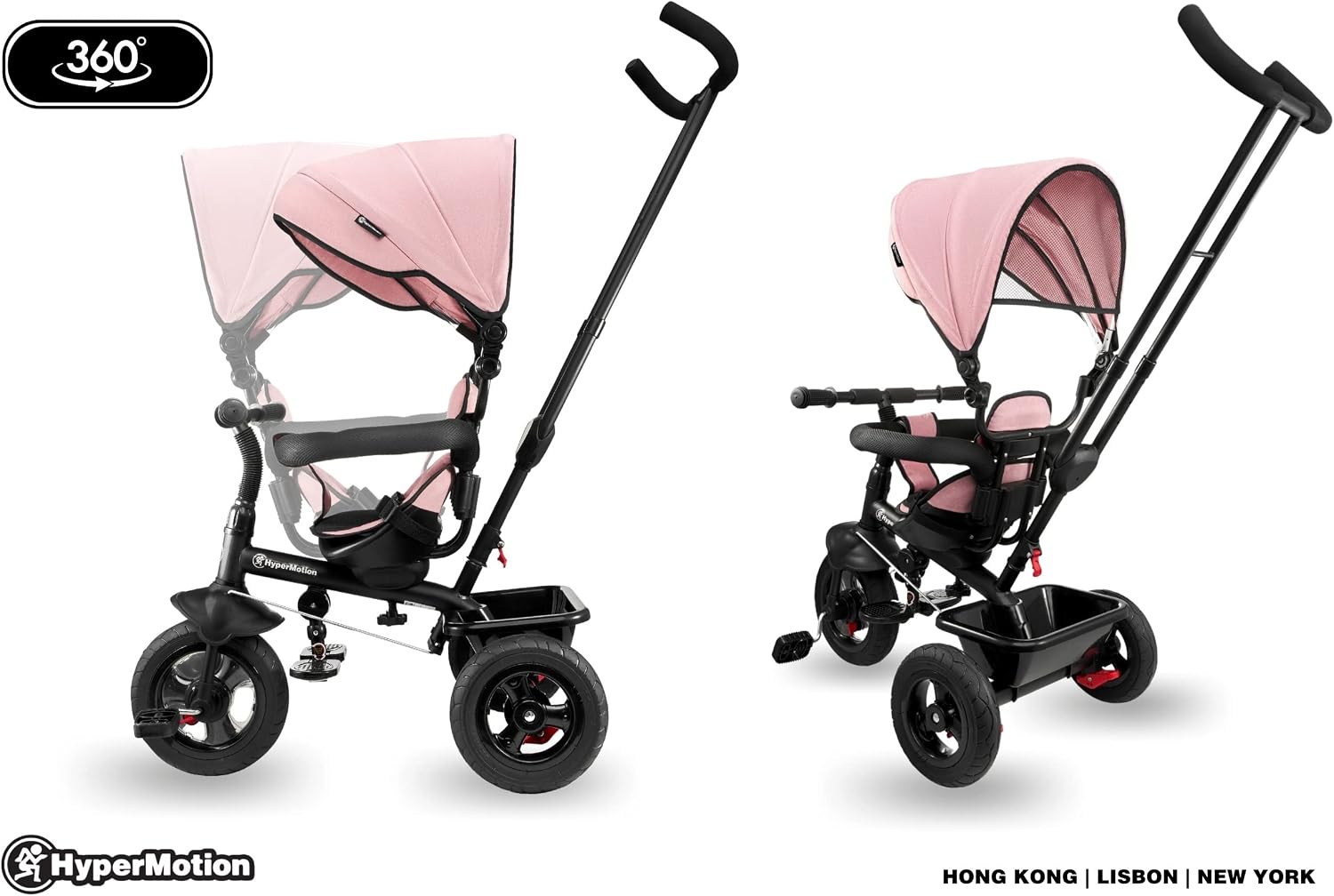
Image: Demonstrates the 360-degree swivel seat feature.
Parental Handle and Steering
The parental handle allows you to steer and push the tricycle. It is adjustable in height for comfortable use.
- To adjust the height, locate the adjustment buttons or clamps on the handle.
- Press/release and slide the handle to the desired height, then secure it.
- The handle directly controls the front wheel for easy steering.
Safety Belt and Footrests
- The 3-point safety belt secures your child in the seat. Always ensure it is fastened correctly and snugly.
- The footrests can be extended for younger children who cannot reach the pedals, or retracted when the child is ready to pedal independently.

Image: Detailed view of the tricycle's wheels, pedals, and brake system.
Maintenance
Regular maintenance ensures the longevity and safety of your HyperMotion Tobi Frey tricycle.
- Cleaning: Wipe down the frame and plastic parts with a damp cloth and mild soap. Avoid harsh chemicals. The fabric parts (seat cover, canopy) can be spot cleaned or hand washed with mild detergent and air-dried.
- Lubrication: Periodically check and lubricate moving parts such as wheel axles and pedal mechanisms with a silicone-based lubricant.
- Fasteners: Regularly inspect all screws, bolts, and locking mechanisms to ensure they are tight. Tighten any loose fasteners.
- Storage: Store the tricycle in a dry, cool place away from direct sunlight and extreme temperatures to prevent material degradation.
Troubleshooting
| Problem | Possible Cause | Solution |
|---|---|---|
| Tricycle pulls to one side | Uneven wheel alignment or loose connection. | Check wheel attachment and ensure all connections are tight. |
| Pedals are stiff or not turning smoothly | Lack of lubrication or debris in the mechanism. | Clean the pedal mechanism and apply a silicone lubricant. |
| Parental handle feels loose | Locking mechanism not fully engaged or worn. | Ensure the height adjustment lock is fully engaged. Inspect for wear. |
| Seat does not swivel smoothly | Locking mechanism engaged or debris. | Ensure the seat is unlocked before rotating. Clean any debris from the swivel mechanism. |
Specifications

Image: Detailed dimensions of the HyperMotion Tobi Frey tricycle.
| Feature | Value |
|---|---|
| Product Dimensions (L x W x H) | 72 x 48 x 59 cm |
| Recommended Age | 12 months - 4 years |
| Model Number | HYP TOBI FREY ROZ |
| Brand | HyperMotion |
| Material | Polyester |
| Item Weight | 6.9 Kilograms |
| Maximum Weight Capacity | 20 Kilograms |
| Assembly Required | Yes |
Warranty and Support
Manufacturer's Warranty: This HyperMotion Tobi Frey tricycle comes with a 2-year manufacturer's warranty from the date of purchase, covering defects in materials and workmanship under normal use.
Customer Support: For any questions, concerns, or warranty claims, please contact HyperMotion customer service through the retailer where the product was purchased or visit the official HyperMotion website for contact information.
