
1. Introduction
Thank you for choosing the usamjtable Ultra-Thin Automatic Mahjong Table, Model Mini360-40. This instruction manual provides essential information for the safe and efficient setup, operation, and maintenance of your new mahjong table. Please read this manual thoroughly before use and retain it for future reference.
This automatic mahjong table features an ultra-thin design, a folding roller coaster style mechanism for tile shuffling, and comes with 40mm numbered tiles suitable for Filipino style mahjong. It includes a built-in hard table cover for protection and convenience.
2. Safety Information
- Electrical Safety: Ensure the power outlet matches the voltage requirements of the table. Do not operate with wet hands or in damp environments. Unplug the table when not in use or before cleaning.
- Moving the Table: The table is heavy (approximately 220 pounds). Always use proper lifting techniques or seek assistance when moving to prevent injury. Utilize the swivel wheels on the base for easier repositioning.
- Children and Pets: Keep children and pets away from the table's moving parts during operation.
- Ventilation: Ensure adequate ventilation around the table to prevent overheating of internal components.
- Tile Handling: Use only the specified 40mm mahjong tiles with this table. Using incorrect tile sizes may cause jams or damage to the shuffling mechanism.
3. Package Contents
Verify that all components are present in the package:
- Table Machine
- Folding Stand and Base with Roller
- Two Sets of Mahjong Tiles (40mm, differently colored)
- Hard Table Cover
4. Assembly Instructions
Assembly is required for this product. Please follow these steps carefully:
- Unpack Components: Carefully remove all parts from the packaging. Place them on a soft, clean surface to prevent scratches.
- Attach the Folding Stand and Base: Connect the table machine to the folding stand and base. Ensure all connections are secure. The base is equipped with swivel wheels for easy movement once assembled.
- Secure Legs (if separate): If the legs are separate from the main table unit, attach them according to the provided diagrams. Ensure they are firmly tightened.

Image: Illustration of the table legs and base structure, highlighting the swivel wheels for mobility.
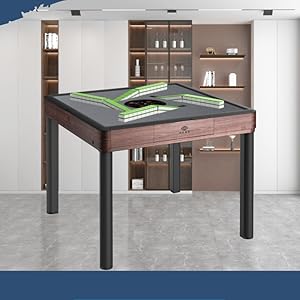
Image: Close-up view of the table's base, showing the integrated roller wheels for easy movement.
Once assembled, the table can be folded up to 90 degrees for space-saving storage. The built-in hard table cover can be attached when the table is folded.

Image: The mahjong table in its folded position, demonstrating how the hard table cover can be attached for protection and compact storage.
5. Operating Instructions
5.1 Powering On/Off
- Connect the power cord to a suitable electrical outlet.
- Locate the power switch, typically on the underside or side of the table, and turn it to the 'ON' position.
- To power off, switch to the 'OFF' position and unplug the table.
5.2 Placing Tiles for Shuffling
This table features a unique "rollercoaster-style" tile pushing mechanism for rapid registration and shuffling.
- Ensure the table is powered on.
- Place the mahjong tiles face down into the designated tile collection area on the table. The table is designed for 40mm tiles.
- The system will automatically register and shuffle the tiles, taking approximately three seconds. After registration, there is no need to manually push tiles.
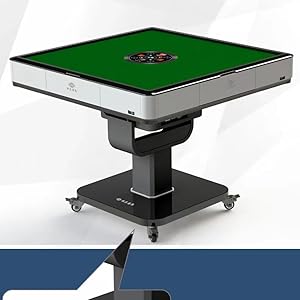
Image: A view of the internal tile shuffling mechanism, showing how tiles are processed for distribution.
5.3 Electronic Dice and Scoring
The table is equipped with an electronic silent dice and an LCD screen for automatic point summation.
- To roll the dice, press the designated button on the control panel.
- The LCD screen will display the dice roll and automatically sum points, providing a quiet and efficient gaming experience.

Image: Close-up of the table's control panel, featuring the electronic dice display and control buttons.
5.4 Dual Mode Setting
The exclusive dual mode setting optimizes internal transportation, motor torque, and speed, contributing to quieter operation and increased machine lifespan.
- Refer to the control panel for specific buttons or settings related to the dual mode.
- This feature ensures smooth and efficient tile handling while minimizing noise.
5.5 Tile Usage
The table includes two sets of differently colored 40mm Melamine mahjong tiles. These are suitable for Filipino mahjong. Using two sets allows for alternating use, saving shuffle time and enhancing gameplay.

Image: A full set of Filipino style mahjong tiles, showing their unique markings and numbering.

Image: A visual comparison of different mahjong tile sizes, including the 40mm tiles used with this table.
5.6 Product Overview Video
Video: This video provides a general overview of the mahjong table, showcasing its design, features, and aesthetic details, including the wooden color variant.
6. Maintenance
- Cleaning the Table Surface: Use a soft, damp cloth to wipe down the table surface. Avoid abrasive cleaners or solvents that could damage the finish.
- Cleaning Tiles: Periodically clean the mahjong tiles with a mild soap solution and a soft cloth. Ensure they are completely dry before storage or use.
- Internal Mechanism: Do not attempt to lubricate or clean internal mechanical parts unless specifically instructed by customer support. Unauthorized tampering may void the warranty.
- Storage: When not in use, especially for extended periods, fold the table and cover it with the hard table cover to protect it from dust and damage. Store in a dry, cool place.
7. Troubleshooting
If you encounter any issues with your mahjong table, please refer to the following common solutions:
| Problem | Possible Cause | Solution |
|---|---|---|
| Table does not power on. | Power cord not connected, power switch off, or power outage. | Check power cord connection. Ensure power switch is ON. Verify power outlet functionality. |
| Tiles are not shuffling correctly or get jammed. | Incorrect tile placement, foreign objects in mechanism, or worn tiles. | Ensure tiles are placed face down correctly. Check for any foreign objects. Use only specified 40mm tiles. If problem persists, contact support. |
| Electronic dice or LCD screen not working. | Power issue or internal malfunction. | Ensure table is powered on. Try restarting the table. If issue continues, contact customer support. |
| Excessive noise during operation. | Internal component issue or foreign object. | Ensure no foreign objects are present. If noise is unusual or persistent, contact customer support. |
For issues not listed above, or if troubleshooting steps do not resolve the problem, please contact usamjtable customer support.
8. Specifications
| Feature | Detail |
|---|---|
| Brand | usamjtable |
| Model Number | Mini360-40 |
| Color | White |
| Item Dimensions (LxWxH) | 36 x 36 x 31.5 inches |
| Item Weight | 220 Pounds |
| Material Type | Metal, Plastic, Wood |
| Number of Players | 4 |
| Tile Size | 40mm (39mm x 28mm x 20mm) |
| Tile Material | Melamine |
| Assembly Required | Yes |
| Batteries Required | No |
| UPC | 370801197194 |
9. Warranty and Support
Your usamjtable Ultra-Thin Automatic Mahjong Table comes with a 1-Year Warranty, as indicated by the warranty badge. This warranty covers manufacturing defects under normal use.

Image: The mahjong table displayed with a prominent "1 Year Warranty" badge, indicating coverage for the product.
For customer support, returns, or warranty claims, please contact the seller, USA MJ TABLE. We offer 30-day easy returns and dedicated customer support to assist you with any inquiries or issues.
You can typically find contact information for the seller through your purchase platform or by visiting the usamjtable Store.