1. Introduction
Thank you for choosing the WELALO Solar Motion Lights Outdoor. This manual provides essential information for the proper installation, operation, and maintenance of your new solar lights. Please read these instructions carefully before use and retain them for future reference.
These solar-powered lights are designed to provide efficient and reliable outdoor illumination with motion-sensing capabilities, enhancing safety and convenience around your home.

Image 1.1: WELALO Solar Motion Lights Outdoor (6-Pack)
This image displays a pack of six WELALO solar motion lights, highlighting their compact design, integrated solar panel, and multi-directional LED panels for wide-angle illumination.
Video 1.1: WELALO Solar Motion Lights Outdoor Overview
This video provides a general overview of the WELALO Solar Motion Lights Outdoor, showcasing their design and typical outdoor application.
2. Package Contents
Please check the package to ensure all items are present:
- 6 x Solar Motion Lights
- 12 x Installing Screws
- 12 x Expansion Pillar-hinges
- 6 x Double-sided Tape
- 1 x Instruction Manual
3. Product Features
- 188 LED Illumination: Equipped with 188 bright LEDs for powerful and wide-angle lighting.
- 270° Wide Angle Lighting: Provides extensive coverage for larger areas.
- 3 Lighting Modes: Adjustable modes to suit various lighting needs (see Operating section).
- Solar Powered: Energy-efficient design with a high-efficiency solar panel (up to 22% conversion rate).
- Motion Sensor: Integrated PIR motion inductor for automatic light activation.
- IP65 Waterproof: Durable construction designed to withstand various outdoor weather conditions.
- Weather Resistant: Heat-resistant and frost-resistant, suitable for temperatures from -20°C to 60°C.

Image 3.1: Automatic Solar Charging
This image illustrates the solar light's ability to automatically charge during the day and illuminate at night, showcasing its energy efficiency.

Image 3.2: Extreme Weather Resistance
This image highlights the IP65 waterproof rating and resistance to extreme temperatures, demonstrating the light's durability in various weather conditions.
4. Setup and Installation
Before installation, ensure the solar panel receives 6-8 hours of direct sunlight daily for optimal performance. Clean the solar panel and press the ON/OFF button to turn on the light.
There are two primary installation methods:
- Screw Installation (Long-term use):
- Drill two holes in your desired mounting surface.
- Insert the expansion pillar-hinges into the drilled holes.
- Align the light with the holes and secure it using the provided screws.
- Double-sided Tape Installation (Temporary or non-drilling surfaces):
- Clean the mounting surface thoroughly to ensure it is dry and free of dust or grease.
- Peel off the protective film from the double-sided tape.
- Firmly press the tape onto the back of the solar light.
- Attach the light to the desired surface, pressing firmly for several seconds.
Important: Choose a location where the solar panel is not obstructed by shade during the day.

Image 4.1: Installation Methods
This diagram illustrates the various ways to install the solar motion light, including drilling for permanent mounting and using adhesive tape for easier placement.
5. Operating Instructions
The WELALO Solar Motion Light features three distinct lighting modes, which can be cycled by pressing the switch button located on the front of the light. The light will only operate at night or in dark conditions.
- Mode 1 (Always On Mode): The light turns on at night and stays at medium brightness continuously. It does not react to motion.
- Mode 2 (Dim Brightness + Motion-Activated High Brightness): The light stays on at a dim brightness at night. When motion is detected, it brightens to full intensity for approximately 15-30 seconds, then returns to dim brightness.
- Mode 3 (Motion-Activated High Brightness Only): The light remains off at night until motion is detected. Upon detection, it illuminates at full brightness for approximately 15-30 seconds, then turns off completely.
To cycle through modes, cover the solar panel to simulate darkness and press the switch button. Each press will advance to the next mode.
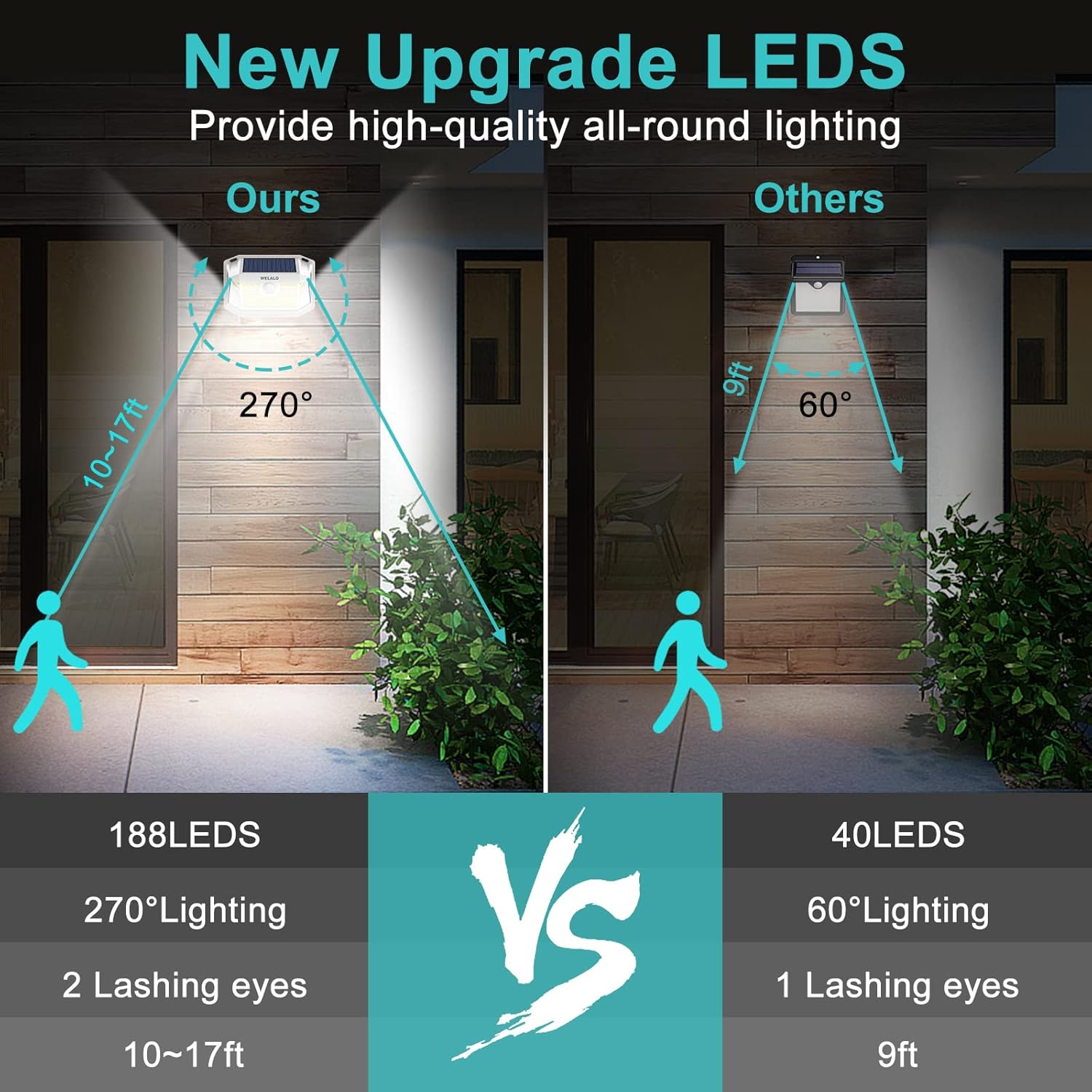
Image 5.1: Three Lighting Modes Explained
This image visually explains the functionality of each of the three operating modes, showing how the light behaves with and without motion detection.
Video 5.2: Demonstration of 3 Lighting Modes
This video demonstrates the three different lighting modes of the solar motion sensor lights, showing how they respond to motion.
Video 5.3: Quick Demo of 188 LED Solar Motion Light
A brief demonstration of the 188 LED solar motion light's functionality, highlighting its brightness and motion detection.
6. Maintenance
- Cleaning: Regularly clean the solar panel surface to ensure maximum sunlight absorption. Use a soft, damp cloth to wipe away dust, dirt, or debris. Avoid abrasive cleaners.
- Placement: Periodically check that the light's placement still allows for optimal sun exposure and that the motion sensor is not obstructed.
- Battery: The integrated battery is designed for long-term use. If the light's performance significantly diminishes over time, ensure the solar panel is clean and receiving adequate sunlight.
7. Troubleshooting
- Light does not turn on at night:
- Ensure the light is switched ON.
- Verify the solar panel is clean and receiving direct sunlight for 6-8 hours during the day.
- Check for any light sources nearby that might be activating the light sensor, preventing it from turning on.
- Light stays on for a short period or is dim:
- The battery may not be fully charged. Allow the light to charge for a full day in direct sunlight.
- Ensure the solar panel is clean and free from obstructions.
- Consider changing the operating mode to Mode 3 (Motion-Activated High Brightness Only) for longer battery life if continuous light is not required.
- Motion sensor not working:
- Ensure the sensor is clean and not obstructed.
- Verify the light is in Mode 2 or Mode 3, as Mode 1 does not use the motion sensor.
- Test the sensor by walking within its detection range (10-17 feet).
8. Specifications

Image 8.1: Product Dimensions
This image provides a visual representation of the solar light's physical dimensions for reference during installation.
| Feature | Detail |
|---|---|
| Model Number | LH-TB11 |
| LED Quantity | 188 LEDs |
| Lighting Angle | 270° |
| Brightness | 800 Lumens |
| Color Temperature | 5500 Kelvin |
| Solar Panel Efficiency | 22% |
| Battery Capacity | 1200mAh |
| Water Resistance Level | IP65 Waterproof |
| Working Temperature | -20°C to 60°C |
| Material | ABS Plastic |
| Product Dimensions | 1"L x 1"W x 1"H (Actual: 5.7"L x 3.9"H x 2.3"W) |
| Item Weight | 2.48 pounds (for 6-pack) |
9. Warranty and Customer Support
WELALO provides a 30-day money-back guarantee and a 12-month replacement warranty for any defective or damaged lights. If you encounter any issues or have questions, please contact us directly.
For warranty claims or support, please email us at: USLEDService@outlook.com. We are committed to ensuring your satisfaction.
Manufacturer: WELALO
Seller: WELALO US


