
1. Introduction
Thank you for purchasing the MJX Hyper Go 14301 Brushless RC Car. This 1/14 scale 4WD off-road racing and drift remote control car is designed for high-speed performance and durability. This manual provides essential information for setting up, operating, maintaining, and troubleshooting your RC car to ensure a safe and enjoyable experience.

Figure 1.1: The MJX Hyper Go 14301 RC Car and included accessories.
2. Safety Information
Please read and understand all safety warnings and precautions before operating the RC car. Failure to do so may result in injury or damage to the product.
- For use by persons over 14 years of age.
- Always operate the RC car in open areas away from people, pets, and obstacles.
- Do not operate in wet conditions or near water.
- Ensure the battery is fully charged before use and disconnect it after use.
- Do not touch moving parts during operation.
- Store the RC car and its components in a cool, dry place.
3. Package Contents
Verify that all items listed below are included in your package:
- 1 x RC Car (Truck)
- 1 x Remote Control (Transmitter)
- 1 x 7.4V 2000mAh 2S LiPo Battery
- 1 x USB Charging Cable
- 1 x Hexagon Wrench
- 1 x Screwdriver
- 4 x TPR Racing Tires (pre-installed or separate)
- 4 x Drift Tires
- 1 x Cooling Fan (possibly pre-installed)
- 1 x Instruction Manual (this document)

Figure 3.1: Contents of the MJX Hyper Go 14301 package.
4. Product Features
The MJX Hyper Go 14301 is engineered with advanced components for superior performance:
- Brushless Motor: Equipped with a powerful 2845 3700KV four-pole brushless motor for efficient and high-speed operation.
- High-Speed Capability: Achieves speeds up to 42km/h with the included 2S battery. Supports 3S batteries (not included) for speeds up to 55km/h.
- Advanced ESC: Features a 45A independent brushless Electronic Speed Controller with a metal heat sink for reliable power delivery.
- Full Metal Hydraulic Shock Absorbers: Durable metal hydraulic shock absorbers provide excellent damping and stability on various terrains.
- Metal Collision Head: A robust metal collision head offers enhanced protection against impacts.
- Full Metal Transmission System: Includes metal gear differentials for improved traction, durability, and smoother operation.
- Independent Receiver: Standard independent receiver allows for easy modification and upgrades.
- Colorful LED Lights: Integrated front and rear LED lights enhance visibility and aesthetics.
- Dust Cover: A PVC inner cover protects internal components from dust and debris.

Figure 4.1: Key internal components of the MJX Hyper Go 14301.

Figure 4.2: Detailed view of durable components including metal differential and oil-filled shocks.
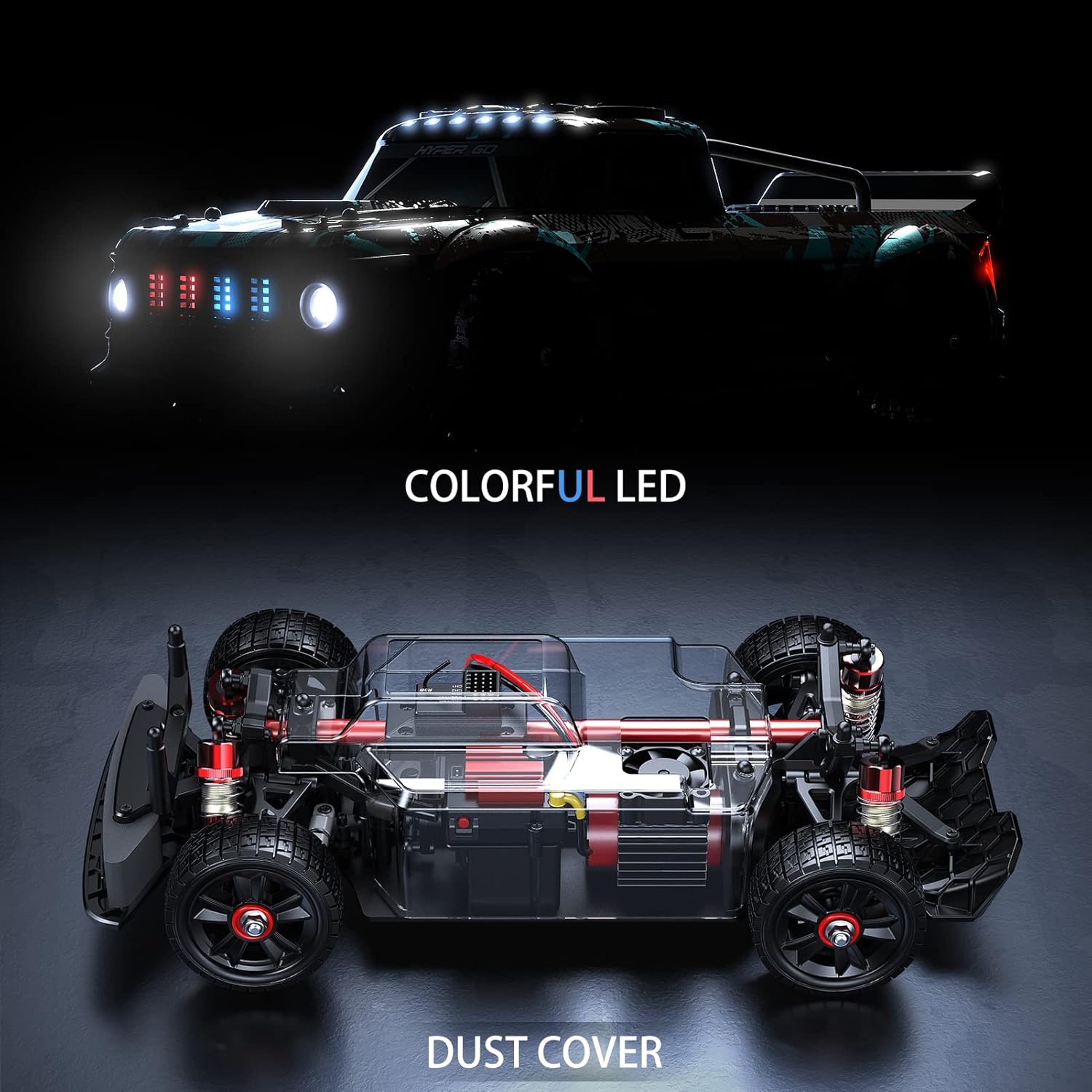
Figure 4.3: Colorful LED lighting and internal dust protection.

Figure 4.4: Interchangeable rubber and drift tires for different driving styles.
5. Setup
5.1 Charging the Battery
- Connect the included USB charging cable to a 5V 2A USB power adapter (not included).
- Connect the battery to the charging cable.
- The charging indicator light will show the charging status. A full charge takes approximately 4 hours.
- Disconnect the battery once fully charged. Do not overcharge.
5.2 Installing the Car Battery
- Carefully remove the body shell of the RC car.
- Locate the battery compartment.
- Insert the charged 7.4V LiPo battery into the compartment.
- Connect the battery connector to the car's ESC connector, ensuring correct polarity.
- Secure the battery and reattach the body shell.
5.3 Installing Remote Control Batteries
- Open the battery cover on the back of the remote control.
- Insert two 1.5V AA batteries (not included), observing the correct polarity (+/-).
- Close the battery cover securely.

Figure 5.1: The 2.4GHz remote control.
6. Operating Instructions
6.1 Powering On and Pairing
- Turn on the remote control first. The indicator light will blink.
- Turn on the RC car. The car's indicator light will also blink.
- Wait a few seconds for the remote control and car to automatically pair. Once paired, the indicator lights on both devices will become solid.
6.2 Basic Controls
- Throttle Trigger: Pull the trigger to accelerate forward. Push the trigger to brake or reverse.
- Steering Wheel: Turn the wheel left or right to steer the car.
- Throttle Trim: Adjusts the neutral position of the throttle. If the car moves slightly forward or backward when the trigger is at neutral, adjust this trim.
- Steering Trim: Adjusts the neutral position of the steering. If the car pulls to one side when the steering wheel is centered, adjust this trim.
- D/R (Dual Rate) Switch: Adjusts the maximum steering angle. Useful for fine-tuning control or reducing sensitivity for beginners.
6.3 Driving Tips
- Start with slow speeds to get accustomed to the controls.
- Practice steering and throttle control in an open, flat area.
- For drifting, use the drift tires and practice initiating slides with throttle and steering input.
- Avoid driving into obstacles or off high drops to prevent damage.
- Monitor battery life and stop operation when performance decreases to avoid over-discharging the battery.
7. Maintenance
Regular maintenance will extend the life and performance of your RC car:
- Cleaning: After each use, especially in dusty or dirty conditions, clean the car with a soft brush or compressed air. Avoid using water directly on electronic components.
- Inspecting Components: Regularly check for loose screws, damaged parts, or worn tires. Tighten screws as needed.
- Shock Absorbers: Ensure the hydraulic shock absorbers are clean and free of leaks.
- Gears and Bearings: Periodically inspect the metal gears and bearings for wear. Lubricate if necessary with RC-specific grease or oil.
- Battery Care: Store LiPo batteries in a cool, dry place at storage voltage (around 3.8V per cell) if not used for extended periods. Do not store fully charged or fully discharged.
8. Troubleshooting
If you encounter issues with your RC car, refer to the following common problems and solutions:
| Problem | Possible Cause | Solution |
|---|---|---|
| Car does not respond to remote control. | Low battery in car or remote; Not paired; Interference. | Charge/replace batteries; Re-pair car and remote; Move to an area with less interference. |
| Car runs slowly or lacks power. | Low car battery; Motor/ESC overheating; Obstruction in drivetrain. | Recharge car battery; Allow components to cool; Check for debris in gears. |
| Steering is erratic or unresponsive. | Loose servo connection; Damaged servo; Incorrect steering trim. | Check servo connections; Replace servo if damaged; Adjust steering trim on remote. |
| Car makes unusual noises. | Damaged gears; Debris in drivetrain; Worn bearings. | Inspect and clean gears; Replace damaged parts. |
9. Specifications
Detailed technical specifications for the MJX Hyper Go 14301 RC Car:
| Feature | Specification |
|---|---|
| Scale | 1/14 |
| Maximum Speed (2S Battery) | 42 km/h |
| Maximum Speed (3S Battery, not included) | 55 km/h |
| Remote Control Distance | 120m |
| Car Battery | 7.4V 2000mAh 2S 25C LiPo |
| Charging Time | 4 hours (using 5V 2A charger) |
| Charging Method | USB charging cable |
| Motor | Brushless Motor 2845 3700KV 4 Poles |
| ESC | 45A Brushless ESC (metal heat sink) |
| Servo | 17g Digital Servo |
| Remote Control Frequency | 2.4GHz |
| Remote Control Battery | 1.5AA*2 (not included) |
| Product Size (L*W*H) | 320*153*115 mm (12.6 x 6 x 4.48 inches) |
| Wheelbase | 192 mm |
| Wheel Base | 125 mm |
| Tire Diameter | 58 mm |
| Item Weight | 2.3 pounds |
| Manufacturer Recommended Age | 14 years and up |

Figure 9.1: Key dimensions of the RC car.
10. Warranty and Support
For any questions, technical assistance, or warranty claims, please contact TesPower customer support through the retailer where you purchased the product. Please have your model number (MJX 14301) and purchase details ready when contacting support.