
1. Introduction
This manual provides essential information for the safe and effective operation of your NEATCELL Red Light Device. Please read this manual thoroughly before first use and retain it for future reference.
2. Safety Information
WARNING: Improper use of this device may cause injury. Always follow safety guidelines.
- Always wear the provided protective glasses during operation to shield your eyes from direct light exposure.
- Do not point the device directly at eyes or sensitive skin areas.
- Keep the device moving during use; do not hold it stationary on one spot for extended periods to avoid burns.
- Ensure the device is unplugged when not in use or during cleaning.
- Keep out of reach of children.
- Consult a healthcare professional before use if you have any underlying medical conditions, are pregnant, or are taking photosensitizing medications.
3. Package Contents
Verify that all items listed below are included in your package:
- 1 x NEATCELL Red Light Device
- 1 x Customer Glasses (Protective Eyewear)
- 1 x US Power Adapter
- 1 x NEATCELL Operation Manual (Paper Book)
- 1 x Protective Paper (to cover fade area)

Figure 3.1: Contents of the NEATCELL Red Light Device package.
4. Product Overview
The NEATCELL Red Light Device is designed for specific applications using red light technology. It features adjustable frequency and energy intensity settings for controlled operation.

Figure 4.1: NEATCELL Red Light Device with key features highlighted.
4.1 Device Components and Controls
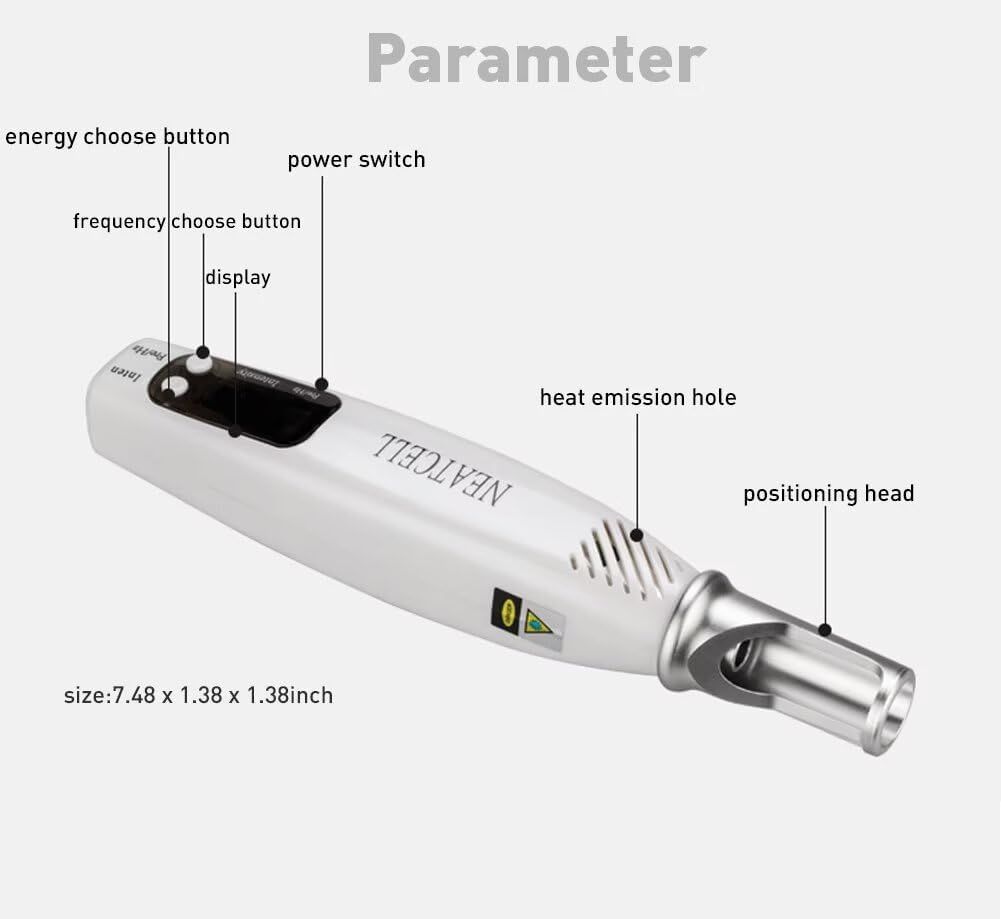
Figure 4.2: Labeled components of the NEATCELL Red Light Device.
- Power Switch: Turns the device on and off.
- Energy Choose Button: Adjusts the energy intensity (4 gears).
- Frequency Choose Button: Adjusts the pulse frequency (9 gears).
- Display: Shows current settings for frequency and energy.
- Heat Emission Hole: For heat dissipation during operation.
- Positioning Head: The part of the device that emits the red light.
5. Setup
- Unpack: Carefully remove all components from the packaging.
- Inspect: Check the device and accessories for any signs of damage. Do not use if damaged.
- Connect Power: Plug the US Power Adapter into the device's power input, then plug the adapter into a standard electrical outlet. The device operates when plugged in.
- Wear Protective Eyewear: Always put on the provided customer glasses before turning on the device.
6. Operating Instructions
Follow these steps for safe and effective operation:
- Power On: Press the Power Switch to turn on the device. The display will illuminate.
- Adjust Frequency: Use the Frequency Choose Button to select the desired pulse frequency (1-9 gears). Higher numbers typically indicate a faster pulse.
- Adjust Energy Intensity: Use the Energy Choose Button to select the desired energy intensity (1-4 gears). Higher numbers indicate stronger energy output.
- Prepare Area: Ensure the skin area to be treated is clean and dry. If using for specific applications, apply the protective paper as instructed in the physical manual.
- Application: Gently place the Positioning Head near the target area. Keep the device moving continuously over the skin. Avoid holding it stationary to prevent discomfort or burns.
- Session Duration: Refer to the detailed operation manual (paper book) for recommended session durations and frequency for your specific application.
- Post-Session Care: After each session, it is recommended to drink plenty of water. Keep the treated area out of direct sunlight and avoid applying any products unless specifically advised. Allow scabs to fall off naturally if they occur.
- Power Off: After use, press the Power Switch to turn off the device and unplug it from the power outlet.
Note: For detailed usage instructions and specific application techniques, please refer to the included NEATCELL Operation Manual (paper book) and any provided operation videos. User reviews indicate that the bars on the device indicate laser strength and numbers indicate pulse speed, and it is crucial to keep the laser moving to avoid burns.
7. Maintenance
- Cleaning: Ensure the device is unplugged before cleaning. Wipe the exterior of the device with a soft, dry cloth. Do not use abrasive cleaners or immerse the device in water.
- Storage: Store the device in its original packaging or a clean, dry place away from direct sunlight and extreme temperatures.
- Cable Care: Do not bend or crimp the power cable excessively.
8. Troubleshooting
| Problem | Possible Cause | Solution |
|---|---|---|
| Device does not turn on. | Not properly plugged in; power adapter faulty; device malfunction. |
|
| Device turns on but no light emits. | Incorrect settings; internal malfunction. |
|
| Device feels too hot during use. | Prolonged use; obstructed heat emission hole. |
|
9. Specifications
| Feature | Detail |
|---|---|
| Model | B0BYDF5MVN |
| Brand | NEATCELL |
| Power Source | US Power Adapter (Plug-in operation) |
| Frequency Settings | 9 gears |
| Energy Intensity Settings | 4 gears |
| Package Dimensions | 8.82 x 7.48 x 1.93 inches |
| Item Weight | 12.31 ounces |
| Manufacturer | NEATCELL |
| First Available Date | March 14, 2023 |
10. Warranty and Support
For warranty information and customer support, please refer to the NEATCELL Operation Manual included in your package or contact the seller directly. Keep your purchase receipt for warranty claims.
Manufacturer: NEATCELL
ASIN: B0BYDF5MVN
11. Important Notice
Statements regarding this device have not been evaluated by the FDA and are not intended to diagnose, treat, cure, or prevent any disease or health condition. This device is intended for specific applications as outlined in the full operation manual.
