
1. Introduction
Thank you for choosing the iRUNTEK FS-6688 Battery-Free Fabric Shaver Lint Remover. This device is designed to effectively remove fuzz, lint balls, pills, and bobbles from various fabrics, helping to restore the appearance of your clothes, furniture, carpets, and couches. This manual provides important information on the safe and proper use, maintenance, and troubleshooting of your new fabric shaver.
2. Important Safety Instructions
Please read all safety instructions carefully before using the appliance and retain this manual for future reference. Failure to follow these instructions may result in electric shock, fire, or serious injury.
- This product is intended for removing lint only. Do not use it for other purposes.
- This product is for household use only. Use it under the guidance of this product manual.
- Before use, ensure the outer knife net is screwed tightly.
- Do not detach the lint storage while the device is in operation. Always turn off the power before cleaning.
- Do not wash the main unit with water. Keep the device dry.
- The blade head is a wear-and-tear part and is not covered by the warranty.
- Always lay the fabric flat on a hard, stable surface before using the shaver. Do not press down excessively on the fabric with the shaver, especially on delicate fabrics, to prevent damage if the fabric gets caught in the opening.
- Keep out of reach of children.
- Do not operate the device with a damaged cord or plug.
3. Product Overview
The iRUNTEK FS-6688 combines a fabric shaver and a lint brush into one convenient device. It is USB-powered and designed for continuous operation without the need for batteries.
3.1 Components
- Fabric Shaver Head: Equipped with a 3-size trimmed mesh and high-speed rotating blades for efficient lint removal.
- Lint Brush: Integrated on the back of the unit for removing surface lint and pet hair.
- Transparent Lint Collector: Gathers removed lint for easy disposal.
- USB Power Cable: Provides continuous power to the device.
- Cleaning Brush: For maintaining the shaver head and lint collector.
- Extra Replaceable Blade: Included for future replacement.

Figure 1: iRUNTEK FS-6688 Fabric Shaver with its extended USB power cable. This device is wired for continuous use and is not rechargeable.

Figure 2: Overview of the iRUNTEK FS-6688 Fabric Shaver, highlighting its dimensions (2.4in/6cm width, 2.2in/5.5cm height of shaver head, 5.1in/13cm total length) and key features including a 3-size trimmed mesh, extra replaceable blade, strong and effective high-speed motor, and an adhesive tape strip for organization.

Figure 3: The iRUNTEK FS-6688 Fabric Shaver package contents, including the shaver unit, USB cable, cleaning brush, and extra blades. The product box also displays the model number FS-6688.
4. Setup
- Unpack: Carefully remove all components from the packaging.
- Inspect: Check the device for any visible damage. Ensure the outer knife net is securely fastened.
- Connect Power: Plug the USB cable into the shaver's port and connect the other end to a standard USB power source (e.g., a USB wall adapter, power bank, or computer USB port). The device is designed for wired use and does not contain a rechargeable battery.
5. Operating Instructions
Follow these steps for effective lint and fuzz removal:
5.1 Using the Fabric Shaver
- Prepare Fabric: Lay the garment or fabric item flat on a clean, hard, and stable surface. Ensure the fabric is smooth and free of wrinkles.
- Power On: Plug the USB cable into a power source. The device will start automatically.
- Shaver Application: Gently glide the shaver head over the affected area in small, circular motions or straight strokes. Avoid pressing down too hard, especially on delicate fabrics, to prevent damage.
- Monitor Lint Collector: Periodically check the transparent lint collector and empty it when it becomes full to maintain optimal performance.
- Power Off: Unplug the USB cable from the power source to turn off the device.

Figure 4: Illustration showing the effectiveness of the iRUNTEK Fabric Shaver on a fabric surface, with a "Before" section displaying pilling and an "After" section showing a smooth, defuzzed surface.
5.2 Using the Lint Brush
The integrated lint brush on the back of the device is suitable for removing surface lint, dust, and pet hair.
- Prepare Fabric: Ensure the fabric is clean and dry.
- Brush Application: Hold the device by the handle and gently brush the fabric surface with the lint brush side. Brush in one direction for best results.
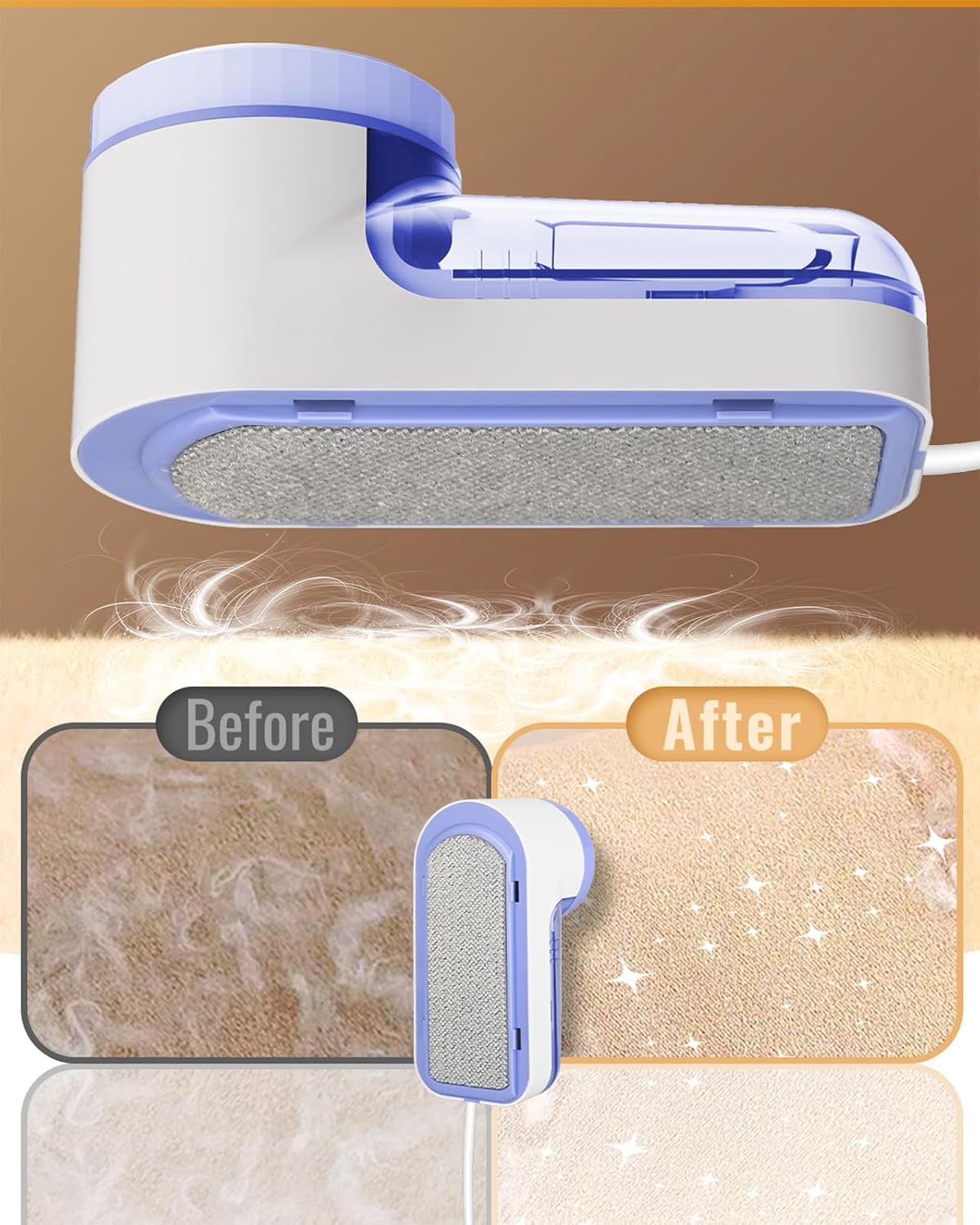
Figure 5: Illustration demonstrating the use of the iRUNTEK Lint Brush, with a "Before" section showing loose lint and hair, and an "After" section showing a cleaner fabric surface.
6. Maintenance
Regular cleaning ensures optimal performance and extends the lifespan of your fabric shaver.
- Empty Lint Collector: After each use, or when full, twist and remove the transparent lint collector. Dispose of the collected lint.
- Clean Shaver Head: Use the provided cleaning brush to remove any lint or debris from the inner blades and the outer knife net. Be careful when handling the blades.
- Blade Replacement: If the shaver's performance decreases significantly, the blades may need replacement. Carefully remove the outer knife net, then remove the old blades and replace them with the extra set provided. Ensure the new blades are securely seated before reattaching the knife net.
- Storage: Store the device in a dry place, away from direct sunlight and moisture.
7. Troubleshooting
| Problem | Possible Cause | Solution |
|---|---|---|
| Device does not turn on. | Not properly connected to power source. | Ensure the USB cable is securely plugged into both the device and a working USB power source. |
| Poor lint removal performance. | Lint collector is full; Blades are dull or obstructed; Outer knife net is loose. | Empty the lint collector. Clean the blades and knife net with the brush. Ensure the outer knife net is screwed on tightly. Replace blades if dull. |
| Device makes unusual noise. | Lint or debris caught in blades; Loose components. | Turn off and unplug the device. Carefully clean the blades and surrounding area. Ensure all parts are securely assembled. |
| Fabric gets damaged. | Excessive pressure applied; Fabric not laid flat; Damaged blades. | Use gentle pressure. Always lay fabric flat and smooth. Inspect blades for damage and replace if necessary. |
8. Specifications
- Model: FS-6688
- Brand: iRUNTEK
- Power Source: USB Powered (Wired Use, Not Rechargeable)
- Material: Stainless Steel (blades), Alloy Steel (handle)
- Product Dimensions: Approximately 8 x 14.5 x 8.51 cm (3.15 x 5.71 x 3.35 inches)
- Item Weight: Approximately 222 g (0.49 lbs)
- Color: Blue-a
9. Warranty and Support
The blade head is considered a wear-and-tear part and is not covered by the warranty. For other inquiries or support, please refer to your purchase documentation or contact iRUNTEK customer service through the retailer where the product was purchased.
Please retain your proof of purchase for any warranty claims.