
Introduction
This manual provides detailed instructions for the safe and efficient operation of your Inkbird VS03 Automatic Vacuum Sealer. Please read this manual thoroughly before first use and keep it for future reference. This appliance is designed to remove air from specially designed bags and containers, preserving food freshness for extended periods.
Safety Information
To ensure safe operation, please observe the following precautions:
- Do not immerse the appliance, power cord, or plug in water or other liquids.
- This appliance is not intended for use by persons (including children) with reduced physical, sensory, or mental capabilities, or lack of experience and knowledge, unless they have been given supervision or instruction concerning use of the appliance by a person responsible for their safety.
- Always unplug the appliance from the power outlet when not in use, before cleaning, or during maintenance.
- Use only Inkbird-approved vacuum sealer bags and accessories.
- Do not operate the appliance with a damaged cord or plug, or after the appliance malfunctions or has been damaged in any manner.
- Keep hands clear of the sealing area during operation to prevent burns.
- Ensure the appliance is placed on a stable, flat, heat-resistant surface.
Package Contents
Please verify that all the following items are included in your package:
- 1 x Inkbird VS03 Automatic Vacuum Sealer
- 1 x Power Cable (1.2m)
- 1 x Air Suction Hose
- 5 x Vacuum Bags (20 x 30 cm / 7.8 x 11.8 inches)
- 1 x Roll of Bags (28 x 300 cm / 11 x 118 inches)
- 1 x Spare Gasket
- 1 x User Manual

Image: Inkbird VS03 Automatic Vacuum Sealer and its complete set of accessories.
Product Overview
Familiarize yourself with the key components and features of your Inkbird VS03 vacuum sealer:
- Control Panel: Features buttons for different operating modes (Dry, Moist, Seal, Pulse, Vac) and a STOP button.
- LED Display: Shows sealing time countdown and operational status.
- Transparent Visualization Window: Allows you to see the bag placement in the vacuum chamber.
- Vacuum Chamber: Area where the bag is placed for vacuuming and sealing.
- Sealing Bar: Heats to create a strong, airtight seal.
- Integrated Bag Cutter: For custom-sizing vacuum bags from a roll.
- Roll Storage: Conveniently stores a roll of vacuum bags within the appliance.
- External Vacuum Port: For connecting the suction hose to external containers.

Image: Visualization window with LED light, showing correct and incorrect bag placement.

Image: Control panel with 5 operating modes: Dry, Moist, Seal, Pulse, and Stop.
Setup
Initial Preparation
- Unpack the vacuum sealer and all accessories.
- Wipe the appliance exterior with a damp cloth. Ensure the sealing bar and vacuum chamber are clean and dry.
- Place the appliance on a flat, stable, and dry surface.
- Plug the power cable into a suitable electrical outlet.
Using the Integrated Bag Cutter and Roll Storage
The Inkbird VS03 features a built-in roll storage and cutter for convenient bag customization:
- Open the lid of the vacuum sealer.
- Place a roll of vacuum bags into the designated roll storage compartment.
- Pull out the desired length of bag material.
- Slide the integrated cutter across the bag material to cut it to size.
- To create a bag, place one end of the cut material into the sealing area and press the 'SEAL' button to create a bottom seal.
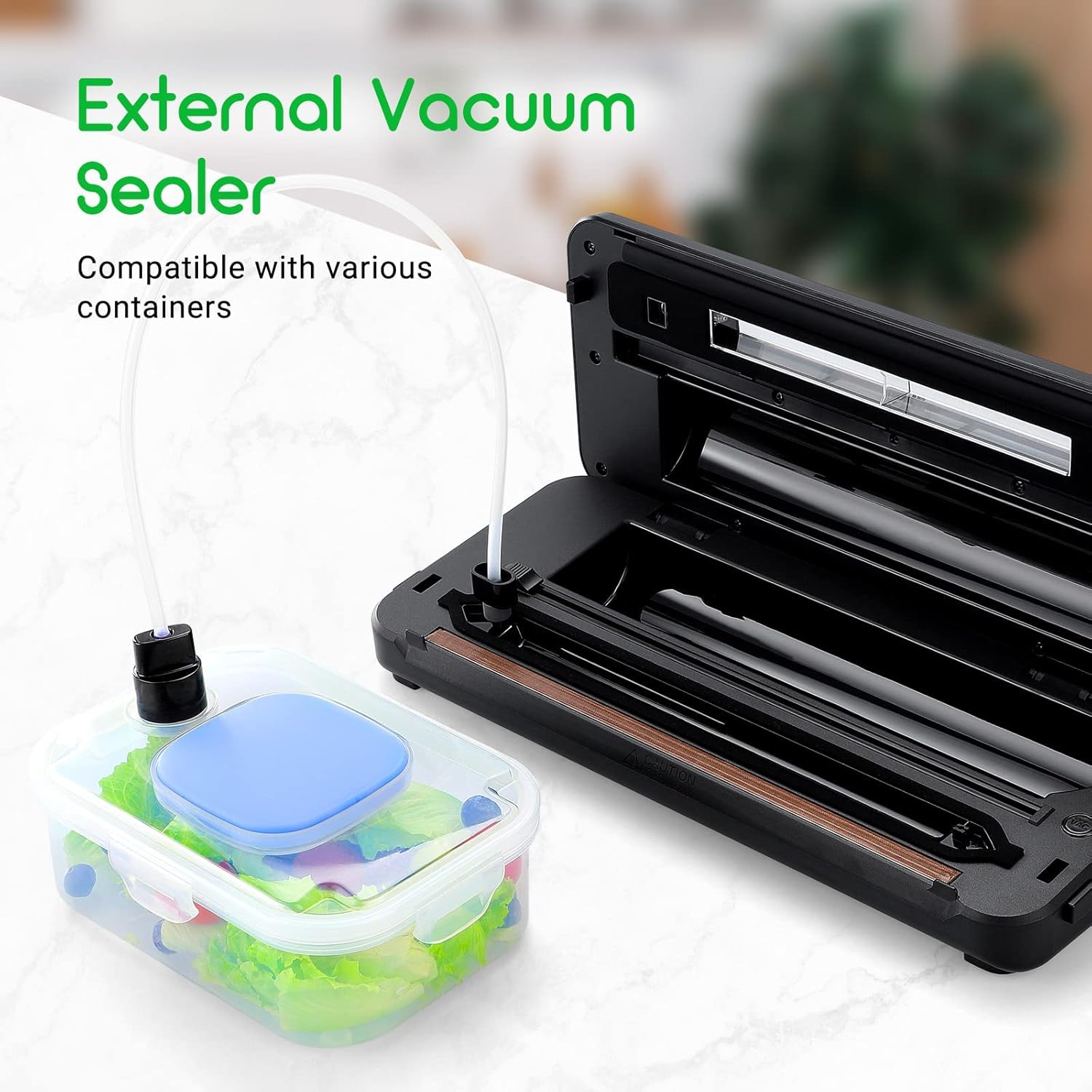
Image: Built-in roll storage and cutter for customizing bag sizes.
Operating Instructions
Basic Vacuum Sealing (Dry Mode)
This mode is suitable for dry food items such as grains, nuts, and dried fruits.
- Place the food item into a vacuum sealer bag, leaving at least 7-10 cm (3-4 inches) of space from the top edge.
- Open the lid of the vacuum sealer.
- Place the open end of the bag flat into the vacuum chamber, ensuring it is centered and free of wrinkles. Use the transparent window to verify correct placement.
- Close the lid firmly until you hear a click, indicating it is locked.
- Press the 'DRY VAC&SEAL' button. The appliance will automatically vacuum the air and then seal the bag.
- Once the sealing process is complete (indicated by the LED display countdown reaching zero), press the release buttons on both sides to open the lid and remove the sealed bag.

Image: Sealing time countdown display during operation.
Vacuum Sealing (Moist Mode)
This mode is designed for moist food items such as raw meat, fish, or marinated foods.
- Prepare the food in a vacuum bag as described for Dry Mode. For very moist foods, consider pre-freezing or placing a paper towel inside the bag to absorb excess liquid near the seal area.
- Place the open end of the bag into the vacuum chamber.
- Close the lid firmly.
- Press the 'MOIST VAC&SEAL' button. The appliance will adjust the vacuum and sealing time for moist contents.
- Once complete, release the lid and remove the sealed bag.
Sealing Only
Use this function to seal bags without vacuuming, for example, to create custom-sized bags from a roll or to reseal snack bags.
- Place the open end of the bag onto the sealing bar, ensuring it is flat and centered.
- Close the lid firmly.
- Press the 'SEAL' button. The appliance will only heat the sealing bar to create a seal.
- Once the sealing indicator light turns off, release the lid and remove the sealed bag.
Pulse Vacuum Mode
This mode provides manual control over the vacuum process, ideal for delicate or fragile food items that could be crushed by full vacuum pressure.
- Place the food item into a vacuum sealer bag.
- Place the open end of the bag into the vacuum chamber.
- Close the lid firmly.
- Press and hold the 'PULSE' button to start vacuuming. Observe the bag and food item.
- Release the 'PULSE' button when the desired amount of air has been removed.
- Immediately press the 'SEAL' button to seal the bag.
- Once the sealing is complete, release the lid and remove the bag.
External Vacuum Sealing
The Inkbird VS03 can also vacuum seal external containers or bottles using the included suction hose.
- Ensure the external container or bottle is designed for vacuum sealing and has a compatible vacuum port.
- Connect one end of the air suction hose to the external vacuum port on the appliance.
- Connect the other end of the hose to the vacuum port on your container or bottle.
- Close the lid of the vacuum sealer.
- Press the 'VAC' button. The appliance will begin to remove air from the external container.
- The process will stop automatically once the vacuum is achieved. Disconnect the hose.

Image: External vacuum sealing function with hose and container.
Maintenance and Care
Cleaning
Regular cleaning ensures optimal performance and extends the life of your vacuum sealer.
- Always unplug the appliance before cleaning.
- Wipe the exterior of the appliance with a soft, damp cloth. Do not use abrasive cleaners or solvents.
- Clean the vacuum chamber and sealing bar with a damp cloth and mild soap if necessary. Ensure these areas are completely dry before next use.
- The gaskets around the vacuum chamber can be removed for cleaning. Wash them with warm, soapy water, rinse, and dry thoroughly before reattaching.
Storage
Proper storage helps maintain the integrity of the appliance.
- Store the appliance in a cool, dry place.
- Important: Do not fully close the lid when the appliance is not in use. This prevents compression and deformation of the sealing bar gasket, which can lead to poor seals over time. Leave the lid slightly ajar or use the provided lid lock if available to keep the gasket relaxed.
Troubleshooting
If you encounter any issues, refer to the table below for common problems and solutions:
| Problem | Possible Cause | Solution |
|---|---|---|
| Appliance does not turn on. | No power supply. | Check if the power cord is securely plugged into the appliance and the electrical outlet. Test the outlet with another device. |
| Bag does not vacuum properly or seal is poor. | Bag not correctly placed; sealing strip/gasket dirty or damaged; bag material incompatible; too much moisture. | Ensure the open end of the bag is flat and fully inside the vacuum chamber. Clean the sealing strip and gaskets. Use only Inkbird-compatible bags. For moist foods, use 'MOIST' mode or pre-freeze. |
| Appliance stops during operation. | Overheating protection activated. | Allow the appliance to cool down for at least 20-30 minutes before resuming use. Avoid continuous operation for extended periods. |
| External vacuum function not working. | Hose not properly connected; container not sealed; container valve faulty. | Ensure the hose is securely connected to both the appliance and the container. Check that the container lid is properly closed and its valve is clean. |
Specifications
- Brand: Inkbird
- Model Number: VS03
- Color: Silver Grey
- Product Dimensions (L x W x H): 43.7 x 12 x 23 cm (17.2 x 4.7 x 9.1 inches)
- Power: 110 Watts
- Voltage: 220V
- Material: Stainless Steel, ABS
- Automatic Shut-off Function: Yes
- Item Weight: 2.12 Kilograms (4.67 lbs)
- Vacuum Pressure: -80 KPA
- Sealing Time: 9-17 seconds
- Continuous Operation (Dry Mode): Up to 200 times
- Continuous Operation (Moist Mode): Up to 50 times
Warranty and Support
Inkbird provides a warranty for this product against defects in materials and workmanship under normal use. The specific warranty period may vary by region and retailer. Please retain your proof of purchase for warranty claims.
For technical support, warranty inquiries, or if you require an instruction manual in a different language, please contact Inkbird customer service. You can typically find contact information on your purchase documentation, the product packaging, or the official Inkbird website.
Note: The manufacturer is committed to providing excellent customer service. If you have any questions or concerns, do not hesitate to reach out to their support team.


