Introduction
Welcome to the user manual for your LG XBOOM XL5 Portable Audio System. This manual provides essential information for setting up, operating, maintaining, and troubleshooting your device. The LG XBOOM XL5 is a 2.1ch multi-color ring lighting audio system designed for powerful sound and dynamic lighting effects, offering up to 12 hours of battery life and IPX4 water resistance for versatile use.
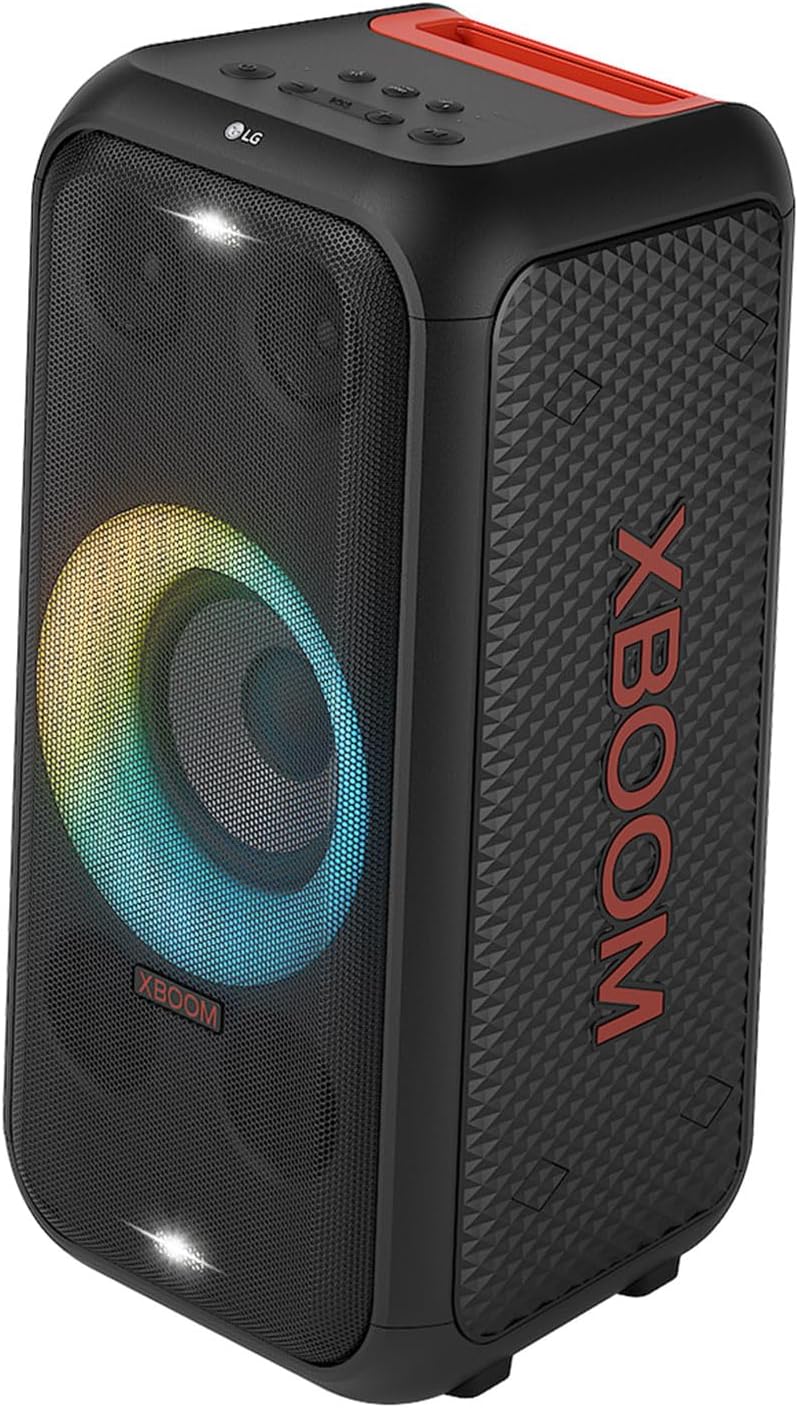
Figure 1: Front view of the LG XBOOM XL5 Portable Audio System, showcasing its multi-color ring lighting.
1. Setup
1.1 Unboxing and Package Contents
Carefully remove all components from the packaging. Ensure the following items are present:
- LG XBOOM XL5 Portable Audio System
- Power Adapter/Charging Cable
- Simple User Manual (this document)
1.2 Charging the Battery
Before initial use, fully charge the LG XBOOM XL5.
- Connect the power adapter to the charging port on the back of the unit.
- Plug the power adapter into a standard electrical outlet (Input Voltage: 240 Volts).
- The charging indicator will illuminate. A full charge typically takes approximately 3.5 hours.
- Once fully charged, the indicator will change or turn off, depending on the model.

Figure 2: Rear view of the LG XBOOM XL5, indicating the location of the charging port.
1.3 Initial Power On and Bluetooth Pairing
To power on the device and connect via Bluetooth:
- Press and hold the Power button located on the top panel until the unit powers on.
- The Bluetooth indicator will flash, indicating it is in pairing mode.
- On your smartphone or compatible device, navigate to the Bluetooth settings.
- Select "LG XBOOM XL5" from the list of available devices.
- Once connected, the Bluetooth indicator will stop flashing and remain solid.

Figure 3: The LG XBOOM XL5 features a convenient pocket handle for easy portability and is IPX4 water resistant, making it suitable for various environments.
2. Operating Instructions
2.1 Basic Controls
The LG XBOOM XL5 can be controlled via the touch panel on the unit or through the LG XBOOM App (available for iOS/Android).
- Power Button: Press to turn on/off.
- Volume Buttons: Adjust audio output level.
- Play/Pause Button: Control media playback.
- Function Button: Switch between input modes (Bluetooth, USB, etc.).
2.2 Audio Features
The XL5 delivers powerful and clear sound:
- Dynamic Bass Optimizer: Ensures rich bass at all volume levels.
- Speaker Configuration: Features a 6.5-inch full-range woofer and two 2.5-inch dome tweeters for a 2.1 channel surround sound experience.
- Equalizer: Customize sound profiles via the LG XBOOM App.

Figure 4: The two 2.5-inch dome tweeters contribute to the crisp and clear audio output of the LG XBOOM XL5.
2.3 Lighting Features
Enhance your audio experience with customizable lighting:
- Multi-Color Ring Lighting: The main woofer features dynamic multi-color ring lighting that synchronizes with the beat of the music.
- Double Strobe Lightings: Two additional strobe lights provide an enhanced visual effect.
- Customization: Use the LG XBOOM App to choose from various colors, movements, and lighting effects.

Figure 5: The LG XBOOM XL5 features multi-color ring lighting around the woofer and two strobe lights for dynamic visual effects.

Figure 6: The LG XBOOM App allows users to customize lighting effects, including continuous color changes and various visual rhythms.
2.4 Connectivity and Special Functions
- Bluetooth: Wireless connection for smartphones and other compatible devices.
- Dual USB: Connect USB drives for audio playback.
- Mic & Guitar Input: Standard auxiliary inputs for connecting a microphone and guitar, enabling karaoke and live performance.
- Karaoke Functionality: Adjust vocal frequencies or alter song keys to suit your voice.
- DJ Controls: Utilize the LG XBOOM App to add sound effects and looping.

Figure 7: The LG XBOOM XL5 offers multiple connectivity options including Guitar In, Mic In, USB, and Bluetooth.
3. Maintenance
3.1 Cleaning
To maintain the appearance and functionality of your LG XBOOM XL5:
- Wipe the exterior with a soft, dry cloth.
- For stubborn marks, use a slightly damp cloth and then dry thoroughly.
- Do not use abrasive cleaners, solvents, or strong chemicals.
- Ensure all ports are dry before connecting cables, especially after exposure to water.
3.2 Battery Care
To prolong battery life:
- Avoid fully discharging the battery frequently.
- Charge the unit regularly, even if not in use for extended periods.
- Store the unit in a cool, dry place when not in use.
3.3 Storage
When storing the unit for an extended period, ensure it is fully charged and stored in a dry environment away from direct sunlight and extreme temperatures.
4. Troubleshooting
If you encounter issues with your LG XBOOM XL5, refer to the following common problems and solutions:
| Problem | Possible Cause | Solution |
|---|---|---|
| No Power | Battery discharged; Power cable not connected. | Charge the unit; Ensure power cable is securely connected. |
| No Sound | Volume too low; Incorrect input source; Device not paired. | Increase volume; Select correct input; Re-pair Bluetooth device. |
| Bluetooth Disconnection | Device out of range; Interference. | Move device closer to XL5; Avoid obstacles; Re-pair. |
| Lighting Not Working | Lighting feature turned off in app; Malfunction. | Check LG XBOOM App settings; Contact support if issue persists. |
For more detailed troubleshooting or issues not listed here, please refer to the LG XBOOM App or contact LG customer support.
5. Specifications
| Model Name | XL5S |
| Brand | LG |
| Speaker Type | Satellite |
| Surround Sound Channel Configuration | 2.1 |
| Woofer Diameter | 6.5 Inches |
| Tweeter Diameter | 2.5 Inches |
| Power Source | Battery Powered (1 Lithium Ion battery required) |
| Battery Playback Time | Up to 12 Hours |
| Charging Time | Approximately 3.5 Hours |
| Water Resistance Level | IPX4 (Water Resistant) |
| Connectivity Technology | Bluetooth, Auxiliary, USB |
| Control Method | App, Touch |
| Product Dimensions (D x W x H) | 11.02"D x 11.1"W x 22.4"H |
| Item Weight | 23.6 Pounds |
| Material | Metal |
| UPC | 195174049211 |

Figure 8: Dimensional overview of the LG XBOOM XL5 Portable Audio System.
6. Warranty Information
The LG XBOOM XL5 Portable Audio System comes with a 1 Year Parts & Labor warranty from the date of purchase. This warranty covers manufacturing defects and workmanship under normal use. Please retain your proof of purchase for warranty claims.
For full warranty terms and conditions, please refer to the official LG website or contact LG customer support.
7. Support
For further assistance, technical support, or service inquiries regarding your LG XBOOM XL5, please use the following resources:
- LG XBOOM App: Download the official LG XBOOM App from your device's app store for advanced controls, settings, and troubleshooting tips.
- LG Official Website: Visit www.lg.com for product information, FAQs, and support contact details.
- Customer Service: Refer to the contact information provided on the LG website for your region.

Figure 9: Front view of the LG XBOOM XL5, showing the brand logo and top controls.