
1. Introduction
The Stealth Cam Reactor Dual Sim Cellular Camera is designed for remote monitoring and capturing high-quality images and videos of wildlife or property. This manual provides detailed instructions for setting up, operating, and maintaining your camera to ensure optimal performance. Please read this manual thoroughly before using your device.
2. Product Overview
The Reactor camera features advanced technology for reliable outdoor surveillance. Key components and features are outlined below.
2.1 Camera Components

Figure 2.1: Front view of the Stealth Cam Reactor Cellular Camera, showing the lens, PIR sensor, and LED array.

Figure 2.2: The camera with its front cover open, displaying the internal control panel, battery compartment, SIM card slots, and SD card slot. A QR code for app download is visible on the inner door.
2.2 Key Features
- High Resolution Imaging: Captures 26MP photos and 1080P videos at 30 frames per second.
- Fast Trigger Speed: A rapid 0.4-second trigger ensures quick capture of movement.
- Extended Detection Range: Features a 100ft no-glare detection and IR range.
- Advanced Night Vision: Equipped with 42 - 940nm LEDs for clear night captures, Matrix Advanced Blur Reduction, and Retina Low Light sensitivity.
- Cellular Connectivity: Dual SIM capability for AT&T and Verizon networks (check specific model for compatibility).
- Remote Management: Utilizes the Stealth Cam Command Pro App for remote viewing, sharing, and camera settings control.
- Expandable Storage: Supports SD memory cards up to 32GB (16GB card included).
- Flexible Power Options: Operates on 8 AA batteries (not included) and includes an external power jack for SOL-PAK solar battery pack (sold separately).
3. Setup
Follow these steps to prepare your Stealth Cam Reactor for operation.
3.1 Battery Installation
- Open the camera's front cover.
- Locate the battery compartment.
- Insert 8 new AA alkaline batteries (not included), ensuring correct polarity (+/-).
- Close the battery compartment securely.
3.2 SD Card Installation
- With the camera open, locate the SD card slot.
- Insert the provided 16GB SD card (or another compatible SD card up to 32GB) into the slot until it clicks into place. Ensure the card is inserted in the correct orientation.
- To remove, gently push the card in until it clicks, then release, and it will eject.
3.3 App Download and Camera Activation
- Download the Stealth Cam Command Pro App from your mobile device's app store (iOS or Android). Alternatively, scan the QR code located on the inside of the camera's front cover (refer to Figure 2.2).
- Follow the in-app instructions to create an account and register your camera. You will need the IMEI and ICCID numbers, also found on the inner door.
- Ensure your camera has a successful cellular connection as indicated by the status lights on the control panel.
4. Operating Instructions
Learn how to use your Stealth Cam Reactor to capture images and videos.
4.1 Powering On/Off
- To power on, slide the power switch to the 'ON' position.
- To power off, slide the power switch to the 'OFF' position.
4.2 Basic Settings
Most camera settings are managed remotely via the Stealth Cam Command Pro App. However, basic functions can be initiated directly on the camera.
- Sync Button: Press the 'SYNC' button to manually initiate a connection with the app and upload data.
- Image Stamp: Photos and videos will automatically include a stamp with time, date, moon phase, and camera ID.
- Burst Mode: The camera can capture 1-9 images per triggering event. This setting is configurable via the app.
- Recovery Time: The interval between triggered captures can be set from 1-59 seconds or 1-59 minutes via the app.
4.3 Remote Monitoring with Command Pro App
The Command Pro App provides full control and access to your camera's functions:
- View and Share: Access captured images and videos from your mobile device or web portal.
- Adjust Settings: Remotely modify photo/video resolution, burst mode, recovery time, and other operational parameters.
- Status Updates: Monitor battery life, signal strength, and SD card capacity.
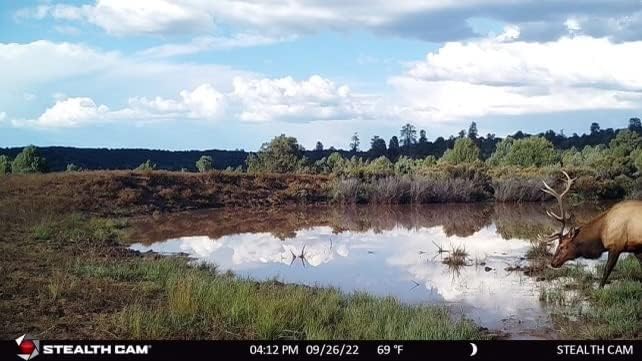
Figure 4.1: Example daytime image captured by the Reactor camera, featuring a deer by a pond.

Figure 4.2: Example daytime image captured by the Reactor camera, showing a deer in a wooded area.
5. Maintenance
Proper maintenance ensures the longevity and performance of your camera.
- Battery Replacement: Replace all 8 AA batteries when the battery indicator in the app or on the camera's status panel shows low power.
- SD Card Management: Regularly check the SD card capacity via the app. Format the SD card periodically to maintain optimal performance and prevent data corruption.
- External Power: For extended deployment, consider using the SOL-PAK solar battery pack (sold separately) connected to the external power jack.
- Cleaning: Gently wipe the camera lens and PIR sensor with a soft, dry cloth to remove dirt or debris. Do not use abrasive cleaners.
- Environmental Protection: Ensure the camera's housing is securely closed to protect against moisture and dust, especially in harsh weather conditions.
6. Troubleshooting
If you encounter issues with your camera, refer to the following common problems and solutions.
| Problem | Possible Cause | Solution |
|---|---|---|
| Camera not powering on | Dead or incorrectly installed batteries | Replace with fresh AA batteries, ensuring correct polarity. |
| No images/videos captured | Full or faulty SD card; incorrect settings; PIR sensor blocked | Check SD card capacity and format if necessary. Verify settings via the app. Ensure no obstructions are in front of the PIR sensor. |
| No cellular connection | Weak signal; inactive data plan; SIM card issue | Relocate camera to an area with better signal. Verify your data plan is active. Reinsert SIM card or contact your provider. |
| Poor image/video quality | Dirty lens; low light conditions; camera movement | Clean the lens. Ensure adequate lighting or adjust camera placement. Securely mount the camera to prevent movement. |
| App not syncing with camera | Connectivity issues; outdated app version | Ensure camera has a strong cellular connection. Update the Stealth Cam Command Pro App to the latest version. |
For further assistance, please refer to the support information in Section 8.
7. Specifications
Detailed technical specifications for the Stealth Cam Reactor Cellular Camera.
- Photo Resolution: 26 Megapixels
- Video Resolution: 1080P at 30 FPS (High), 720P (Low)
- Trigger Speed: 0.4 seconds
- Detection & IR Range: 100 feet
- LED Flash: 42 pcs 940nm (No-Glow)
- Memory: SD Card slot, supports up to 32GB (16GB included)
- Power Source: 8 AA batteries (not included), external power jack for SOL-PAK solar battery pack
- Connectivity: Wireless, App Controlled (Wi-Fi for local setup, Cellular for remote)
- Dimensions: 4 x 2.5 x 10 inches
- Weight: 1.24 pounds
- Operating Environment: Outdoor, IP54 International Protection Rating
- Model Number: STC-RWCT
- UPC: 813628008118
8. Warranty and Support
8.1 Warranty Information
The Stealth Cam Reactor Dual Sim Cellular Camera comes with a 1 Year Limited Warranty. Please retain your proof of purchase for warranty claims. For specific terms and conditions, refer to the warranty documentation included with your product or visit the official Stealth Cam website.
8.2 Customer Support
For technical assistance, troubleshooting, or questions regarding your Stealth Cam Reactor camera, please contact Stealth Cam customer support:
- Website: www.stealthcamcommand.com
- Phone: 1-888-508-5922
- App Support: Utilize the help resources within the Stealth Cam Command Pro App.


