
1. Product Overview
The Vomeko HC-801PLUS is an advanced outdoor trail camera designed for various applications including hunting, wildlife observation, and security monitoring. It features 30MP photo resolution, 2.7K video recording, IR night vision, 4G connectivity for remote access, and motion detection capabilities. This manual provides detailed instructions for setting up, operating, and maintaining your camera to ensure optimal performance.

Image: The Vomeko HC-801PLUS trail camera is suitable for hunting, wildlife monitoring, farm security, and home security.
2. Package Contents
Please verify that all items listed below are included in your package:
- 1 x Vomeko HC-801PLUS Trail Camera
- 1 x Bandage (for mounting)
- 1 x Antenna
- 1 x Tweezers
- 1 x USB Data Cable
- 1 x English Manual

Image: The Vomeko HC-801PLUS trail camera with its antenna.
3. Setup Guide
3.1. Battery Installation
- Open the camera housing latches.
- Locate the battery compartment.
- Insert 8 AA alkaline batteries, ensuring correct polarity (+/-).
- Close the battery compartment securely.
3.2. Micro Memory Card Installation
- With the camera powered off, locate the Micro Memory Card slot.
- Insert a Micro Memory Card (up to 256GB, not included) into the slot until it clicks into place.
- To remove, gently push the card in until it springs out.
3.3. Antenna Installation
- Screw the provided antenna onto the antenna port at the top of the camera until it is finger-tight.
3.4. SIM Card Installation (for 4G Connectivity)
For 4G functionality, a compatible SIM card (not included) with an active data plan is required. Refer to your network provider for SIM card activation.
- With the camera powered off, locate the SIM card slot.
- Insert the SIM card into the slot as indicated by the diagram (usually with the cut corner facing out and contacts down).
3.5. Mounting the Camera
Use the provided bandage to secure the camera to a tree or pole. Ensure the camera is stable and positioned to capture the desired area.

Image: Internal view of the camera showing the screen and controls, where batteries and memory card are inserted.
4. Operating Instructions
4.1. Powering On/Off
Locate the power switch inside the camera housing. Slide it to the 'ON' position to power on the camera. Slide to 'OFF' to power off.
4.2. Menu Navigation
Use the control buttons (MENU, SHOT, OK, and directional arrows) to navigate through the camera's settings on the 2.0-inch TFT screen.
- MENU: Enters/exits the settings menu.
- SHOT: Manually captures a photo or starts video recording.
- OK: Confirms selections.
- Directional Arrows: Navigate through menu options.
4.3. Setting Date and Time
It is crucial to set the correct date and time for accurate record-keeping. Access this setting via the MENU and adjust using the directional arrows.
4.4. Photo and Video Settings
Customize your capture settings:
- Photo Resolution: Select from 30MP, 24MP, 20MP, 16MP, 12MP.
- Video Resolution: Choose 2.7K, 1080P, 720P, or VGA (480P).
- Video Length: Set video duration (5s, 10s, 30s, 60s, 90s).
- Delay Mode: Configure the delay between detections (5, 10, 30, or 60 minutes).
- Multi Shot Mode: Capture up to 9 photos per detection.
4.5. Motion Sensor Settings
The camera features 3 PIR motion sensors with a 120° detection angle and a range of 1 to 20 meters. The trigger speed is 0.2 seconds. Adjust the delay between each test (1/5/10/30 seconds or 1/5/10/30 minutes) to suit your monitoring needs.
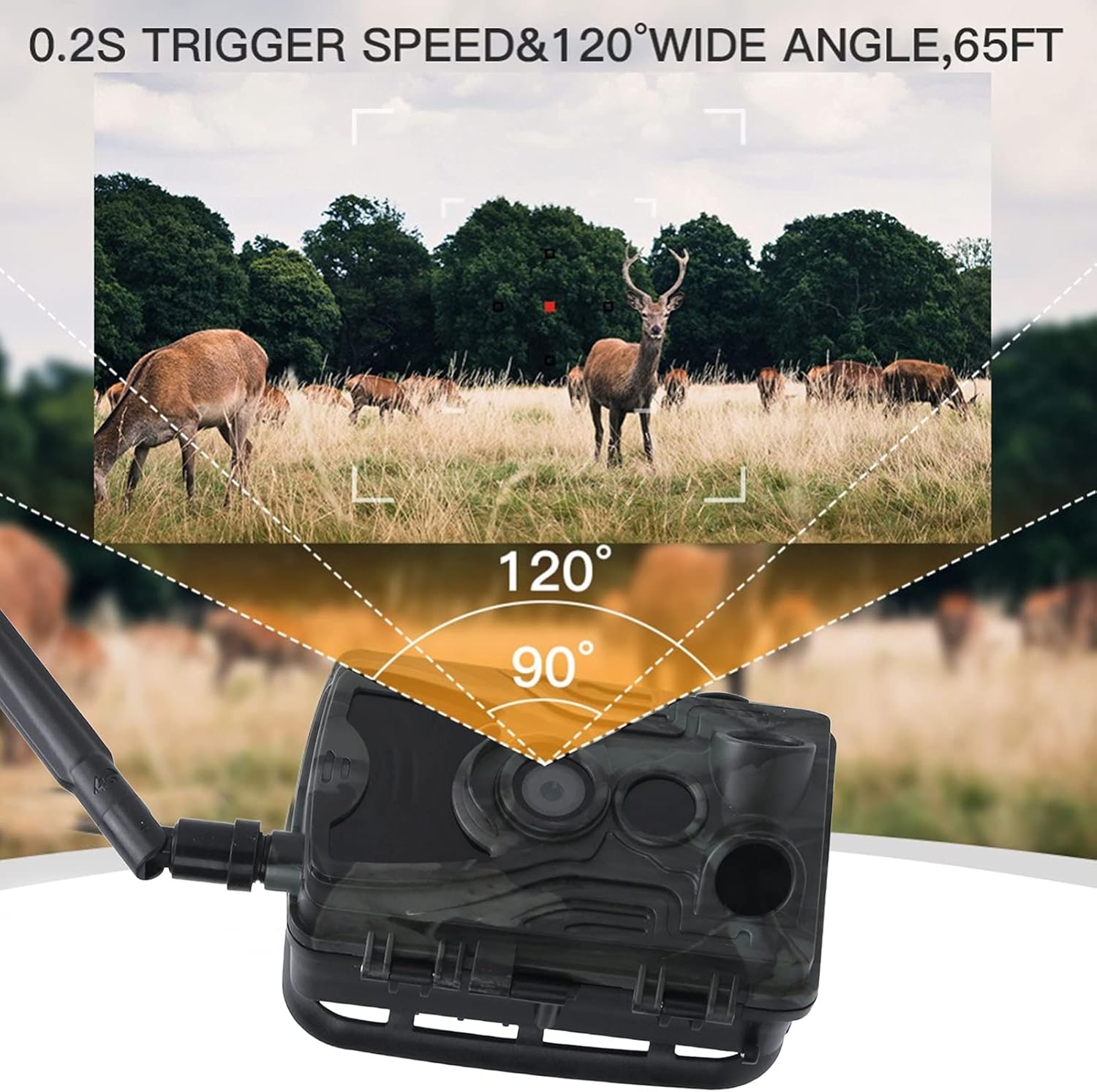
Image: Illustration of the camera's 0.2s trigger speed and 120-degree wide-angle detection.
4.6. 4G Connectivity and APP Remote Control
The HC-801PLUS supports 4G network connectivity and APP remote control. Download the dedicated mobile application (compatible with Android and iPhone) to monitor and control your camera remotely, view real-time video, and access captured media.

Image: The camera's mobile application interface for remote viewing.
4.7. Viewing Captured Media
You can view photos and videos directly on the camera's 2.0-inch TFT screen using the 'REPLAY' button, or by connecting the camera to a computer via the USB cable. Alternatively, use the mobile app for remote viewing if 4G connectivity is active.
5. Maintenance
5.1. Cleaning
Regularly clean the camera's exterior with a soft, damp cloth. Ensure the lens and PIR sensors are free from dirt, dust, or debris to maintain optimal performance. Do not use harsh chemicals or abrasive materials.
5.2. Battery Replacement
Replace all 8 AA batteries when the battery indicator shows low power. Always use new, high-quality alkaline batteries for best results and to prevent leakage.
5.3. Storage
When not in use for extended periods, remove the batteries and Micro Memory Card. Store the camera in a cool, dry place away from direct sunlight and extreme temperatures.
6. Troubleshooting
6.1. Camera Does Not Power On
- Ensure batteries are inserted correctly with proper polarity.
- Replace with fresh batteries.
- Check if the power switch is in the 'ON' position.
6.2. No Photos/Videos Captured
- Verify that a Micro Memory Card is properly inserted and has sufficient free space.
- Check motion sensor settings (sensitivity, delay).
- Ensure the camera is in the correct shooting mode (Camera, Video, or Camera + Video).
6.3. Poor Night Vision Quality
- Ensure the camera's IR LEDs are not obstructed.
- Check battery level; low batteries can affect IR performance.
- Clean the camera lens.

Image: Example of day and night vision captures from the trail camera.
6.4. 4G Connectivity Issues
- Ensure the SIM card is correctly inserted and activated with a data plan.
- Check for adequate cellular signal strength in the camera's location.
- Restart the camera.
7. Specifications
| Item Type | Trail Camera |
| Material | Plastic |
| Product Size | Approx. 135x90x76mm (5.3x3.5x3.0in) |
| Weight | Approx. 536g (18.9oz) |
| Power Supply | 8 AA Alkaline Batteries (not included) / DC 12V/1.5A External |
| Built-In Screen | TFT 2.0 inch |
| External Storage | Micro Memory Card Up To 256GB (not included) |
| Photo Resolution | 30MP/24MP/20MP/16MP/12MP |
| Video Resolution | 2.7K/1080P/720P/VGA (480P) |
| File Format | JPG (Photos), .Mp4/H.265 (Videos) |
| Motion Sensor | 3xPIR |
| Detection Angle | 120° |
| Detection Range | 1 to 20 Meters |
| Trigger Speed | 0.2 Seconds |
| Night Vision Range | 20 Meters |
| Waterproof Grade | IP66 |
| Operating Temperature | -20 ~ 70℃ (-4 ~ 158℉) |
| Standby Time | 6 Months |
| Connectivity | 4G Network, APP Remote Control |

Image: Key technical specifications and features of the HC-801PLUS camera.
8. Warranty and Support
For warranty information, technical support, or service inquiries, please contact your retailer or the manufacturer directly. Keep your purchase receipt as proof of purchase.