
Introduction
This user manual provides comprehensive instructions for the UWAYKEY T160HS Amplifier Board. This 2.0 channel stereo amplifier board features the TDA7498E chip, offering 160W+160W output with treble and bass control. It supports multiple input methods including Bluetooth, AUX, and USB, making it compatible with various audio devices. Please read this manual thoroughly before operation to ensure proper use and longevity of the product.
Safety Information
- Ensure the power supply voltage is within the specified range of DC 12-36V.
- Do not expose the amplifier board to moisture or extreme temperatures.
- Avoid short-circuiting the output terminals.
- Disconnect power before making any connections or disconnections.
- This product is designed for indoor use.
- Keep out of reach of children.
- The amplifier board includes overheat protection, reverse protection, circuit protection, over-voltage, and under-voltage protection. However, proper handling is still essential.
Product Overview
The UWAYKEY T160HS Amplifier Board is a versatile audio amplification solution. Below are its key components and features.
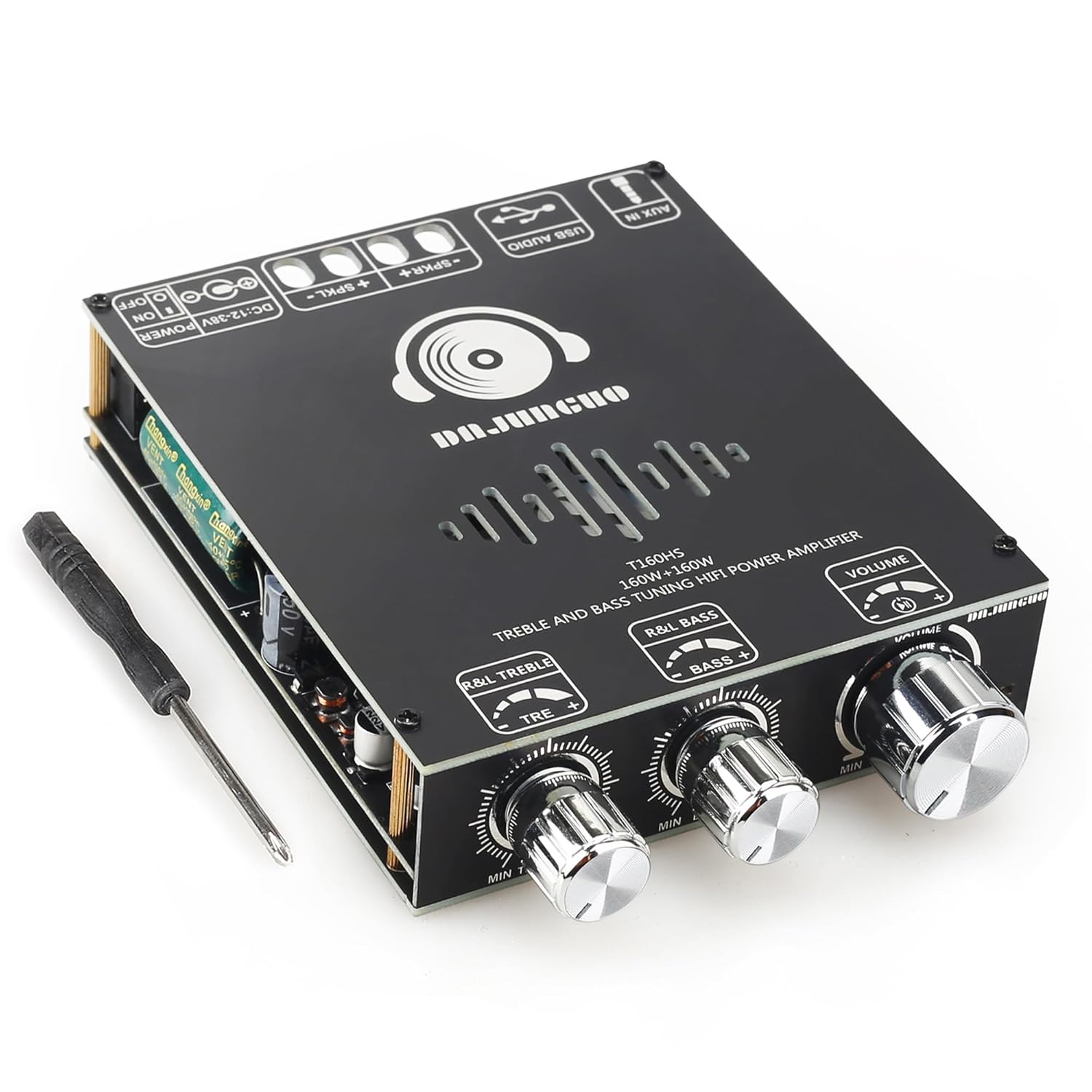
Figure 1: Front view of the T160HS amplifier board, showing the volume, treble, and bass control knobs, along with input/output ports and a small screwdriver for assembly.

Figure 2: Top-down view of the amplifier board, highlighting key components such as the TDA7498E chip, power switch, DC 12-38V input, speaker outputs (L/R), USB Flash Drive port, 3.5mm AUX input, and the ultra-quiet cooling fan.
Key Features:
- TDA7498E Chip: Utilizes the TDA7498E chip for high-quality audio amplification with low distortion.
- Power Output: 160W + 160W (2.0 Channel Stereo).
- Wide Voltage Input: Supports DC 12-36V.
- Multiple Input Methods: Bluetooth (Version 5.1), 3.5mm AUX, and USB input (USB Flash Drive/USB Sound Card).
- Multifunctional Knob: Provides control for switching input modes, activating apps, and power on/off.
- Adjustable Treble and Bass: Independent adjustment of high and low frequencies for customized sound.
- Safety Protection: Includes Overheat Protection, Reverse protection, Circuit Protection, Over-voltage, and Under-voltage Protection.
- Cooling System: Features a large-area aluminum alloy heat sink and an ultra-quiet cooling fan for efficient heat dissipation.
Product Video Overview:
Video 1: An official product video from UWAYKEY demonstrating the T160HS 160W+160W Power Amplifier Board, showcasing its features and capabilities.
Setup
- Unpack: Carefully remove all components from the packaging. Verify that the amplifier board is included.
- Power Connection: Connect a DC 12-36V power supply (e.g., 36V 8A power adapter) to the DC input port on the amplifier board. Ensure the polarity is correct.
- Speaker Connection: Connect your passive speakers to the L (Left) and R (Right) speaker output terminals. Ensure correct positive (+) and negative (-) connections for each speaker.
- Audio Input Selection:
- Bluetooth: Power on the device. The amplifier will enter Bluetooth pairing mode. Search for "T160HS" on your device (phone, tablet, computer) and connect.
- AUX: Connect your audio source (e.g., phone, MP3 player) to the 3.5mm AUX input port using an audio cable.
- USB: Insert a USB flash drive containing audio files into the USB input port. The amplifier will automatically detect and play files. Alternatively, connect to a computer via USB for use as a USB Sound Card.
- Initial Volume Adjustment: Before playing audio, set the volume knob to a low level to prevent sudden loud sounds.

Figure 3: Diagram illustrating the three main audio input methods: Bluetooth 5.1, 3.5mm AUX Input, and USB Flash Drive/USB Sound Card, along with the DC 12-36V power input and Power On/Off switch.
Operating
Controls:
- Volume Knob: Rotate clockwise to increase volume, counter-clockwise to decrease.
- Treble Knob: Adjusts the high-frequency response. Rotate to increase or decrease treble.
- Bass Knob: Adjusts the low-frequency response. Rotate to increase or decrease bass.
- Multifunctional Knob (Press Actions):
- Single Click: Pause/Play audio.
- Double Click: Next Track.
- Three Clicks: Previous Track.
- Four Clicks: Switch Input Modes (Bluetooth, AUX, USB).
- Five Clicks: Factory Reset.
- Long Press: Power on/Standby.

Figure 4: Close-up view of the multifunctional knob, detailing its various press actions for controlling playback, track navigation, input mode switching, factory reset, and power.
Maintenance
- Cleaning: Use a soft, dry cloth to clean the surface of the amplifier board. Do not use liquid cleaners or abrasive materials.
- Ventilation: Ensure the cooling fan and heat sink areas are free from dust and obstructions to maintain proper airflow and prevent overheating.
- Storage: When not in use for extended periods, store the amplifier board in a cool, dry place away from direct sunlight and moisture.
- Handling: Handle the board with care to avoid damaging electronic components.
Troubleshooting
| Problem | Possible Cause | Solution |
|---|---|---|
| No sound output. |
|
|
| Bluetooth connection issues. |
|
|
| Distorted audio. |
|
|
| Amplifier overheats. |
|
|
Specifications
| Feature | Detail |
|---|---|
| Model Number | T160HS (160W+160W) |
| Chip | TDA7498E |
| Channels | 2.0 Stereo |
| Output Power |
|
| Power Supply | DC 12-36V (Recommended DC12-36V/8A or above) |
| Audio Input | Bluetooth 5.1, 3.5mm AUX, USB (USB Flash Drive/USB Sound Card) |
| Frequency Response | 20Hz - 20KHz |
| Decoding Format (USB) | WAV, FLAC, APE, MP3 |
| Protection Mechanisms | Overvoltage, Undervoltage, Clipping, Short Circuit, Overheating, Reverse Protection |
| Product Dimensions (L x W x H) | 5.04 x 3.74 x 0.98 inches (128 x 95 x 26mm) |
| Item Weight | 3.99 ounces |
Warranty and Support
UWAYKEY is committed to customer satisfaction. If you encounter any issues with your T160HS Amplifier Board or have questions regarding its operation, please contact UWAYKEY customer service. Refer to your purchase documentation for specific warranty terms and contact information. Our service tenet is to pay attention to customer experience and satisfy customers. We will provide a 100% satisfactory answer to any product quality problems or inquiries.
For the most up-to-date support information, please visit the official UWAYKEY website or the product page on the platform where you made your purchase.