
Super Star 3900
Super Star 3900 CB Radio Instruction Manual
Model: 3900
1. Introduction
The Super Star 3900 is a multi-standard 27 MHz CB mobile station, offering 40 channels and AM/FM/USB/LSB modes. It features a power output of 4 W (AM/FM) and 12 W in Single Side Band (SSB). This manual provides detailed instructions for the proper setup, operation, and maintenance of your Super Star 3900 CB radio. Designed primarily for mobile use, it can also function as a base station when connected to a DC power source and an appropriate antenna.

Figure 1.1: Super Star 3900 CB Radio with attached microphone.
2. Product Overview
2.1 Key Features
- 40 Multi-Standard Channels
- AM/LSB/USB/FM Modes
- Frequency Range: 26.565 to 27.99125 MHz
- Transmit Power: 4 W (AM/FM), 12 W (SSB)
- Built-in Standing Wave Ratio (SWR) and Power Meter
- Updated display with function indicator and adjustable illumination
- New hand microphone with Up/Down channel change buttons
2.2 Components and Controls
The Super Star 3900 retains its classic design with intuitive controls. Familiarize yourself with the main components and their functions:
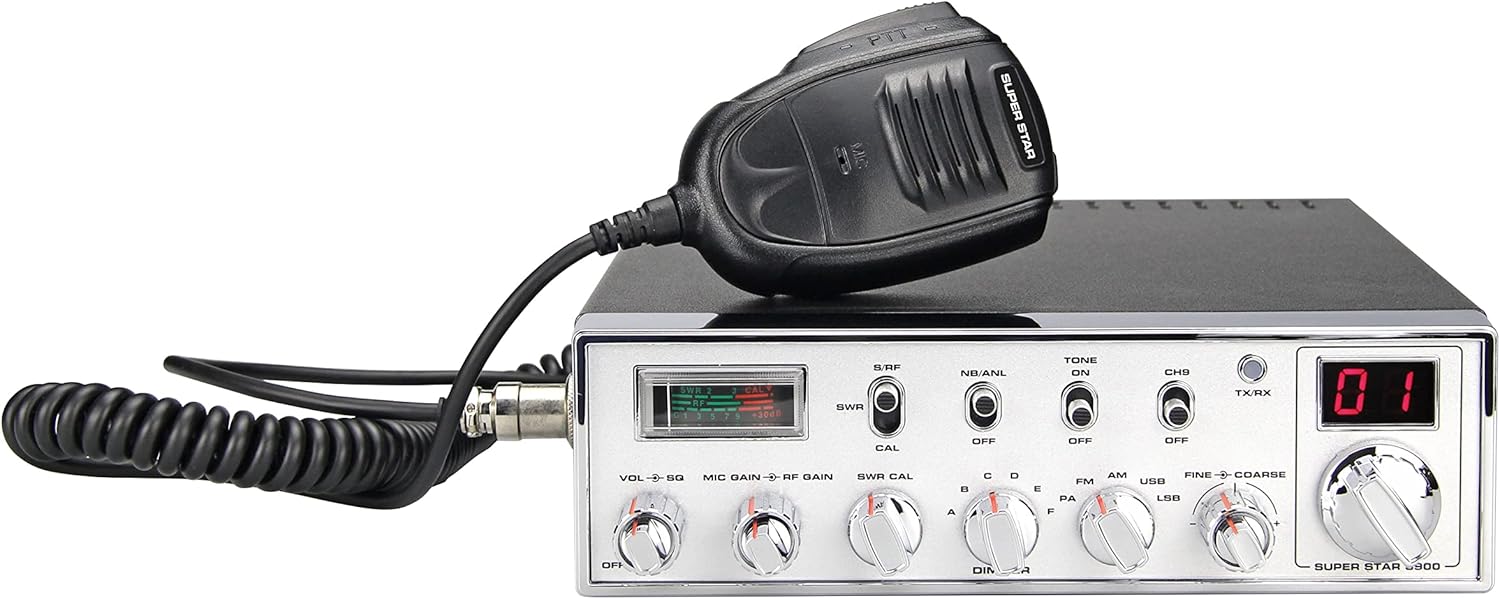
Figure 2.1: Front Panel Controls.
- Volume/Squelch (VOL/SQ) Knob: Controls audio output and squelch level.
- Microphone Gain (MIC GAIN) Knob: Adjusts microphone sensitivity.
- RF Gain (RF GAIN) Knob: Adjusts receiver sensitivity.
- SWR/CAL Switch: Selects between SWR meter and calibration mode.
- S.RF/SWR Meter: Analog meter displaying signal strength (S.RF) or SWR.
- NB/ANL Switch: Noise Blanker and Automatic Noise Limiter.
- TONE Switch: Adjusts audio tone.
- CH9 Switch: Instantly selects emergency channel 9.
- TX/RX Indicator: Illuminates green for receive, red for transmit.
- Channel Display: Digital display showing the current channel number.
- Mode Selector (AM/FM/USB/LSB): Rotary switch to select operating mode.
- Fine/Coarse Tuning: Adjusts frequency within a channel for SSB modes.
- Dimmer Knob: Adjusts the brightness of the display and meter illumination.
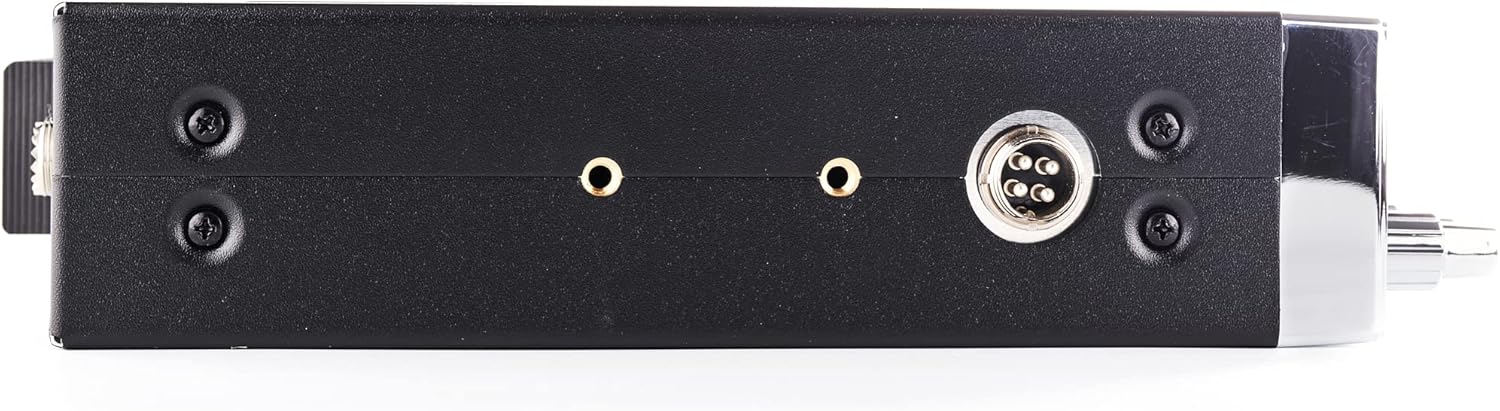
Figure 2.2: Hand Microphone with Up/Down buttons.
3. Setup
3.1 Unpacking and Inspection
Carefully remove all components from the packaging. Verify that all items are present:
- Super Star 3900 CB Radio Unit
- Hand Microphone
- DC Power Cable
- Mounting Bracket and Hardware (screws, washers, knobs)
- Microphone Hanger
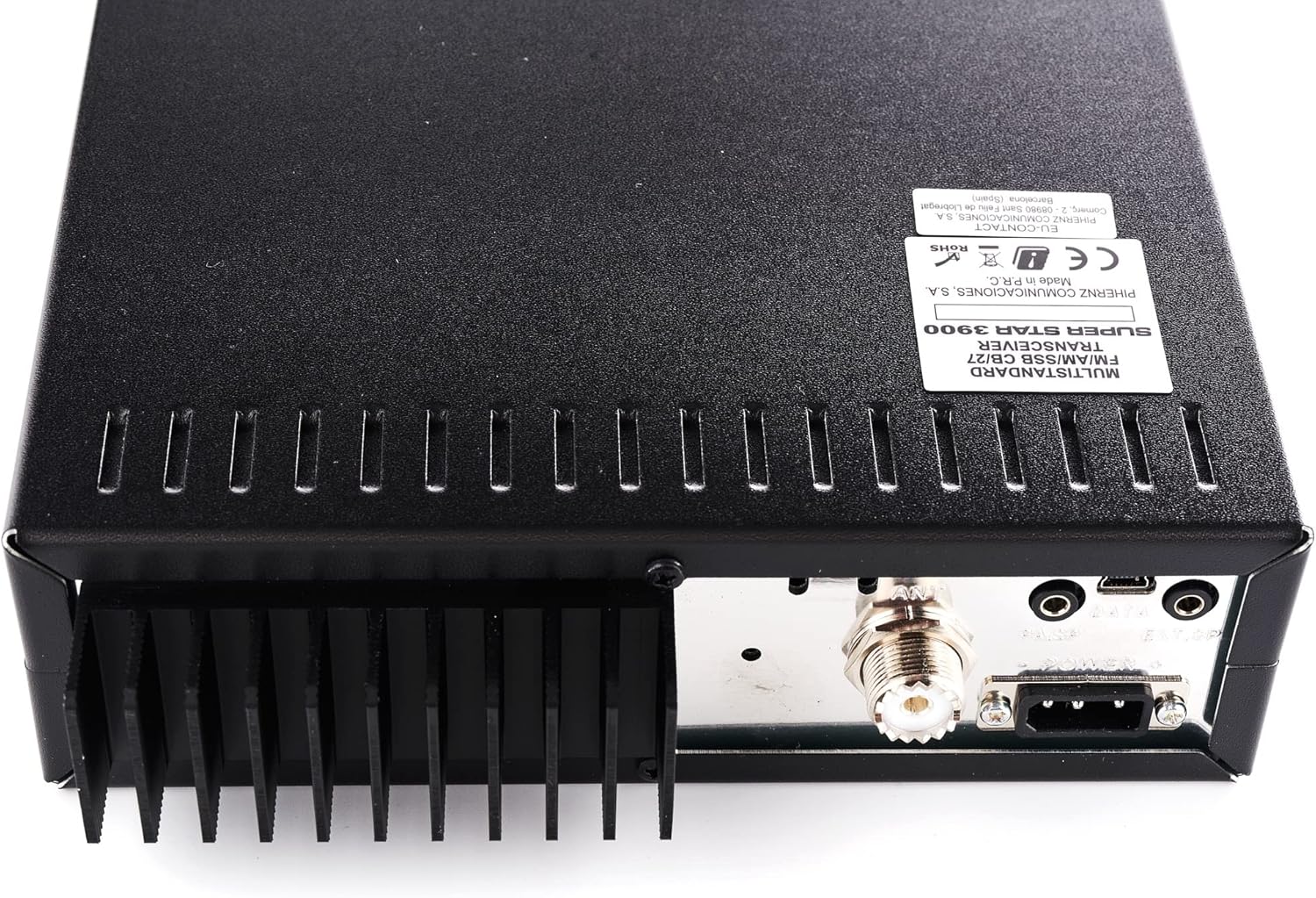
Figure 3.1: Included components and accessories.
3.2 Power Connection
The Super Star 3900 operates on a 13.8 Volt DC power supply. Ensure your power source can provide sufficient current for transmission (typically 2-3 Amperes). Connect the red wire of the DC power cable to the positive (+) terminal and the black wire to the negative (-) terminal of your power supply. Connect the other end of the cable to the power input on the rear of the radio.
3.3 Antenna Connection
A properly tuned CB antenna is crucial for optimal performance and to prevent damage to the radio. Connect your 27 MHz CB antenna to the SO-239 connector on the rear of the radio. Ensure the connection is secure.

Figure 3.2: Rear panel connections (Antenna, Power).
3.4 Microphone Connection
Plug the microphone connector into the 4-pin microphone jack located on the side of the radio unit. Secure the connection by tightening the collar if present.
3.5 Mounting
Use the provided mounting bracket and hardware to securely install the radio in your desired location (e.g., vehicle dashboard, desk). Ensure adequate ventilation around the unit.
4. Operating Instructions
4.1 Power On/Off and Volume
- Rotate the VOL/SQ knob clockwise to turn the radio ON. Continue rotating to increase the volume.
- Rotate the VOL/SQ knob counter-clockwise until it clicks to turn the radio OFF.
4.2 Squelch Adjustment
The squelch control eliminates background noise when no signal is being received. Rotate the VOL/SQ knob (outer ring) clockwise until the background hiss disappears. Do not set it too high, as it may block weak signals.
4.3 Mode Selection (AM/FM/USB/LSB)
Use the rotary Mode Selector switch to choose your desired operating mode:
- AM (Amplitude Modulation): Standard mode for many CB communications.
- FM (Frequency Modulation): Offers clearer audio in some conditions.
- USB (Upper Side Band): Single Side Band mode, often used for longer distance communication.
- LSB (Lower Side Band): Single Side Band mode, also for longer distance communication.
4.4 Channel Selection
Use the large Channel Selector knob on the front panel to choose your desired channel. The selected channel number will be displayed digitally. Alternatively, use the UP/DOWN buttons on the microphone for quick channel changes.
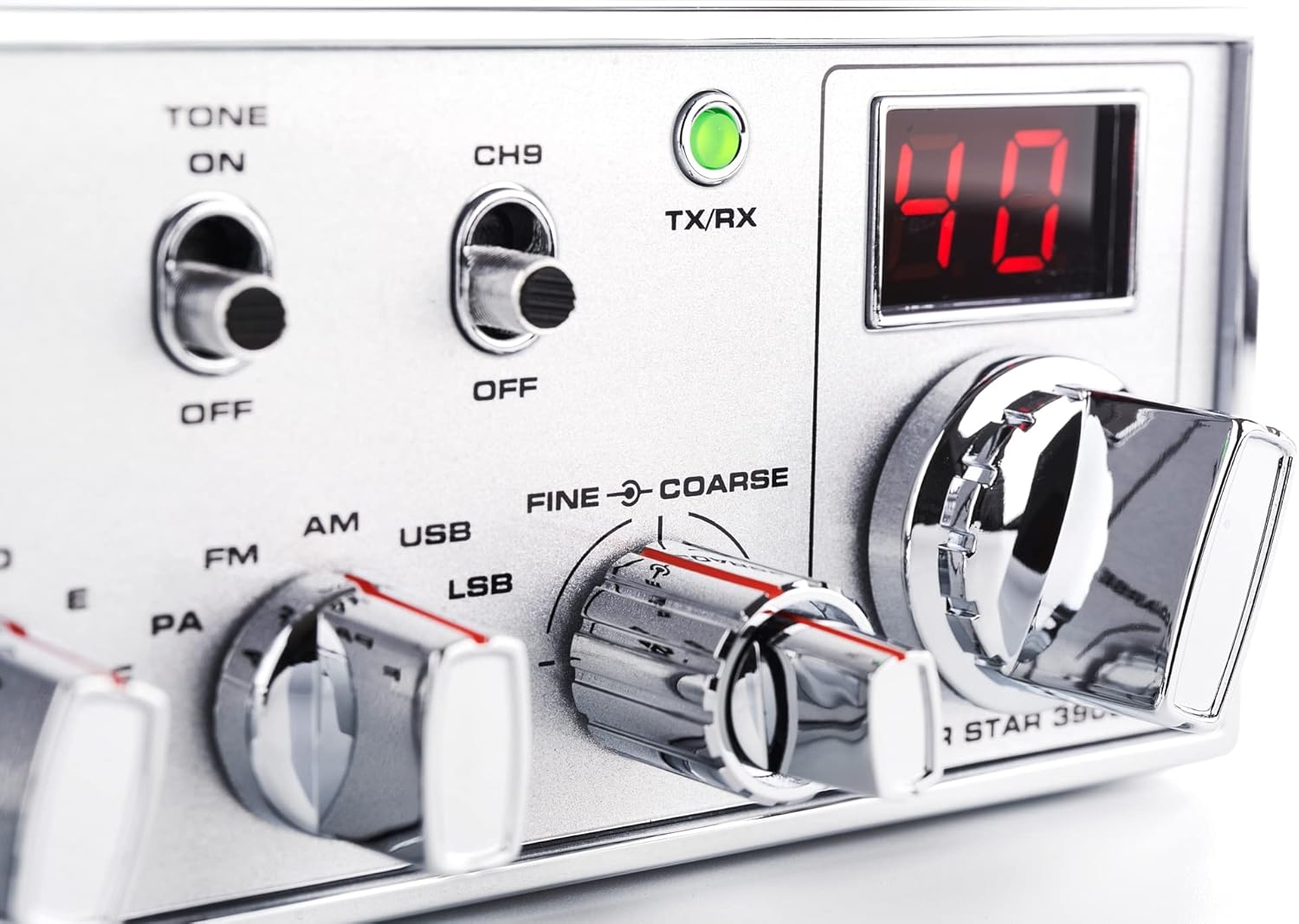
Figure 4.1: Mode and Channel Controls.
4.5 Fine/Coarse Tuning (SSB Modes)
When operating in USB or LSB modes, use the Fine/Coarse tuning knob to precisely adjust the frequency for clear reception of SSB signals. The 'Fine' adjustment allows for small frequency shifts, while 'Coarse' allows for larger steps.
4.6 SWR Calibration
It is essential to calibrate your antenna's SWR (Standing Wave Ratio) for optimal performance and to protect your radio. Perform SWR calibration after initial setup and whenever you change your antenna or its location.
- Set the SWR/CAL switch to CAL.
- Press and hold the PTT (Push-To-Talk) button on the microphone.
- While holding PTT, adjust the SWR CAL knob until the meter needle points to the 'CAL' mark (usually at the end of the green section).
- Release the PTT button.
- Set the SWR/CAL switch to SWR.
- Press and hold the PTT button again. The meter will now display your SWR reading. An SWR of 1.5:1 or lower is generally acceptable. Higher readings indicate a poorly tuned antenna, which can damage the radio.
- Release the PTT button.

Figure 4.2: SWR Meter and Calibration Controls.
5. Maintenance
5.1 Cleaning
To clean the radio, use a soft, dry cloth. For stubborn dirt, a slightly damp cloth with mild soap can be used, followed by a dry cloth. Do not use abrasive cleaners, solvents, or strong chemicals, as they may damage the finish or internal components.
5.2 Storage
When not in use for extended periods, store the radio in a cool, dry place, away from direct sunlight and extreme temperatures. Disconnect the power cable and antenna.
5.3 General Care
- Avoid dropping the radio or subjecting it to strong impacts.
- Do not expose the radio to water or excessive moisture.
- Ensure proper ventilation to prevent overheating, especially during prolonged transmission.
6. Troubleshooting
This section addresses common issues you might encounter with your Super Star 3900 CB radio.
| Problem | Possible Cause | Solution |
|---|---|---|
| No power | Loose power connection, blown fuse, power supply issue. | Check power cable connections. Inspect the fuse in the power cable. Verify power supply is functioning. |
| No reception or weak reception | Squelch set too high, antenna disconnected or faulty, RF Gain too low, incorrect mode. | Adjust squelch. Check antenna connection. Increase RF Gain. Ensure correct operating mode (AM/FM/USB/LSB). |
| No transmission or weak transmission | Microphone not connected, faulty microphone, high SWR, incorrect mode. | Check microphone connection. Test with another microphone if possible. Perform SWR calibration. Ensure correct operating mode. |
| Distorted audio | Volume too high, microphone gain too high, interference. | Adjust volume. Reduce Microphone Gain. Check for local interference sources. |
| Display light not working (Dimmer) | Dimmer knob set to minimum, internal issue. | Rotate the Dimmer knob clockwise to increase brightness. If issue persists, contact support. |
7. Specifications
| Feature | Specification |
|---|---|
| Brand | Super Star |
| Model Number | 3900 |
| Color | Black - Silver |
| Number of Channels | 40 (Multi-standard) |
| Modes | AM/LSB/USB/FM |
| Frequency Range | 26.565 to 27.99125 MHz |
| Transmit Power (TX) | 4 W (AM/FM), 12 W (SSB) |
| Tuning Technology | UHF |
| Voltage | 13.8 Volts |
| Max Range | 10 Kilometers (dependent on conditions and antenna) |
| Item Weight | 1500 Grams |
| Water Resistance Level | Not Waterproof |
| Manufacturer | Pihernz Comunicaciones s.a. |
| Country of Origin | China |
8. Warranty and Support
For information regarding warranty coverage and technical support for your Super Star 3900 CB radio, please refer to the documentation provided with your purchase or contact the retailer. Information on spare parts availability and software updates is not explicitly provided at this time.
For general inquiries or troubleshooting assistance not covered in this manual, please contact the manufacturer or your authorized Super Star dealer.
Related Documents - 3900
 |
Super Star 3900 CB Transceiver Manual Comprehensive instruction manual for the Super Star 3900 multi-standard CB mobile transceiver, covering features, operation, installation, and safety precautions. |
 |
Superstar SS-158VDX Amateur Mobile Transceiver Owner's Manual This owner's manual provides detailed information on the Superstar SS-158VDX Amateur Mobile Transceiver, including specifications, installation guides, operational procedures, and microphone wiring instructions. |
 |
Superstar SS-158VC6 Amateur Mobile Transceiver Owner's Manual Owner's manual for the Superstar SS-158VC6 AM/FM/USB/LSB/CW Amateur Mobile Transceiver, detailing specifications, installation, operation, and microphone wiring. |
 |
Superstar 3900 CB Radio Service Manual and Technical Specifications Detailed service manual and technical specifications for the Superstar 3900 CB radio, covering the EPT360014B chassis, including adjustment points, circuit diagrams, and modification instructions. |
 |
SUPERSTAR SS-158VC6: AM/FM/USB/LSB/CW Amateur Mobile Transceiver Owner's Manual This owner's manual provides detailed specifications, installation instructions, and operational guidance for the SUPERSTAR SS-158VC6, an AM/FM/USB/LSB/CW amateur mobile transceiver with a built-in frequency counter. |
 |
Superstar 3900 EFT Export Modification Guide A guide detailing the export modification for the Superstar 3900 EFT radio, including steps for component adjustments and wiring changes. |
Ask a question about this manual
Ask about setup, troubleshooting, compatibility, parts, safety, or missing instructions. Manuals+ will review the question and use this page’s manual context to help answer it.