
TaFoyu ADDC-2
Tafoyu 60W 5-in-1 Professional Nail Vacuum Cleaner User Manual
Model: ADDC-2
Product Overview
The Tafoyu 60W 5-in-1 Professional Nail Vacuum Cleaner is an all-in-one device designed for comprehensive nail care. It integrates five key functions: nail polishing, powerful dust collection, illuminating lighting, UV nail drying, and a comfortable hand rest. This versatile tool is suitable for both professional salon use and personal home manicures, providing a clean and efficient environment for nail treatments.

Safety Information
Please read and understand all safety precautions before operating the device to ensure safe and proper use.
- Always protect your ears during operation, especially when the device is running at high speeds, to prevent hearing damage.
- Take regular breaks during extended use to prevent the device from overheating and to ensure user comfort.
- Do not immerse the device in water or any other liquid.
- Keep the device away from children and pets.
- Use only the provided power adapter and accessories.
- Ensure proper ventilation around the device during operation.
Setup
Unpacking and Inspection
Carefully remove all components from the packaging and inspect them for any signs of damage.
- Main unit (Nail Vacuum Cleaner)
- Nail drill handpiece
- USB illuminating lamp
- Power adapter
- Set of grinding heads
- Pen holder
Connecting the Device
- Place the main unit on a stable, flat surface.
- Connect the power adapter to the "Interface Électrique" port on the main unit and plug it into a suitable power outlet.
- Connect the nail drill handpiece cable to the designated port on the main unit.
- Insert the USB illuminating lamp into one of the USB ports on the main unit.
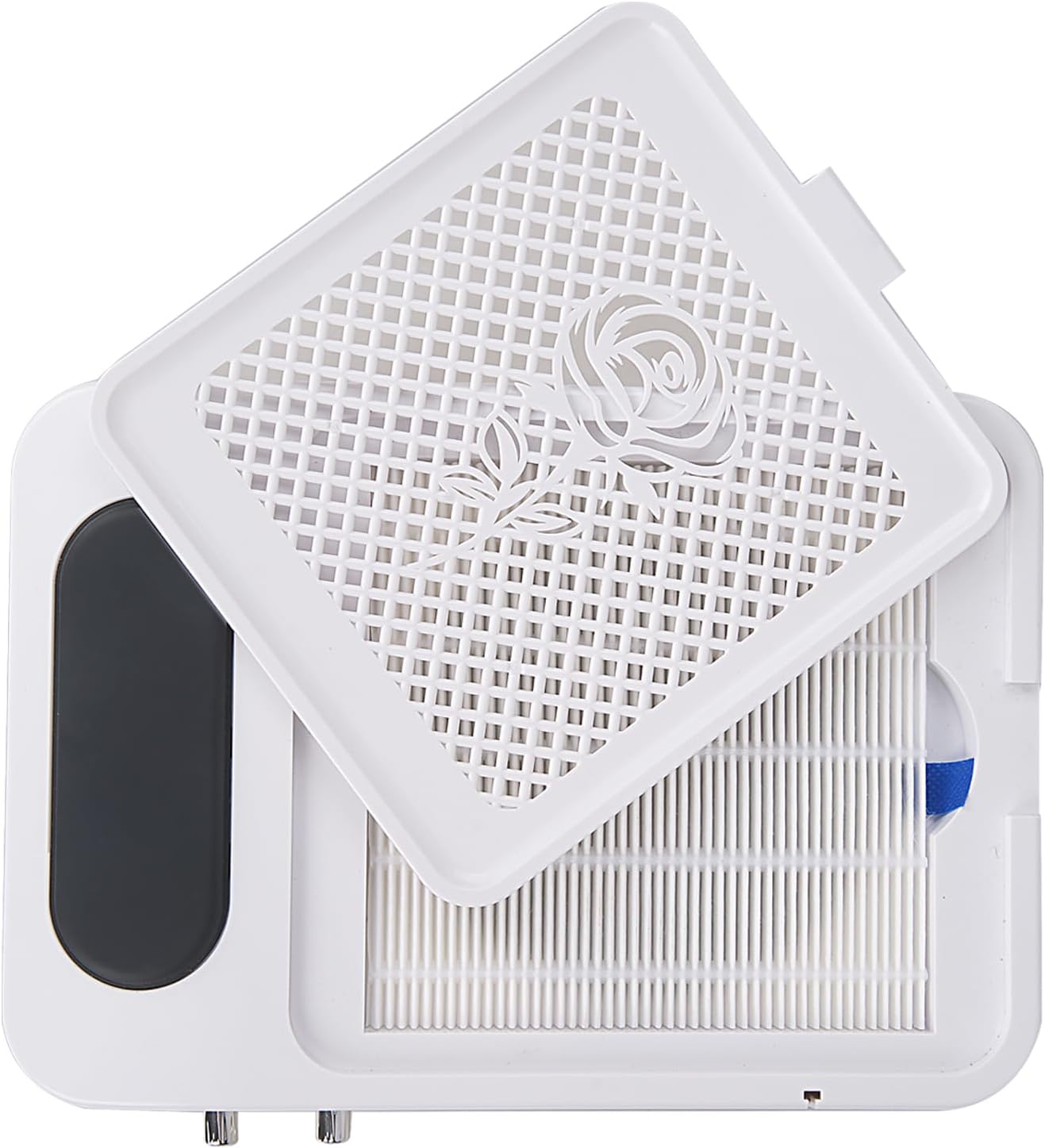
- Ensure the dust filter is correctly seated in its compartment.

Operating Instructions
General Operation
- Ensure the machine is off and disconnected from the power source before making any adjustments or changing accessories.
- Turn the main power switch to the ON position.
- Allow the machine to stabilize for a few moments before beginning use.
- After use, turn off the machine and unplug it from the power outlet.
Using the Nail Drill
- Select the appropriate grinding head for your desired nail treatment (e.g., shaping, polishing, removing gel).
- Insert the chosen grinding head firmly into the nail drill handpiece.
- Use the rotary knob labeled for the nail drill to adjust the rotation speed. Start with a lower speed and gradually increase as needed. The maximum rotation speed is 45,000 RPM.
- Apply gentle pressure and move the drill smoothly over the nail surface.

Using the Dust Collector
- Place your hand directly over the suction area on the main unit.
- Use the rotary knob labeled for the vacuum to adjust the suction power. Choose a setting that effectively captures nail dust and debris.
- The powerful fans and reusable filter ensure up to 100% dust removal, creating a clean working environment.
Using the UV Lamp and Lighting
- The integrated UV lamp is located beneath the hand rest area. Place your nails inside this compartment for curing gel polish.
- The USB illuminating lamp can be adjusted to provide optimal lighting for your work area. Bend the flexible arm to direct the light as needed.


Maintenance
Cleaning the Dust Filter
Regular cleaning of the dust filter is crucial for maintaining optimal suction performance and extending the life of the device.
- Ensure the device is turned off and unplugged before cleaning.
- Carefully lift the top cover of the main unit to access the filter compartment.
- Remove the dust filter.
- Clean the filter using a soft brush or by gently tapping it to remove accumulated dust.
- Important: The filter is NOT washable. Washing the filter will cause damage and render it unusable.
- Once clean, reinsert the filter correctly into its compartment and close the top cover.
General Cleaning
- Wipe the exterior of the device with a soft, dry cloth.
- Do not use abrasive cleaners or solvents.
- Keep the ventilation vents clear of dust and debris to ensure efficient heat dissipation.
Troubleshooting
This section provides solutions to common issues you might encounter with your Tafoyu 5-in-1 Nail Vacuum Cleaner.
| Problem | Possible Cause | Solution |
|---|---|---|
| Device does not power on. | Power cable not connected; Power outlet malfunction; Main switch off. | Ensure power cable is securely plugged in. Test power outlet with another device. Turn the main power switch ON. |
| Low suction power. | Dust filter is clogged; Suction vents are blocked. | Clean the dust filter as described in the Maintenance section. Ensure no debris is blocking the suction vents. |
| Nail drill handpiece overheats. | Continuous high-speed use; Insufficient breaks. | Take regular breaks during extended use. Reduce the speed setting if possible. |
| Excessive noise during operation. | Device not on a stable surface; Internal fan obstruction. | Place the device on a firm, flat, and stable surface. If noise persists, contact customer support. |
| UV lamp not curing gel. | Nails not positioned correctly; Lamp malfunction. | Ensure entire nail surface is exposed to the UV light. If problem persists, contact customer support. |
Specifications
| Feature | Detail |
|---|---|
| Brand | TaFoyu |
| Model Number | ADDC-2 |
| Input Power | 60 Watt |
| Voltage | 230 Volts |
| Max Rotation Speed (Nail Drill) | 45,000 RPM |
| Material | Plastic |
| Package Dimensions | 25.5 x 24.6 x 9.5 cm |
| Package Weight | 1.1 Kilograms |
| Power Source | Electric Cable |
| Country of Origin | China |
Warranty and Support
This product is covered by a manufacturer's warranty against defects in materials and workmanship. Please refer to your purchase documentation for specific warranty terms and duration.
For technical support, troubleshooting assistance, or warranty claims, please contact TaFoyu customer service through the retailer where the product was purchased or visit the official TaFoyu website for contact information.
Please have your model number (ADDC-2) and purchase date available when contacting support.
Ask a question about this manual
Ask about setup, troubleshooting, compatibility, parts, safety, or missing instructions. Manuals+ will review the question and use this page’s manual context to help answer it.