
Neewer NK500
NEEWER 600W Photography Lighting Kit User Manual
Model: NK500
Brand: Neewer
Introduction
This manual provides detailed instructions for the safe and effective use of your NEEWER 600W Photography Lighting Kit. Please read this manual thoroughly before operating the equipment and retain it for future reference.
Package Contents
Before beginning assembly, please verify that all components listed below are present in your package:
- 3 x 24W LED Bulb
- 2 x 83"/210cm Light Stand
- 1 x 43.3"/110cm Light Stand
- 3 x E26 Bulb Socket with Cable
- 2 x 33" Black Umbrella
- 2 x 33" White Umbrella
- 1 x Carrying Bag for Light Stand and Umbrella
- 1 x Carrying Bag for LED Bulbs
- 5 x Cable Tie

Image: All components included in the NEEWER 600W Photography Lighting Kit, neatly arranged.
Setup Instructions
1. Assembling the Light Stands
Extend the legs of the light stand until they are fully spread and stable. Adjust the height of the stand by loosening the locking knobs on each section, extending the pole to the desired height, and then securely tightening the knobs. There are two 83" (210cm) stands and one 43.3" (110cm) stand for various lighting positions.

Image: Illustration of the adjustable metal light stands, showing their minimum and maximum heights.
2. Attaching the E26 Bulb Socket
Mount the E26 bulb socket onto the top stud of the light stand. Ensure it is securely fastened. The socket features a 180-degree adjustable head for precise light direction and an on/off switch for convenient control.

Image: Details of the universal ceramic lamp holder, highlighting its adjustable angle and power switch.
3. Installing the LED Bulbs
Carefully screw one of the 24W LED bulbs into the E26 socket. These bulbs provide 2160 lumens and a 5700K color temperature, equivalent to a 200W incandescent bulb.

Image: The 24W LED light bulb, detailing its energy-saving features and specifications.
4. Attaching the Umbrellas
Insert the shaft of either a black or white umbrella into the designated hole on the bulb socket assembly. Adjust the umbrella's position to achieve the desired light reflection or diffusion.
- Black Umbrellas (with silver interior): Ideal for bouncing and reflecting light, providing more directed and intense illumination.
- White Translucent Umbrellas: Used to soften and evenly distribute the light source, creating a softer, more diffused light.
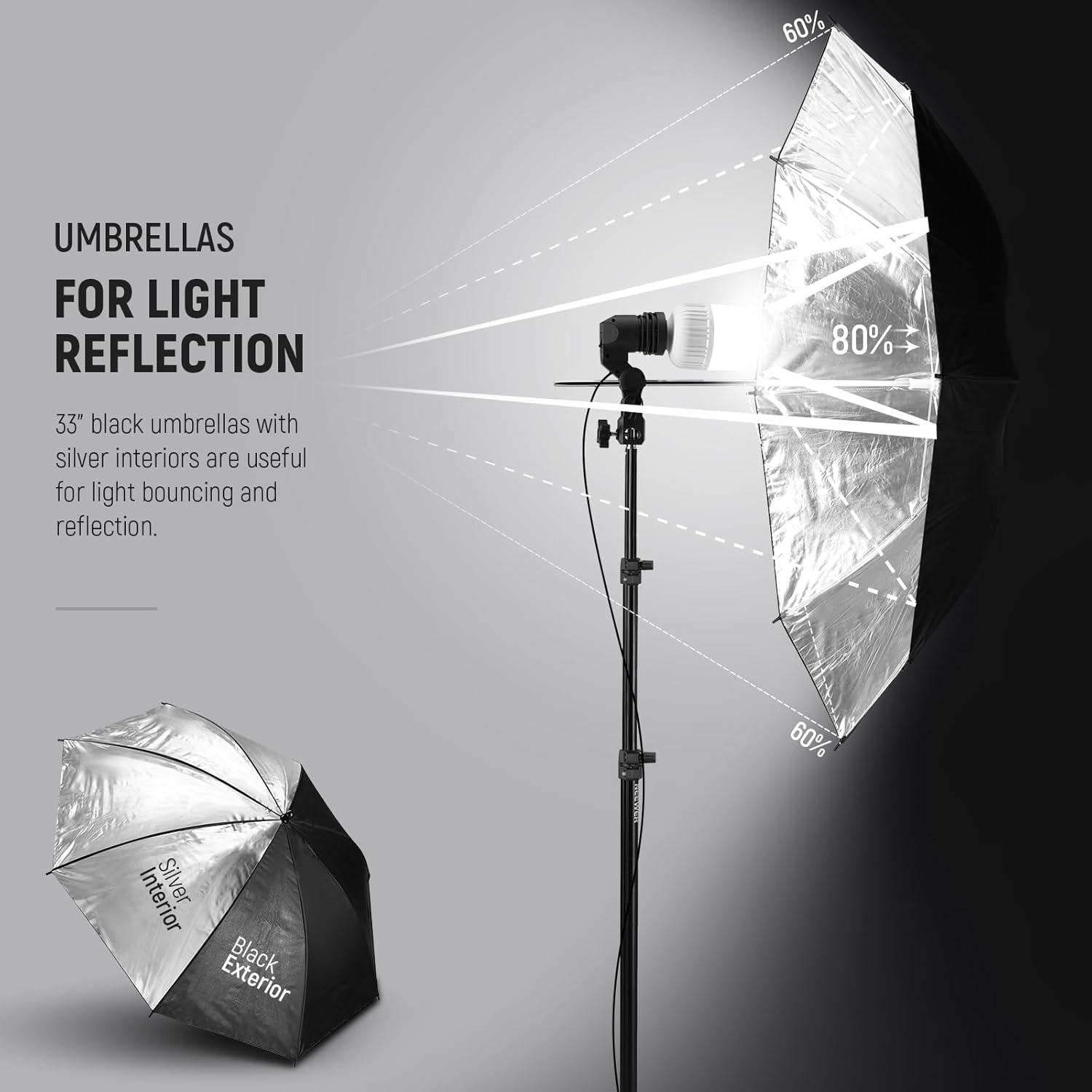
Image: Illustration demonstrating light reflection using a black umbrella with a silver interior.

Image: A white translucent umbrella, designed for softening and diffusing light.
5. Cable Management
Use the included cable ties to secure the 11' (336cm) prolonged cables to the light stands. This helps maintain a tidy setup and prevents tripping hazards.
Operating Instructions
Once assembled, plug the power cables into a standard electrical outlet. Use the on/off switch located on each E26 bulb socket to control the light. Adjust the angle of the lamp holder and the position of the umbrella to achieve your desired lighting effect.
This kit is ideal for various photography and videography applications, including portraits, food photography, children's photography, fashion, and weddings.

Image: A complete setup of the NEEWER 600W Photography Lighting Kit, demonstrating its components in action.

Image: Examples of applicable scenes for the lighting kit, showcasing its versatility in different photographic settings.
Maintenance
- Always unplug the kit from the power source before cleaning or performing any maintenance.
- Wipe down light stands and bulb sockets with a soft, dry cloth. Do not use abrasive cleaners or solvents.
- Handle LED bulbs with care. Avoid touching the glass surface directly to prevent smudges.
- Store the kit in the provided carrying bags when not in use to protect components from dust and damage. The large bag accommodates light stands, umbrellas, and cable ties, while the small bag safely stores the LED bulbs.

Image: The two portable and protective carrying bags for the lighting kit, designed for easy transport and storage.
Troubleshooting
| Problem | Possible Cause | Solution |
|---|---|---|
| Light does not turn on. |
|
|
| Light is too harsh/bright. |
|
|
| Light stand is unstable. |
|
|
Specifications
| Feature | Detail |
|---|---|
| Model Number | NK500 (10102119) |
| Brand | Neewer |
| LED Bulb Power | 24W (equivalent to 200W incandescent) |
| Color Temperature | 5700K |
| Light Stand Height (Tall) | Max. 83" (210cm) |
| Light Stand Height (Short) | Max. 43.3" (110cm) |
| Umbrella Size | 33" (84cm) |
| Bulb Socket Type | E26 |
| Cable Length | 11" (336cm) |
| Item Weight | 12.67 pounds (approx. 5.75 kg) |
| Package Dimensions | 30 x 8.4 x 8.3 inches (approx. 76.2 x 21.3 x 21.1 cm) |
Warranty and Support
For warranty information and technical support, please refer to the official Neewer website or contact their customer service directly. Keep your purchase receipt as proof of purchase for any warranty claims.
Official Neewer Website: www.neewer.com
Ask a question about this manual
Ask about setup, troubleshooting, compatibility, parts, safety, or missing instructions. Manuals+ will review the question and use this page’s manual context to help answer it.