
1. Introduction
This manual provides detailed instructions for the safe and efficient operation of your Kapbom KA-3199 Vintage Retro Portable Bluetooth FM Radio Speaker. Please read this manual thoroughly before using the device and retain it for future reference.
2. Product Overview
The Kapbom KA-3199 is a versatile portable audio device featuring a vintage design. It combines a powerful 5W RMS speaker with multiple connectivity options, including Bluetooth, USB, Micro SD, and FM radio. It also includes a built-in flashlight for added utility.
Key Features:
- 5W RMS High-Quality Audio Output
- Bluetooth Connectivity for Wireless Streaming
- FM Radio Tuner
- USB and Micro SD Card Playback
- AUX Input
- Integrated Flashlight
- Portable and Lightweight Design
- Rechargeable Internal Battery (1200mAh)
Component Identification:
Refer to the images below for a visual guide to the device's components and controls.
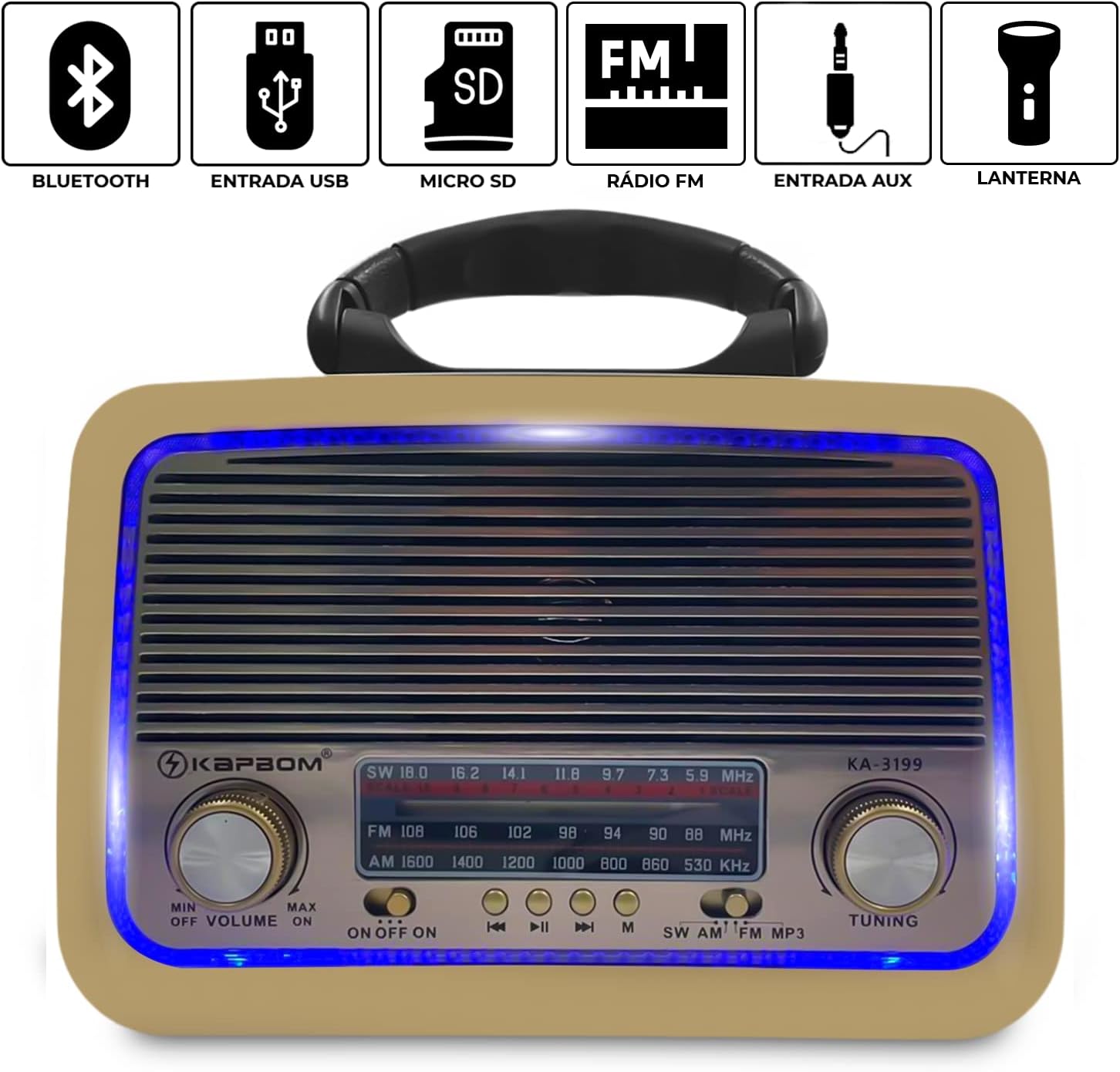
Figure 2.1: Front panel of the KA-3199, showing volume, tuning knobs, and mode selection buttons. Icons indicate Bluetooth, USB, Micro SD, FM Radio, AUX input, and Flashlight capabilities.

Figure 2.2: Side panel of the KA-3199, illustrating the various input ports including USB, TF (Micro SD) card slot, DC 5V charging port, and AUX input.

Figure 2.3: Top-back view of the KA-3199, showing the retractable antenna for improved radio reception and the integrated carry handle.
3. Setup
3.1 Initial Charging
Before first use, fully charge the device. Connect the provided AC power cable to the DC 5V input port on the side of the radio and plug it into a standard wall outlet. The charging indicator light will illuminate. Charging is complete when the light changes or turns off (refer to specific model behavior if indicated on device).
3.2 Powering On/Off
Locate the volume knob on the front panel. Rotate the volume knob clockwise past the 'MIN' position to turn the device ON. Rotate it counter-clockwise to the 'OFF' position to turn the device OFF.

Figure 3.1: Rear view of the KA-3199 with the battery compartment open, showing where to insert or replace batteries if applicable (internal rechargeable battery is primary power source).
4. Operating Instructions
4.1 Mode Selection
After powering on, press the 'M' (Mode) button on the front panel to cycle through available modes: FM Radio, Bluetooth, USB, Micro SD, and AUX. The display will indicate the current mode.
4.2 Volume Control
Adjust the volume by rotating the 'VOLUME' knob on the front panel. Rotate clockwise to increase volume and counter-clockwise to decrease it.
4.3 FM Radio Operation
- Switch to FM mode using the 'M' button.
- Extend the telescopic antenna for better reception.
- Rotate the 'TUNING' knob on the right side of the front panel to scan for radio stations. The frequency will be displayed.
4.4 Bluetooth Pairing
- Switch to Bluetooth mode using the 'M' button. The device will enter pairing mode, indicated by a flashing light or audible prompt.
- Enable Bluetooth on your mobile device (smartphone, tablet, etc.).
- Search for available devices and select "KA-3199" from the list.
- Once paired, the device will confirm with an audible sound, and you can begin playing audio wirelessly.
4.5 USB/Micro SD Playback
- Insert a USB flash drive or Micro SD card (with audio files) into the respective port on the side of the device.
- Switch to USB or Micro SD mode using the 'M' button. The device will automatically begin playing audio files.
- Use the playback control buttons (Play/Pause, Next Track, Previous Track) on the front panel to manage your music.
4.6 AUX Input
- Connect an external audio device (e.g., MP3 player, phone) to the AUX input port using a 3.5mm audio cable (not included).
- Switch to AUX mode using the 'M' button.
- Control playback from your external device.
4.7 Flashlight Function
The device includes a built-in flashlight. Locate the flashlight switch, typically on the side or top of the unit, and toggle it to turn the flashlight ON or OFF.

Figure 4.1: Side view of the KA-3199, highlighting the integrated flashlight feature.
5. Maintenance
5.1 Cleaning
Wipe the device with a soft, dry cloth. Do not use abrasive cleaners, waxes, or solvents as they may damage the finish. Avoid exposing the device to excessive moisture.
5.2 Storage
When not in use for extended periods, store the device in a cool, dry place away from direct sunlight and extreme temperatures. Ensure the device is turned off before storage.
6. Troubleshooting
| Problem | Possible Cause | Solution |
|---|---|---|
| No power | Battery is depleted; Device is off. | Charge the device fully; Rotate volume knob clockwise to turn on. |
| No sound | Volume is too low; Incorrect mode selected; External device volume low. | Increase volume; Select correct mode; Increase volume on external device. |
| Bluetooth not connecting | Device not in pairing mode; Bluetooth off on external device; Out of range. | Ensure device is in Bluetooth pairing mode; Enable Bluetooth on external device; Move devices closer. |
| Poor FM radio reception | Antenna not extended; Weak signal area. | Fully extend the telescopic antenna; Try repositioning the radio. |
7. Specifications
| Feature | Detail |
|---|---|
| Model Number | KA-3199 |
| Power Output | 5W RMS |
| Internal Battery Capacity | 1200mAh |
| Battery Life (Average) | 4 hours |
| Frequency Response | 150 - 20000 Hz |
| Sensitivity | 80 dB |
| Impedance | 8 Ohm |
| Speaker Diameter | 75 mm |
| Connectivity | Bluetooth, USB, Micro SD, FM Radio, AUX |
| Dimensions (L x W x H) | 20.5 cm x 8.5 cm x 15 cm |
| Weight | 970 grams |
| Included Components | Portable Speaker, AC Power Cable, User Manual |

Figure 7.1: Dimensions of the KA-3199 radio.
8. Safety Information
- Do not expose the device to water or excessive moisture.
- Avoid dropping or subjecting the device to strong impacts.
- Do not attempt to disassemble or repair the device yourself. Refer to qualified service personnel.
- Keep the device away from heat sources and direct sunlight.
- Use only the provided charging cable or a compatible alternative.
- Dispose of batteries responsibly according to local regulations.
9. Warranty and Support
Warranty information for the Kapbom KA-3199 is typically provided at the point of purchase or included with the product packaging. Please refer to these documents for details regarding warranty coverage and duration.
For technical support or service inquiries, please contact the retailer or manufacturer directly using the contact information provided with your purchase.