
1. Introduction
Thank you for choosing the NETTA Mini Dehumidifier. This compact and efficient appliance is designed to remove excess moisture from small spaces, helping to prevent dampness, condensation, and mold growth. Please read this manual thoroughly before operating the device to ensure safe and optimal performance. Keep this manual for future reference.
2. Safety Instructions
To reduce the risk of fire, electric shock, or injury, always follow these basic safety precautions:
- Ensure the power supply matches the voltage specified on the rating label.
- Do not operate the dehumidifier with a damaged cord or plug.
- Keep the appliance away from water or other liquids. Do not immerse it.
- Do not block air inlets or outlets. Maintain at least 10 cm clearance around the unit.
- Unplug the unit before cleaning, maintenance, or when not in use.
- This appliance is for indoor use only.
- Do not allow children to play with the appliance.
- Empty the water tank regularly to prevent overflow.
3. Product Overview
Familiarize yourself with the components of your NETTA Mini Dehumidifier.
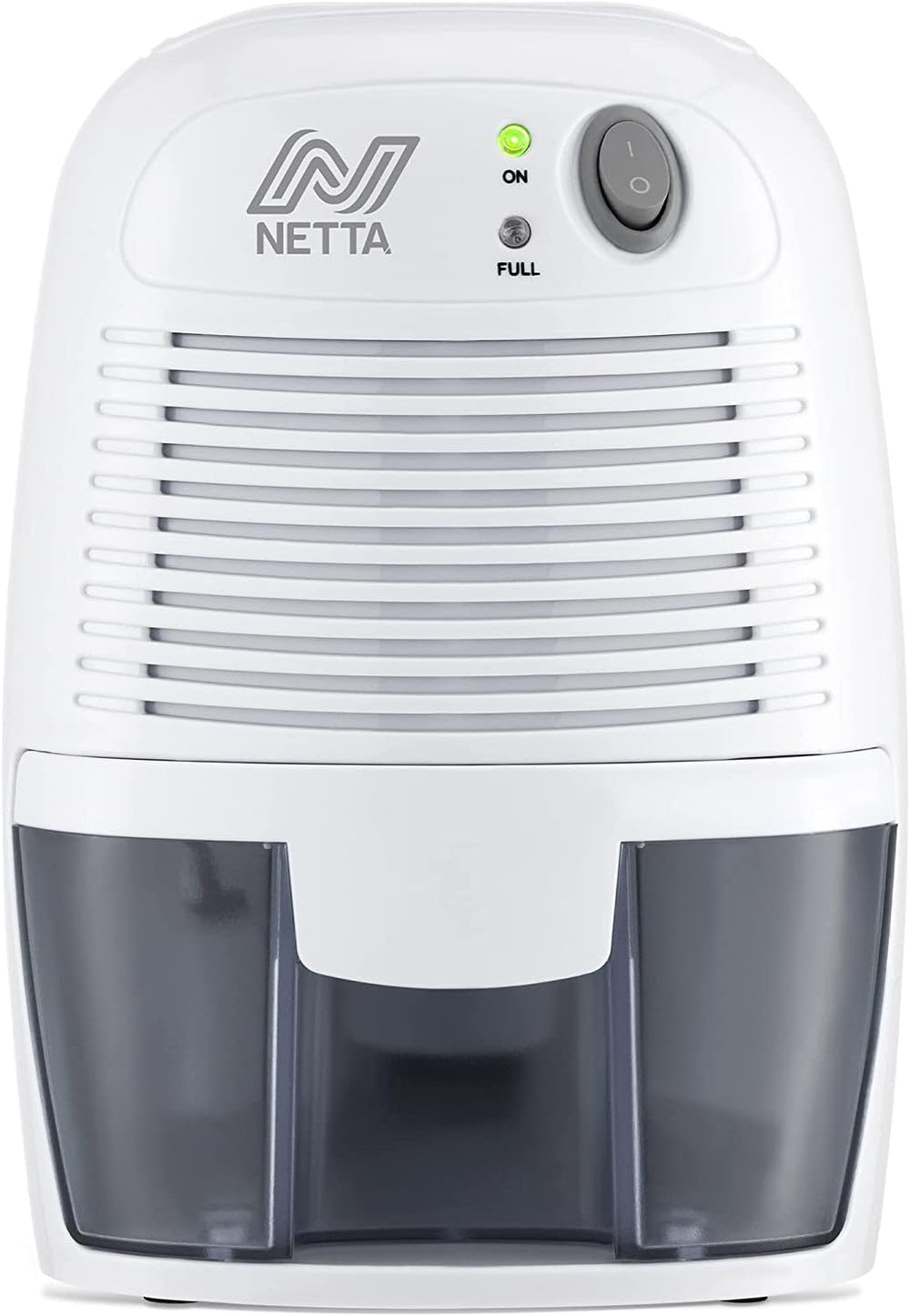
Image: The NETTA Mini Dehumidifier, highlighting its compact design and ability to extract up to 300ml of moisture per day. The unit features a power button, indicator lights, and a visible water tank.
Key Components:
- Power Button: Turns the unit on or off.
- Power Indicator Light (Green): Illuminates when the unit is operating.
- Full Tank Indicator Light (Red): Illuminates when the water tank is full, and the unit automatically shuts off.
- Air Inlet: Where humid air enters the unit.
- Air Outlet: Where dry air is expelled.
- Water Tank: Collects extracted moisture. Removable for easy emptying.

Image: A detailed view of the dehumidifier's control panel, showing the 'ON' and 'FULL' indicator lights, and the removable 500ml water tank being detached for emptying.
4. Setup
Follow these steps to set up your dehumidifier for first use:
- Unpack: Carefully remove the dehumidifier from its packaging. Retain packaging for future storage or transport.
- Placement: Place the unit on a flat, stable surface in the desired location. Ensure there is at least 10 cm of clear space around the air inlets and outlets for proper airflow. Avoid placing it near heat sources or in direct sunlight. This unit is ideal for small spaces like bedrooms, kitchens, closets, or cupboards.
- Power Connection: Plug the power adapter into a suitable electrical outlet.

Image: The compact dehumidifier shown in different small environments, including inside a closet and on a bedroom shelf, demonstrating its portability and suitability for confined areas.
5. Operating Instructions
Operating your NETTA Mini Dehumidifier is simple:
- Power On: Press the power button once. The green 'ON' indicator light will illuminate, and the dehumidifier will begin to operate.
- Automatic Shut-Off: The unit features an automatic shut-off function. When the 500ml water tank is full, the red 'FULL' indicator light will illuminate, and the dehumidifier will automatically turn off to prevent overflow.
- Emptying the Water Tank: When the 'FULL' indicator light is on, carefully slide out the water tank from the front of the unit. Pour out the collected water.
- Replace Tank: Slide the empty water tank back into the unit until it clicks securely into place. The dehumidifier will resume operation automatically if the power button is still pressed.
- Power Off: To turn off the unit manually, press the power button again. The green 'ON' indicator light will turn off.

Image: A visual representation of the dehumidifier's effectiveness, showing a reduction in humidity levels from 85% to 45% in a room environment.
6. Maintenance
Regular maintenance ensures the longevity and efficiency of your dehumidifier.
Cleaning the Water Tank:
- Empty the water tank as described in the operating instructions.
- Rinse the tank with clean water. For stubborn residue, use a mild detergent and a soft cloth, then rinse thoroughly.
- Ensure the tank is completely dry before reinserting it into the unit.
Cleaning the Exterior:
- Wipe the exterior of the dehumidifier with a soft, damp cloth.
- Do not use abrasive cleaners, solvents, or harsh chemicals, as these can damage the surface.
Storage:
- If storing the unit for an extended period, ensure the water tank is empty and clean.
- Clean the exterior of the unit.
- Store the dehumidifier in a cool, dry place, away from direct sunlight and extreme temperatures.
7. Troubleshooting
If you encounter issues with your dehumidifier, refer to the following table:
| Problem | Possible Cause | Solution |
|---|---|---|
| Dehumidifier does not turn on. | No power supply. | Check if the power adapter is securely plugged into the unit and the wall outlet. Ensure the outlet is functional. |
| Unit is on but not collecting water. | Humidity level is too low. | The unit will only extract water if the humidity is above 40%. If the air is already dry, it will collect less or no water. |
| Red 'FULL' indicator light is on, but tank is not full. | Water tank not correctly seated. | Remove the water tank and reinsert it firmly until it clicks into place. |
| Reduced dehumidification performance. | Air inlets/outlets blocked. | Ensure there is sufficient clearance around the unit for proper airflow. Clean any dust or debris from the vents. |
| Unit is noisy. | Unit not on a flat surface. | Place the dehumidifier on a stable, flat surface to minimize vibrations. The unit operates at a quiet 35dB. |
8. Specifications
Technical details for the NETTA Mini Dehumidifier Model DH500A:
- Brand: NETTA
- Model Number: DH500A (104038)
- Color: Grey
- Product Dimensions: 13 x 15.4 x 22 cm
- Weight: 1 kg
- Water Tank Capacity: 500 ml
- Moisture Extraction: Up to 300 ml/day
- Power Consumption: 22 Watts
- Noise Level: 35 dB

Image: An illustration comparing the 35dB noise level of the NETTA dehumidifier to other common sounds like rustling leaves (25dB) and normal conversation (60dB), emphasizing its quiet operation.
9. Warranty and Support
For warranty information or technical support, please refer to the warranty card included with your product or visit the official NETTA website. If you require assistance, please contact NETTA customer service directly.