
Introduction
Thank you for purchasing the Maite Portable Bluetooth CD Player. This device offers versatile audio playback options, including CD, Bluetooth, FM radio, AUX, and USB. It is designed for both wall-mounted and desktop use, providing a flexible and enjoyable listening experience. Please read this manual carefully before using the product to ensure proper operation and to maximize its features.
Package Contents
Please check the package for the following items:
- 1 x Maite Portable Bluetooth CD Player
- 1 x Audio Cable
- 1 x Power Cable
- 1 x User Manual
- 1 x Wall Mounting Plate and Kit
- 1 x Desktop Stand
- 1 x Remote Control
Product Overview

Image: The Maite Portable Bluetooth CD Player in black, shown with its included white remote control. The player features a circular transparent cover over the CD tray.
Component Identification
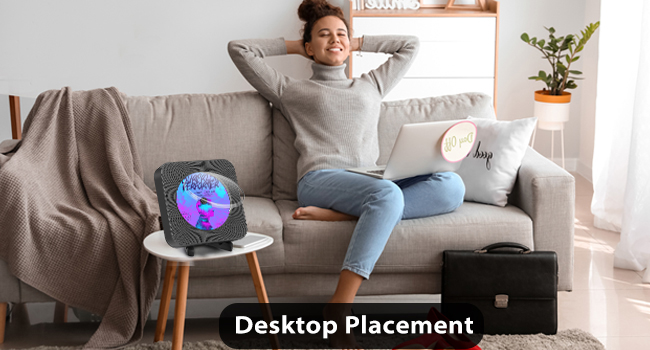
Image: A close-up diagram of the Maite CD Player's side and top, highlighting the USB Port, AUX Port, Power Switch, and Micro SD slot. It also shows the control buttons on the top: Mode Switching, Volume -, Volume +, Next, Previous.
- Power Switch: Located on the power cable, pull to turn on/off.
- USB Port: For connecting USB flash drives for audio playback.
- AUX Port (3.5mm Audio Jack): For connecting external audio devices or headphones.
- Micro SD Slot: For connecting Micro SD cards for audio playback.
- Control Buttons (Top Panel):
- MODE: Switches between FM Radio, CD Mode, AUX Mode, Bluetooth Mode, USB Mode.
- Volume - / +: Adjusts volume.
- Previous / Next: Navigates tracks or radio stations.
- LED Display: Shows current mode and time/track information.

Image: The LED display of the CD player showing various modes: CD Mode, USB Mode, Bluetooth Mode (Transmission and Reception), AUX Mode, and FM Mode.
Setup Instructions
Power Connection
- Connect the provided power cable to the DC IN port on the back of the CD player.
- Plug the other end of the power cable into a standard wall outlet.
- To power on the device, gently pull the power cable downwards. Pull it again to power off.
Mounting Options
The Maite CD Player offers flexible placement options:
1. Desktop Placement

Image: The Maite CD Player placed on its included desktop stand on a small table next to a sofa, with a person relaxing in the background.
Attach the provided desktop stand to the bottom of the CD player. Place the player on any flat, stable surface such as a desk, table, or shelf. The stand allows for angle adjustment (30°, 60°, 120°) for optimal viewing and sound projection.

Image: A diagram illustrating the adjustable angles of the desktop stand, showing positions at 30, 60, and 120 degrees.
2. Wall Mounting

Image: The Maite CD Player mounted on a kitchen wall, with a family in the foreground. The power cable hangs neatly from the bottom of the player.
Use the included wall mounting plate and kit to securely attach the CD player to a wall. Ensure the wall is suitable for mounting and follow the instructions provided with the mounting kit for safe installation.
Operating Instructions
General Operation
- Power On/Off: Pull the power cable downwards to turn the player on or off.
- Mode Selection: Press the MODE button on the top panel or remote control to cycle through available modes: CD, Bluetooth, FM, AUX, USB. The LED display will indicate the current mode.
- Volume Adjustment: Use the Volume + and Volume - buttons on the top panel or remote control to adjust the sound level.
1. CD Playback
- Ensure the player is in CD mode (indicated on the LED display).
- Gently open the CD cover and insert a CD (compatible formats: CD, CD-R, CD-RW, MP3, WMA) with the label side facing up.
- Close the CD cover. The player will automatically begin reading the disc and start playback.
- Use the Previous and Next buttons to skip tracks.
- Press the Play/Pause button to pause or resume playback.
- Repeat Functions: The player supports Repeat One, Repeat All, Shuffle Play, and A-B Repeat. Press the Repeat button on the remote control to cycle through these options.

Image: A diagram illustrating the repeat functions: Repeat One, Repeat All, Shuffle Play, and A-B Repeat, shown with a child studying.
2. Bluetooth Mode
The player supports both Bluetooth transmission and reception.
Bluetooth Transmission (Connect to Bluetooth Headphones/Speakers)

Image: A diagram showing the Maite CD Player transmitting audio via Bluetooth to an Amazon Echo speaker and wireless earbuds.
- Long press the M button (Mode button) on the player or the Bluetooth button on the remote control for 3 seconds. The LED display will show "BLUE" and flash, indicating pairing mode.
- Enable Bluetooth on your external Bluetooth headphones or speaker and set them to pairing mode.
- The CD player will automatically connect to the nearest discoverable Bluetooth device. Once connected, "BLUE" will stop flashing.
- You can now play audio from the CD player through your Bluetooth output device.
Bluetooth Reception (Connect to Phone/Tablet/Laptop)

Image: A diagram showing the Maite CD Player receiving audio via Bluetooth from a smartphone and a laptop.
- Press the MODE button until the LED display shows "BLUE" (Bluetooth Reception mode).
- On your smartphone, tablet, or laptop, enable Bluetooth and search for available devices.
- Select "MAITE CD Player" from the list of devices to pair.
- Once connected, you can play audio from your device through the CD player's speakers.
3. FM Radio
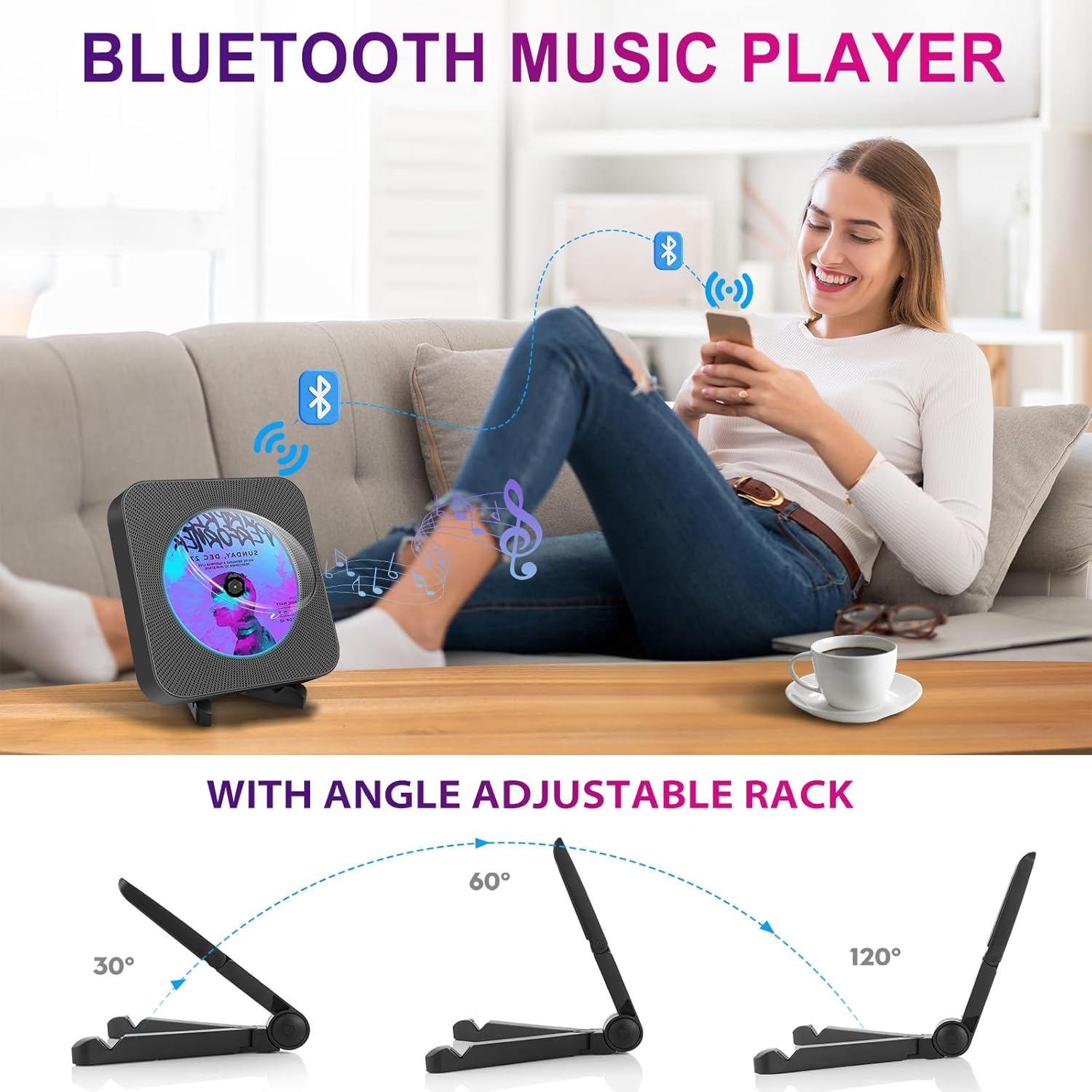
Image: A person in a kitchen enjoying music from the Maite CD Player, which is set to FM radio mode. The image highlights the FM frequency range of 76-108 MHz.
- Press the MODE button until the LED display shows the FM frequency (e.g., "104.7").
- The player will automatically scan and store available FM stations.
- Use the Previous and Next buttons to switch between stored stations.

Image: A collage showing the Maite CD Player's features: FM Radio (76MHz-108MHz), Earphone Output (person listening with headphones), and USB Support (USB cable connected to the player).
4. AUX Mode

Image: The Maite CD Player connected via its AUX port to external speakers, with people enjoying music in the background. A remote control is also shown.
- Connect one end of the provided audio cable to the AUX port on the CD player.
- Connect the other end to the audio output jack of an external device (e.g., smartphone, MP3 player).
- Press the MODE button until the LED display shows "LINE" or "AUX".
- Play audio from your external device. The sound will be output through the CD player's speakers.
- You can also connect headphones to the 3.5mm AUX port for private listening.
5. USB Mode
- Insert a USB flash drive containing MP3 or WMA audio files into the USB port on the CD player.
- Press the MODE button until the LED display shows "USB".
- The player will automatically detect and begin playing audio files from the USB drive.
- Use the Previous and Next buttons to navigate through tracks.
6. Remote Control Usage
- The included remote control allows for convenient operation from a distance.
- Ensure there are no obstructions between the remote control and the CD player.
- Functions include: Power On/Off, Mode Selection, Volume Up/Down, Play/Pause, Previous/Next Track, Repeat functions, and Bluetooth pairing.
Maintenance
- Cleaning: Use a soft, dry cloth to clean the exterior of the player. Do not use liquid cleaners or abrasive materials.
- CD Care: Handle CDs by the edges. Clean discs with a soft, lint-free cloth, wiping from the center outwards.
- Storage: When not in use for extended periods, store the player in a cool, dry place away from direct sunlight and extreme temperatures.
- Avoid Dust: Keep the CD tray closed when not in use to prevent dust accumulation.
Troubleshooting
| Problem | Possible Cause | Solution |
|---|---|---|
| Player does not power on. | No power connection; Power cable not pulled. | Ensure power cable is securely plugged in and pulled downwards to activate the switch. |
| No sound from speakers. | Volume too low; Incorrect mode selected; External speakers not connected/powered. | Increase volume. Verify correct mode (CD, Bluetooth, AUX, USB). If using AUX OUT, ensure external speakers are connected and powered on. |
| CD not playing/reading. | CD is dirty, scratched, or inserted incorrectly; Incorrect disc format; Player not in CD mode. | Clean the CD. Reinsert the CD with the label side up. Ensure the disc format is compatible (CD, CD-R, CD-RW, MP3, WMA). Switch to CD mode. |
| Bluetooth connection issues. | Device too far; Not in pairing mode; Interference. | Ensure devices are within 10m range. Put both devices into pairing mode. Restart both devices and try again. |
| FM radio static/poor reception. | Weak signal; Interference. | Adjust the player's position. Try auto-scanning for stations again. |
| Remote control not working. | Batteries low/dead; Obstruction; Not pointing at sensor. | Replace batteries. Remove any obstructions. Point the remote directly at the player's sensor. |
Specifications
| Feature | Detail |
|---|---|
| Brand | MAITE |
| Model Number | 20230516 |
| Connectivity Technology | Auxiliary, Bluetooth, USB |
| Compatible Devices | Speakers, Headphones |
| Audio Formats Supported | CD, MP3, WMA |
| FM Radio Frequency | 76.0-108.0 MHz |
| Bluetooth Version | 5.0 (up to 10m range) |
| Number of Discs | 1 |
| Number of Channels | 2 (HIFI integrated speakers) |
| Product Dimensions | 18.9L x 18.9W x 3.7H cm |
| Power Cable Length | 1.8 meters |
| Power Source | Wired Electric (AC Power) |
Warranty and Support
Your Maite Portable Bluetooth CD Player comes with the following:
- 30-Day Return for Refund: If you are not satisfied with your purchase, you may return it for a full refund within 30 days.
- 60-Day Warranty: The product is covered by a 60-day warranty from the date of purchase, covering manufacturing defects.
- Lifetime Technical Support: Maite provides lifetime technical support for this product.
- 24 Hours Online Service: For any inquiries or assistance, please contact Maite customer service.
For support, please refer to the contact information provided on the product packaging or the official Maite website.