
1. Product Overview
The Belkin BoostCharge Magnetic Wireless Power Bank is designed to provide portable power for your compatible devices. Featuring MagSafe compatibility and a built-in kickstand, it offers convenient charging and hands-free viewing.

Image: Belkin BoostCharge Magnetic Wireless Power Bank in pink, attached to a smartphone.
2. What's in the Box
- Belkin BoostCharge Magnetic Wireless Power Bank (Model BPD004)
- USB-C to USB-C Charging Cable (3.3ft)
- User Manual (this document)
3. Setup
3.1 Charging the Power Bank
- Connect the included USB-C to USB-C cable to the USB-C port on the power bank.
- Connect the other end of the cable to a compatible USB-C power adapter (not included).
- The LED indicator lights on the side of the power bank will illuminate to show charging progress. All four LEDs will be solid white when fully charged.
3.2 Attaching to Your Device
For MagSafe-compatible devices:
- Align the power bank with the back of your MagSafe-compatible iPhone.
- The magnets will securely attach the power bank to your device, initiating wireless charging.

Image: A hand demonstrating the magnetic attachment of the power bank to an iPhone.
4. Operating Instructions
4.1 Wireless Charging
Once magnetically attached to a compatible iPhone, the power bank will automatically begin wireless charging. Ensure the power bank is sufficiently charged for optimal performance.
4.2 Wired Charging (Pass-Through)
The USB-C port on the power bank supports both input and output. You can charge the power bank itself or use it to charge other devices via a USB-C cable. The pass-through charging feature allows you to charge your phone wirelessly while the power bank itself is being charged via its USB-C port.
4.3 Using the Kickstand
The integrated pop-up kickstand allows for hands-free viewing of your device while it charges. Simply pull out the kickstand from the back of the power bank to prop up your phone in either portrait or landscape orientation.
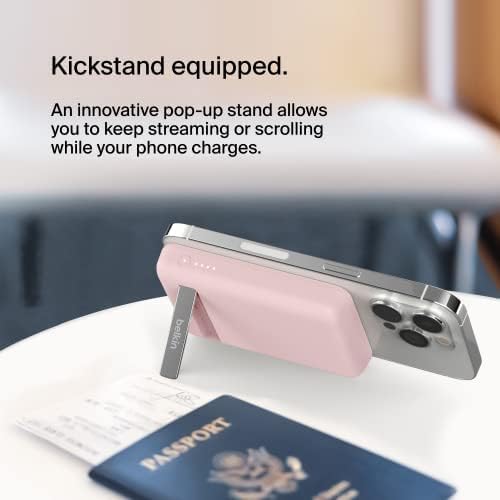
Image: The power bank's kickstand supporting a phone for hands-free viewing.
5. LED Indicator Lights
The LED lights on the side of the power bank indicate its battery status:
- Four solid LEDs: 75-100% charged
- Three solid LEDs: 50-75% charged
- Two solid LEDs: 25-50% charged
- One solid LED: 0-25% charged
- Flashing LEDs: Power bank is charging or experiencing an error.
6. Compatibility
This power bank is compatible with MagSafe-enabled iPhones and other devices that support wireless charging or can be charged via USB-C. Specific compatible models include:
- iPhone 17, iPhone Air, iPhone 17 Pro, iPhone 17 Pro Max
- iPhone 16 Pro Max, iPhone 16 Pro, iPhone 16, iPhone 16 Plus
- iPhone 15 Pro Max, iPhone 15 Pro, iPhone 15 Plus, iPhone 15
- iPhone 14 Pro Max, iPhone 14 Pro, iPhone 14 Plus, iPhone 14
- iPhone 13 Pro Max, iPhone 13 Pro, iPhone 13, iPhone 13 mini
- iPhone 12 Pro Max, iPhone 12 Pro, iPhone 12, iPhone 12 mini
- AirPods Pro, AirPods
- Apple Watch Series 11, Apple Watch SE 3, Apple Watch Ultra 3
- Google Pixel 10 Pro XL, Google Pixel 10 Pro Fold, Google Pixel 10 Pro, Google Pixel 10
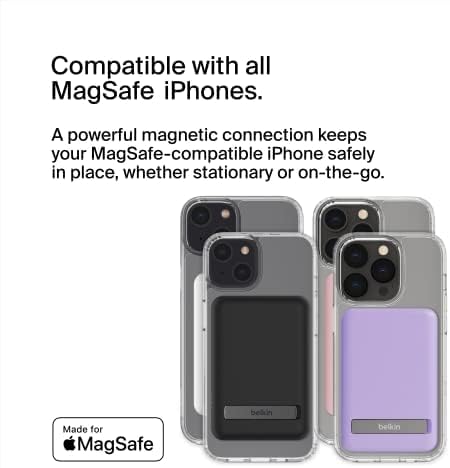
Image: Various iPhones demonstrating MagSafe compatibility with the power bank.
7. Maintenance and Care
- Keep the power bank away from water and extreme temperatures.
- Clean the surface with a soft, dry cloth. Do not use harsh chemicals.
- Avoid dropping or subjecting the power bank to strong impacts.
- Store in a cool, dry place when not in use.
8. Troubleshooting
8.1 Device Not Charging Wirelessly
- Ensure your device is MagSafe-compatible or supports wireless charging.
- Verify the power bank is sufficiently charged (check LED indicators).
- Ensure the power bank is properly aligned with your device's charging coil.
- If using a case, ensure it is MagSafe-compatible and not too thick to impede charging.
8.2 Power Bank Not Charging
- Check the USB-C cable for damage and ensure it is securely connected to both the power bank and the power adapter.
- Try a different USB-C cable or power adapter.
- Ensure the power adapter is functioning correctly and providing adequate power.
8.3 Overheating
- It is normal for the power bank to become slightly warm during charging.
- If it becomes excessively hot, disconnect it immediately and allow it to cool down. Avoid charging in direct sunlight or enclosed spaces.
9. Specifications
| Feature | Detail |
|---|---|
| Brand | Belkin |
| Model Number | BPD004 |
| Battery Capacity | 5000 mAh |
| Wireless Charging Output | 7.5W (MagSafe compatible) |
| Connector Type | USB Type C |
| Voltage | 1.5 Volts |
| Amperage | 2 Amps |
| Special Features | LED Indicator Lights, Pass-Through Charging, Pocket Size, Slim, Wireless Charging, Built-in Pop-up Kickstand |
| Battery Cell Type | Lithium Ion |
| Item Weight | 170 Grams |
| Item Dimensions (L x W x Thickness) | 3.7"L x 2.52"W x 0.63"Th |
10. Warranty and Support
This Belkin product comes with a 2-year limited warranty. For detailed warranty information and support, please refer to the official Belkin website or contact Belkin customer service.
Belkin also offers a $2500 Connected Equipment Warranty. Please check the official Belkin website for terms and conditions.
11. Official Product Video
Video: An official product video from Belkin Inc. showcasing the BoostCharge Magnetic Wireless Power Bank's features, including its magnetic attachment, pass-through charging, and kickstand functionality.