1. Introduction
This document serves as an instruction manual for the Generic replacement infrared remote control designed for various Air Conditioner (AC) units. This remote is compatible with specific Electra, Elco, Emailair, and Johnson AC models, including RC08B and RC08C. It is intended as a direct replacement for your original remote control, provided its appearance and button layout match the images shown in this manual.
Please ensure your original remote control is identical to the one depicted in this manual to guarantee full compatibility and functionality. This remote operates via infrared (IR) signals.
2. Setup
2.1 Battery Installation
The remote control requires two (2) AAA batteries for operation. Follow these steps to install the batteries:
- Locate the battery compartment cover on the back of the remote control.
- Slide the cover downwards or press the latch (if present) to open the compartment.
- Insert two AAA batteries, ensuring the positive (+) and negative (-) terminals align correctly with the markings inside the compartment.
- Slide the battery compartment cover back into place until it clicks securely.
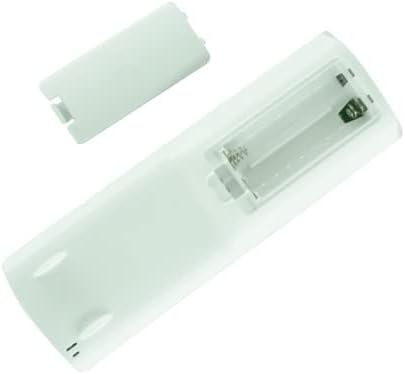
Image: Rear view of the remote control with the battery cover open, illustrating the correct orientation for AAA battery insertion.
Note: Always use new batteries and replace both batteries at the same time. Do not mix old and new batteries or different types of batteries.
3. Operating Instructions
This remote control functions as an infrared transmitter. For optimal performance, point the remote directly at the infrared receiver on your AC unit. Ensure there are no obstructions between the remote and the AC unit.

Image: Front view of the replacement AC remote control, displaying its LCD screen and button layout.
3.1 Button Functions (Common)
The remote control features various buttons for controlling your AC unit. While specific functions may vary slightly depending on your AC model, the general purpose of common buttons is as follows:
- Power (Red Button): Turns the AC unit On or Off.
- Mode: Cycles through operating modes (e.g., Cool, Heat, Fan, Dry, Auto).
- Temp +/-: Adjusts the desired temperature setting.
- Fan Speed: Adjusts the fan speed (e.g., Low, Medium, High, Auto).
- Swing: Controls the louver swing function.
- Sleep: Activates or deactivates sleep mode for energy saving and quiet operation.
- Timer: Sets a timer for the AC unit to turn On or Off automatically.
- Light: Controls the display light on the AC unit.
- Eco/Clean: Activates energy-saving or self-cleaning functions, if available on your AC unit.
For detailed information on specific functions and advanced settings, please refer to the original instruction manual of your Air Conditioner unit.
4. Maintenance
4.1 Cleaning the Remote Control
To maintain the remote control's appearance and functionality, clean it regularly:
- Wipe the surface with a soft, dry cloth.
- For stubborn dirt, lightly dampen the cloth with water or a mild, non-abrasive cleaner. Do not spray cleaner directly onto the remote.
- Avoid using harsh chemicals, abrasive cleaners, or solvents, as these can damage the remote's finish or internal components.
4.2 Battery Replacement
Replace batteries when the remote's range decreases or if the display becomes dim or unresponsive. Refer to Section 2.1 for battery installation instructions. Remove batteries if the remote will not be used for an extended period to prevent leakage.
5. Troubleshooting
If you experience issues with your remote control, please review the following common problems and solutions:
| Problem | Possible Cause / Solution |
|---|---|
| Remote is unresponsive or has short range. |
|
| Certain functions do not work. |
|
| Remote does not control the AC unit at all. |
|
If troubleshooting steps do not resolve the issue, please contact the seller for further assistance.
6. Specifications
| Feature | Detail |
|---|---|
| Brand | Generic |
| Model Compatibility | Electra RC08B, RC08C; Elco RC08B, RC08C; Emailair RC08C, RC08B; Johnson RC08C, RC08B |
| Connectivity Technology | Infrared (IR) |
| Controller Type | Button Control |
| Batteries Required | 2 x AAA batteries (not included) |
| Special Feature | Replacement remote; Ergonomic design |
| Manufacturer | Easytry |
| Country of Origin | China |
7. Warranty and Support
7.1 Return Policy
This product is subject to a 30-day return policy for refund or replacement, as per the seller's terms. Please refer to your purchase details for specific return instructions and eligibility.
7.2 Customer Support
For any questions, concerns, or issues not covered in this manual, please contact the seller directly through the platform where the purchase was made. Provide your order number and a clear description of the issue for prompt assistance.
