1. Introduction
Thank you for choosing the Wefomey White LED Strip Lights. This product features tunable white light (2700K-6500K), motion sensing capabilities, and multiple control options including remote and APP control. Designed for both indoor and outdoor use (PIR sensor box is not waterproof), this manual provides essential information for safe installation, operation, and maintenance.
Please read this manual thoroughly before installation and operation to ensure optimal performance and safety.
2. What's in the Box
Verify that all components are present before beginning installation:
- 1 x 10ft (3m) Waterproof Tunable White LED Strip with PIR & Light Sensitive Motion Sensor
- 1 x RF Remote Controller
- 1 x 5V 2A US plug power supply
- 1 x 8mm 3-Pin L Shape Solderless Connector
- 4 x Sticky Cable Clips
- 1 x CR 2025 Lithium Battery (for remote)
- 1 x User Manual (this document)

Figure 2.1: All components included in the Wefomey LED Strip Lights package.
3. Product Specifications
| Feature | Description |
|---|---|
| Model Number | 3M-MSWW-IP65 |
| Light Color | Tunable White (2700K-6500K) |
| Length | 10 feet (3 meters) |
| Voltage | 5V |
| Wattage | 10 Watts |
| Water Resistance | IP65 (Strip light is waterproof, PIR sensor box is not) |
| Control Methods | APP Control (Lotus Lantern CCT), RF Remote Control, Motion Sensor Box |
| Motion Sensor Range | Max 16.4 ft (5m), 120° detection angle |
| Average Life | 50,000 Hours |
4. Safety Information
- Ensure the power supply is disconnected before installation or maintenance.
- The PIR sensor box is not waterproof. Avoid exposing it to water or high humidity.
- Do not submerge the LED strip in water, despite its IP65 rating. It is designed for splash and dust resistance.
- Use only the provided 5V USB power supply. Using an incorrect power supply may damage the product and void the warranty.
- Do not bend the LED strip sharply or apply excessive force, as this may damage the circuit.
- Keep out of reach of children.
5. Setup and Installation
- Prepare the Surface: Clean and dry the surface where the LED strip will be installed. Ensure it is smooth and free of dust or oil for optimal adhesive performance.
- Measure and Cut (Optional): If needed, the LED strip can be cut at designated cut marks (usually indicated by a scissor icon or copper pads). Ensure to cut only at these marks to avoid damaging the circuit.
- Connect Components:
- Connect the LED strip to the PIR motion sensor box.
- Connect the PIR motion sensor box to the 5V USB power supply.
- Insert the CR 2025 Lithium Battery into the RF Remote Controller.
- Attach the LED Strip: Peel off the adhesive backing from the LED strip and firmly press it onto the prepared surface. Use the provided sticky cable clips to secure any loose cables and ensure a neat installation.
- Position the Motion Sensor: Place the PIR motion sensor box in a location where it can effectively detect motion within its 120° and 16.4 ft (5m) range. For best results, ensure the sensor is facing the area where motion is expected.
- Power On: Plug the 5V USB power supply into a suitable power outlet. The LED strip should illuminate or be ready for control.

Figure 5.1: Connection and installation guide for the LED strip lights.
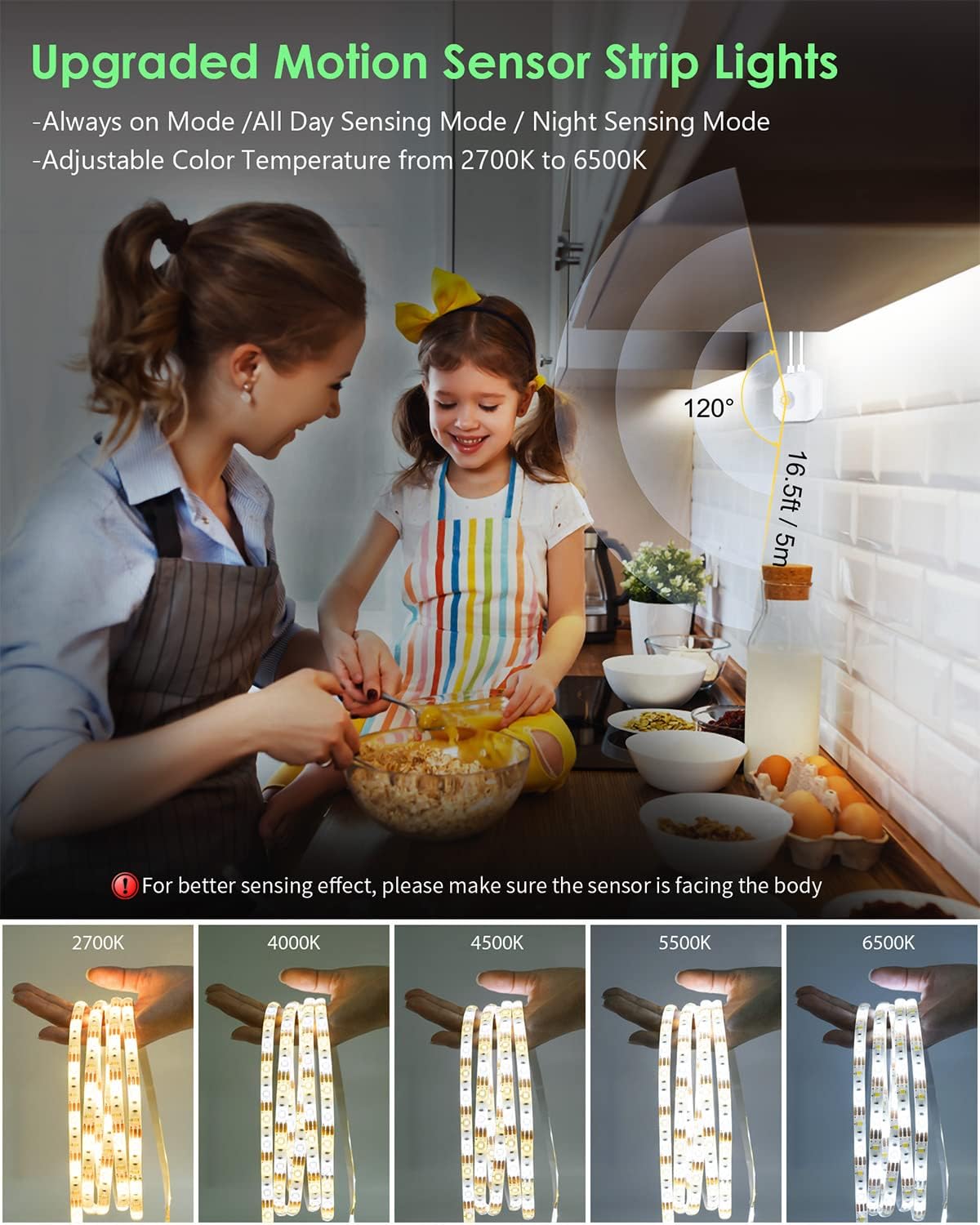
Figure 5.2: Example installation in a kitchen setting, demonstrating sensor placement.
6. Operating Instructions
6.1 Control Methods
The Wefomey LED Strip Lights offer three primary control methods:
- RF Remote Controller: Provides direct control over color temperature, brightness, and lighting modes.
- APP Control (Lotus Lantern CCT): Offers advanced features including precise color temperature adjustment (2700K-6500K), 0-100% brightness control, timer functions, and group control via Bluetooth.
- Motion Sensor Box: Allows selection of different sensing modes directly from the sensor unit.

Figure 6.1: Overview of the three available control options.
6.2 Lighting Modes
The motion sensor box offers three distinct lighting modes:
- "CLEAR" Mode (Always ON): The LED strip remains constantly illuminated throughout the day and night until manually turned off.
- "AUTO" Mode (Night Sensing Mode): The lights remain OFF when the ambient environment is bright enough. They automatically turn ON when motion is detected in darkness within the sensing range (MAX: 16.4 ft, 120°) and turn OFF after 30 seconds of inactivity.
- "PIR" Mode (All Day Sensing Mode): The lights operate based on motion detection throughout the entire day, regardless of ambient light conditions.
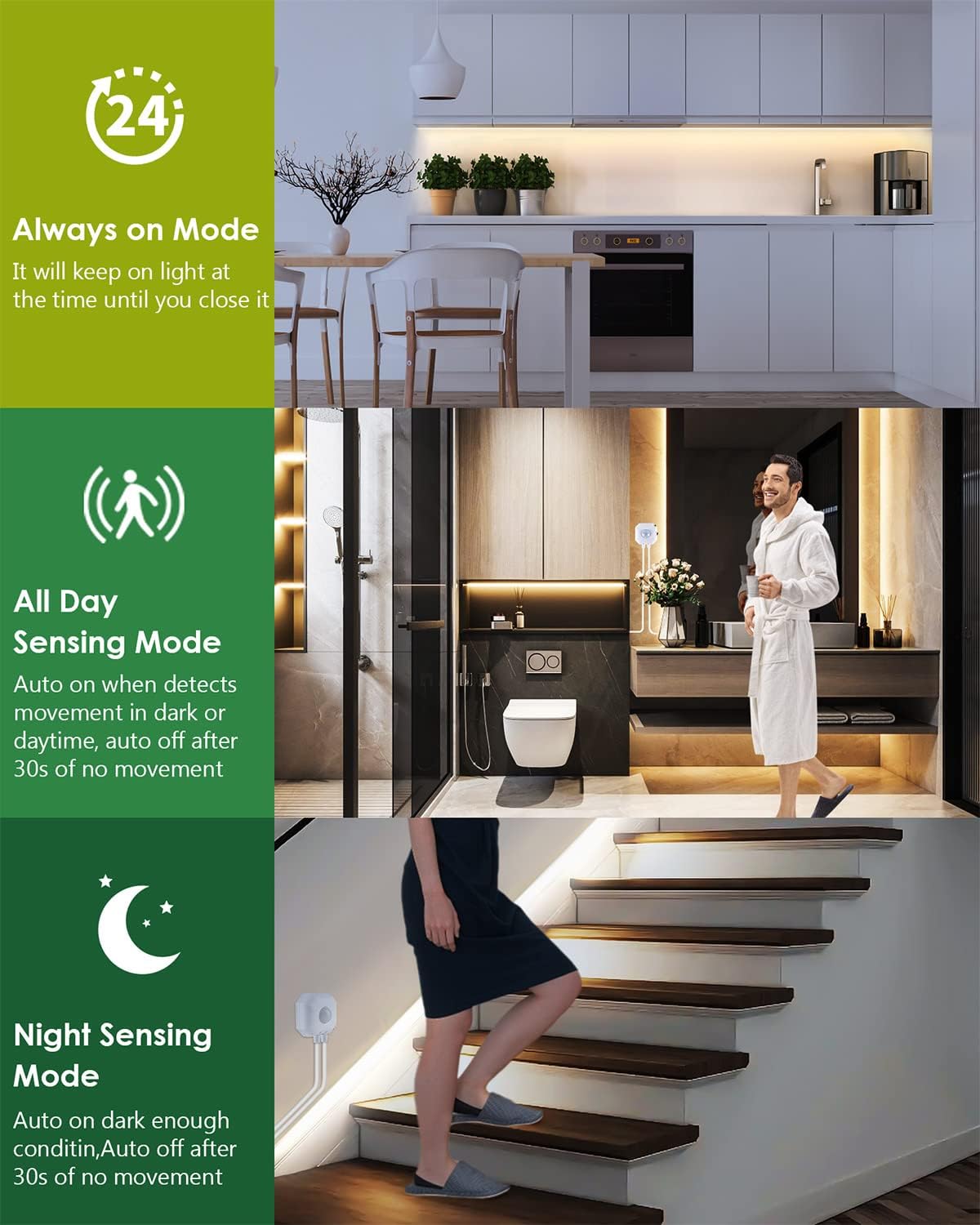
Figure 6.2: Explanation of the three available lighting modes.
6.3 Adjusting Color Temperature and Brightness
- Using the RF Remote: Use the dedicated buttons on the RF remote to adjust the color temperature from warm white (2700K) to cool white (6500K) and to increase or decrease brightness.
- Using the Lotus Lantern CCT App: Download the "Lotus Lantern CCT" app from your device's app store. Connect to the LED strip via Bluetooth. The app interface allows for precise adjustment of color temperature and brightness, along with setting timers and managing multiple light strips.

Figure 6.3: Visual representation of tunable white light from warm to cool.
7. Maintenance
- Cleaning: Gently wipe the LED strip with a soft, dry cloth. Do not use abrasive cleaners or immerse the strip in water.
- Adhesive Check: Periodically check the adhesive backing to ensure the strip remains securely attached. Reapply or use additional clips if necessary.
- Battery Replacement: If the RF remote control becomes unresponsive, replace the CR 2025 Lithium Battery.
- Storage: If storing the LED strip for an extended period, ensure it is clean, dry, and stored in a cool, dry place away from direct sunlight.
8. Troubleshooting
| Problem | Possible Cause | Solution |
|---|---|---|
| LED strip does not light up. | No power, loose connection, faulty power supply. | Check power outlet. Ensure all connections are secure. Try a different USB power source if available. |
| Remote control not working. | Battery drained, remote out of range, obstruction. | Replace CR 2025 battery. Ensure remote is within 45-50ft range and no major obstacles are blocking the signal. |
| Motion sensor not detecting. | Incorrect mode, sensor obstructed, sensor not facing detection area. | Ensure "AUTO" or "PIR" mode is selected. Clear any obstructions. Adjust sensor position to face the desired detection zone. |
| Lights flicker or change color unexpectedly. | Loose connection, power fluctuation, damaged strip section. | Check all connections. Ensure stable power supply. If a section is damaged, it may need replacement. |
9. Product Demonstration Video
Video 9.1: A demonstration of the Wefomey LED Strip Lights, showcasing installation and various lighting effects. This video is provided by an influencer and offers a visual guide to the product's features and appearance when installed.
10. Warranty and Support
Wefomey products come with a standard manufacturer's warranty. For specific warranty details, please refer to the product packaging or contact Wefomey customer support directly.
If you encounter any issues or have questions not covered in this manual, please contact our customer support team:
- Email: [Insert Manufacturer Email Here, if available]
- Phone: [Insert Manufacturer Phone Here, if available]
- Website: Wefomey Official Page (Link to Amazon brand page for Wefomey)
Please have your model number (3M-MSWW-IP65) and purchase date ready when contacting support.