
1. Introduction
Welcome to the user manual for your LINEARFLUX HyperSonic Evolution Bluetooth Earbuds. These earbuds are designed to provide a high-definition audio experience with features such as 3D Spatial Sound, up to 60 hours of playtime, iPX7 water resistance, passive noise isolation, and convenient wireless charging. This manual will guide you through the setup, operation, and maintenance of your new earbuds to ensure optimal performance and longevity.

Image: LINEARFLUX HyperSonic Evolution earbuds, highlighting advanced features like 3D spatial sound, touch controls, IPX7 resistance, and customizable fit.
2. What's in the Box
Please check the package contents to ensure all items are present:
- HyperSonic Evolution Bluetooth Earbuds (Left and Right)
- Wireless Charging Case
- Eartips (Small, Medium, Large, eXtra Large)
- Sport Earhooks (Small, Medium, Large)
- USBC Charging Cable
- User Manual (this document)
3. Product Overview
Familiarize yourself with the components of your HyperSonic Evolution earbuds and charging case.

Image: Front view of the HyperSonic Evolution earbuds, displaying the LINEARFLUX logo and the design of the eartips.
Earbud Components:
- Touch Control Area: Located on the outer surface of each earbud for various functions.
- LED Indicator: Provides status updates (pairing, charging, connection).
- Microphone: For calls and voice assistant.
- Charging Contacts: On the underside of each earbud.
- Eartip: Interchangeable silicone tips for comfort and sound isolation.
- Sport Earhook: Removable hooks for secure fit during activity.
Charging Case Components:
- Earbud Charging Slots: Securely holds and charges the earbuds.
- USB-C Charging Port: For wired charging of the case.
- LED Battery Indicators: Displays the charging status and battery level of the case.
- Wireless Charging Area: Bottom of the case for Qi-compatible wireless charging.
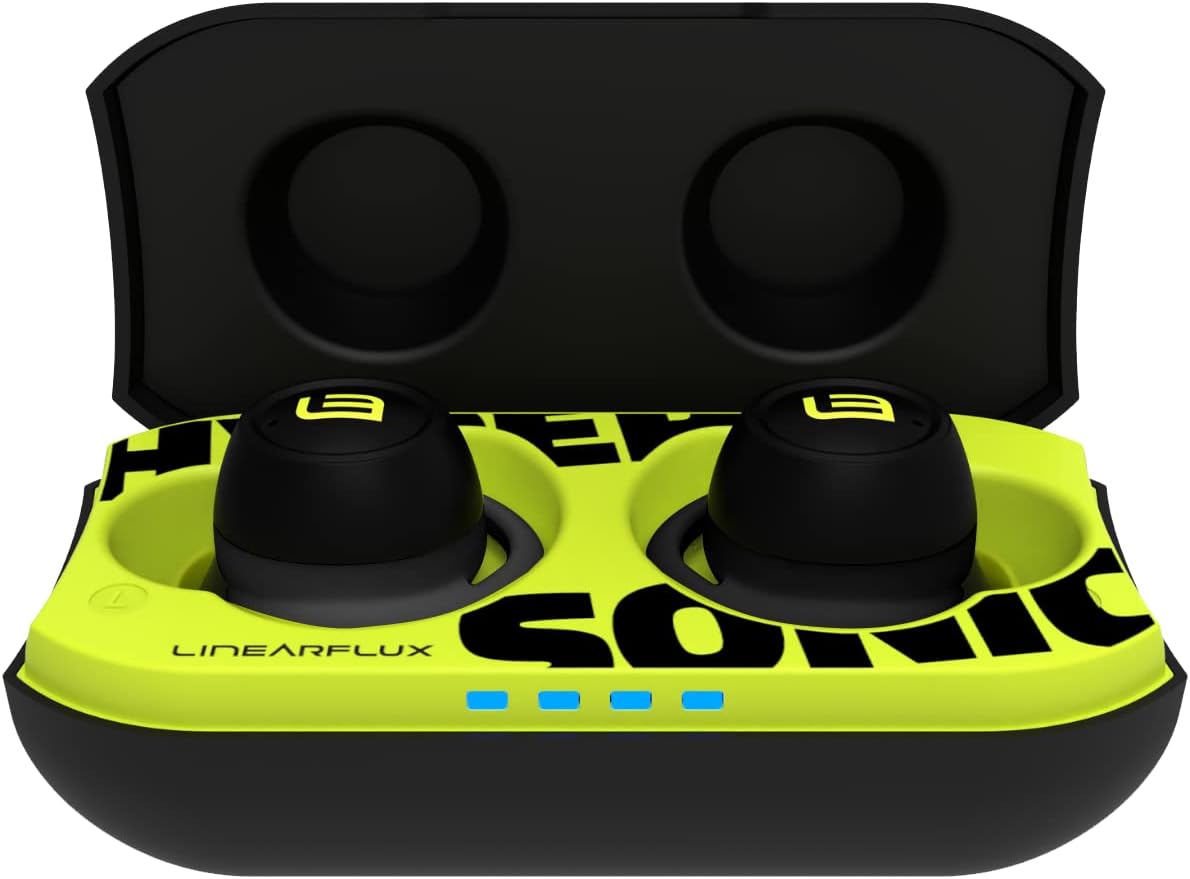
Image: The HyperSonic Evolution wireless charging case opened, revealing the earbuds nestled inside and the LED battery indicators.
4. Setup
4.1. Charging Your Earbuds and Case
For the first use, fully charge both the earbuds and the charging case.
- Charging the Earbuds: Place the earbuds into their respective slots in the charging case. The earbuds will automatically begin charging. The LED indicators on the earbuds will show charging status.
- Charging the Case (Wired): Connect the provided USB-C charging cable to the charging port on the case and to a USB power adapter (not included). The LED indicators on the case will illuminate to show the charging progress.
- Charging the Case (Wireless): Place the charging case on a Qi-compatible wireless charging pad. Ensure the case is centered on the pad for efficient charging. The LED indicators on the case will show charging progress.
A full charge provides up to 60 hours of playtime with the charging case. A quick 5-minute charge can provide up to 1 hour of playtime.

Image: The HyperSonic Evolution charging case with earbuds, illustrating the wireless charging capability and extended playtime.
4.2. Fitting Your Earbuds
Proper fit is crucial for sound quality, comfort, and passive noise isolation.
- Choose Eartips: Select the eartips (Small, Medium, Large, eXtra Large) that provide the best seal and comfort for your ears. Experiment with different sizes.
- Attach Sport Earhooks: If desired for a more secure fit, attach the appropriate size of sport earhooks (Small, Medium, Large) to the earbuds.
- Insert Earbuds: Gently insert each earbud into your ear canal. Twist slightly to ensure a snug and comfortable fit. The sport earhooks should rest securely in the curve of your ear.

Image: A visual guide to the customizable fit options, showing various sizes of eartips and sport earhooks for the HyperSonic Evolution earbuds.

Image: A woman wearing a HyperSonic Evolution earbud, illustrating how the earbud sits comfortably and securely in the ear.
4.3. Pairing with Your Device
The HyperSonic Evolution earbuds use Bluetooth 5 for fast and stable connections.
- Initial Pairing:
- Open the charging case. The earbuds will automatically enter pairing mode, and their LED indicators will flash.
- On your device (smartphone, tablet, laptop), go to Bluetooth settings and turn Bluetooth on.
- Select "HyperSonic Evolution" from the list of available devices.
- Once connected, the earbud LEDs will stop flashing, and you will hear a confirmation tone.
- Re-pairing: The earbuds will automatically connect to the last paired device when taken out of the case.
- Single Earbud Use: Either earbud can be used independently. Simply take one earbud out of the case, and it will connect to your device.

Image: A man wearing a HyperSonic Evolution earbud, illustrating the ease of Bluetooth connectivity with the device.
5. Operating Instructions
5.1. Power On/Off
- Power On: The earbuds automatically power on when removed from the charging case.
- Power Off: Place the earbuds back into the charging case to automatically power them off and begin charging.
5.2. Touch Controls
The HyperSonic Evolution earbuds feature intuitive touch controls on the outer surface of each earbud.
| Action | Function |
|---|---|
| Single Tap (Left or Right) | Play/Pause Music, Answer/End Call |
| Double Tap (Right Earbud) | Next Track |
| Double Tap (Left Earbud) | Previous Track |
| Triple Tap (Right Earbud) | Volume Up |
| Triple Tap (Left Earbud) | Volume Down |
| Long Press (2 seconds, Left or Right) | Activate Voice Assistant (Siri, Google Assistant) |
| Long Press (3 seconds, Left or Right) | Toggle Passive Noise Isolation (On/Off) |
| Incoming Call (Long Press 2 seconds) | Reject Call |
5.3. Passive Noise Isolation
The HyperSonic Evolution earbuds feature passive noise isolation, which helps to block out ambient sounds. This is achieved through the ergonomic design and proper fit of the eartips. You can toggle this feature using the touch controls to either hear your surroundings or immerse yourself in your audio.

Image: A woman wearing a HyperSonic Evolution earbud, illustrating the effectiveness of passive noise isolation in focusing on audio content.
5.4. 3D Spatial Sound
Experience immersive audio with the 3D Spatial Sound feature. This technology creates a wider, more dynamic soundstage, making your music, movies, and games come alive. This feature is always active, providing an enhanced listening experience.

Image: A sound mixing console with a HyperSonic Evolution earbud, symbolizing the precision-crafted performance and studio-quality sound experience.
6. Maintenance
6.1. Cleaning
- Earbuds: Gently wipe the earbuds with a soft, dry, lint-free cloth. Do not use abrasive materials or harsh chemicals.
- Eartips: Remove the eartips and wash them with mild soap and water. Rinse thoroughly and allow them to dry completely before reattaching.
- Charging Contacts: If charging issues occur, gently clean the charging contacts on both the earbuds and the case with a dry cotton swab.
- Charging Case: Wipe the exterior of the charging case with a soft, dry cloth.
6.2. Storage
When not in use, always store your HyperSonic Evolution earbuds in their charging case to protect them and keep them charged. Store the case in a cool, dry place away from direct sunlight and extreme temperatures.
6.3. Water Resistance (iPX7)
The HyperSonic Evolution earbuds are rated iPX7, meaning they are protected against immersion in water up to 1 meter for up to 30 minutes. This makes them resistant to sweat and rain, ideal for workouts and outdoor activities.
- Do not submerge the earbuds in water for extended periods or use them for swimming.
- Ensure the earbuds are completely dry before placing them back into the charging case to prevent damage to the charging contacts.

Image: HyperSonic Evolution earbuds amidst water splashes, visually representing their iPX7 water-resistant capabilities.

Image: An earbud with dynamic sound wave graphics, emphasizing the active sport design and secure fit for an active lifestyle.
7. Troubleshooting
If you encounter any issues with your HyperSonic Evolution earbuds, please refer to the following common problems and solutions:
- Earbuds not charging:
- Ensure the charging case has sufficient battery.
- Check that the earbuds are correctly seated in the charging slots.
- Clean the charging contacts on both earbuds and the case with a dry cotton swab.
- Try a different USB-C cable or power adapter for the case.
- Earbuds not pairing with device:
- Ensure Bluetooth is enabled on your device.
- Make sure the earbuds are out of the charging case and in pairing mode (LEDs flashing).
- Forget "HyperSonic Evolution" from your device's Bluetooth list and try pairing again.
- Restart your device and the earbuds (by placing them back in the case and taking them out).
- No sound from one earbud:
- Place both earbuds back into the charging case, close the lid, wait a few seconds, then take them out again.
- Ensure both earbuds are charged.
- Try resetting the earbuds (refer to the full product support page for specific reset instructions if needed).
- Poor sound quality or weak bass:
- Ensure you have selected the correct size eartips for a proper seal in your ear canal.
- Clean any debris from the earbud nozzles.
- Check the audio source and ensure the volume is appropriately set.
- Touch controls not responding:
- Ensure your fingers are clean and dry when using the touch controls.
- Try placing the earbuds back in the case and taking them out to reset them.
8. Specifications
Detailed technical specifications for the LINEARFLUX HyperSonic Evolution Bluetooth Earbuds:
| Feature | Detail |
|---|---|
| Model Name | HyperSonic Evolution |
| Item Model Number | HYPEVO |
| Connectivity Technology | Bluetooth, Wireless (Bluetooth 5) |
| Battery Life | Up to 60 hours (with charging case) |
| Water Resistance Level | iPX7 (Water Resistant) |
| Special Features | 3D Spatial Sound with Bass Boost, Passive Noise Isolation, Wireless Charging, Long Range Bluetooth |
| Control Method | Touch |
| Ear Placement | In Ear |
| Form Factor | In Ear |
| Audio Driver Type | Dynamic Driver |
| Included Components | Eartips (S, M, L, XL), Sport Earhooks (S, M, L), USBC Charging Cable, User Manual, Wireless Charging Case |
| Material | Acrylonitrile Butadiene Styrene (ABS), Plastic, Rubber, Silicone |
| Item Weight | 2 Ounces |
| Compatible Devices | Android, Cellphones, Gaming Consoles, Laptops, iPhone |
9. Warranty Information
LINEARFLUX products are manufactured to the highest quality standards. Your HyperSonic Evolution earbuds are covered by a manufacturer's warranty against defects in materials and workmanship. Please refer to the warranty card included in your packaging or visit the official LINEARFLUX website for detailed warranty terms and conditions.
10. Customer Support
For further assistance, technical support, or to inquire about replacement parts, please visit the official LINEARFLUX support website or contact their customer service team.
Website: www.linearflux.com/support (Example link, please verify actual support URL)