
DAHUA DEE1010B-S2
Dahua DEE1010B-S2 RS485 Relay Module User Manual
Model: DEE1010B-S2
Introduction
The Dahua DHI-DEE1010B-S2 is an additional relay module designed for use with Dahua outdoor access control stations. This module expands the functionality of your access control system by providing additional relay outputs via an RS485 interface, enabling integration with various external devices such as electric locks, alarms, or other control systems. It ensures reliable and secure operation within your security infrastructure.
Product Overview
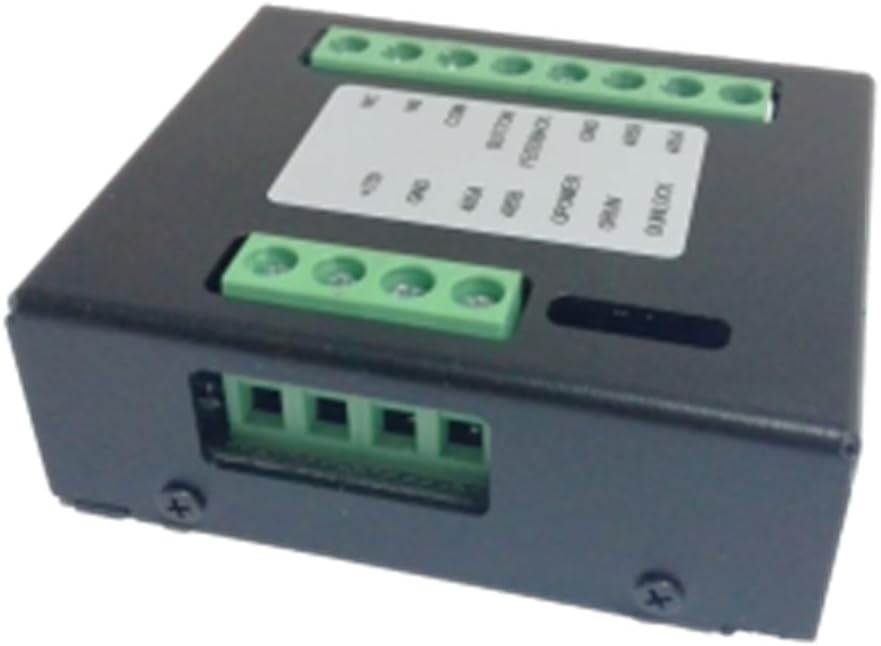
Figure 1: Top-down view of the Dahua DEE1010B-S2 RS485 Relay Module, showing the terminal blocks for connections.

Figure 2: Angled view of the module, highlighting the side and top terminal connections and the compact form factor.

Figure 3: Close-up view of the terminal block labels, indicating connections for power, RS485, button, feedback, and relay outputs (NC, NO, COM).
Setup and Installation
Package Contents
- Dahua DEE1010B-S2 RS485 Relay Module
- Mounting Screws (if included)
- Quick Start Guide (refer to this manual for detailed instructions)
Mounting
The module is designed for surface mounting. Choose a secure, dry location near your access control station or the device it will control. Use appropriate screws to fix the module firmly to the desired surface.
Wiring Diagram and Connections
Refer to Figure 3 for a detailed view of the terminal labels. Ensure all connections are made securely and correctly to prevent damage to the module or connected devices.
- Power Supply: Connect a +12V DC power source to the +12V and GND terminals. Ensure the power supply meets the module's requirements.
- RS485 Communication: Connect the RS485 A and B lines from your access control station to the 485A and 485B terminals respectively. Maintain correct polarity.
- Relay Outputs (for Lock/Alarm Control):
- NC (Normally Closed): Connect to devices that require a closed circuit to operate when the relay is inactive.
- NO (Normally Open): Connect to devices that require an open circuit to operate when the relay is inactive.
- COM (Common): The common terminal for the relay.
For example, to control an electric lock, connect the lock's power input to either NC or NO and the other end to COM, depending on the lock's operating mode (fail-safe or fail-secure).
- Button Input: Connect an external exit button or similar trigger to the BUTTON and GND terminals.
- Feedback Input: Connect a door sensor or similar feedback device to the FEEDBACK terminal and its corresponding ground.
- Output Status Indicators (O POWER, O RUN, O UNLOCK): These terminals provide status outputs that can be connected to external indicators or monitoring systems.
After all connections are made, double-check wiring before applying power.
Operation
The Dahua DEE1010B-S2 module operates as an extension of your Dahua access control system. Once properly connected and configured within the main access controller's software, it will respond to commands received via the RS485 bus.
Relay Control
- The relays (NC/NO/COM) are typically controlled by the main access controller to trigger actions such as unlocking a door, activating an alarm, or controlling other connected devices.
- The specific configuration and mapping of relay outputs to events (e.g., valid card swipe, remote unlock command) are managed through the access control system's software interface.
Input Monitoring
- The BUTTON input allows for local control, such as an exit button to momentarily unlock a door.
- The FEEDBACK input can be used to monitor the status of a door (open/closed) or other sensors, providing real-time feedback to the access control system.
Status Indicators
The O POWER, O RUN, and O UNLOCK terminals provide electrical signals indicating the module's power status, operational status, and unlock events, respectively. These can be integrated with external LEDs or monitoring systems for visual or automated status checks.
Maintenance
The Dahua DEE1010B-S2 module is designed for low maintenance. Regular checks can help ensure its continued reliable operation.
- Cleaning: Periodically clean the exterior of the module with a soft, dry cloth. Do not use harsh chemicals or abrasive cleaners.
- Connection Check: Annually, or as needed, inspect all wiring connections to ensure they are secure and free from corrosion. Loose connections can lead to intermittent operation.
- Environmental Conditions: Ensure the module is operating within its specified environmental conditions (temperature, humidity) to prevent premature failure.
- Firmware Updates: While the module itself typically does not require direct firmware updates, ensure your main access control system's firmware is up-to-date, as this can affect the module's performance and compatibility.
Troubleshooting
If you encounter issues with the DEE1010B-S2 module, refer to the table below for common problems and their solutions.
| Problem | Possible Cause | Solution |
|---|---|---|
| Module not powering on. | No power supply; Incorrect voltage; Loose power connection. | Check +12V and GND connections. Verify power supply output. Ensure connections are secure. |
| Relay not activating/deactivating. | Incorrect wiring to controlled device; No command from main controller; RS485 communication issue; Faulty relay. | Verify NC/NO/COM wiring. Check main access controller configuration. Inspect RS485 connections and polarity. Test relay with a multimeter if possible. |
| Module not communicating via RS485. | Incorrect RS485 A/B connection; RS485 termination issues; Address conflict; Cable damage. | Ensure 485A and 485B are correctly connected and polarity is maintained. Check for proper RS485 termination on the bus. Verify module address in controller software. Inspect cable for damage. |
| Button/Feedback input not responding. | Incorrect wiring; Faulty button/sensor; Configuration issue in main controller. | Check BUTTON/FEEDBACK and GND wiring. Test the button/sensor directly. Verify input configuration in the access control system. |
If the problem persists after attempting these solutions, contact technical support.
Specifications
| Feature | Detail |
|---|---|
| Model Number | DEE1010B-S2 |
| Manufacturer | Dahua |
| Dimensions | 50 x 50 x 28 cm (approx. 19.7 x 19.7 x 11 inches) |
| Weight | 500 grams (approx. 1.1 lbs) |
| Interface | RS485 |
| Relay Type | Normally Open (NO), Normally Closed (NC), Common (COM) |
| Contact Material | Silver Nickel |
| Mounting Type | Surface Mount |
| Operating Mode | Automatic |
| Certification | CE |
| First Available Date | September 20, 2022 |
Warranty Information
This Dahua product is covered by a limited warranty. The specific terms and duration of the warranty may vary by region and retailer. Please retain your proof of purchase for warranty claims.
For detailed warranty information, please refer to the warranty card included with your product or visit the official Dahua website.
Technical Support
For technical assistance, troubleshooting beyond this manual, or product inquiries, please contact Dahua Technology customer support or your local distributor.
You can find contact information and additional resources on the official Dahua Technology website: www.dahuasecurity.com
Related Documents - DEE1010B-S2
 |
Access Control Extension Module User's Manual V1.0.1 User's manual for the Dahua Access Control Extension Module (DEE1010B-S2), covering product overview, networking, port descriptions, frequently asked questions, packing list, and essential cybersecurity recommendations for secure operation. |
 |
Dahua DEE1010B Video Intercom Extension Module User Manual User manual for the Dahua DEE1010B Video Intercom Extension Module, detailing its connections, interface, FAQ, and technical specifications for access control and security systems. |
 |
Dahua DHI-VTO3211D-P1/P2/P4-S2 IP Villa Door Station Datasheet Technical specifications and features for the Dahua DHI-VTO3211D-P1/P2/P4-S2 IP 1/2/4-button Villa Door Station, including its casing, performance, connectivity, and ordering information. |
 |
Dahua Wireless Relay User's Manual: Installation, Operation, and Configuration Comprehensive user's manual for the Dahua Wireless Relay (DHI-ARM7011-W2 series), covering installation, operation, technical specifications, safety guidelines, and cybersecurity recommendations. |
 |
S2 NetBox User Guide - Comprehensive Security System Manual Explore the S2 NetBox User Guide, detailing setup, monitoring, administration, and configuration of the S2 Security Corporation's robust security management system. Version 4.8.01. |
 |
Alpine S2-S69 Coaxial 2-Way Speaker System - Installation, Specifications, and Warranty Detailed information for the Alpine S2-S69 Coaxial 2-Way Speaker System, including installation guidelines, technical specifications, and limited warranty details. Learn about product features, power handling, and compliance. |
Ask a question about this manual
Ask about setup, troubleshooting, compatibility, parts, safety, or missing instructions. Manuals+ will review the question and use this page’s manual context to help answer it.