
1. Introduction
Thank you for choosing the KKL L Shaped Desk. This manual provides essential information for the safe and efficient assembly, operation, and maintenance of your new desk. Please read these instructions carefully before beginning assembly and retain this manual for future reference. This desk is designed to maximize your workspace, offering ample room for computers, peripherals, and storage, suitable for home office, gaming, or study environments.

Image 1.1: The KKL L Shaped Desk, featuring a monitor stand, storage shelves, and file drawers.
2. Safety Information
Please observe the following safety precautions to prevent injury or damage to the product:
- Always assemble the desk according to the provided instructions.
- Ensure the desk is placed on a stable, level surface to prevent tipping or instability.
- Do not place heavy objects on the desk that could exceed its weight limit (60 pounds) or cause it to tip over.
- Keep small parts and packaging materials away from children to prevent choking hazards.
- Periodically check all connections and fasteners to ensure they remain tight.
- Avoid exposing the desk to excessive moisture or direct sunlight, which can cause damage to the material.
3. Package Contents
Before beginning assembly, verify that all components listed below are present and undamaged. If any parts are missing or damaged, please contact KKL customer service immediately.
- Desk Panels (L-shaped main desktop, monitor stand, side shelves)
- Metal Frame Components (legs, support bars)
- Fabric Drawers (2 units)
- Hardware Pack (screws, bolts, nuts, washers, Allen wrench)
- Adjustable Leg Pads
- Headphone Hooks (2 units)
- Assembly Instruction Manual
Note: All assembly tools are included in the package.
4. Product Specifications
The following table outlines the key specifications for your KKL L Shaped Desk:
| Feature | Specification |
|---|---|
| Brand | KKL |
| Model Number | B01011137USAN0306A0DRLYQ |
| Product Dimensions (D x W x H) | 59"D x 47"W x 35"H |
| Color | Black |
| Style | Modern |
| Base Material | Metal |
| Top Material Type | Engineered Wood |
| Finish Type | Powder Coated |
| Shape | L-Shape |
| Number of Drawers | 2 (File Drawers) |
| Number of Shelves | 2 (Storage Shelves) |
| Maximum Weight Recommendation | 60 Pounds |
| Assembly Required | Yes |
| Includes All Assembly Tools | Yes |

Image 4.1: Overall Dimensions of the KKL L Shaped Desk.
5. Setup and Assembly Instructions
Follow these steps carefully to assemble your KKL L Shaped Desk. It is recommended to assemble the desk with two people.
- Unpack and Identify Parts: Lay out all components on a clean, soft surface (e.g., carpet or blanket) to prevent scratches. Compare all parts with the package contents list and the assembly diagram in the included manual.
- Assemble the Main Frame: Begin by attaching the metal legs to the main desktop panels using the provided screws and Allen wrench. Ensure all connections are secure but do not overtighten until the entire frame is assembled.
- Attach Support Bars: Connect the cross-support bars between the legs to enhance stability. These typically use specific fasteners as indicated in the diagram.
- Install Monitor Stand: Secure the long monitor stand to the designated area on the main desktop. Ensure it is level and firmly attached.
- Assemble Side Shelves: Attach the two-tier storage shelves to the side frame of the desk. These shelves are designed to hold a CPU tower and other items.
- Insert File Drawers: Assemble the fabric file drawers according to their individual instructions and slide them into their designated compartments on the right side of the desk. Ensure they slide smoothly.
- Attach Headphone Hooks: Secure the headphone hooks to the side of the desk frame as desired.
- Adjust Leg Pads: Once the desk is fully assembled and in its desired location, adjust the leveling leg pads at the bottom of each leg to ensure the desk is stable and does not wobble on uneven floors.
- Final Tightening: Once all components are in place and the desk is stable, go back and fully tighten all screws and fasteners.

Image 5.1: Assembled KKL L Shaped Desk in a typical setup.
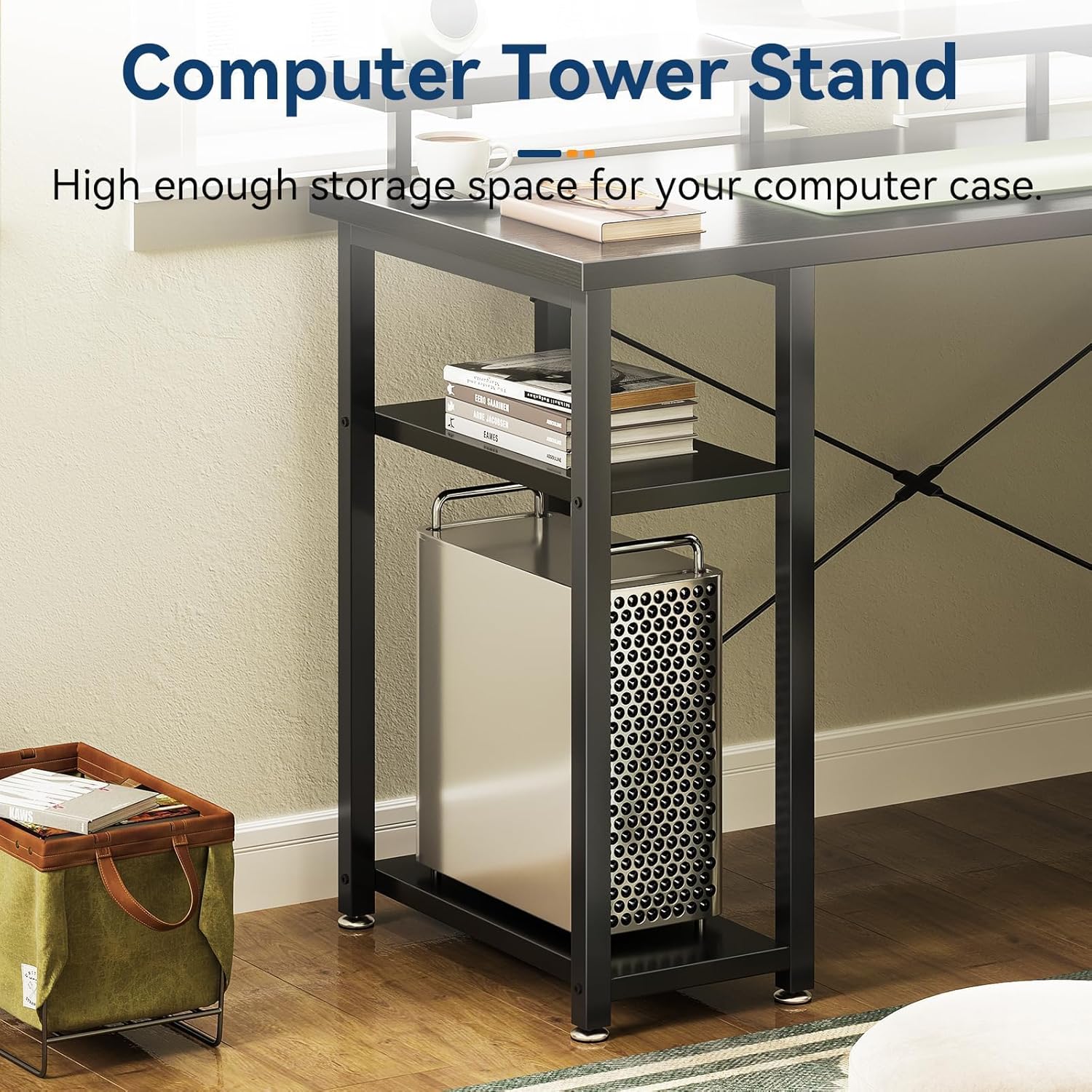
Image 5.2: Dedicated Computer Tower Stand and Storage Shelves.

Image 5.3: Adjustable Leg Pads for stability.
6. Operation and Usage
The KKL L Shaped Desk is designed for versatility and efficiency in various settings.
6.1 Workspace Utilization
- L-Shape Configuration: The L-shape design maximizes corner spaces, providing distinct areas for different tasks. Utilize one side for your primary computer setup and the other for writing, secondary monitors, or creative work.
- Monitor Stand: The extra-long monitor stand is designed to elevate your screen(s) to an ergonomic viewing height, reducing neck and eye strain. It can accommodate up to three monitors, freeing up valuable desktop space below.
- Storage Shelves: The two-tier shelves on the left side are ideal for housing your computer tower, books, or other office supplies, keeping them organized and off the main desk surface.
- File Drawers: The two fabric drawers on the right side provide enclosed storage. The bottom drawer is designed to hold letter, A4, or legal-sized hanging files, while the top drawer is suitable for smaller office essentials and personal items.

Image 6.1: Long Monitor Stand for ergonomic viewing.

Image 6.2: Multifunctional File Drawers for organized storage.
6.2 Cable Management
While the desk does not include integrated cable management, its open design allows for easy routing of cables using external cable ties or clips (not included) to maintain a tidy workspace.
7. Maintenance
Proper care will extend the life and appearance of your KKL L Shaped Desk.
- Cleaning: Wipe the desk surfaces with a soft, damp cloth. For stubborn marks, a mild soap solution can be used, followed by drying with a clean cloth. Avoid harsh chemicals or abrasive cleaners, which can damage the finish.
- Spills: Immediately wipe up any spills to prevent moisture damage to the engineered wood surface.
- Fasteners: Periodically check all screws and bolts to ensure they remain tight. Retighten as necessary to maintain stability.
- Drawer Care: The fabric drawers can be spot cleaned with a damp cloth. Do not machine wash or tumble dry.
8. Troubleshooting
If you encounter any issues with your KKL L Shaped Desk, refer to the common problems and solutions below:
- Desk Wobbles:
- Ensure all assembly screws are fully tightened.
- Adjust the leveling leg pads on the bottom of the desk legs to compensate for uneven flooring.
- Drawers Do Not Slide Smoothly:
- Check that the fabric drawers are correctly assembled and inserted into their compartments.
- Ensure no objects are obstructing the drawer's path.
- Missing Parts:
- Carefully re-check all packaging materials. If parts are genuinely missing, contact KKL customer service with your purchase details.
- Surface Scratches/Damage:
- For minor scratches, furniture repair markers or touch-up pens matching the black finish may be used.
- To prevent future scratches, use desk mats or coasters.
If the problem persists or is not listed here, please contact KKL customer service for further assistance.
9. Warranty and Customer Support
KKL provides a limited warranty for this product. Please refer to your purchase documentation for specific warranty terms and conditions.
- Return/Exchange Policy: KKL offers a 30-day free return or exchange service from the date of purchase.
- Customer Service: For any questions, concerns, or assistance with assembly or product issues, please contact KKL customer service. Our professional customer service team is available online to assist you.
- Contact Information: Please refer to the contact details provided with your purchase or visit the official KKL store on Amazon: KKL Store.