
AVNICUD digital tv antenna 003
AVNICUD Digital TV Antenna 003 User Manual
Model: digital tv antenna 003
1. Introduction
Thank you for choosing the AVNICUD Digital TV Antenna 003. This amplified HDTV antenna is designed to provide clear reception of free over-the-air broadcast channels, supporting 720p, 1080p, 4K, and 8K formats. With its 360-degree reception and up to 500 miles range, you can enjoy a wide variety of local news, weather, sitcoms, and sports programs without monthly fees.
This manual provides detailed instructions for setup, operation, and troubleshooting to ensure optimal performance of your antenna.
2. Important Usage Guidelines
To ensure safe and effective operation of your digital TV antenna, please observe the following guidelines:
- Placement: Avoid placing the antenna near large obstructions such as valleys, mountains, or dense foliage, as these can significantly reduce signal reception.
- Interference: Keep the antenna away from potential sources of electromagnetic interference, including refrigerators, hair dryers, air conditioners, and microwave ovens. These appliances can disrupt signal quality.
- Rescanning Channels: Always perform a channel scan after moving the antenna to a new position. This ensures your television detects all available channels in the new location.
- Indoor/Outdoor Use: The antenna is designed for both indoor and outdoor use. For optimal signal, consider placing it near a window or in a high location.
- Cable Management: Ensure the 18ft coax cable is not kinked or damaged, as this can affect signal transmission.

Image: Avoid placing the antenna near large obstructions or electronic devices that may cause interference.
3. Package Contents
Please verify that all items are present in your package:
- AVNICUD Digital TV Antenna
- Amplified Signal Booster with USB Power Cable
- 18ft Coaxial Cable (attached to antenna)
- User Manual (this document)
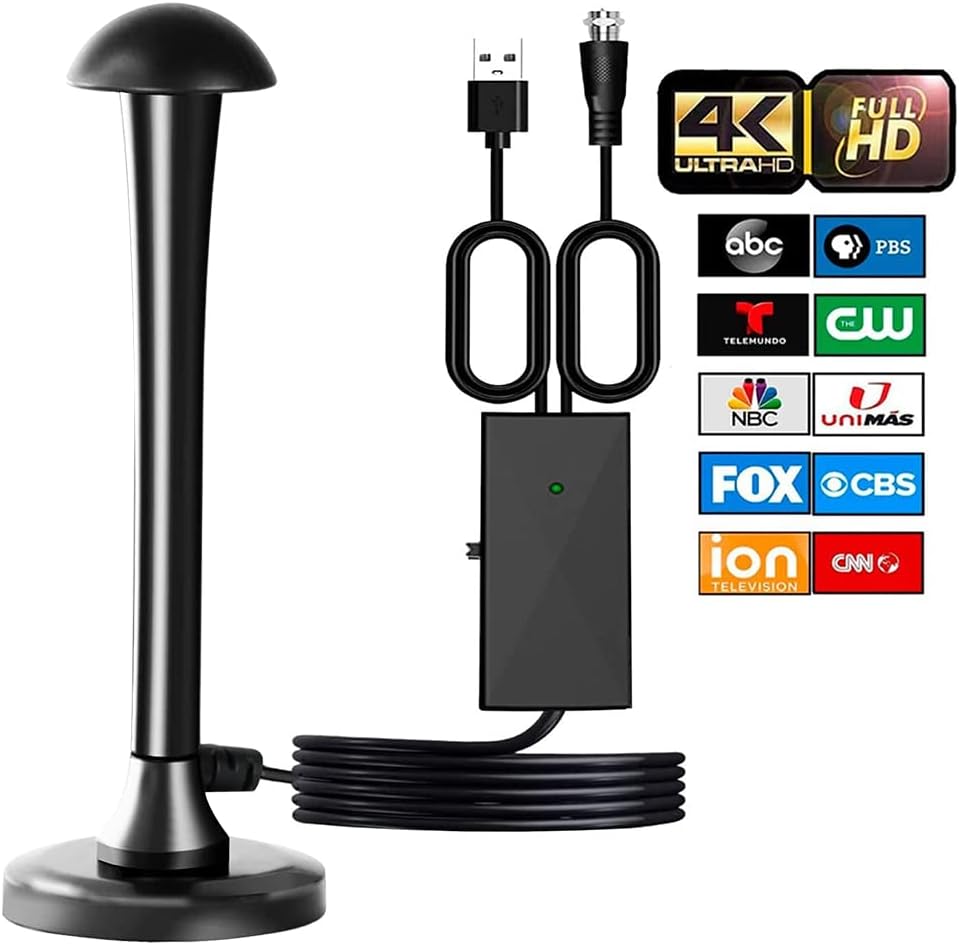
Image: The AVNICUD Digital TV Antenna and its components.
4. Setup Guide
Follow these steps to install your AVNICUD Digital TV Antenna:
- Connect the Antenna: Connect the coaxial cable from the antenna to the "ANT IN" or "CABLE IN" port on the back of your television or digital converter box.
- Connect the Signal Booster: The signal booster is integrated into the coaxial cable. Connect the USB power cable from the signal booster to a USB port on your TV or a separate USB power adapter (not included). Ensure the indicator light on the booster illuminates.
- Position the Antenna: Place the antenna in a location where it can receive the strongest signal. Recommended locations include near a window, on a wall, or on a high shelf. For outdoor use, ensure it is securely mounted and protected from extreme weather.
- Scan for Channels:
- Turn on your TV.
- Go to your TV's menu, then navigate to "Channel Scan," "Auto Program," or "Auto Tune." The exact wording may vary by TV model.
- Select "Air" or "Antenna" as the input source, not "Cable."
- Start the channel scan. This process may take several minutes.
- Optimize Reception: If you are not receiving many channels or the picture quality is poor, try repositioning the antenna and performing another channel scan. Experiment with different locations to find the best signal.

Image: Connection diagrams for HDTV and traditional TV setups.

Image: Recommended antenna placement options for optimal signal reception.
5. Operating Instructions
Your AVNICUD Digital TV Antenna features an amplified signal booster with adjustable range settings:
- Signal Booster Switch: The signal booster has a switch to select between "Short Range" (less than 35 miles) and "Long Range" (greater than 35 miles).
- Short Range (Yellow Light): If broadcast towers are within approximately 35 miles of your location, slide the switch to the left. The yellow indicator light will illuminate.
- Long Range (Green Light): If broadcast towers are further than 35 miles, slide the switch to the right for amplified reception. The green indicator light will illuminate.
- Channel Rescan: After adjusting the range setting or repositioning the antenna, always perform a channel scan on your TV to detect new or improved signals.

Image: The signal booster with its range selection switch.

Image: Visual guide for the signal booster's range indicators.
6. Maintenance
The AVNICUD Digital TV Antenna requires minimal maintenance:
- Cleaning: Wipe the antenna and booster with a soft, dry cloth to remove dust. Do not use liquid cleaners or abrasive materials.
- Cable Inspection: Periodically check the coaxial cable for any signs of damage, kinks, or fraying. Damaged cables can impair signal quality.
- Outdoor Placement: If used outdoors, ensure the antenna is securely mounted and regularly check for any weather-related damage or loose connections. The flame-retardant material provides moisture, lightning, and sunscreen features.
7. Troubleshooting
If you experience issues with your antenna, try the following solutions:
- No Channels or Poor Reception:
- Ensure all connections are secure (antenna to TV, USB power to booster).
- Verify the signal booster's indicator light is on.
- Reposition the antenna. Try placing it higher, near a window, or facing different directions.
- Perform a new channel scan after each repositioning.
- Check the signal booster's range switch (Short/Long) to match your distance from broadcast towers.
- Consult online resources like dtv.gov/maps or antennaweb.org to identify broadcast towers in your area and their direction.
- Intermittent Signal or Pixelation:
- Move the antenna away from electronic devices that may cause interference (e.g., microwaves, Wi-Fi routers).
- Ensure the coaxial cable is not damaged.
- Check for any new obstructions (e.g., new buildings, dense trees) that might be blocking the signal.
- TV Does Not Detect Antenna:
- Confirm your TV has a built-in ATSC tuner. Older TVs may require a separate digital converter box.
- Ensure the TV input source is set to "Antenna" or "Air."

Image: Example of channels available with a digital TV antenna.
8. Specifications
| Brand | AVNICUD |
| Model Number | digital tv antenna 003 |
| Product Dimensions | 7.8 x 2.75 x 7.55 inches (or 3.6"L x 2.7"W x 7.4"H) |
| Item Weight | 11.2 ounces |
| Maximum Range | 500 Miles |
| Number of Channels | Up to 40 (varies by location) |
| Impedance | 75 Ohm |
| Coaxial Cable Length | 18 feet |
| Supported Formats | 720p, 1080i, 1080p, 4K, 8K / ATSC |
| Color | Black |
9. Warranty and Support
1-Year Worry-Free Guarantee: If you encounter any problems with your AVNICUD HDTV Antenna within 1 year of purchase, we offer a full replacement or refund. Please ensure you have attempted different antenna positions and channel rescans to optimize reception before contacting support.
For any questions or assistance, please contact AVNICUD customer support through the retailer's platform where you purchased the product.
10. Legal Disclaimer
The number and quality of channels received will depend on various factors, including geographical location, distance from broadcast towers, terrain, and environmental factors. Antenna performance may vary. While this antenna is designed for long-range reception, actual results can differ based on local conditions. The manufacturer is not responsible for the availability of specific channels or signal strength in all areas. This product is intended to receive free over-the-air broadcasts and does not guarantee access to paid or subscription-based content.
Ask a question about this manual
Ask about setup, troubleshooting, compatibility, parts, safety, or missing instructions. Manuals+ will review the question and use this page’s manual context to help answer it.