
1. Product Overview
The Neewer 72mm ND Filter Kit is designed for photographers using DSLR cameras with 72mm lens threads. This kit provides essential tools for controlling light exposure, enhancing creative photography, and maintaining your equipment.
Kit Contents:
- 4x Neutral Density Filters: ND2, ND4, ND8, ND16
- 1x Lens Cleaning Pen
- 1x Cleaning Cloth
- 1x Filter Pouch

Image 1.1: Contents of the Neewer 72mm ND Filter Kit.
2. Setup and Installation
2.1 Identifying Your Lens Filter Size
Before attaching any filter, verify your camera lens's filter thread size. This is typically marked on the front of your lens barrel or on the lens cap, often preceded by a "⌀" (diameter) symbol. This kit is designed for lenses with a 72mm filter thread.
2.2 Attaching the ND Filter
- Ensure your lens and the filter are clean (refer to Section 4 for cleaning instructions).
- Align the filter's threads with the threads on the front of your camera lens.
- Gently rotate the filter clockwise until it is securely fastened. Avoid overtightening.
- The slim frame design of these filters helps prevent vignetting, especially when using wide-angle lenses.

Image 2.1: A 72mm ND filter correctly attached to a camera lens.
3. Operating the ND Filters
Neutral Density (ND) filters reduce the amount of light entering your camera lens without affecting color balance. This allows for greater control over exposure settings, particularly in bright conditions.
3.1 Understanding ND Filter Strengths
The kit includes four filters with varying light reduction capabilities:
| Filter Type | Light Reduction | F-Stop Reduction | Typical Use Case |
|---|---|---|---|
| ND2 | 50% (1/2) | 1 Stop | Slightly bright conditions, subtle motion blur. |
| ND4 | 25% (1/4) | 2 Stops | Moderately bright conditions, increased motion blur. |
| ND8 | 12.5% (1/8) | 3 Stops | Bright conditions, significant motion blur, wider apertures. |
| ND16 | 6.25% (1/16) | 4 Stops | Very bright conditions, long exposures, shallow depth of field. |
3.2 Applications of ND Filters
- Long Exposure Photography: Achieve silky smooth water effects or streaky clouds by extending shutter speeds in daylight.
- Shallow Depth of Field: Use wider apertures (e.g., f/1.4, f/2.8) in bright light to create a blurred background (bokeh) without overexposing the image.
- Motion Blur: Capture movement in subjects like cars or people while keeping stationary elements sharp.
- Video Production: Maintain desired shutter speeds (e.g., 1/50th or 1/60th for cinematic look) in bright outdoor settings.

Image 3.1: Visual comparison of ND filter effects on a waterfall.
4. Maintenance and Care
Proper maintenance ensures the longevity and optimal performance of your ND filters and cleaning accessories.
4.1 Cleaning Your Filters and Lens
Use the included lens cleaning pen and cloth for best results:
- Brush Away Dust: Use the soft brush head of the cleaning pen to gently remove loose dust and debris from the filter surface.
- Remove Smudges: For fingerprints, grease, or stubborn smudges, use the activated carbon head. Apply gentle, circular sweeping motions. If necessary, exhale lightly onto the surface to create moisture before cleaning.
- Final Polish: Use the cleaning cloth for a final polish or to remove any remaining residue.
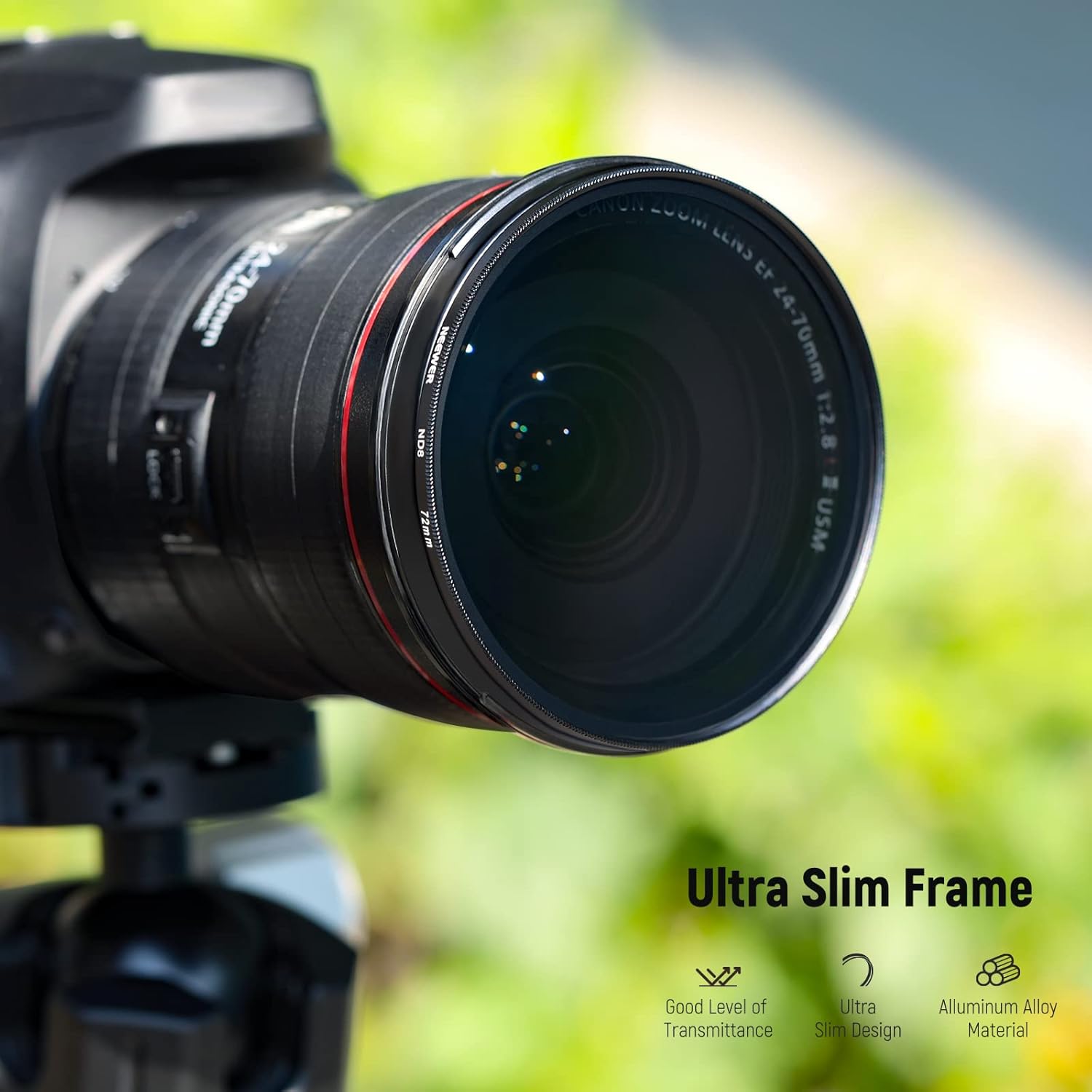
Image 4.1: Instructions for using the retractable lens cleaning pen.
4.2 Storage
Store your ND filters in the provided filter pouch when not in use. The individual mesh pockets protect each filter from scratches and dust, ensuring they remain in optimal condition.

Image 4.2: Storing filters in the protective carrying pouch.
5. Troubleshooting
- Vignetting (Dark Corners): While these filters feature a slim frame to minimize vignetting, it can still occur with extremely wide-angle lenses or when stacking multiple filters. Try removing stacked filters or adjusting your focal length.
- Difficulty Attaching Filter: Ensure the filter size matches your lens (72mm). Check for cross-threading; gently unscrew and realign the filter before attempting to screw it on again. Do not force it.
- Dust/Smudges on Images: This indicates dust or smudges on the filter or lens. Refer to Section 4.1 for proper cleaning procedures.
6. Specifications
| Feature | Detail |
|---|---|
| Brand | NEEWER |
| Model Number | NW SERIES B |
| Filter Sizes Included | ND2, ND4, ND8, ND16 |
| Filter Thread Size | 72 Millimeters |
| Material | Optical Glass, CNC Aluminum Alloy Frame |
| Coating Description | No Coating (as per product data) |
| Photo Filter Effect Type | Neutral Density |
| Water Resistance Level | Not Water Resistant |
| Product Dimensions | 2.83 x 2.83 x 0.1 inches (per filter) |
| Item Weight | 4.4 ounces (total kit) |
| UPC | 191073121300 |
7. Warranty and Support
For warranty information and customer support, please refer to the official NEEWER website or contact their customer service directly. Keep your purchase receipt for any warranty claims.