
COSTWAY 10249US-GN-CYPF
COSTWAY Car Refrigerator User Manual
Model: 10249US-GN-CYPF
1. Product Overview
The COSTWAY Car Refrigerator is a versatile and portable cooling solution designed for various applications, including road trips, camping, and home use. It features a powerful compressor for fast cooling and freezing, dual-zone single-temperature control, and multiple power supply options for convenience.

Figure 1.1: The COSTWAY Car Refrigerator, showcasing its dual compartments for various items.
Key Features:
- Large Capacity & Dual Zone: 51-quart (48L) capacity with dual-zone single-temperature control, allowing use as a freezer and fridge. Adjustable temperature range from -20℃ to 10℃ (-4℉ to 50℉).
- Smart Control Panel & LCD Display: Easy-to-operate touch control panel with temperature setting, parameter setting, power on/off, and LCD display. Includes ECO mode for energy saving (45W) and MAX mode for fast cooling (60W).
- Multiple Power Supply Modes: Compatible with DC 12V/24V for car use and AC 100V-240V for household use. Can also be powered by solar panels and power stations (not included).
- Portable Design & Reversible Lids: Equipped with a retractable pull handle and two anti-wear large wheels for easy movement. Detachable and reversible lids allow for flexible opening directions.

Figure 1.2: Portable design features including retractable handle and anti-tilt capability.
- Low Noise & Humanized Design: Features a high-efficiency, quiet compressor (≤45dB). Includes 3-level battery protection, 30° anti-tilt function, built-in LED lights, a bottle opener, a USB charging port, and four convenient hooks.
2. Safety Instructions
To ensure safe operation and prolong the lifespan of your COSTWAY Car Refrigerator, please read and follow these safety guidelines carefully.
- Ensure the power supply voltage matches the specifications of the refrigerator (12V/24V DC, 100-240V AC).
- Do not operate the refrigerator in wet or damp conditions to prevent electric shock.
- Keep ventilation openings clear of obstructions to ensure proper airflow and prevent overheating.
- Avoid placing flammable or explosive materials inside the refrigerator.
- Always disconnect the power supply before cleaning or performing maintenance.
- Do not attempt to repair or modify the refrigerator yourself. Contact qualified service personnel for assistance.
- When using in a vehicle, ensure the refrigerator is securely fastened to prevent movement during transit.
- The 3-level battery protection feature helps prevent damage to your car battery by automatically shutting off the unit if the voltage drops too low.
3. Setup and Installation
Follow these steps to set up your car refrigerator for first-time use.
- Unpacking: Carefully remove the refrigerator from its packaging. Inspect for any shipping damage. Retain packaging for future transport or storage.
- Positioning: Place the refrigerator on a flat, stable surface. Ensure adequate ventilation around the unit, especially the compressor area.
- Power Connection:
- DC Power (Car Use): Connect the 8 ft DC power cord to the refrigerator's DC input port and then to your vehicle's 12V/24V power outlet (cigarette lighter socket).
- AC Power (Household Use): Connect the 5 ft AC adapter to the refrigerator's AC input port, then plug the adapter into a standard 100-240V AC wall outlet.
- Alternative Power (Solar/Power Station): For off-grid use, connect to a compatible solar panel or power station (not included) via the appropriate DC input.

Figure 3.1: Power supply options for the refrigerator.
- Lid Reversal (Optional): The lids are detachable and reversible. To change the opening direction, carefully detach the lids and reattach them in the desired orientation.

Figure 3.2: Detachable and reversible lids for flexible access.
- Initial Cooling: For optimal performance, it is recommended to pre-cool the refrigerator for at least 30 minutes before loading items, especially when using it as a freezer.
4. Operating Instructions
Learn how to operate your COSTWAY Car Refrigerator using its smart control panel.
4.1 Control Panel Overview
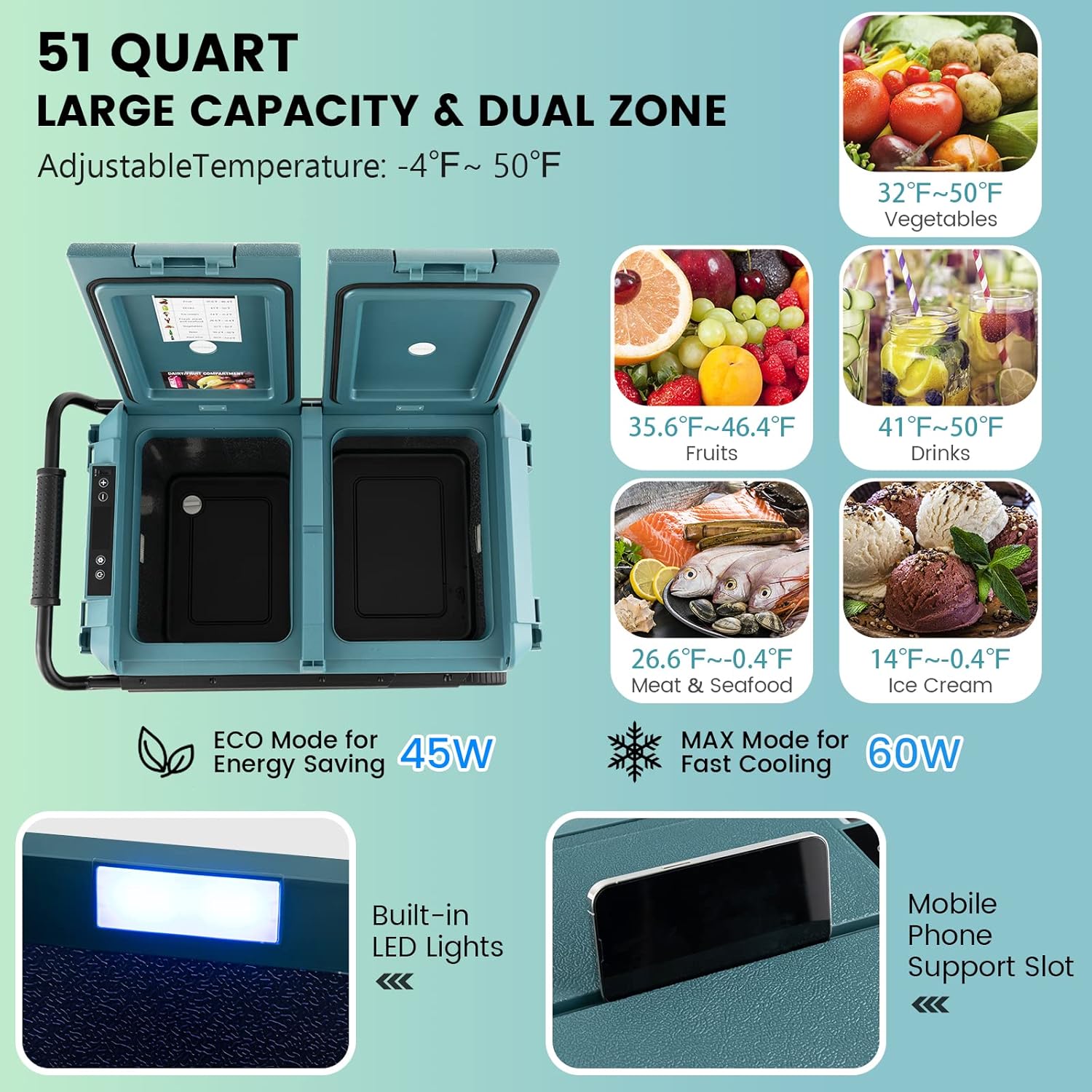
Figure 4.1: Smart Control Panel and internal features.
The control panel features an LCD display and touch buttons for easy temperature and mode adjustments.
4.2 Power On/Off
- Press the Power Button to turn the unit on or off.
4.3 Temperature Setting
- Press the Temperature Setting Button (usually '+' or '-') to adjust the desired temperature. The temperature range is -20℃ to 10℃ (-4℉ to 50℉).
- The unit features dual-zone single-temperature control, meaning both compartments will maintain the set temperature.
- Typical temperature ranges for various items:
- Vegetables: 0℃~10℃ (32℉~50℉)
- Fruits: 2℃~8℃ (35.6℉~46.4℉)
- Drinks: 5℃~10℃ (41℉~50℉)
- Meat & Seafood: -3℃~-18℃ (26.6℉~-0.4℉)
- Ice Cream: -10℃~-18℃ (14℉~-0.4℉)
4.4 Operating Modes (ECO/MAX)
- Press the Parameter Setting Button (or similar, refer to specific icon on panel) to switch between operating modes:
- ECO Mode (45W): Energy-saving mode, suitable for maintaining temperature over longer periods.
- MAX Mode (60W): Fast cooling mode, ideal for quickly reaching the desired temperature.
4.5 Battery Protection
The refrigerator features a 3-level battery protection system to prevent your car battery from draining completely. You can typically adjust this setting via the control panel (refer to specific instructions in the product's included manual for exact steps).

Figure 4.2: Key operational features.
4.6 Additional Features
- °C/°F Switch: Toggle between Celsius and Fahrenheit temperature display.
- Memory Function: The unit retains your last temperature setting even after being powered off.
- Built-in LED Lights: Convenient for viewing contents in low light conditions.
- USB Charging Port: Located on the control panel, allows charging of mobile devices.
- Bottle Opener & Hooks: Integrated features for added convenience during outdoor activities.
5. Maintenance and Cleaning
Regular maintenance ensures optimal performance and longevity of your car refrigerator.
5.1 Cleaning the Interior
- Disconnect the power supply before cleaning.
- Use a soft cloth dampened with mild detergent and warm water to wipe the interior surfaces.
- The bottom drain plug allows for easy drainage and cleaning. Open the plug to drain any liquids, then wipe dry.
- Do not use abrasive cleaners, solvents, or sharp objects, as they can damage the interior lining.
- Ensure the interior is completely dry before reconnecting power or storing items.
5.2 Cleaning the Exterior
- Wipe the exterior with a soft, damp cloth.
- Keep the ventilation grilles clean and free of dust or debris to ensure efficient cooling. Use a soft brush or vacuum cleaner to remove accumulated dust.
5.3 Storage
- If storing the refrigerator for an extended period, ensure it is clean and dry.
- Store in a cool, dry place, away from direct sunlight and extreme temperatures.
- It is advisable to leave the lids slightly ajar to prevent odors and mildew buildup.
6. Troubleshooting
Refer to this section for common issues and their solutions. If the problem persists, contact customer support.
| Problem | Possible Cause | Solution |
|---|---|---|
| Refrigerator not turning on. | No power supply; loose connection; blown fuse (DC); power outlet issue. | Check power cord connection; ensure power outlet is functional; check vehicle's fuse box for blown fuse (if using DC); try a different power source. |
| Not cooling sufficiently. | Temperature setting too high; ventilation blocked; overloaded with warm items; ambient temperature too high. | Lower temperature setting; ensure clear ventilation; pre-cool items before loading; operate in a cooler environment if possible. |
| Excessive noise. | Unit not level; fan obstruction; normal compressor operation. | Ensure unit is on a flat surface; check for debris near fan; some compressor noise is normal (unit operates at ≤45dB). |
| Error code on display. | Specific internal issue. | Refer to the detailed error code list in the full product manual or contact customer support with the specific code. |
| Car battery draining. | Battery protection setting too low; prolonged use with engine off. | Adjust battery protection to a higher level; avoid prolonged use when vehicle engine is off. |
7. Specifications
| Attribute | Value |
|---|---|
| Model Number | 10249US-GN-CYPF |
| Capacity | 51 Quart (48L) |
| Product Dimensions (D x W x H) | 17.5" x 29.5" x 21.5" (44.45 x 74.93 x 54.61 cm) |
| Voltage | 12V/24V (DC), 100-240V (AC) 50/60Hz |
| Rated Power | 60W |
| Rated Current | 4.8A/2.4A |
| Power Consumption | 0.265kwh |
| Temperature Range | -4℉~50℉ / -20℃~10℃ |
| DC Power Cord Length | 8 ft |
| AC Adapter Length | 5 ft |
| Noise Level | ≤45dB |
| Net Weight | 42 lbs (19.05 kg) |
| Material | PP |
8. Warranty and Support
For warranty information and customer support, please refer to the official COSTWAY website or the documentation included with your purchase. It is recommended to register your product to facilitate any future support needs.
Note: Warranty terms may vary based on purchase location and retailer. Please retain your proof of purchase for warranty claims.
For direct support, you may visit the COSTWAY Store on Amazon.
Ask a question about this manual
Ask about setup, troubleshooting, compatibility, parts, safety, or missing instructions. Manuals+ will review the question and use this page’s manual context to help answer it.