
1. Introduction
Thank you for purchasing the Aiwa AWPOK100D Bluetooth Speaker. This portable audio system is designed to deliver powerful sound with its integrated woofer and tweeter, dynamic LED lighting, and versatile connectivity options including Bluetooth, USB, and Auxiliary input. It also features a karaoke function with microphone input, making it ideal for various entertainment needs. Please read this manual carefully before using the product to ensure proper operation and to maximize its performance.
2. Safety Information
To ensure safe operation and prevent damage, please observe the following safety precautions:
- Do not expose the speaker to water or excessive moisture. This product is not waterproof.
- Do not place the speaker near heat sources such as radiators, heat registers, stoves, or other apparatus (including amplifiers) that produce heat.
- Use only attachments/accessories specified by the manufacturer.
- Unplug the speaker during lightning storms or when unused for long periods.
- Refer all servicing to qualified service personnel. Servicing is required when the apparatus has been damaged in any way, such as power-supply cord or plug is damaged, liquid has been spilled or objects have fallen into the apparatus, the apparatus has been exposed to rain or moisture, does not operate normally, or has been dropped.
- Ensure proper ventilation and do not block any ventilation openings.
- Do not overload wall outlets or extension cords as this can result in a risk of fire or electric shock.
3. Package Contents
Please check that all the following items are included in your package:
- Aiwa AWPOK100D Bluetooth Speaker
- Power Adapter
- Auxiliary Cable
- Wired Microphone
- User Manual (this document)
- Warranty Card
4. Product Overview
The Aiwa AWPOK100D is a floor-standing portable speaker system featuring a robust design with integrated woofers and tweeters for clear and powerful audio. It includes a full LED panel that provides dynamic lighting effects, enhancing your audio experience.

Figure 4.1: Front view of the Aiwa AWPOK100D Bluetooth Speaker. This image displays the speaker's front panel, highlighting the two main speaker grilles and the integrated LED lighting system, which can display various colors.
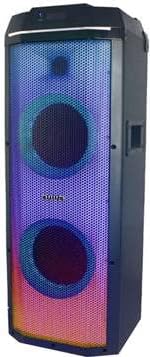
Figure 4.2: Side view of the Aiwa AWPOK100D Bluetooth Speaker. This image shows the speaker from a slight angle, revealing its robust casing and the side profile of the speaker grilles.

Figure 4.3: Rear view or control panel area of the Aiwa AWPOK100D, indicating microphone inputs. This image shows the speaker in a social setting, highlighting its karaoke functionality with two microphone inputs visible on the side or rear panel.
5. Setup
5.1 Unpacking and Placement
- Carefully remove all components from the packaging.
- Place the Aiwa AWPOK100D speaker on a stable, flat surface. The speaker is designed for floor mounting.
- Ensure there is adequate space around the speaker for ventilation and to prevent obstruction of sound.
5.2 Power Connection
- Connect the provided power adapter to the speaker's power input port.
- Plug the power adapter into a standard electrical outlet.
- The speaker operates via an electric cable. If it contains an internal rechargeable battery, ensure it is fully charged before initial portable use.
6. Operating Instructions
6.1 Powering On/Off
- To power on the speaker, press and hold the power button located on the control panel until the LED lights illuminate.
- To power off, press and hold the power button again until the LED lights turn off.
6.2 Bluetooth Pairing
- Turn on the speaker. It will automatically enter Bluetooth pairing mode, indicated by a flashing Bluetooth indicator light.
- On your compatible device (smartphone, tablet, laptop), enable Bluetooth and search for available devices.
- Select "AWPOK100D" from the list of devices.
- Once paired, the Bluetooth indicator light will become solid, and you will hear a confirmation tone.
6.3 USB and Auxiliary Input
- USB Playback: Insert a USB flash drive containing audio files into the USB port. The speaker will automatically detect and begin playing music. Use the control panel or connected app to navigate tracks.
- Auxiliary Input: Connect an external audio device (e.g., MP3 player, CD player) to the AUX input port using the provided auxiliary cable. Switch the speaker's input mode to AUX.
6.4 Karaoke Function
- Connect the wired microphone to one of the microphone input jacks on the speaker.
- Adjust the microphone volume using the dedicated controls on the speaker.
- The speaker supports a "Voice Cancel" feature for karaoke, which can be activated via the control panel or the companion application to reduce vocals in music tracks.

Figure 6.1: The Aiwa AWPOK100D speaker providing entertainment in a party environment. This image illustrates the speaker's use in social gatherings, emphasizing its powerful sound and LED lighting for ambiance.
6.5 True Wireless Stereo (TWS) Function
The TWS function allows you to connect two Aiwa AWPOK100D speakers wirelessly via Bluetooth for a true stereo sound experience.
- Ensure both AWPOK100D speakers are powered on and not connected to any other Bluetooth device.
- On one speaker (this will be the primary speaker), press and hold the TWS button (refer to the speaker's control panel for exact button location).
- The primary speaker will search for the secondary speaker. Once connected, both speakers will emit a confirmation tone, and their Bluetooth indicators will synchronize.
- Now, connect your Bluetooth device to the primary speaker as described in Section 6.2. Audio will play in stereo across both speakers.

Figure 6.2: Two Aiwa AWPOK100D speakers demonstrating the True Wireless Stereo (TWS) function. This image shows two speakers positioned to create a wider stereo soundstage, with a person dancing to illustrate the enhanced audio experience.
6.6 LED Lighting Control
The speaker features a full LED panel with various lighting modes. Use the dedicated LED control button on the speaker's control panel or the companion application to cycle through different lighting effects or to turn the lights off.
7. Maintenance
- Cleaning: Use a soft, dry cloth to clean the exterior of the speaker. Do not use liquid cleaners or abrasive materials.
- Storage: When not in use for extended periods, store the speaker in a cool, dry place, away from direct sunlight and extreme temperatures.
- Battery Care: If the speaker has an internal rechargeable battery, avoid fully discharging it frequently. Charge it regularly, even if not in use, to maintain battery health.
8. Troubleshooting
If you encounter issues with your Aiwa AWPOK100D speaker, please refer to the following common problems and solutions:
| Problem | Possible Cause | Solution |
|---|---|---|
| No power | Power cable not connected; Power outlet not working; Internal battery depleted. | Ensure power cable is securely connected. Try a different power outlet. Charge the speaker for several hours. |
| No sound | Volume too low; Incorrect input mode; Device not connected properly. | Increase volume on speaker and connected device. Select correct input mode (Bluetooth, USB, AUX). Reconnect Bluetooth device or cables. |
| Bluetooth not pairing | Speaker not in pairing mode; Device Bluetooth off; Speaker already connected to another device. | Ensure speaker is in pairing mode (flashing indicator). Turn Bluetooth on your device. Disconnect from other devices and try again. |
| Microphone not working | Microphone not connected; Microphone volume too low. | Ensure microphone is securely plugged in. Increase microphone volume on the speaker. |
If the problem persists after trying these solutions, please contact customer support.
9. Specifications
| Feature | Specification |
|---|---|
| Model Name | AWPOK100D |
| Brand | Aiwa |
| Mounting Type | On floor |
| Speaker Type | Woofer, Tweeter |
| Special Features | Bluetooth, Full LED Panel, Karaoke Function, TWS (True Wireless Stereo) |
| Recommended Uses | For smartphones or tablets |
| Compatible Devices | Smartphone, Tablet, Laptop (Android, iOS, Windows) |
| Included Components | Adapter, Auxiliary Cable, User Manual, Wired Microphone, Warranty Card |
| Product Dimensions (D x W x H) | 29.8 cm x 27 cm x 83.5 cm |
| Product Weight | 13 Kilograms |
| Waterproof | No |
| Control Method | Application, On-device controls |
| Wireless Communication Technology | Bluetooth |
| Power Source | Electric Cable |
| Speaker Amplification Type | Active |
| Average Battery Life | 5 Hours (if internal battery is present) |
| Batteries Included | No |
| Batteries Required | Yes (likely for remote control, if included, or internal rechargeable) |
| Max Speaker Output Power | 2000 Watts (PMPO) |
| Frequency Response | 50 Hz |
| Connectivity Technology | Bluetooth, USB, Auxiliary |
| Audio Output Mode | Stereo (with TWS) |
10. Warranty and Support
Your Aiwa AWPOK100D Bluetooth Speaker comes with a warranty. Please refer to the included Warranty Card for detailed terms and conditions, including the warranty period and coverage.
For technical support, troubleshooting assistance beyond what is provided in this manual, or warranty claims, please contact Aiwa customer service. Contact information can typically be found on the Warranty Card or the official Aiwa website.
Please retain your proof of purchase for warranty purposes.


