
Daakro
Daakro AK45 Stereo Audio Amplifier User Manual
Model: AK45
1. Introduction
Thank you for purchasing the Daakro AK45 Stereo Audio Amplifier. This amplifier is designed to provide high-quality audio for your home theater, karaoke, or general audio system. Featuring Bluetooth 5.0 connectivity, USB/SD card input, FM radio, and versatile controls, the AK45 offers a comprehensive audio solution. Please read this manual carefully before operation to ensure proper use and optimal performance.
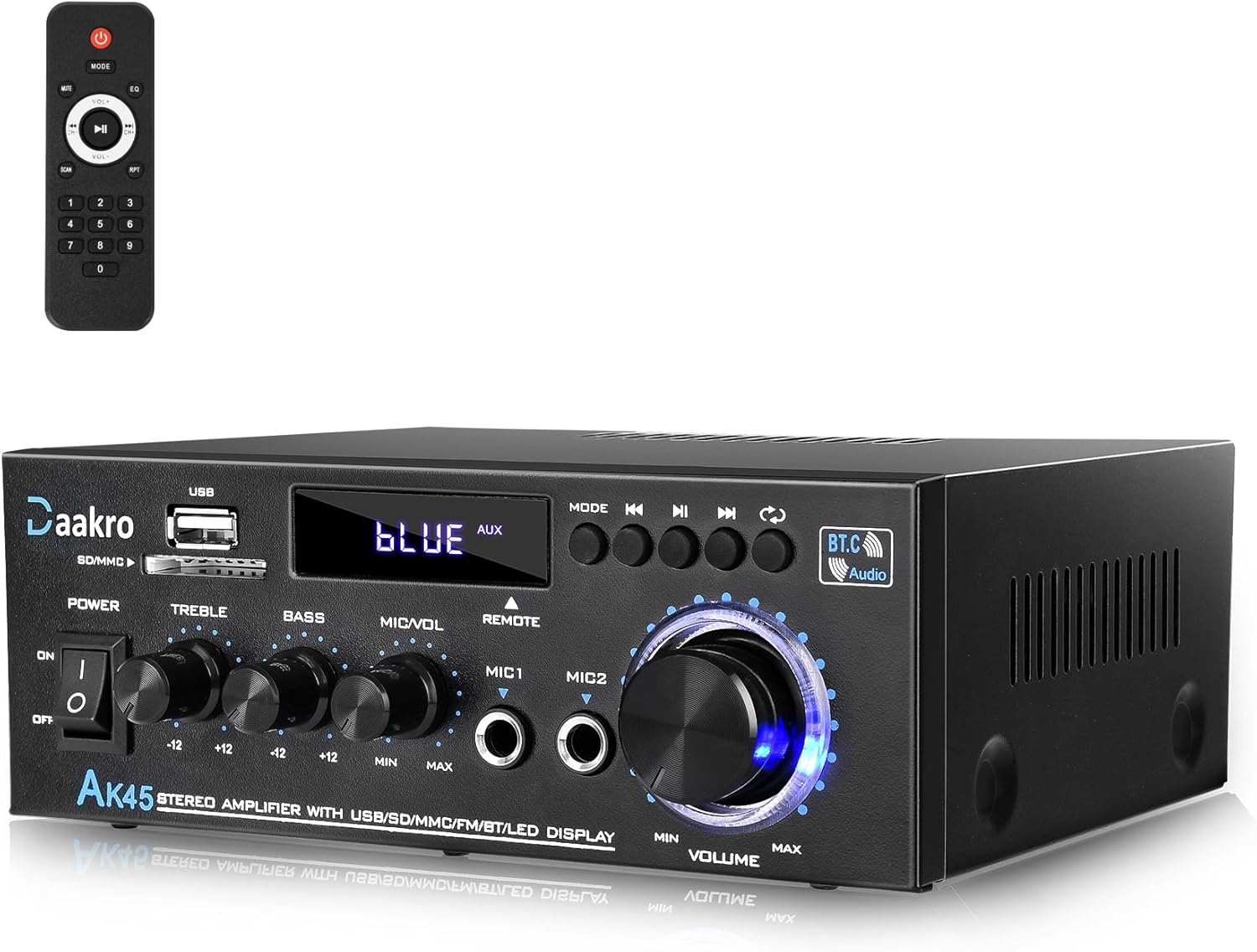
Figure 1: Daakro AK45 Stereo Audio Amplifier and Remote Control.
2. Safety Precautions
- Do not expose this unit to rain or moisture to prevent fire or electric shock.
- Do not open the amplifier casing. There are no user-serviceable parts inside. Refer all servicing to qualified personnel.
- Ensure proper ventilation. Do not block ventilation openings.
- Use only the power supply specified for this unit.
- Keep the distance within 30ft/10m between the device and amplifier for Bluetooth connection without any wall blocking. For TV or PC devices, keep the distance within 15ft/5m.
- Remove the isolation plastic sheet from the remote control before first use.
3. Package Contents
Verify that all items are present in the package:
- Daakro AK45 Stereo Audio Amplifier
- Remote Control
- Power Cable
- FM Antenna
- User Manual (this document)

Figure 2: What's in the Box.
4. Product Overview
4.1 Front Panel

Figure 3: Front Panel Controls and Inputs.
- Power Switch: Turns the unit on or off.
- USB/SD Card Input: For playing audio files from USB flash drives or SD cards.
- Mode Button: Switches between input modes (Bluetooth, FM, USB, SD, AUX).
- Play/Pause, Next/Previous Track Buttons: Media playback controls.
- Treble Knob: Adjusts the high-frequency audio level.
- Bass Knob: Adjusts the low-frequency audio level.
- MIC/VOL Knob: Adjusts the microphone volume.
- MIC1/MIC2 Inputs: 6.35mm jack inputs for microphones.
- Master Volume Control: Adjusts the overall output volume.
- LED Display: Shows current mode, track information, or FM frequency.
4.2 Back Panel

Figure 4: Back Panel Connections.
- FM Antenna Input: Connect the included FM antenna for radio reception.
- Audio Input (RCA): Connect external audio sources like CD/DVD players, TVs, or computers using RCA cables.
- Speaker Outputs: Connect passive speakers (4-16 ohms impedance). Ensure correct polarity (+ to + and - to -).
- DC 12V/5A Power Input: For external DC power supply (if applicable, typically for car use).
- AC Power Input: Connect the provided AC power cable to a wall outlet.
5. Setup
- Placement: Place the amplifier on a stable, flat surface with adequate ventilation. Avoid placing it near heat sources or in direct sunlight.
- Speaker Connection:
- Identify the positive (+) and negative (-) terminals on your passive speakers and on the amplifier's speaker outputs.
- Connect the positive terminal of the left speaker to the "LCH +" terminal on the amplifier.
- Connect the negative terminal of the left speaker to the "LCH -" terminal on the amplifier.
- Repeat for the right speaker, connecting to the "RCH +" and "RCH -" terminals.
- Ensure all connections are secure to prevent short circuits. The amplifier is suitable for 4-16 inch passive speakers.
Figure 5: Connecting Passive Speakers.
- FM Antenna Connection: Connect the included FM antenna to the "FM.ANT" input on the back panel. Extend the antenna for better reception.
- Audio Source Connection (AUX):
- For external devices like CD/DVD players, connect RCA audio cables from the device's audio output to the "AUDIO INPUT" (red for right, white for left) on the amplifier's back panel.

Figure 6: Connecting External Audio Sources.
- Power Connection: Connect the provided AC power cable to the "AC POWER INPUT" on the back panel, then plug the other end into a standard wall outlet.
6. Operating Instructions
6.1 Power On/Off
Flip the "POWER" switch on the front panel to the "ON" position to turn on the amplifier. Flip it to "OFF" to turn it off.
6.2 Input Mode Selection
Press the "MODE" button on the front panel or the remote control to cycle through available input modes: Bluetooth (BT), FM Radio, USB, SD Card, and AUX (Line Input).
6.3 Volume Control
Adjust the "VOLUME" knob on the front panel to control the overall audio output level. The remote control also has volume adjustment buttons.
Note: The front panel volume knob and the remote control volume buttons operate independently. For optimal control, set the remote volume to maximum and use the front panel knob for primary volume adjustment, or vice-versa, depending on your preference. If using the remote, be aware that the digital volume level resets to maximum (30) when the unit is powered off and on via the main power switch.
6.4 Tone Control
Use the "TREBLE" and "BASS" knobs on the front panel to adjust the high and low frequencies of the audio output, respectively. Turn clockwise to increase, counter-clockwise to decrease.

Figure 7: Bass and Treble Controls.
6.5 Bluetooth Operation
- Switch the amplifier to "BT" mode using the "MODE" button. The LED display will show "BLUE".
- Enable Bluetooth on your mobile device (smartphone, tablet, computer).
- Search for "AK45" in the list of available Bluetooth devices and select it to pair.
- Once paired, the amplifier will indicate a successful connection. You can now play audio from your device through the amplifier.
- Control playback (play/pause, next/previous) using the buttons on the amplifier or your connected device.
Note: Maintain a distance of within 30 feet (10 meters) between the Bluetooth device and the amplifier for optimal connection, ensuring no significant obstacles. For TV or PC connections, keep the distance within 15 feet (5 meters).

Figure 8: Bluetooth Connection Range.
6.6 USB/SD Card Playback
- Insert a USB flash drive or SD card containing audio files into the respective slot on the front panel.
- The amplifier will automatically switch to USB or SD mode and begin playing audio. If not, press the "MODE" button to select the correct input.
- Use the playback control buttons on the front panel or remote to navigate tracks.
6.7 FM Radio Operation
- Switch the amplifier to "FM" mode using the "MODE" button.
- Press the Play/Pause button to initiate an automatic scan for available FM stations. The amplifier will save detected stations.
- Use the Next/Previous track buttons to cycle through saved stations.
- Adjust the FM antenna position for better reception if needed.
6.8 Microphone and Karaoke Function
The AK45 amplifier features two microphone inputs for karaoke or public address use.
- Plug your microphones into the "MIC1" or "MIC2" inputs on the front panel.
- Adjust the "MIC/VOL" knob to control the microphone volume.
- Ensure the microphone volume is turned down when not in use to prevent feedback or background noise.

Figure 9: Karaoke Functionality.
6.9 Remote Control Usage
The included remote control allows for convenient operation from a distance.
- Ensure the plastic isolation sheet is removed from the battery compartment before first use.
- Point the remote control directly at the amplifier's front panel.
- Functions include power on/off, mode selection, volume up/down, mute, EQ presets, and media playback controls.
Figure 10: Remote Control in Use.
7. Maintenance
- Cleaning: Use a soft, dry cloth to clean the exterior of the amplifier. Do not use liquid cleaners or aerosols.
- Ventilation: Regularly check that the ventilation openings are clear of dust and debris to prevent overheating.
- Storage: If storing the amplifier for an extended period, disconnect it from power and store it in a cool, dry place.
8. Troubleshooting
| Problem | Possible Cause | Solution |
|---|---|---|
| No power | Power cable not connected; Power switch off; Outlet not working. | Ensure power cable is securely connected. Turn power switch to ON. Test outlet with another device. |
| No sound output | Incorrect input mode; Volume too low; Speaker wires loose/incorrectly connected; Mute activated. | Press MODE to select correct input. Increase volume. Check speaker connections and polarity. Press MUTE on remote. |
| Bluetooth connection issues | Device too far; Obstacles blocking signal; Amplifier not in BT mode; Device not paired. | Move device closer (within 30ft/10m). Ensure clear line of sight. Switch amplifier to BT mode. Re-pair device. |
| Poor FM reception | Antenna not connected; Antenna not extended; Weak signal. | Connect FM antenna. Extend antenna fully. Try repositioning the antenna or amplifier. |
| Distorted sound | Volume too high; Incorrect tone settings; Loose connections; Speaker impedance mismatch. | Reduce volume. Adjust Bass/Treble knobs. Check all cable connections. Ensure speakers are 4-16 ohms. |
| Remote control not working | Battery depleted; Plastic isolation sheet not removed; Obstruction between remote and amplifier. | Replace battery. Remove plastic sheet. Ensure clear line of sight to amplifier's IR receiver. |
| Digital volume resets to max after power cycle | This is expected behavior for the digital volume when powered off via the main switch. | Adjust the digital volume via remote after each power-on, or primarily use the analog volume knob on the front panel. |
9. Specifications
| Feature | Specification |
|---|---|
| Model Number | AK45 |
| Peak Power Output | 300W + 300W |
| Rated Power Output | 40W + 40W |
| Speaker Impedance | 4-16 ohms |
| Bluetooth Version | 5.0 |
| Bluetooth Range | Up to 30ft/10m (without blocking); 15ft/5m (with TV/PC) |
| Inputs | USB 2.0, SD Card, FM Radio, Bluetooth, AUX (RCA), 2x Microphone (6.35mm) |
| Controls | Volume, Treble, Bass, Microphone Volume |
| Power Supply | AC 240V (or as specified on unit), DC 12V/5A |
| Dimensions (L x W x H) | Approx. 7.1 x 5.5 x 2.6 inches (based on image) |
| Item Weight | 1.91 pounds |
| Batteries (Remote) | 1 CR2 battery (included) |
Figure 11: Approximate Product Dimensions.
10. Warranty and Support
Daakro provides a 36-month warranty for this product, ensuring peace of mind regarding manufacturing defects and performance issues.
For any questions, technical assistance, or warranty claims, please contact Daakro customer service. We offer 24-hour online customer service to assist you promptly.
Contact Information:
- Refer to your purchase platform or the Daakro official website for the most current contact details.
- Visit the Daakro Store on Amazon for more information and support.

Figure 12: Daakro After-Sales Support.
Ask a question about this manual
Ask about setup, troubleshooting, compatibility, parts, safety, or missing instructions. Manuals+ will review the question and use this page’s manual context to help answer it.