
Introduction
This manual provides essential information for the safe and efficient use of your YAOSHENG 150W GigE Passive PoE Injector. This device is designed to provide power and data connectivity for Starlink systems, featuring high-power PoE injection, surge protection, and ESD protection within a durable aluminum case.

Figure 1: YAOSHENG 150W GigE Passive PoE Injector
Safety Information
- Ensure proper grounding of the device for effective surge and ESD protection.
- Verify input voltage and current specifications before connecting power to prevent damage.
- Do not expose the device to moisture or extreme temperatures.
- Handle all cable connections carefully to avoid damage to ports or cables.
Package Contents
The package includes:
- 1x YAOSHENG 150W GigE Passive PoE Injector
Product Features
- 4-pair high-power PoE injection: Delivers sufficient power for Starlink Dishy V2.
- Surge protection: Protects connected equipment from power surges.
- ESD protection: Safeguards against electrostatic discharge.
- Aluminium case: Provides durability and heat dissipation.
- Pinout: +V: 1,2,3,6 / -V: 4,5,7,8: Compatible with Starlink Dishy V2 without requiring cross-pairs.

Figure 2: Internal components highlighting protection features
Setup Instructions
1. Connecting the Starlink Cable
The Starlink cable connects to the PoE port of the injector. Ensure the cable is properly terminated with a T-568B pinout for optimal performance and to prevent equipment damage. If your Starlink cable has a proprietary connector, an adapter may be required.

Figure 3: Connection diagram for Starlink setup

Figure 4: T-568B pinout for Starlink cable crimping
2. Powering the Injector
Connect a 48-57V DC power source to the screw terminals on the injector. Observe polarity: +V to the positive terminal and -V to the negative terminal. The injector requires a stable power supply to function correctly.
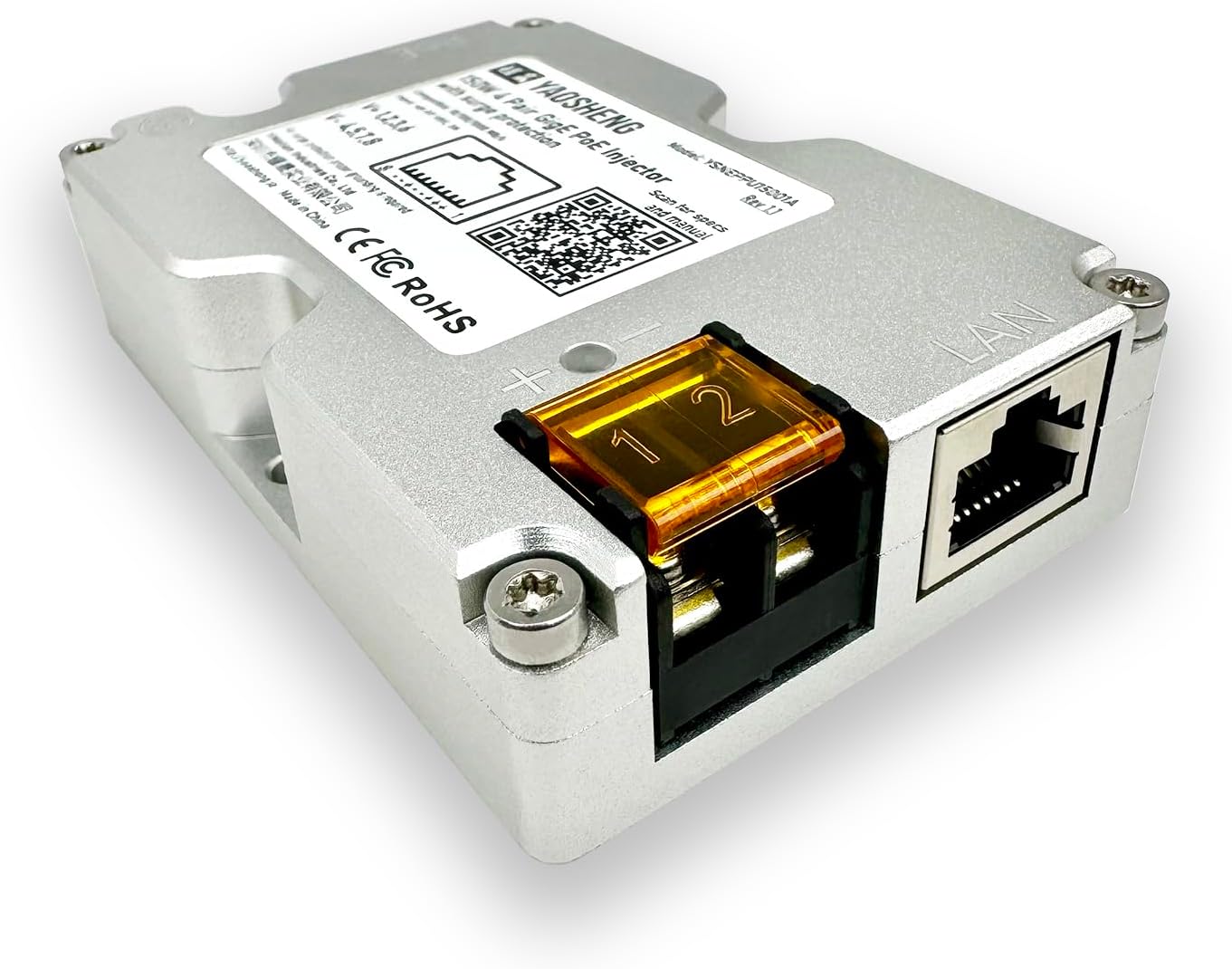
Figure 5: DC power input terminals
3. Connecting to Your Network
Connect a standard Ethernet cable from the LAN port of the injector to your router or network switch. This provides the data connection for your Starlink system to your local network.

Figure 6: LAN port for network connection
Operation
Once all connections are secure and power is supplied, the PoE injector will provide power to the Starlink dish and facilitate Gigabit Ethernet data transfer. The device operates automatically, requiring no further configuration. The blue LED indicator on the injector confirms power is being supplied.
Maintenance
- Regularly inspect all cable connections for wear or damage.
- Keep the device clean and free from dust and debris to ensure proper heat dissipation.
- Ensure the grounding wire (if used) remains securely connected.
- Avoid placing the injector in areas with poor ventilation.
Troubleshooting
| Problem | Possible Cause | Solution |
|---|---|---|
| No power indicator (blue LED off) | Incorrect or insufficient DC power input; faulty power supply. | Verify DC power supply voltage (48-57V) and current. Check polarity of connections. Test power supply. |
| No network connection (LAN port light off) | Faulty Ethernet cable; incorrect cable termination (T-568B); issue with connected router/switch. | Replace Ethernet cable. Ensure Starlink cable is correctly crimped to T-568B standard or use appropriate adapter. Check router/switch status. |
| Starlink dish not powering on or rebooting | Insufficient power from injector; issue with Starlink cable connection. | Ensure power supply can deliver adequate current for the Starlink dish. Recheck all connections, especially the Starlink cable to the PoE port. |
Specifications
| Feature | Detail |
|---|---|
| Model Number | YSNEPPU15001A |
| Package Dimensions | 4.02 x 2.83 x 1.26 inches |
| Item Weight | 3.35 ounces (95 Grams) |
| Brand | YAOSHENG |
| Hardware Interface | Ethernet |
| Color | Silver |
| Compatible Devices | Starlink Round Dishy, Rectangular Dishy v2, v3 |
| Data Link Protocol | Gigabit Ethernet |
| Data Transfer Rate | 1000 Megabits Per Second |

Figure 7: Product dimensions
Warranty and Support
For warranty information and technical support, please contact YAOSHENG directly through their official website or the retailer where the product was purchased. Keep your proof of purchase for warranty claims.