
Introduction
The BELLESA Thump is a clitoral vibrator designed for external stimulation. It features multiple modes of vibration, suction, and thumping, crafted from body-safe silicone, and is USB rechargeable and waterproof. This manual provides essential information for the safe and effective use of your device.

Image: The BELLESA Thump device held in a hand, showcasing its ergonomic design.
Safety Information
- Material Safety: The BELLESA Thump is made from medical-grade, body-safe silicone. Ensure the device is clean before and after each use.
- Waterproof: The device is fully submersible. It can be used in the shower or bath.
- Charging: Use only the provided USB charging cable. Do not use the device while it is charging.
- Storage: Store in a cool, dry place, away from direct sunlight and extreme temperatures.
- Discontinue Use: If you experience any discomfort, irritation, or if the device overheats, discontinue use immediately.
- Legal Disclaimer: Statements regarding this product have not been evaluated by the FDA and are not intended to diagnose, treat, cure, or prevent any disease or health condition.
Product Features
- Material: Body-safe silicone for a smooth and non-porous surface.
- Water Resistance: Fully waterproof, suitable for use in water.
- Power: USB rechargeable with an included Lithium Ion battery.
- Modes: Features 5 suction modes, 5 thumping modes, and 5 vibration modes for varied sensations.
- Design: Ergonomic and discreet design, includes a storage pouch.

Image: Visual representation of key features including storage, silicone material, waterproof capability, and rechargeable function.
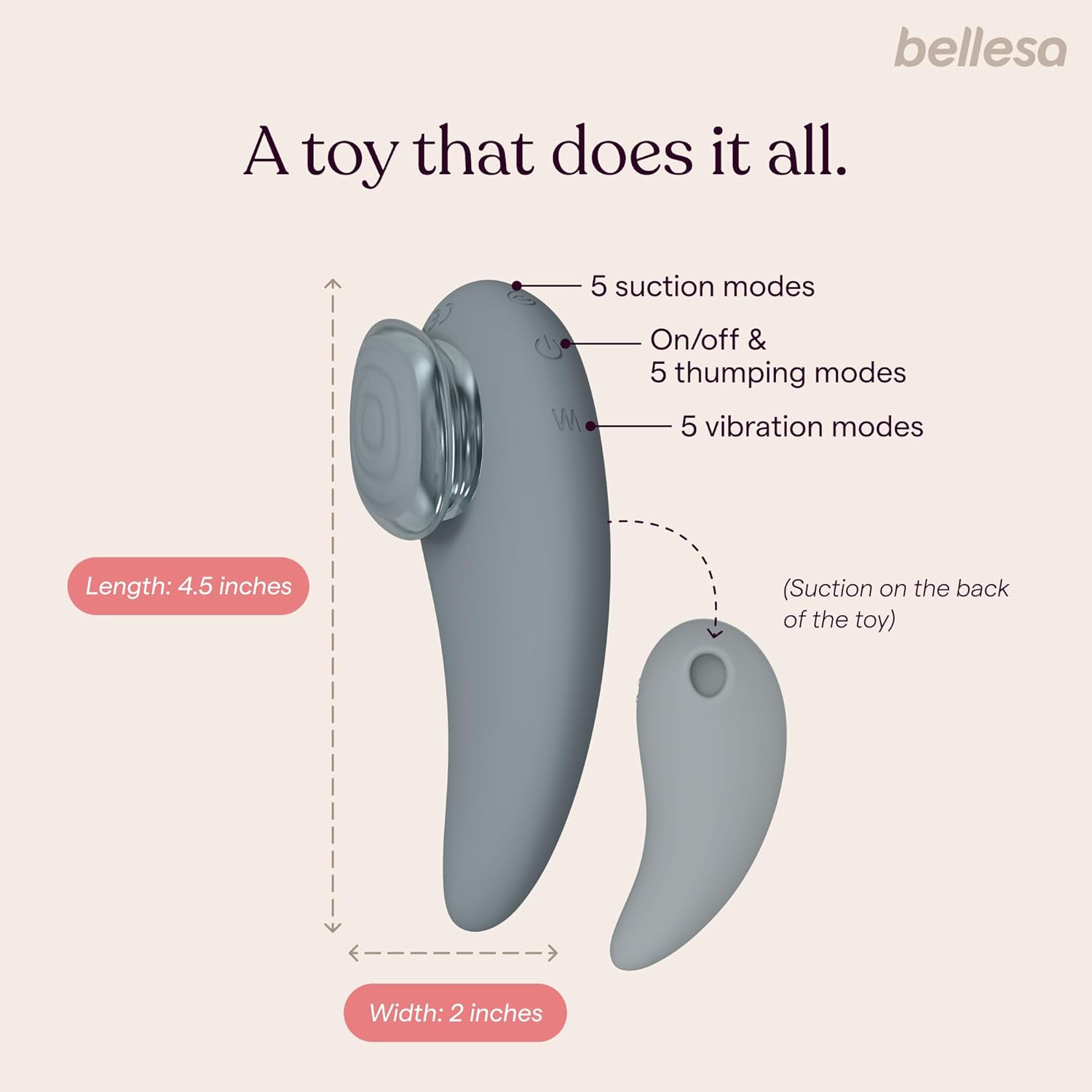
Image: Diagram showing the BELLESA Thump's length (4.5 inches) and width (2 inches), along with labels for 5 suction modes, 5 thumping modes, and 5 vibration modes.
Setup
Charging the Device
- Before first use, fully charge your BELLESA Thump.
- Locate the charging port on the device.
- Connect the provided USB charging cable to the device and then to a compatible USB power source (e.g., computer, USB wall adapter).
- The indicator light will illuminate to show that the device is charging. Once fully charged, the light may change color or turn off. Refer to the product packaging for specific indicator light behavior.
First Use Preparation
- Clean the device thoroughly before its initial use. Refer to the 'Maintenance' section for cleaning instructions.
- Ensure the device is completely dry before powering on.
Operating Instructions
Power On/Off
- To turn on: Press and hold the power button (usually marked with a power symbol) for 2-3 seconds until the device activates.
- To turn off: Press and hold the power button again for 2-3 seconds until the device deactivates.
Mode Selection and Intensity Adjustment
- Once powered on, press the mode button (often marked with a wave or 'M' symbol) to cycle through the different vibration, suction, and thumping patterns.
- Each mode typically has multiple intensity levels. Repeatedly pressing the mode button or using dedicated '+' and '-' buttons (if present) will adjust the intensity within the selected mode.
- Experiment with the different modes and intensities to find your preferred settings.

Image: Visual demonstration of the device's three primary functions: vibration, suction, and thumping.
Video: An official product video demonstrating the BELLESA Thump's features and operation.
Maintenance
Cleaning
- Clean the BELLESA Thump before and after each use.
- Wash the device with warm water and a mild, toy-safe soap or a specialized toy cleaner.
- Rinse thoroughly to remove all soap residue.
- Pat dry with a lint-free cloth or allow it to air dry completely before storage.
- Do not use harsh chemicals, alcohol-based cleaners, or petroleum-based lubricants, as these can damage the silicone material.
Storage
- Store the device in its original storage pouch or a clean, breathable bag.
- Keep it in a cool, dry place, away from direct sunlight, extreme temperatures, and other toys made of different materials to prevent potential damage or reactions.

Image: The BELLESA Thump device neatly stored within its protective case.
Troubleshooting
- Device not turning on or charging:
Ensure the USB charging cable is securely connected to both the device and a functional USB power source. Allow sufficient time for the device to charge (typically 1-2 hours for a full charge). If the issue persists, try a different USB port or power adapter. - Weak or no sensation:
Check if the device is fully charged. Cycle through the different modes and intensity levels to ensure the desired setting is selected. If the device is charged and still not functioning as expected, it may indicate a malfunction. - Device overheating during use:
If the device becomes excessively warm or hot to the touch during operation, discontinue use immediately. Allow the device to cool down completely. Persistent overheating may indicate an internal issue. - Unusual noises or odors:
If you notice any unusual noises, vibrations, or odors coming from the device, discontinue use immediately.
If troubleshooting steps do not resolve the issue, please contact BELLESA customer support for further assistance.
Specifications
| Feature | Detail |
|---|---|
| Model | Thump |
| Brand | BELLESA |
| Material | Silicone |
| Color | Grey |
| Water Resistance Level | Waterproof |
| Battery Type | 1 Lithium Ion battery (included) |
| Package Dimensions | 7.72 x 3.9 x 2.64 inches |
| Item Weight | 12.31 ounces |
Warranty and Support
For warranty information, product support, or any inquiries not covered in this manual, please refer to the BELLESA official website or contact their customer service directly. Keep your proof of purchase for any warranty claims.