
1. Introduction
Thank you for choosing the Gaiatop Portable Neck Fan M5. This innovative, hands-free device is designed to provide personal cooling wherever you go. Its lightweight, bladeless design ensures comfort and safety, making it ideal for various activities. This manual provides essential information for safe and effective use of your new neck fan.
Package Contents:
- 1 x Gaiatop Portable Neck Fan M5
- 1 x Type-C Power Cord
- 1 x User Manual
2. Safety Instructions
Please read all safety instructions carefully before using the device to prevent injury or damage.
- Do not immerse the fan in water or other liquids.
- Keep out of reach of small children and pets.
- Do not disassemble, repair, or modify the device yourself. Contact customer support if needed.
- Use only the provided Type-C charging cable.
- Avoid exposing the device to extreme temperatures or direct sunlight for prolonged periods.
- The bladeless design prevents hair entanglement, but exercise caution with very long hair.
3. Product Overview
The Gaiatop M5 Portable Neck Fan features a comfortable, U-shaped design that rests securely around your neck. It is engineered for 360-degree surrounding airflow with 72 air outlets, ensuring comprehensive cooling.

Figure 1: Gaiatop Portable Neck Fan M5, highlighting its sleek design and air outlets.

Figure 2: Illustration of the 360-degree surrounding air movement from 72 air outlets.

Figure 3: The flexible design allows for comfortable adjustment around the neck.
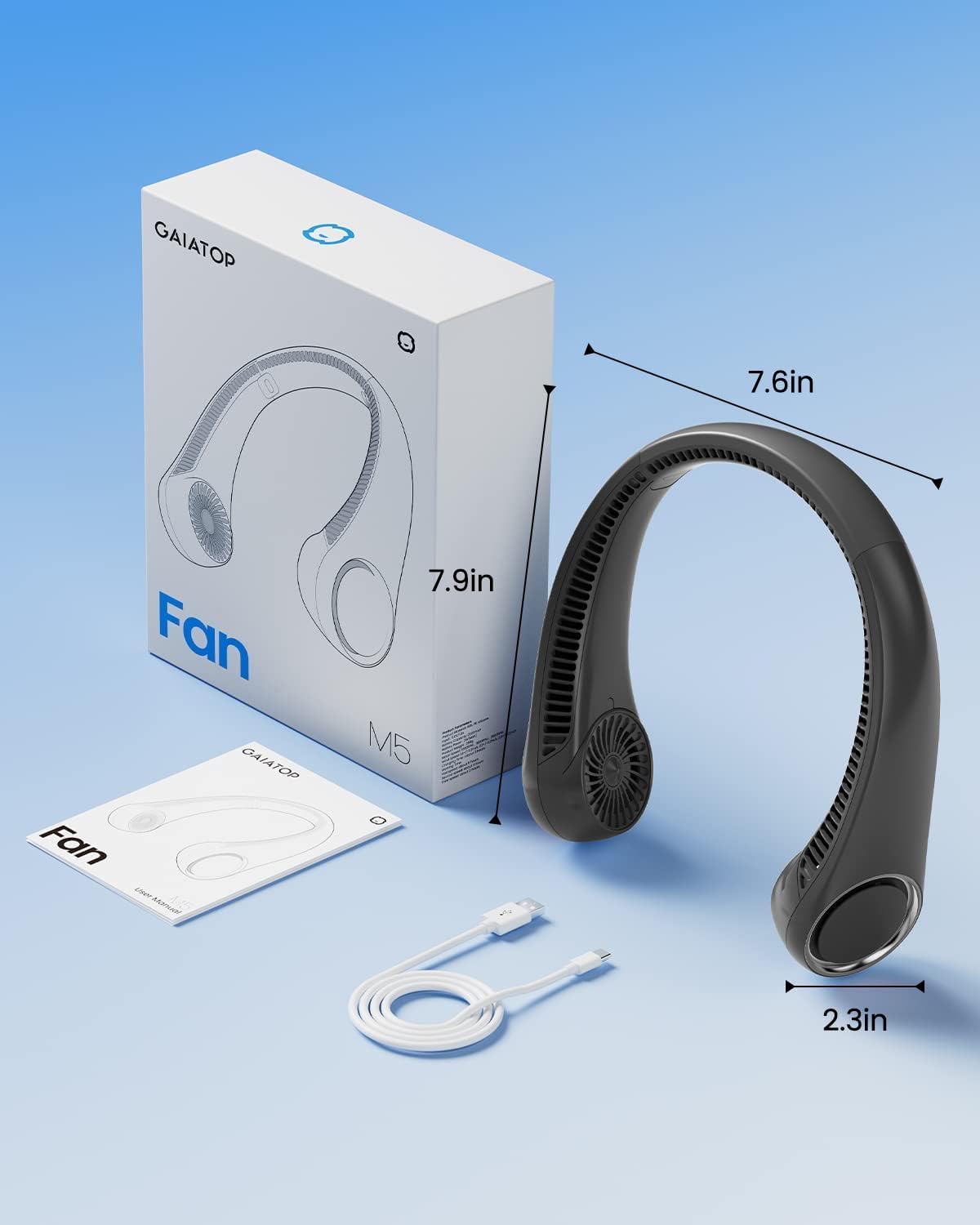
Figure 4: Product dimensions and included accessories.
4. Setup
Charging the Device:
Before first use, fully charge your neck fan. The device charges via a Type-C USB port, located on the side of the fan. A full charge takes approximately 6 hours and provides 6 to 23.5 hours of cooling time, depending on the speed setting.

Figure 5: The neck fan features a long-lasting 4000mAh battery, charging in about 6 hours.

Figure 6: The USB-C charging port for convenient power input.

Figure 7: The fan supports various power sources for charging.
5. Operating Instructions
Power On/Off and Speed Adjustment:
The neck fan features a single push button for all operations. Press the power button to turn the fan on and cycle through the three available speed settings.
- Press once: Activates Speed 1 (Gentle Breeze - 2800 RPM)
- Press twice: Activates Speed 2 (Cool Breeze - 3900 RPM)
- Press three times: Activates Speed 3 (Strong Wind - 4800 RPM)
- Press four times: Turns the fan off.
The fan operates with low noise levels, starting from 30dB, ensuring minimal distraction during use.

Figure 8: The power button with an indicator light.

Figure 9: Three powerful wind speeds for customized cooling.

Figure 10: The fan operates quietly, with noise levels starting from 30dB.
Usage Scenarios:
The lightweight and portable design makes this fan suitable for various activities:

Figure 11: Suitable for many occasions, providing hands-free cooling.

Figure 12: The low noise level ensures it does not affect work or concentration.
Video 1: Official Gaiatop video demonstrating the portable neck fan's features and use.
6. Maintenance
- To ensure longevity, store the fan in a dry place when not in use.
- Wipe the exterior of the fan with a soft, dry cloth to remove dust and debris.
- Do not use harsh chemicals or abrasive cleaners.
7. Troubleshooting
- Fan not turning on: Ensure the device is fully charged. Connect to a power source and check the indicator light.
- Weak airflow: Check if the air outlets are obstructed. Increase the fan speed by pressing the power button.
- Unusual noise: Turn off the fan and check for any foreign objects in the air outlets. If the issue persists, discontinue use and contact customer support.
8. Specifications
| Feature | Detail |
|---|---|
| Brand | Gaiatop |
| Model Name | M5 |
| Color | Black |
| Electric Fan Design | Wearable Fan |
| Power Source | Battery Powered |
| Product Dimensions | 2.2"D x 6.5"W x 7.7"H |
| Item Weight | 9.3 ounces (0.58 Pounds) |
| Noise Level | 30 Decibels |
| Speed | 4800 RPM (Max) |
| Voltage | 5 Volts |
| Switch Type | Push Button |
| Control Method | Touch |
| Number of Power Levels | 3 |
| Reusability | Rechargeable |
| Batteries | 1 Lithium Ion batteries required (included) |
9. Warranty and Support
For warranty information or technical support, please refer to the contact details provided on the product packaging or visit the official Gaiatop website. Keep your purchase receipt for warranty claims.