
Lianai XZMKLXXE22976-3
Lianai Smart Tuya WiFi Weather Station User Manual
Brand: Lianai | Model: XZMKLXXE22976-3
1. Introduction
Thank you for choosing the Lianai Smart Tuya WiFi Weather Station. This device provides comprehensive indoor and outdoor environmental monitoring, including temperature, humidity, UV index, wind speed, and air pressure, all displayed on a large, vibrant color screen. With smart app integration, you can easily manage settings and receive alerts. This manual will guide you through the setup, operation, and maintenance of your weather station to ensure optimal performance.
2. Package Contents
Please check the package for the following items:
- 1 x Main Weather Station Unit
- 3 x Auxiliary Sensors
- 1 x USB Cable (Power adapter not included)
- 1 x User Manual (English, German, French, Spanish, Italian)

Image 1: Main Weather Station Unit and Auxiliary Sensors
This image displays the main weather station unit with its large color screen, alongside three small, white, circular auxiliary sensors. The main unit is white with a black display area, showing various weather parameters and time.
3. Safety Information
- Do not expose the main unit or sensors to extreme temperatures, direct sunlight, or moisture.
- Keep the device away from strong magnetic fields.
- Use only the provided USB cable for power. Ensure the power adapter (not included) meets 5V/2A specifications.
- Do not attempt to disassemble or repair the device yourself. Contact customer support for assistance.
- Keep out of reach of children.
4. Product Overview
4.1 Key Features
- Large color display showing UV index, air pressure, wind speed, 'feels like' temperature, actual temperature, humidity, and weather forecast.
- Supports up to 3 auxiliary sensors for simultaneous temperature and humidity data collection from different locations.
- Adjustable display brightness with 3 levels, activated by touching the top of the main unit.
- Easy operation via the Smart Life / Tuya WiFi app for unit switching (°F/°C, mph/km/h, hpa/mbar, 12/24-hour formats).
- Configurable alarms for UV, pressure, wind speed, temperature, and humidity.
- Flexible installation: main unit can be wall-mounted or placed on a desk; auxiliary sensors can be hung, attached with a lanyard, or magnetically mounted.
4.2 Components
The Lianai Smart Tuya WiFi Weather Station consists of a main display unit and auxiliary sensors.
- Main Unit: Displays all weather data, time, and connects to WiFi.
- Auxiliary Sensors: Wireless sensors that measure temperature and humidity in remote locations and transmit data to the main unit.

Image 2: Main Unit and a Single Auxiliary Sensor
This image shows the main weather station unit from an angled perspective, with its vibrant color display active. A single auxiliary sensor is visible to the right of the main unit, highlighting the compact design of the remote sensor.
5. Setup
5.1 Powering On the Main Unit
- Connect the provided USB cable to the "INPUT 5V" port on the back of the main unit.
- Plug the other end of the USB cable into a 5V/2A USB power adapter (not included) and then into a power outlet.
- The display will light up, indicating the unit is powered on.
5.2 Installing Auxiliary Sensors
The auxiliary sensors require a CR2477 button cell battery (not included). Insert the battery according to the polarity markings inside the sensor compartment.
Auxiliary sensors can be installed in various ways:
- Wall Mounting: Use adhesive or screws (not included) to attach the sensor to a wall.
- Hanging: Thread a string or lanyard through the designated hole on the sensor and hang it.
- Magnetic Attachment: The sensor features a magnetic back for easy attachment to metal surfaces like refrigerators.

Image 3: Main Unit and Auxiliary Sensor Installation Methods
This image illustrates various installation methods. The main unit can be hung on a wall or placed on a desk. Auxiliary sensors can be hung on a wall, hung with a lanyard, or attached to metal surfaces using their magnetic back design. Examples include a sensor in a wine cellar and on a refrigerator.
5.3 App Installation and Pairing
- Download the Smart Life or Tuya Smart app from your smartphone's app store (iOS or Android).
- Register or log in to your account.
- Ensure your main weather station unit is powered on and your phone is connected to a 2.4GHz WiFi network.
- In the app, tap the "+" icon to add a new device. Select "Sensors" or "Weather Station" from the device list.
- Follow the on-screen instructions in the app to put the weather station into pairing mode (usually involves pressing and holding a button on the main unit or a specific sequence).
- Once paired, the app will display the weather station, and you can configure settings.
6. Operation
6.1 Display Information
The large color display provides real-time information:
- Time and Date: Current time and date.
- Weather Forecast: Icons for sunny, cloudy, rainy, snowy, thunderstorm, partially cloudy.
- UV Index: Ultraviolet radiation level.
- Wind Speed: Current wind speed.
- Air Pressure: Atmospheric pressure.
- Indoor Temperature & Humidity: Readings from the main unit.
- Outdoor/Auxiliary Sensor Temperature & Humidity: Readings from connected auxiliary sensors (CH1, CH2, CH3).
- "Feels Like" Temperature: Perceived temperature based on actual temperature and humidity.
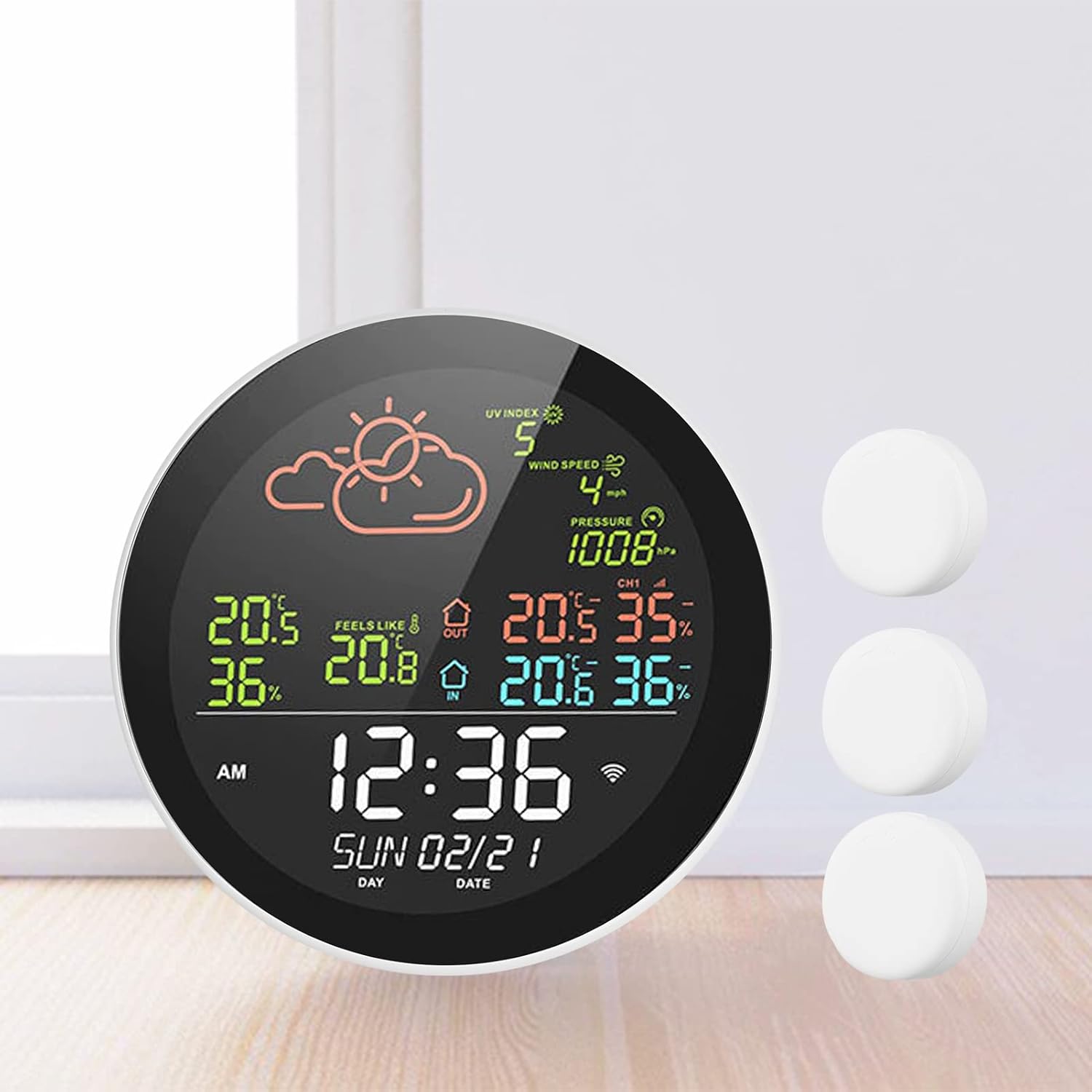
Image 4: Detailed Display of Weather Station
This image provides a close-up view of the weather station's display, clearly showing the time, date, weather forecast icons, UV index, wind speed, air pressure, and temperature/humidity readings for both indoor and multiple outdoor channels.
6.2 Adjusting Brightness
To adjust the display brightness, gently tap the top of the main unit. There are 3 levels of brightness to cycle through.
6.3 App Control and Settings
The Smart Life / Tuya Smart app allows for advanced control and customization:
- Unit Switching: Change temperature units (°F/°C), wind speed units (mph/km/h), air pressure units (hpa/mbar), and time formats (12/24 hours).
- Alarm Settings: Set custom alerts for UV index, air pressure, wind speed, temperature, and humidity thresholds.
- Data Logging: View historical data for temperature and humidity.
- Display Content: Optionally display or hide specific data content on the main unit.

Image 5: Smart Control and Data Synchronization
This image demonstrates the smart control capabilities via the mobile app, showing how users can optionally display or hide data content. It also illustrates how the weather station acquires and synchronizes weather data automatically via the network throughout the day, and highlights various alarm reminder settings for air pressure, UV, wind speed, temperature, and humidity.
7. Maintenance
7.1 Cleaning
Wipe the main unit and sensors with a soft, dry cloth. Do not use abrasive cleaners or solvents, as they may damage the surfaces.
7.2 Auxiliary Sensor Battery Replacement
When the auxiliary sensor battery is low, replace it with a new CR2477 button cell battery. Ensure correct polarity during installation.
8. Troubleshooting
- No Display:
- Ensure the USB cable is securely connected and the power adapter is working.
- Verify the power outlet is functional.
- No Auxiliary Sensor Data:
- Check if the auxiliary sensor has a working CR2477 battery installed correctly.
- Ensure the sensor is within the 80-meter communication range of the main unit (in an open outdoor environment).
- Re-pair the sensor with the main unit via the app if necessary.
- App Connection Issues:
- Confirm your phone is connected to a 2.4GHz WiFi network.
- Restart the main unit and your router.
- Try re-pairing the device with the app.
- Inaccurate Readings:
- Ensure sensors are not exposed to direct sunlight, heat sources, or excessive moisture, which can affect accuracy.
- Allow some time for readings to stabilize after initial setup or relocation.
9. Specifications
| Brand | Lianai |
| Model | XZMKLXXE22976-3 |
| Material | ABS |
| Main Unit Input | 100-240V, 50/60Hz (via USB cable, adapter not included) |
| USB Input (Main Unit) | 5V/2A |
| USB Output (Main Unit) | 5V/1A |
| App Compatibility | Smart Life / Tuya Wifi |
| Auxiliary Sensor Standby Current | Approx. 6uA |
| Auxiliary Sensor Standby Time | 6 months |
| Communication Mode | WiFi (2.4G) + BLE |
| Auxiliary Sensor Communication Frequency | 433 MHz |
| Auxiliary Sensor Communication Distance | 80M (open outdoor environment) |
| Temperature Display Unit | °C / °F |
| Humidity Display Unit | RH% |
| Temperature Range & Accuracy | -20~60°C, ±0.5°C |
| Humidity Range & Accuracy | 0%~99%, ±2%RH |
| Operating Temperature | -20~60°C |
| Auxiliary Sensor Power Supply | 3V 1000mA, CR2477 button cell (not included) |
| Main Unit Dimensions | 160 x 23.5 mm / 6.30 x 0.93 inches |
| Auxiliary Sensor Dimensions | 45 x 15 mm / 1.77 x 0.59 inches |
| Item Weight | 355g / 12.52 oz |
| Package Weight | 600g / 21.15 oz |
| Package Size | 19.5 x 18.5 x 6.3 cm / 7.68 x 7.28 x 2.48 inches |

Image 6: Main Unit and Auxiliary Sensor Dimensions
This image provides a visual representation of the dimensions for both the main weather station unit and the auxiliary sensors, showing measurements in millimeters and inches.
10. Warranty and Support
For warranty information or technical support, please refer to the contact details provided with your purchase or visit the official Lianai website. Keep your proof of purchase for warranty claims.
Ask a question about this manual
Ask about setup, troubleshooting, compatibility, parts, safety, or missing instructions. Manuals+ will review the question and use this page’s manual context to help answer it.