
Introduction
Thank you for choosing the UXD Bluetooth Wireless Earphones. This manual provides essential information for setting up, operating, maintaining, and troubleshooting your new earphones. Please read it carefully to ensure optimal performance and longevity of your device. These earphones feature Bluetooth 5.0 connectivity, IPX7 waterproofing, CVC 8.0 noise cancellation for clear calls, and up to 20 hours of playtime.

Image: UXD Bluetooth Wireless Earphones, a general view of the product.
Package Contents
Before you begin, please check the package contents to ensure all items are present:
- UXD Bluetooth Wireless Earphones
- Micro-USB Charging Cable
- Three (3) Pairs of Eartips (Small, Medium, Large)
- Three (3) Pairs of Cable Management Clips
- User Manual

Image: All items included in the UXD Bluetooth Wireless Earphones package, including the earphones, charging cable, various eartips, and clips.
Setup
1. Charging the Earphones
Before first use, fully charge the earphones. A full charge takes approximately 2 hours and provides up to 20 hours of playtime.
- Connect the micro-USB charging cable to the charging port on the earphone's control unit.
- Connect the other end of the cable to a USB power adapter (not included) or a computer's USB port.
- The LED indicator on the control unit will show the charging status (e.g., red for charging, blue for fully charged).

Image: A man exercising while wearing the UXD Bluetooth Wireless Earphones, highlighting the 20-hour playtime feature.
2. Bluetooth Pairing
Pair your earphones with your Bluetooth-enabled device to begin listening.
- Ensure the earphones are fully charged and turned off.
- Press and hold the Multi-function button (usually the center button on the control unit) for approximately 5-7 seconds until the LED indicator flashes red and blue alternately, indicating pairing mode.
- On your device (smartphone, tablet, etc.), enable Bluetooth and search for available devices.
- Select "UXD Earphones" (or similar name) from the list of found devices.
- Once connected, the LED indicator on the earphones will flash blue slowly or turn solid blue. You will also hear an audible confirmation.
- The earphones support Bluetooth 5.0 for a stable connection up to 10 meters (30 feet).

Image: A detailed view of the earphone's control unit, emphasizing the stable Bluetooth 5.0 technology.
Operating Instructions
1. Power On/Off
- Power On: Press and hold the Multi-function button for 3 seconds until the LED flashes blue and you hear a power-on prompt.
- Power Off: Press and hold the Multi-function button for 3 seconds until the LED flashes red and you hear a power-off prompt.
2. Music Playback
- Play/Pause: Press the Multi-function button once.
- Next Track: Press and hold the Volume Up (+) button.
- Previous Track: Press and hold the Volume Down (-) button.
3. Call Management
The earphones feature CVC 8.0 noise cancellation for clear voice calls.
- Answer/End Call: Press the Multi-function button once.
- Reject Call: Press and hold the Multi-function button for 2 seconds.
- Redial Last Number: Double-press the Multi-function button.
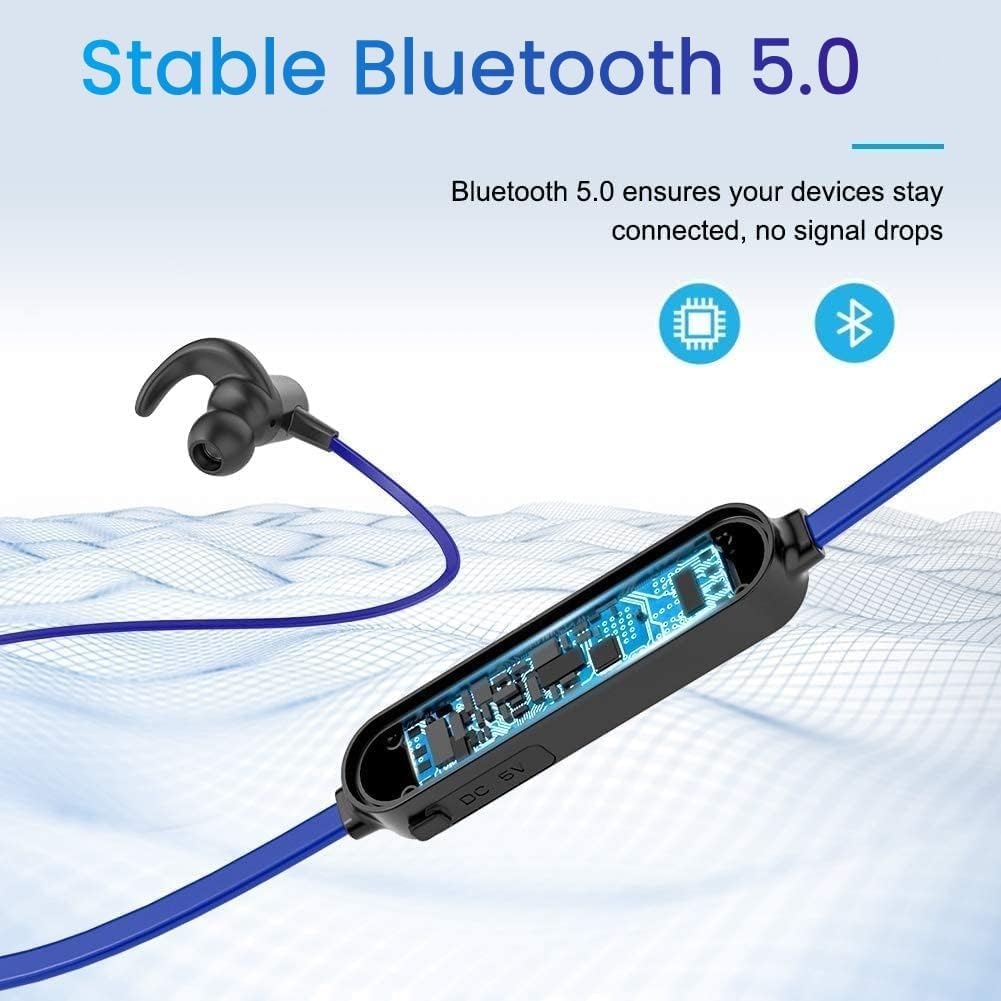
Image: A woman using the UXD Bluetooth Wireless Earphones, demonstrating the clear voice call feature powered by CVC 8.0 technology.
4. Volume Control
- Increase Volume: Press the Volume Up (+) button.
- Decrease Volume: Press the Volume Down (-) button.
Maintenance
Proper maintenance ensures the longevity and performance of your earphones.
- Cleaning: Use a soft, dry cloth to clean the earphones. Do not use harsh chemicals or abrasive materials.
- Eartips: Regularly remove and clean the eartips with mild soap and water. Ensure they are completely dry before reattaching.
- Storage: When not in use, store the earphones in a cool, dry place, away from direct sunlight and extreme temperatures.
- Water Resistance: The earphones are IPX7 waterproof, meaning they can withstand submersion in up to 1 meter of water for 30 minutes. However, they are not designed for swimming or prolonged underwater use. Always ensure the charging port cover is securely closed to maintain water resistance.

Image: The UXD Bluetooth Wireless Earphones shown with water droplets, emphasizing their IPX7 waterproof capability.
Troubleshooting
If you encounter issues with your earphones, refer to the following common solutions:
- Earphones will not turn on: Ensure the earphones are fully charged.
- Cannot pair with device:
- Ensure the earphones are in pairing mode (LED flashing red and blue).
- Make sure Bluetooth is enabled on your device.
- Move the earphones closer to your device (within 10 meters).
- Turn off and on both the earphones and your device, then try pairing again.
- Clear previous Bluetooth connections on your device.
- No sound or low volume:
- Check the volume level on both the earphones and your connected device.
- Ensure the earphones are properly connected to your device.
- Try playing different audio sources.
- Intermittent connection:
- Ensure there are no obstructions between the earphones and your device.
- Move away from other wireless devices that might cause interference.
- Keep the earphones within the 10-meter Bluetooth range.
Specifications
| Feature | Detail |
|---|---|
| Model Number | erfver |
| Brand | UXD |
| Connectivity | Wireless Bluetooth 5.0 |
| Battery Type | Lithium-polymer |
| Playtime | Up to 20 hours |
| Charging Time | Approximately 2 hours |
| Water Resistance | IPX7 |
| Microphone | Integrated with CVC 8.0 |
| Form Factor | In-Ear |
| Impedance (Sensitivity) | 15 ohms |
| Material | Silicone |
| Control Method | Remote control |
Warranty and Support
Your UXD Bluetooth Wireless Earphones come with the following:
- 30-day money-back guarantee.
- 3-month product replacement warranty.
For any product inquiries, technical support, or warranty claims, please contact UXD customer service through the platform where you purchased the product. Please have your model number (erfver) and purchase details ready.
