
Introduction
Welcome to the user manual for the LiebeWH EQ PS-500 5 Band Equalizer Acoustic Guitar Pickup with Digital Tuner. This device is designed to enhance the sound of your acoustic guitar with precise tone control and an integrated digital tuner. Please read this manual thoroughly before installation and operation to ensure optimal performance and longevity of your unit.
Product Features
- High-Quality Tone Shaping: Features a loudness contour control for precise sound adjustment, allowing you to determine the level of contour for the right sound.
- Easy to Use: Intuitive controls for quick sound adjustments, minimizing time spent tweaking and maximizing playing time.
- Feedback Control: A phase switch provides additional feedback control by allowing the phase of the pickup to be reversed in relation to the amplification speakers.
- Compact and Lightweight: Designed with a compact size and light weight, making it a great accessory for acoustic guitars.
- 5-Band Tone Controls: Includes Bass, Midd.1, Midd.2, Treble, and Presence controls for comprehensive sound sculpting, suitable for all guitarists looking to improve their sound.
Package Contents
The package includes the following items:
- 1 x EQ PS-500 Guitar Preamp Unit
- 1 x Piezo Pickup (Under-saddle transducer)
- 3 x Mounting Screws
- 3 x Mounting Nuts
- 1 x Sticker

Image: All components included in the LiebeWH EQ PS-500 package, showing the preamp unit, piezo pickup, screws, nuts, and sticker.
Specifications
| Specification | Value |
|---|---|
| Material | Plastic |
| Color | Black |
| Output Jack | 6.35mm |
| Power Supply | 1 x 6F22 9V Battery (not included) |
| Dimensions (Approx.) | 97 x 65 x 56mm (3.8 x 2.5 x 2.2 inches) |
| Suitable For | Acoustic Guitar |
| Weight (Approx.) | 108g (3.52 ounces) |
| Signal Format | Analog |
| Voltage | 229 Volts (Note: This refers to internal component rating; unit operates on 9V battery) |
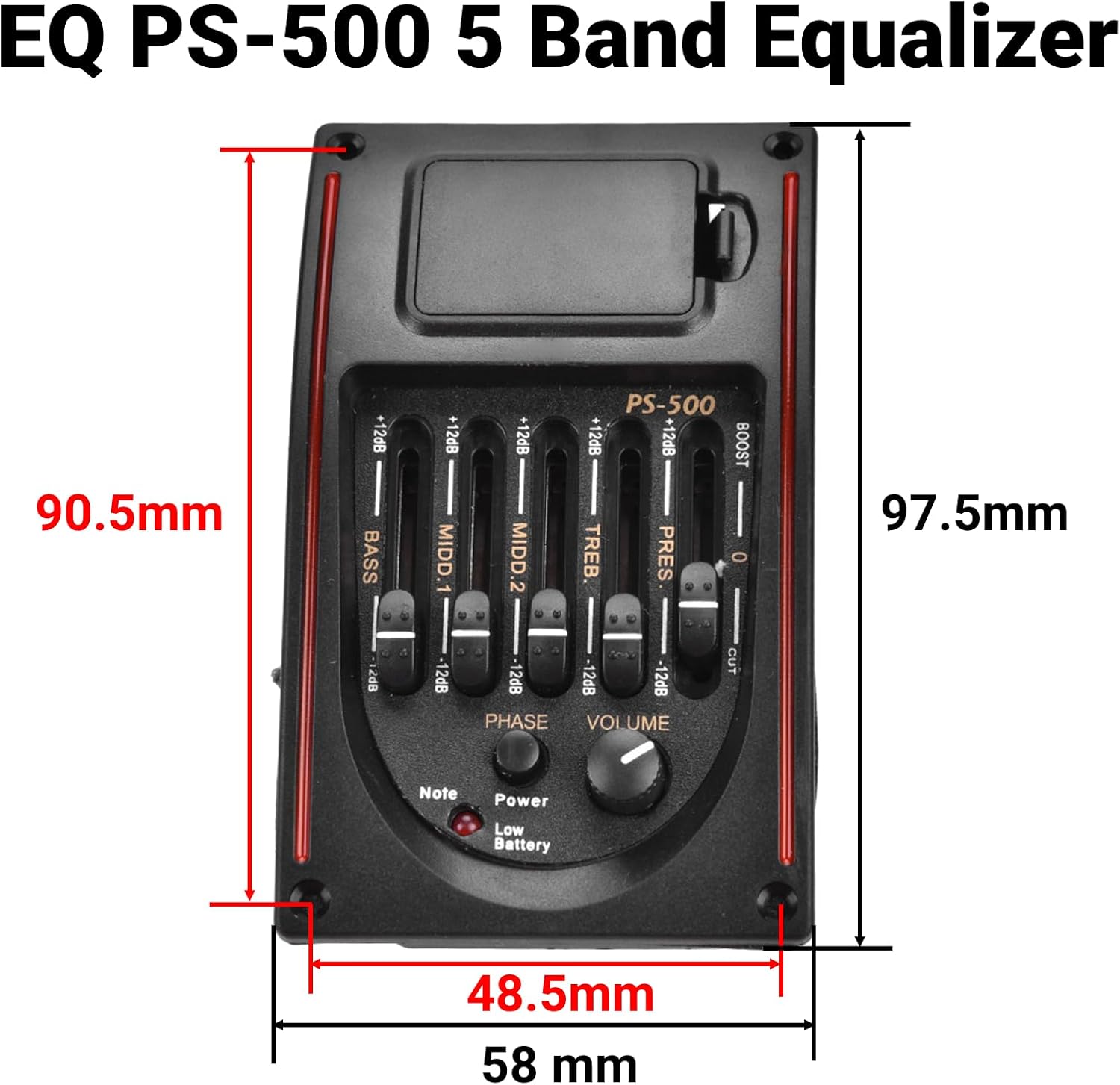
Image: Detailed dimensions of the EQ PS-500 preamp unit, showing measurements of 97.5mm in length and 58mm in width.
Setup and Installation
Installing the EQ PS-500 requires careful modification of your acoustic guitar. It is recommended that installation be performed by a qualified guitar technician if you are not experienced with such modifications.
Tools Required (Not included)
- Drill with appropriate bits
- Screwdriver
- Measuring tape or ruler
- Masking tape (for marking)
- Small file or sandpaper (for saddle adjustment)
Installation Steps
- Prepare the Guitar: Carefully determine and mark the precise location for the preamp unit on the side of your acoustic guitar. Ensure it does not interfere with internal bracing, soundhole, or other components.
- Cut the Opening: Using appropriate tools (e.g., a router or jigsaw with a fine blade), carefully cut a precise rectangular opening in the guitar body to accommodate the EQ PS-500 unit. Follow the dimensions provided in the specifications.
- Install the Preamp: Insert the EQ PS-500 unit into the cut opening from the outside. Secure it firmly using the provided mounting screws and nuts.
- Install the Piezo Pickup: The piezo pickup (transducer) is typically installed under the saddle of the guitar bridge. Carefully remove the guitar strings and saddle. Place the piezo pickup in the saddle slot. You may need to sand the bottom of your saddle slightly to ensure proper contact with the piezo and maintain correct string action and intonation.
- Connect Wiring: Connect the piezo pickup cable to the designated input on the preamp unit. Ensure all internal wiring connections are secure and routed away from vibrating parts.
- Install Battery: Open the battery compartment on the preamp unit and insert one 9V (6F22) battery, observing the correct polarity. Close the compartment securely.
- Test Functionality: Re-string your guitar. Connect your guitar to an amplifier using a 6.35mm instrument cable. Test all functions of the equalizer, volume, phase switch, and digital tuner to ensure proper operation.

Image: The EQ PS-500 preamp unit seamlessly integrated into the side of an acoustic guitar, demonstrating a typical installation.

Image: A view of the rear of the EQ PS-500 preamp, illustrating the internal wiring and output jack connection point.
Operating Instructions
Powering On/Off
The unit powers on automatically when a 6.35mm instrument cable is plugged into the output jack. The "Power" indicator light will illuminate. To turn off the unit, simply unplug the cable.
Using the Equalizer
The EQ PS-500 features five frequency bands for precise tone control. Use the slider controls to boost (+) or cut (-) each frequency band by up to 12dB:
- Bass: Adjusts low-end frequencies for warmth and depth.
- Midd.1: Controls lower-midrange frequencies, affecting the body and fullness of the sound.
- Midd.2: Controls upper-midrange frequencies, influencing clarity and projection.
- Treble: Adjusts high-end frequencies for brightness and sparkle.
- Presence: Boosts or cuts upper-harmonic frequencies for added clarity and attack.
Volume Control
The "Volume" knob adjusts the overall output level of the pickup. Turn clockwise to increase volume, counter-clockwise to decrease.
Phase Switch
The "Phase" button reverses the phase of the pickup signal. This can be used to reduce acoustic feedback, especially in live performance settings, by aligning or misaligning the phase with amplification speakers. Press the button to toggle the phase.
Digital Tuner
To activate the digital tuner, press the "Note" button. The display will show the note being played. Strum a single string and tune your guitar until the display indicates the correct pitch. The tuner will automatically detect the note. The "Low Battery" indicator light will illuminate when the 9V battery needs replacement.
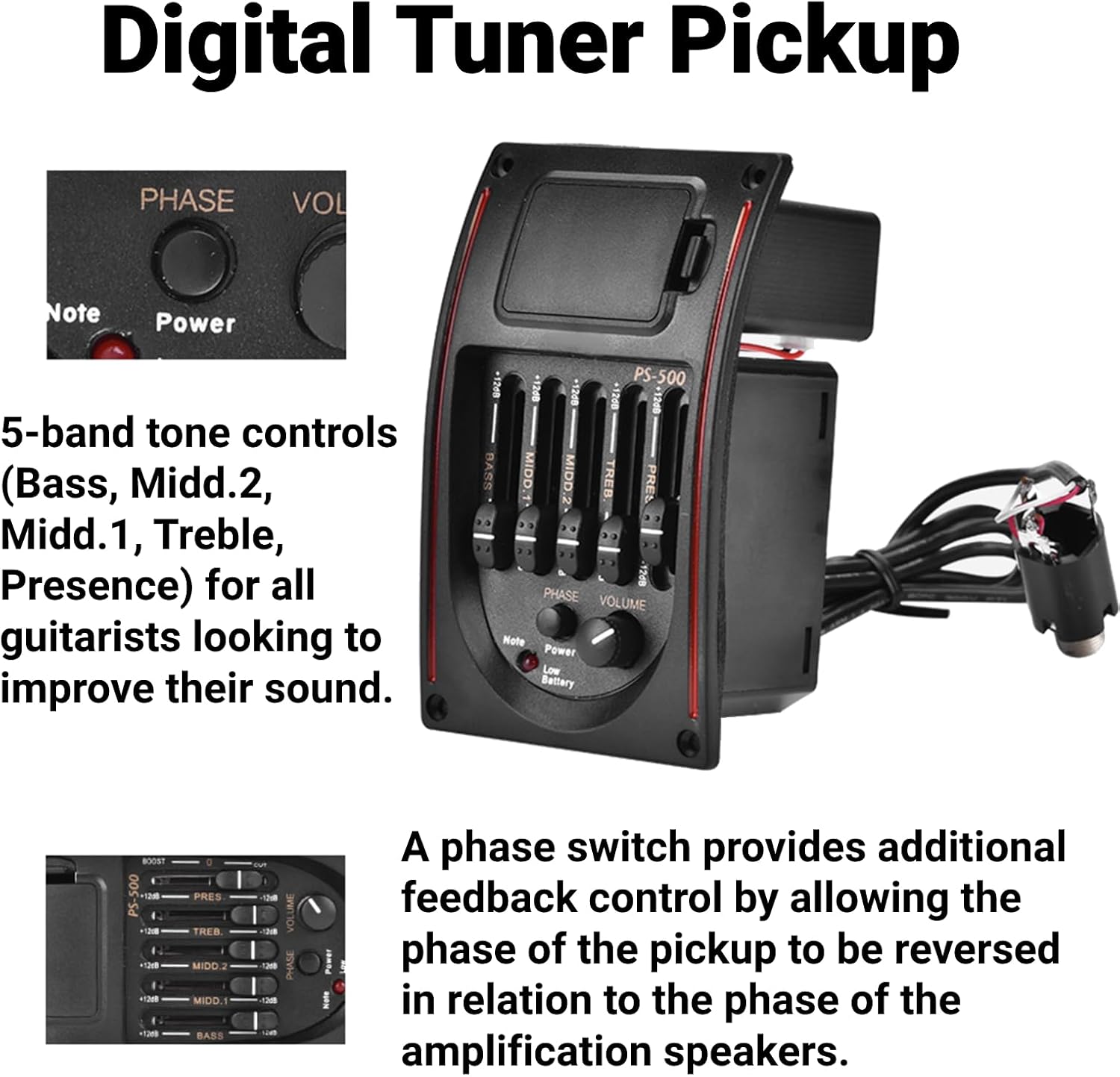
Image: A detailed view of the EQ PS-500 control panel, highlighting the 5-band equalizer sliders, volume knob, phase button, and tuner controls.

Image: Another close-up of the control panel, clearly labeling the Bass, Midd.1, Midd.2, Treble, Presence sliders, along with the Phase button, Volume knob, Note button for the tuner, Power indicator, and Low Battery warning light.
Maintenance
Battery Replacement
When the "Low Battery" indicator light illuminates, replace the 9V battery immediately to ensure optimal performance and prevent unexpected power loss during use. To replace the battery:
- Open the battery compartment located on the preamp unit.
- Remove the depleted 9V battery.
- Insert a new 9V (6F22) alkaline battery, ensuring correct polarity.
- Close the battery compartment securely.

Image: A close-up view of the battery compartment on the EQ PS-500 preamp, showing how to access and replace the 9V battery.
Cleaning
Wipe the unit with a soft, dry cloth to remove dust and fingerprints. Do not use abrasive cleaners, solvents, or excessive moisture, as these can damage the electronics and finish.
Storage
If the guitar will not be used for an extended period, it is advisable to remove the 9V battery from the preamp unit to prevent potential battery leakage and damage to the electronics.
Troubleshooting
- No Sound Output:
- Ensure a 6.35mm instrument cable is securely plugged into the output jack.
- Check if the 9V battery is correctly installed and not depleted. Replace if necessary.
- Verify all internal wiring connections (piezo to preamp, output jack) are secure.
- Check the volume knob position; ensure it is not set to minimum.
- Excessive Feedback:
- Try pressing the "Phase" button to reverse the signal phase.
- Reduce the overall volume level.
- Adjust equalizer settings, particularly reducing Bass and Presence frequencies.
- Move further away from the amplifier or monitor speakers.
- Tuner Not Working:
- Ensure the "Note" button has been pressed to activate the tuner display.
- Check the battery level; a low battery can affect tuner functionality.
- Ensure the guitar strings are vibrating sufficiently for the tuner to detect the pitch.
- Distorted Sound:
- Reduce the volume level on the preamp and/or amplifier.
- Check for proper installation of the piezo pickup under the saddle; uneven contact can cause distortion.
- Ensure the amplifier input is not overdriven.
Warranty and Support
For warranty information, technical support, or any inquiries regarding your LiebeWH EQ PS-500, please contact LiebeWH customer service through their official website or the retailer where the product was purchased. Please retain your purchase receipt as proof of purchase for warranty claims.